



DIC control panel

Thread Starter
7th Gear

Joined: Jun 2007
Posts: 7
Likes: 1
 DIC control panel
I've just purchased a 1997 C5, and am now sorting out various problems. I've discovered that the buttons on the DIC control panel are not functioning. The DIC display will show warnings, such as "low washer fluid", but pressing buttons on the control panel does nothing! Any suggestions?
Thread Starter
7th Gear
Joined: Jun 2007
Posts: 7
Likes: 1
Yes - I have read the owner's manual. I'm not sure that I understand your reply, as the manual is very clear on the various DIC funtions - but does not cover "what to do if none of the buttons work". No matter what DIC button is pressed, no menu is displayed. The digital display stays blank.

Safety Car


Joined: Aug 2000
Posts: 4,933
Likes: 30
From: San Rafael CA
I've just purchased a 1997 C5, and am now sorting out various problems. I've discovered that the buttons on the DIC control panel are not functioning. The DIC display will show warnings, such as "low washer fluid", but pressing buttons on the control panel does nothing! Any suggestions?
If the buttons aren't working, RESET should not clear the message.

Tech Contributor
Joined: Dec 2006
Posts: 10,962
Likes: 29
From: Van Buren Arkansas
Wounded Warrior Escort '11
Will take the simple guess that the connector on the rear of it is disconnected. The problem with that is, you will or may have to disassemble the dash to get to it unless someone knows a secret. As far as I could see, the dash pad has to come out as the DIC Switch is screwed in from the back on the cluster itself. I'm fixing to do the same myself but only because I suspect the ambient light sensor in the DIC control is dying on me. I had the dash pad out about two months ago to replace the HUD and saw no other way to get to the DIC control.
If I was you, I would have another one on-hand when you got in there or be prepared to leave it open while you ordered one in case you needed it. The other option is the dealer and a Tech 2 to see if the cluster is accepting commands....which might point you in another direction.
If I was you, I would have another one on-hand when you got in there or be prepared to leave it open while you ordered one in case you needed it. The other option is the dealer and a Tech 2 to see if the cluster is accepting commands....which might point you in another direction.

Le Mans Master


Joined: Sep 2003
Posts: 8,812
Likes: 2,029
From: eastern NC
Removing the instrument cluster is not too difficult at all.
There is no need to remove the dash pad, but you will need to remove most of the console. There are a few hidden bolts and screws, so pay attention.
I have done this a half dozen times and can have the cluster out in about 30 minutes. But be sure to use the service manual instructions or you are sure to damage some of the trim pieces or disassemble more than necessary.
The best news is that unlike the C2's and C3's... there is extra harness which allows you to pull the cluster out to access the plug on the rear.
The cluster is composed of a bunch of plug-in modules, so it comes apart and goes together pretty easily. But again the service manual is excellent at providing directions.
Since you're going to remove the cluster, you might think about a HUD upgrade. Contact PaceThis for a deal on the system as well as installation. Josh is a Supporting Vendor here.
Good luck... GUSTO
There is no need to remove the dash pad, but you will need to remove most of the console. There are a few hidden bolts and screws, so pay attention.
I have done this a half dozen times and can have the cluster out in about 30 minutes. But be sure to use the service manual instructions or you are sure to damage some of the trim pieces or disassemble more than necessary.
The best news is that unlike the C2's and C3's... there is extra harness which allows you to pull the cluster out to access the plug on the rear.
The cluster is composed of a bunch of plug-in modules, so it comes apart and goes together pretty easily. But again the service manual is excellent at providing directions.
Since you're going to remove the cluster, you might think about a HUD upgrade. Contact PaceThis for a deal on the system as well as installation. Josh is a Supporting Vendor here.
Good luck... GUSTO
Tech Contributor
Joined: Dec 2006
Posts: 10,962
Likes: 29
From: Van Buren Arkansas
Wounded Warrior Escort '11
Interesting...So you are saying that if I remove the knee bolster panel and center console, I may be able to extract the Cluster without taking the dash pad off? When I had the dash pad out, it appeared that the cluster was held in by a couple of nuts on the rear of it. My manuals are lost somewhere in my small garage therefore I cannot refer too them. I'm referring to my '99 Coupe.
HUD upgrade? Never heard of that before. I had just replaced the HUD with a new one. I'm wondering what upgrades were possible and how?
HUD upgrade? Never heard of that before. I had just replaced the HUD with a new one. I'm wondering what upgrades were possible and how?
Corvette Stories
The Best of Corvette for Corvette Enthusiasts

Top 10 Most Explosive Corvettes Ever Made: Power-to-Weight Ratio Ranked!
Joe Kucinski
150 hp to 1,250 hp: Every Corvette Generation Compared by the Specs That Matter
Joe Kucinski
8 Coolest Corvette Pace Cars (and Replicas) of All Time
Verdad Gallardo
Top 10 Corvette Engines RANKED by Peak Torque (70+ Years of Muscle!)
Joe Kucinski
Corvette ZR1X Will Be Pacing the Indy 500, And Could Probably Race, Too!
Verdad Gallardo
Top 10 Corvettes Coming to Mecum Indy 2026!
Brett Foote
Top 10 C9 Corvette MUST-HAVES to Fix These C8 Generation Flaws!
Michael S. Palmer
10 Revolutionary 'Corvette Firsts' Most People Don't Know
Joe Kucinski
5 Reasons to Upgrade to an LS6-Powered Corvette; 5 Reasons to Stay LT2
Michael S. Palmer
Drifting


Joined: Oct 2004
Posts: 1,384
Likes: 8
From: Southwest Virginia
Interesting...So you are saying that if I remove the knee bolster panel and center console, I may be able to extract the Cluster without taking the dash pad off? When I had the dash pad out, it appeared that the cluster was held in by a couple of nuts on the rear of it. My manuals are lost somewhere in my small garage therefore I cannot refer too them. I'm referring to my '99 Coupe.
HUD upgrade? Never heard of that before. I had just replaced the HUD with a new one. I'm wondering what upgrades were possible and how?
HUD upgrade? Never heard of that before. I had just replaced the HUD with a new one. I'm wondering what upgrades were possible and how?
As a matter of fact, I thought you HAD to remove the cluster before you could pull the dash pad. I thought the cluster was screwed into the bottom (inside) of the dash pad.
Tech Contributor
Joined: Dec 2006
Posts: 10,962
Likes: 29
From: Van Buren Arkansas
Wounded Warrior Escort '11
I had to remove the dash pad for the HUD replacement. I did not remove the cluster. The two upper screws in the cluster trim plate go into the dash pad but nothing else on the cluster.
Drifting
Joined: Oct 2004
Posts: 1,384
Likes: 8
From: Southwest Virginia
Welcome to the forum
The problem is most likely a disconnected cable between the switch panel and the cluster. Below is a photo of how that cable works. The photo is the HUD side of the cluster but the DIC cable works the same way. If the cable is plugged in good then it would likely be the switch, or could possible be a bad cluster. Those switches cost less than $50 the best I remember.
Warning: Do not leave your cluster sitting face down like this very long, it can damage the fluid filled gauges. When you remove the cluster always sit it as it would sit in the car.
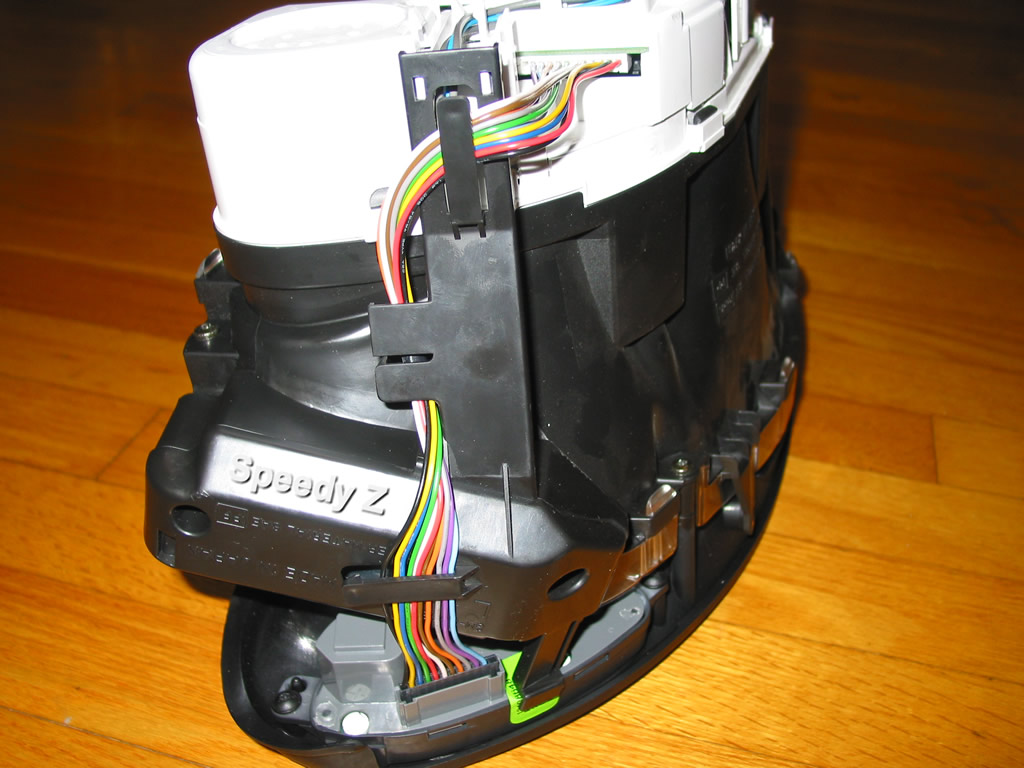
The problem is most likely a disconnected cable between the switch panel and the cluster. Below is a photo of how that cable works. The photo is the HUD side of the cluster but the DIC cable works the same way. If the cable is plugged in good then it would likely be the switch, or could possible be a bad cluster. Those switches cost less than $50 the best I remember.
Warning: Do not leave your cluster sitting face down like this very long, it can damage the fluid filled gauges. When you remove the cluster always sit it as it would sit in the car.
Drifting
Joined: Oct 2004
Posts: 1,384
Likes: 8
From: Southwest Virginia
Interesting... I did not know you could do that. The two screws in the bottom tabs of the cluster should be all that was left holding it in. No screws from the back anywhere. Unfortunately, to get to those two lower screws you have to remove the center console and knee bolster.
Le Mans Master
Joined: Sep 2003
Posts: 8,812
Likes: 2,029
From: eastern NC
GUSTO