


HVAC control problem


Tech Contributor


Joined: Dec 1999
Posts: 32,910
Likes: 2,402
From: Anthony TX
CI 6,7,8,9,11 Vet
St. Jude Donor '08

I replied to MUSCL2 in a PM for resloution to the HVAC issue. Here is what I wrote:
Lets do some FREE stuff first to see if it will help!
I had the same problem a while back and fixed it carrying out this procedure:
1. First, Turn OFF the HVAC unit with the OFF button on the head unit.
2. Clear the DTC's that are displayed in the HVAC DIC module.
3. When you clear the DTCs you will hear the actuator motors cycle through out their operating ranges. Wait till they stop cycling.
4. Turn the HVAC system back on and see if you get any HVAC DTCs. If the DTC pop back up, repete the procedure.
I had to do this procedure a few times to get things cleared up. Once it cycled through the damper ranges a few times, I was good to go!
Just incase you dont know how to read your on DTC's, heres the procedure.
READING YOUR Engine Diagnostic Codes
The Diagnostic Display Mode is entered with the following procedure:
1) Turn on the ignition but don't start the engine.
2) Press the RESET button to turn off any warning messages. (i.e. door open, trunk open ect)
3) Press and hold OPTIONS
4) While holding OPTIONS, press FUEL four times within a 10-second period.
Initially, on-board diagnostics go into an Automatic Mode which shows diagnostic codes in a pre-set sequence: PCM - TCS - RTD - BCM - IPC - RADIO - HVAC - LDCM - RDCM - SCM - RFA. All codes will be displayed for each. ( i.e. PCM = 4 codes)
If none are present in a given module, you will see No More Codes on the display.
There are two kinds of diagnostic codes, Current and History designated with a letter suffix, C or ;H. A current code indicates a malfunction is present in the module displaying data. A history code indicates a problem existed sometime in the last 40 or 50 ignition cycles. When not accompanied by a current code of the same number, it's potential evidence of a previous problem, now resolved, that was not removed by clearing the codes.
More likely it's an indication of an intermittent malfunction.
Intermittent codes are the most challenging of the diagnostics. An intermittent code may have happened once, may have happened more than once but is inconsistent or may be happening on a regular basis but not at the time the codes are displayed. History codes can also be caused by a current malfunction in a system that is not operating at the time codes are displayed. An example is the rear window defogger which doesn't operate until the Body Control Module detects engine rpm. For history codes set by a module that does not operate with the key on and engine off, a special diagnostic tool called a Scan Tester is necessary to properly diagnose the malfunction.
Once the system has displayed all modules, it goes into the manual mode which allows selection of each module using combinations of Driver Information Center buttons. Manual mode can also be entered during the automatic sequence by pressing any button except E/M. Once the display shows Manual Diagnostics, select a module by pressing the OPTIONS button to go forward or the TRIP button to go back. Once a module is selected, a code is displayed, and if more than one are present;
press GAGES to go forward or FUEL to go back.
To exit the diagnostic mode at any time, press E/M. If you want to erase codes in a given module, press RESET
To reset the codes once in manual mode, press and hold RESET until it displays NO CODES Press OPTIONS to go to the next module. Repeat the steps until you have reset the codes in all the computer modules.
NOTE!! Only reset the codes IF you want to - it is NOT necessary to do this. Clearing a code does not repair a problem. You are simply erasing the evidence of it in the module's memory. If you clear the code/s, and extinguish the Check Engine Light, your emissions status ready will NOT allow you to pass an emissions test until you have completed the required driving cycles.
Once you have the codes, the next question is: What to do with the information?
First, consult the factory service manual. Any serious C5 Do-It-Yourself owner should invest in the Corvette Service Manual of the appropriate model year. The Service Manual is really a requirement if you want to understand and work on your C5.
These are the absolute best C5 Diagnostic Trouble Code (DTC) explanation web sites!!!
http://www.corvettedoctor.com/Code_Main.html
http://www.corvettedoctor.com/index.html
Go to “technical data base” and then to “Corvette ECM Computer Codes”. Then select your year car. Read the instructions and then scroll down to the "READ MORE" window to view the code definitions.\
Here is another very good site:
http://www.obd-codes.com/trouble_cod...d-ii-codes.php
Make sure to include the H or C suffix!!
Once you carry out the procedure, let me know how it works out for you. I have more info if it doesnt work.
Merry Christmas,
Bill C
Lets do some FREE stuff first to see if it will help!
I had the same problem a while back and fixed it carrying out this procedure:
1. First, Turn OFF the HVAC unit with the OFF button on the head unit.
2. Clear the DTC's that are displayed in the HVAC DIC module.
3. When you clear the DTCs you will hear the actuator motors cycle through out their operating ranges. Wait till they stop cycling.
4. Turn the HVAC system back on and see if you get any HVAC DTCs. If the DTC pop back up, repete the procedure.
I had to do this procedure a few times to get things cleared up. Once it cycled through the damper ranges a few times, I was good to go!
Just incase you dont know how to read your on DTC's, heres the procedure.
READING YOUR Engine Diagnostic Codes
The Diagnostic Display Mode is entered with the following procedure:
1) Turn on the ignition but don't start the engine.
2) Press the RESET button to turn off any warning messages. (i.e. door open, trunk open ect)
3) Press and hold OPTIONS
4) While holding OPTIONS, press FUEL four times within a 10-second period.
Initially, on-board diagnostics go into an Automatic Mode which shows diagnostic codes in a pre-set sequence: PCM - TCS - RTD - BCM - IPC - RADIO - HVAC - LDCM - RDCM - SCM - RFA. All codes will be displayed for each. ( i.e. PCM = 4 codes)
If none are present in a given module, you will see No More Codes on the display.
There are two kinds of diagnostic codes, Current and History designated with a letter suffix, C or ;H. A current code indicates a malfunction is present in the module displaying data. A history code indicates a problem existed sometime in the last 40 or 50 ignition cycles. When not accompanied by a current code of the same number, it's potential evidence of a previous problem, now resolved, that was not removed by clearing the codes.
More likely it's an indication of an intermittent malfunction.
Intermittent codes are the most challenging of the diagnostics. An intermittent code may have happened once, may have happened more than once but is inconsistent or may be happening on a regular basis but not at the time the codes are displayed. History codes can also be caused by a current malfunction in a system that is not operating at the time codes are displayed. An example is the rear window defogger which doesn't operate until the Body Control Module detects engine rpm. For history codes set by a module that does not operate with the key on and engine off, a special diagnostic tool called a Scan Tester is necessary to properly diagnose the malfunction.
Once the system has displayed all modules, it goes into the manual mode which allows selection of each module using combinations of Driver Information Center buttons. Manual mode can also be entered during the automatic sequence by pressing any button except E/M. Once the display shows Manual Diagnostics, select a module by pressing the OPTIONS button to go forward or the TRIP button to go back. Once a module is selected, a code is displayed, and if more than one are present;
press GAGES to go forward or FUEL to go back.
To exit the diagnostic mode at any time, press E/M. If you want to erase codes in a given module, press RESET
To reset the codes once in manual mode, press and hold RESET until it displays NO CODES Press OPTIONS to go to the next module. Repeat the steps until you have reset the codes in all the computer modules.
NOTE!! Only reset the codes IF you want to - it is NOT necessary to do this. Clearing a code does not repair a problem. You are simply erasing the evidence of it in the module's memory. If you clear the code/s, and extinguish the Check Engine Light, your emissions status ready will NOT allow you to pass an emissions test until you have completed the required driving cycles.
Once you have the codes, the next question is: What to do with the information?
First, consult the factory service manual. Any serious C5 Do-It-Yourself owner should invest in the Corvette Service Manual of the appropriate model year. The Service Manual is really a requirement if you want to understand and work on your C5.
These are the absolute best C5 Diagnostic Trouble Code (DTC) explanation web sites!!!
http://www.corvettedoctor.com/Code_Main.html
http://www.corvettedoctor.com/index.html
Go to “technical data base” and then to “Corvette ECM Computer Codes”. Then select your year car. Read the instructions and then scroll down to the "READ MORE" window to view the code definitions.\
Here is another very good site:
http://www.obd-codes.com/trouble_cod...d-ii-codes.php
Make sure to include the H or C suffix!!
Once you carry out the procedure, let me know how it works out for you. I have more info if it doesnt work.
Merry Christmas,
Bill C
Tech Contributor
Joined: Dec 1999
Posts: 32,910
Likes: 2,402
From: Anthony TX
CI 6,7,8,9,11 Vet
St. Jude Donor '08
I agree with FLORIDA. If my code clearing / cycling procedure doesnt fix the issue,,you will have to change the actuator. Here is what happens to the main drive gear:
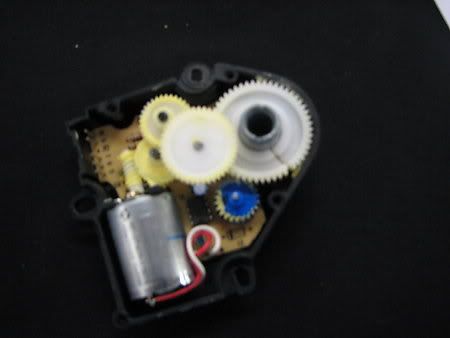
Hope yours clears and you dont have to change that actuaror.
BC
Hope yours clears and you dont have to change that actuaror.
BC
Burning Brakes


Joined: Mar 2007
Posts: 1,203
Likes: 21
From: centennial colorado
hvac drivers temp controll
I just restored the display on an hvac unit,the display works great. While ;testing this unit I noticed the drivers temp would stay between 71 and 73 degrees no matter how much you turned the dial. I'm thinking the temp pot is bad. Any past experience with this type of problem??Where can I find parts for these hvac and radio units??

Heel & Toe

Joined: Feb 2008
Posts: 16
Likes: 3
Hvac vent-direction control issues
I have the typical no-display issue with my 01 convertible dual-zone control head. After I repair the pc board, will that also correct the other problem? That is; the "mode" button will not work. I have air coming from every duct at the same time. Pressing the mode button, holding the mode button, cursing at the mode button will not isolate a specific zone of air output. This results in a very weak air flow on blower and a very aggravating driving experience in hot and humid south Florida. Could this be a vac line issue? Can you help?

Tech Contributor


Joined: Jan 2007
Posts: 19,401
Likes: 1,141
From: Dyer, IN

Advanced

Joined: Apr 2010
Posts: 55
Likes: 0
From: Lake Worth Florida
Removing the dash pad to replace the right actuator
I am looking for guidance in removing the dash pad to replace the right HVAC actuator. My codes match those mentioned previously and hot air on the right side are the problem. I have easily pulled the console to replace the HVAC control but am uneasy about pulling the dash pad to replace the actuator. Any help would be appreciated! Thanks!!!










