


Kenwood DNX 690HD error message when changing splash screen


Thread Starter
Team Owner

Joined: Mar 2001
Posts: 21,325
Likes: 3,841
From: small town in S.E Pa. PA
St. Jude Donor '03-'04
 Kenwood DNX 690HD error message when changing splash screen
I just installed a Kenwood DNX690HD, its a new model not even listed on Kenwood's site. it just came out in Jan 2013. I want to change the splash screen to something more C5ish. I've followed instructions from former models: size 800 X 480, saved as a 16 bit BMP using R5,G6,B5 and saved to a flash drive.
I used the Hold menu + Tel and then press the reset button. the unit shut off and then rebooted to the add a image screen where the Kenwood splash screen image resides. I pressed the OEM line and it brought up the bmp thumb nail and a blank thumbnail from my flash drive. I selected the visual thumbnail and it placed the file name on a line and then selected enter... it started to write because it said writing.. then after 2 seconds it said error. I've been doing this all day..
New flash drive.
I've tried about 6 different bmp files, and all show error. I'm thinking this New unit might have a different format. I used two different flash drive both were different manufacturers, and both were new.
Thank for any thoughts.. Kenwood is no help at this point. Dennis is also trying to debug this issue.
Bill aka ET
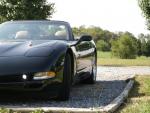
This is what IM trying to load although this is a JPEG, I converted this to a BMP with Photoshop then put it on the flash drive

I used the Hold menu + Tel and then press the reset button. the unit shut off and then rebooted to the add a image screen where the Kenwood splash screen image resides. I pressed the OEM line and it brought up the bmp thumb nail and a blank thumbnail from my flash drive. I selected the visual thumbnail and it placed the file name on a line and then selected enter... it started to write because it said writing.. then after 2 seconds it said error. I've been doing this all day..
New flash drive.
I've tried about 6 different bmp files, and all show error. I'm thinking this New unit might have a different format. I used two different flash drive both were different manufacturers, and both were new.
Thank for any thoughts.. Kenwood is no help at this point. Dennis is also trying to debug this issue.
Bill aka ET
This is what IM trying to load although this is a JPEG, I converted this to a BMP with Photoshop then put it on the flash drive
 ...Just ordered the exact same unit from Dennis...plus now I have ..Borrowed..( stolen ) that image from you...Thanks..Tom
Pro


Joined: Apr 2008
Posts: 510
Likes: 12
From: Laurel MD
St. Jude Donor '08
Found this online....
http://www.kenwoodusa.com/Car_Entert...ation/DNX690HD
Click on the Manuals tab...
http://www.kenwoodusa.com/Car_Entert...ation/DNX690HD
Click on the Manuals tab...
Last edited by tbar1963; Mar 26, 2013 at 07:56 AM.








