


my try at posting a pic

Thread Starter
Burning Brakes


Joined: Feb 2005
Posts: 977
Likes: 1
From: wash. dc
 my try at posting a pic
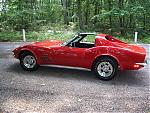
my 71BB, all stock except an undercar chambered exhaust, no power, no a/c...all the power is under the hood...lol...http://i22.photobucket.com/71redskin/imgp0458.jpg
Race Director


Joined: Nov 2000
Posts: 11,872
Likes: 12
From: Waterloo ontario Canada
Originally Posted by 71redskin
my 71BB, all stock except an undercar chambered exhaust, no power, no a/c...all the power is under the hood...lol...http://i22.photobucket.com/71redskin/imgp0458.jpg
[img] and ending with [/img].
Copy this link and post it in a post and the picture will appear instead of the link.


Drifting


Joined: May 2003
Posts: 1,634
Likes: 2
From: Melbourne, Victoria, Australia, the World
Redskin,
For some reason the picture's link you posted earlier doesn't work.
I tried to post it here for you.
Open up your new post or reply, Above the text box is a bunch of symbols. If you mouse over them they tell you what they do. The square one which looks like an envelope is the image insertion tool. It comes up with a window which you put the link to your picture in. Easiest to copy and paste to avoid errors. Press enter and when you post it, the forum loads the pic from the link.

For some reason the picture's link you posted earlier doesn't work.
I tried to post it here for you.
Open up your new post or reply, Above the text box is a bunch of symbols. If you mouse over them they tell you what they do. The square one which looks like an envelope is the image insertion tool. It comes up with a window which you put the link to your picture in. Easiest to copy and paste to avoid errors. Press enter and when you post it, the forum loads the pic from the link.
Last edited by RHD '68 L89; Jun 27, 2005 at 08:05 PM.









