



1980 Front Section Body Alignment

Thread Starter
Cruising

Joined: May 2012
Posts: 14
Likes: 0
 1980 Front Section Body Alignment
Just purchased a 1980 & I have a bit of a gap difference where the front door edge meets the rear part of the front section. The top edge is wider then at the bottom. I have seen this in a few photo's of other cars. Its equally spaced on driver & passenger side. Is there a way to correct this & what causes it?
Jp
Jp

Melting Slicks


Joined: Aug 2001
Posts: 3,050
Likes: 124
From: Wichita KS
Just purchased a 1980 & I have a bit of a gap difference where the front door edge meets the rear part of the front section. The top edge is wider then at the bottom. I have seen this in a few photo's of other cars. Its equally spaced on driver & passenger side. Is there a way to correct this & what causes it?
Jp
Jp
A picture would be helpful to see what the gaps look like. Gap may just be typical of the C3s.

Team Owner


Joined: Jun 2000
Posts: 38,923
Likes: 1,482
From: Southbound
Cruise-In II Veteran
Usual Suspect: Fender corners have become unbonded up near the base of the windshield.
Worst case scenario, the nose is low pulling the fender corners away from their bonding points.

Worst case scenario, the nose is low pulling the fender corners away from their bonding points.
Thread Starter
Cruising
Joined: May 2012
Posts: 14
Likes: 0
Wish I could post a picture but not allowed. At the bottom the spacing is just about a 1/8" & at the top its 1/2". Front end seems secure and not loose anywhere. I realize that it could be a factory thing but measurements seem excessive. I could send you a email photo if I had your address.
Thread Starter
Cruising
Joined: May 2012
Posts: 14
Likes: 0
Wouldn't I experience a loose front end? Something else has to be holding the front up & its not loose, tried moving it without any luck. Pretty secure. Any info greatly appreciated.
Thread Starter
Cruising
Joined: May 2012
Posts: 14
Likes: 0
Looks about the same, would like to correct the problem. Thanks for the info & Pic. Now comes the hard part, correcting it. From what I've read so far it won't be easy especially if the inside bonds are still holding.
Corvette Stories
The Best of Corvette for Corvette Enthusiasts

5 Best & 5 Worst Corvette Daily Drivers
Joe Kucinski
The Headlights of Every Corvette Generation Explained
Joe Kucinski
5 Best & 5 Most Overrated Corvette Track Packages of All Time!
Joe Kucinski
Every 2027 Corvette Engine Explained
Joe Kucinski
Designer Imagines A Corvette That Looks More Like a Corvette Than the Corvette
Verdad Gallardo
10 Ugly Corvettes That We Still Kinda Love
Joe Kucinski
Top 10 Most Expensive Corvettes Ever Sold on Bring A Trailer
Brett Foote
10 Things Every Corvette Owner Needs (2026 Edition)
Michael S. Palmer
8 Most "Only Corvette Owners Understand" Quirks and Problems
Pouria Savadkouei
Melting Slicks
Joined: Aug 2001
Posts: 3,050
Likes: 124
From: Wichita KS
NOT A PROBLEM per se that needs correcting.
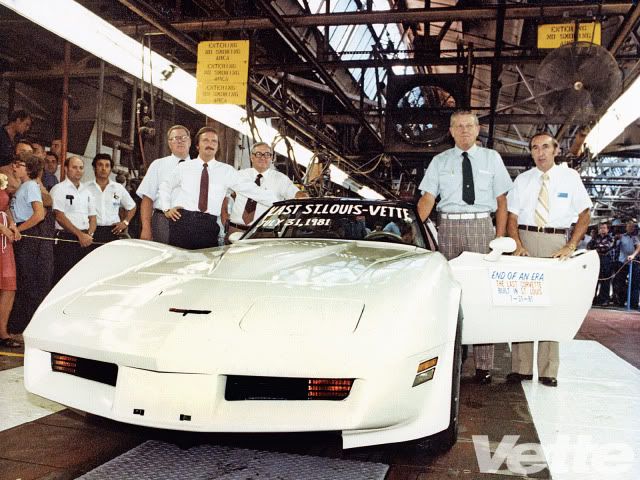
That picture is of a NEW 1981 at the St. Louis factory. That was as good as it got. If your 1980 looks like that, then it is typical factory production quality.
Not to say you can't do better on the gaps. You might also search threads in the "PAINT" section of the Forum.
That picture is of a NEW 1981 at the St. Louis factory. That was as good as it got. If your 1980 looks like that, then it is typical factory production quality.
Not to say you can't do better on the gaps. You might also search threads in the "PAINT" section of the Forum.
Last edited by mapman; May 20, 2012 at 11:07 AM.
Thread Starter
Cruising
Joined: May 2012
Posts: 14
Likes: 0
Thanks for the help- Checked my vin #'s & guess where my car was assembled, St. Louis!!!
NOT A PROBLEM per se that needs correcting.
That picture is of a NEW 1981 at the St. Louis factory. That was as good as it got. If your 1980 looks like that, then it is typical factory production quality.
Not to say you can't do better on the gaps. You might also search threads in the "PAINT" section of the Forum.
That picture is of a NEW 1981 at the St. Louis factory. That was as good as it got. If your 1980 looks like that, then it is typical factory production quality.
Not to say you can't do better on the gaps. You might also search threads in the "PAINT" section of the Forum.
Thread Starter
Cruising
Joined: May 2012
Posts: 14
Likes: 0
Thread Starter
Cruising
Joined: May 2012
Posts: 14
Likes: 0
I love the emblem with the girl sitting on the crossed flags. Where did you find that? Jp
Team Owner
Joined: Jun 2000
Posts: 38,923
Likes: 1,482
From: Southbound
Cruise-In II Veteran
Found my Corvette Lady on the internet.
Thread Starter
Cruising
Joined: May 2012
Posts: 14
Likes: 0
Could you send me a pic of it if possible? Want to use her for my screensaver. Looked everywhere on line & have not come up with that one. Jp
Thread Starter
Cruising
Joined: May 2012
Posts: 14
Likes: 0

Instructor
Joined: May 2012
Posts: 109
Likes: 0
Thread Starter
Cruising
Joined: May 2012
Posts: 14
Likes: 0
