


pics




Drifting


Joined: May 2004
Posts: 1,543
Likes: 1
From: Levittown NY

Setting up a photobucket account
1) Open up your web browser and go to www.photobucket.com
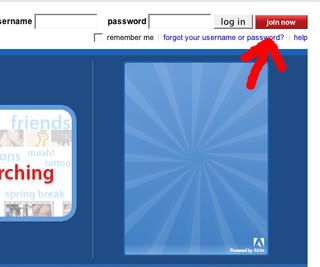
2) Create an account by clicking "join now" on the top right of your screen.
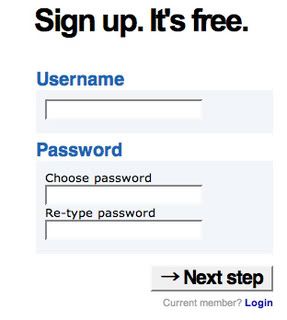
3) Type desired user name and password then click "next step"
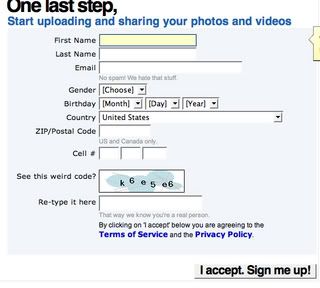
4) fill in info then click "i accept sign me up"
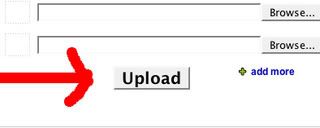
5) Click "browse". a little window will open to browse your pc to find the desired image you want to upload. once you click the image click "open". the little window will disappear.

6) Click "upload" and wait until the page refreshes
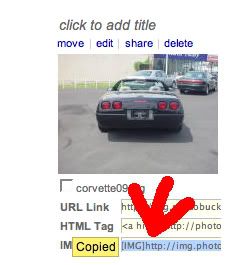
7) Click in the IMG text. it should say "Copied" (if not you need to select it then right click it and click copy)
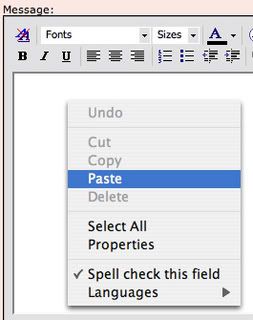
8) Right click in the message box. a menu should come up. left click "paste"

1) Open up your web browser and go to www.photobucket.com
2) Create an account by clicking "join now" on the top right of your screen.
3) Type desired user name and password then click "next step"
4) fill in info then click "i accept sign me up"
5) Click "browse". a little window will open to browse your pc to find the desired image you want to upload. once you click the image click "open". the little window will disappear.
6) Click "upload" and wait until the page refreshes
7) Click in the IMG text. it should say "Copied" (if not you need to select it then right click it and click copy)
8) Right click in the message box. a menu should come up. left click "paste"
Burning Brakes


Joined: Nov 2005
Posts: 1,211
Likes: 2
From: Dumas Arkansas
The way that I do it is right click on the photo that I want and copy properties. Next click on Insert Image icon and paste the properties and click OK. Then you can preview it to see if it worked.


Burning Brakes
Joined: Jun 2005
Posts: 1,159
Likes: 0
From: anytown anystate









