


Weird dash lighting issue

Thread Starter
Racer

Joined: Apr 2012
Posts: 268
Likes: 0
From: Galva IL
 Weird dash lighting issue
The dash dimmer no longer seems to work when the headlights are off. Once I turn them on the dash lights brighten up again. But when off they are way too dim.
Suggestions before I just start pulling things apart and checking connections?
Suggestions before I just start pulling things apart and checking connections?
Thread Starter
Racer
Joined: Apr 2012
Posts: 268
Likes: 0
From: Galva IL
To clear that upa bit.
Headlights off= dash dimmer does not work, set at lowest setting.
Headlights or running lights on = dash dimmer works, can set to my pleasing.
Sometime next week I'm gonna start taking things apart.
Headlights off= dash dimmer does not work, set at lowest setting.
Headlights or running lights on = dash dimmer works, can set to my pleasing.
Sometime next week I'm gonna start taking things apart.

Melting Slicks


Joined: Aug 1999
Posts: 2,240
Likes: 42
From: Baltimore, MD USA
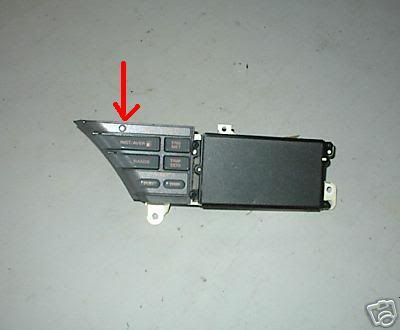
The ambient light sensor determines the brightness of the LCD
back lighting when the headlight switch is Off. The dimmer switch
should have no effect on the brightness when the headlight switch is
in the Off position.
When the headlight switch is in Park or Head, a combination of the
ambient light sensor and the position of the dimmer switch determines
the LCD back lighting brightness.
Turn the ignition On, With the headlight switch off, shine a flashlight into the ambient light sensor. The LCD back lighting should increase
in brightness. With your thumb, block the ambient light sensor.
The LCD back lighting should dim.
Here's a picture of the location of the ambient light sensor.
There is a CCM diagnostic to test the output of the ambient light
sensor.
back lighting when the headlight switch is Off. The dimmer switch
should have no effect on the brightness when the headlight switch is
in the Off position.
When the headlight switch is in Park or Head, a combination of the
ambient light sensor and the position of the dimmer switch determines
the LCD back lighting brightness.
Turn the ignition On, With the headlight switch off, shine a flashlight into the ambient light sensor. The LCD back lighting should increase
in brightness. With your thumb, block the ambient light sensor.
The LCD back lighting should dim.
Here's a picture of the location of the ambient light sensor.
There is a CCM diagnostic to test the output of the ambient light
sensor.
Thread Starter
Racer
Joined: Apr 2012
Posts: 268
Likes: 0
From: Galva IL
Ok that helps a load. The owner before me ran a hard wired cord for his radar detector. I think he messed up some of the dash wiring when he did. I'll have to check it as it was bouncing bright to weak in the day before it went super dim.
Thanks for the info. That should help me narrow it down faster and fix it.
Thanks for the info. That should help me narrow it down faster and fix it.
Melting Slicks
Joined: Aug 1999
Posts: 2,240
Likes: 42
From: Baltimore, MD USA
If you're confident that's the problem you can purchase
a used Driver Information Center for $29.00 plus shipping.
http://www.ebay.com/itm/94-96-C4-Cor...sories&vxp=mtr
a used Driver Information Center for $29.00 plus shipping.
http://www.ebay.com/itm/94-96-C4-Cor...sories&vxp=mtr
Thread Starter
Racer
Joined: Apr 2012
Posts: 268
Likes: 0
From: Galva IL
Update:
It appears that the sensor works when the lights are "on" but not when they are off so the opposite of what it should be. Any ideas?
EDIT: Also last night all the interior orange illumination stopped working. Wondering is the switch is going bad.
It appears that the sensor works when the lights are "on" but not when they are off so the opposite of what it should be. Any ideas?
EDIT: Also last night all the interior orange illumination stopped working. Wondering is the switch is going bad.
Last edited by AaronDoud; Jun 10, 2012 at 03:25 PM.
Melting Slicks
Joined: Aug 1999
Posts: 2,240
Likes: 42
From: Baltimore, MD USA
The dimmer switch and the ambient light sensor must be good since they work when the headlight switch is on.
To fix the back lighting problem.
The Incandescent Power Driver is controlled by the CCM and
determines the brightness of the orange back lighting.
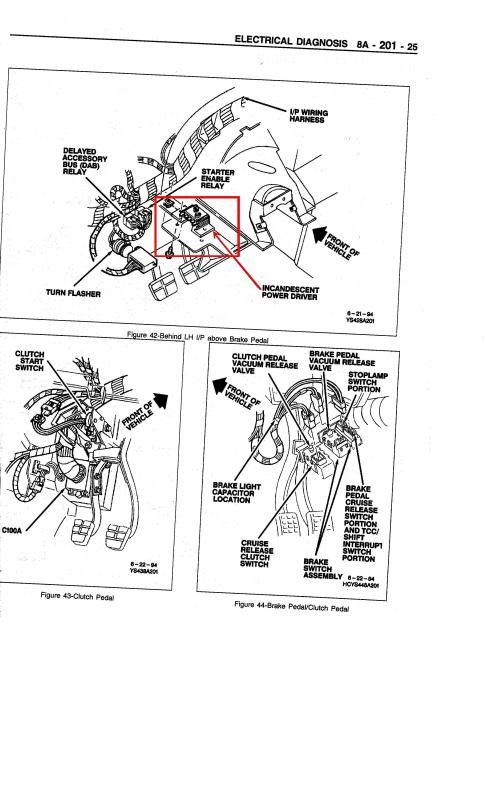
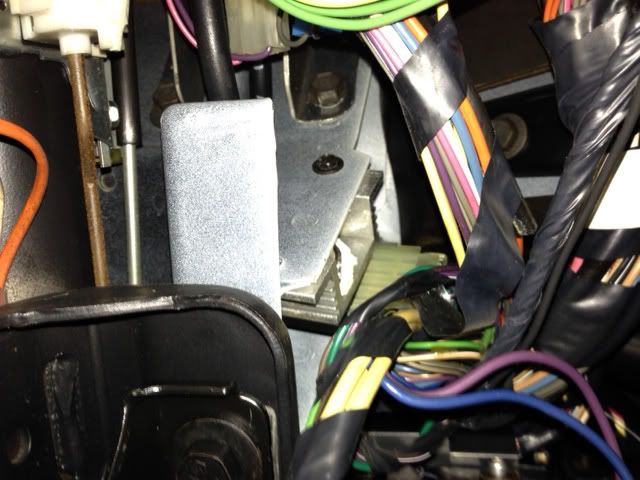
It's mounted on a heat sink attached on the left side
in the middle of the steering column.
To bypass the Incandescent Power Driver.
Disconnect the connector going to it.
The connector has a Brown wire, a Brown/White wire
and two Dark Green wires.
With the connector disconnected, At the connector, Jump the
Brown wire to the Brown/White wire. Turn the headlight switch on.
If the back lighting works, the Incandescent Power Driver is
probably bad.
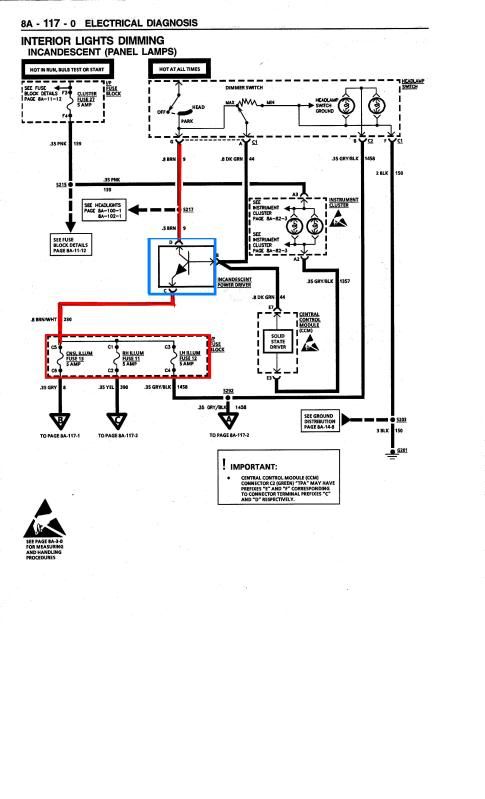
Below is the schematic that shows the Incandescent Power Driver
which provides the voltage to 3 fuses which powers the orange back
lighting circuits.
The last picture shows the location of the Incandescent Power Driver.
Last edited by Hooked on Vettes; Jun 11, 2012 at 03:01 PM.
Corvette Stories
The Best of Corvette for Corvette Enthusiasts

5 Best & 5 Worst Corvette Daily Drivers
Joe Kucinski
The Headlights of Every Corvette Generation Explained
Joe Kucinski
5 Best & 5 Most Overrated Corvette Track Packages of All Time!
Joe Kucinski
Every 2027 Corvette Engine Explained
Joe Kucinski
Designer Imagines A Corvette That Looks More Like a Corvette Than the Corvette
Verdad Gallardo
10 Ugly Corvettes That We Still Kinda Love
Joe Kucinski
Top 10 Most Expensive Corvettes Ever Sold on Bring A Trailer
Brett Foote
10 Things Every Corvette Owner Needs (2026 Edition)
Michael S. Palmer
8 Most "Only Corvette Owners Understand" Quirks and Problems
Pouria Savadkouei
Cruising

Joined: Apr 2009
Posts: 13
Likes: 0
From: Welch West Virginia
Hey Guys, I have a 87 and it has the digital dash, half of it lights up but the other half is dark and I can not see my speed, the strange thing is I use to be able to slap the bottom of the dash and the side would light up now it is just out. Any suggestions would be greatly appreciated, they want a small fortune to referb. it.
Thread Starter
Racer
Joined: Apr 2012
Posts: 268
Likes: 0
From: Galva IL
Hey Guys, I have a 87 and it has the digital dash, half of it lights up but the other half is dark and I can not see my speed, the strange thing is I use to be able to slap the bottom of the dash and the side would light up now it is just out. Any suggestions would be greatly appreciated, they want a small fortune to referb. it.
Intermediate
Joined: Jun 2010
Posts: 45
Likes: 0
From: Cincinnati Ohio
Hey Guys, I have a 87 and it has the digital dash, half of it lights up but the other half is dark and I can not see my speed, the strange thing is I use to be able to slap the bottom of the dash and the side would light up now it is just out. Any suggestions would be greatly appreciated, they want a small fortune to referb. it.
 , but to answer your question, there are 4 bulbs that light up the back of the digital dash. You can remove the digi-dash and replace the burnt out bulbs from the backside of the unit. Do a search, there are write-ups on this topic. It's an easy fix.
Melting Slicks
Joined: Aug 1999
Posts: 2,240
Likes: 42
From: Baltimore, MD USA
You need to bypass the Incandescent Power Driver to
confirm it is bad.
You can purchase one here.
http://www.amazon.com/ACDelco-D1509B.../dp/B000C9P310
confirm it is bad.
You can purchase one here.
http://www.amazon.com/ACDelco-D1509B.../dp/B000C9P310

8th Gear
Joined: Dec 2012
Posts: 8
Likes: 2
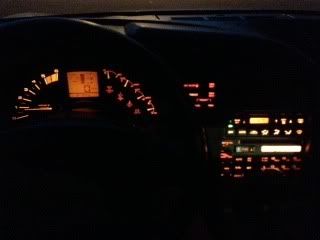
How did the original poster's situation turn out, its almost exactly what happened on my 1990 coupe. Normal night driving and the LCD speedo is so dim its barely readable. With light on the sensor it gets very bright, hence something is limiting current to the dash lighting pcb and bulbs. I tried replacing the light sensor (SCR inside the DIC) to no avail, even though the sensor would make the LCD panel brighter with a flashlight shining into it. Was thinking of replacing the headlight switch under the left hand a/c duct, but those are $230-300 and I didn't want to gamble on that yet.
Heres my dash with the dim LCD speedo when its working its best, most of the time its even dimmer
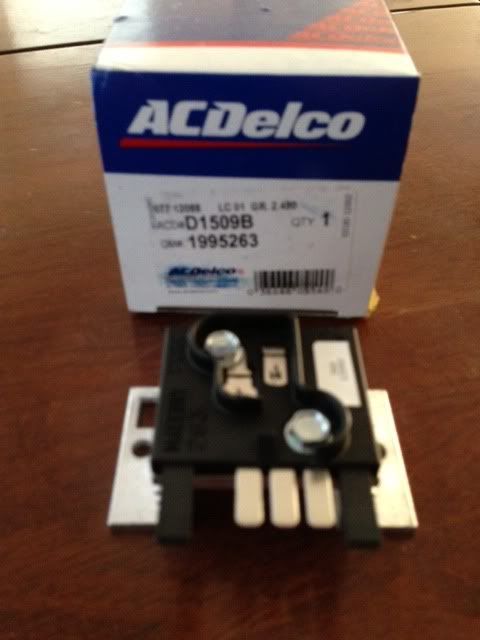
This information given by HookedOnVettes looks very promising, so much so that I bought one of the devices right of Amazon as recommended and will try putting it in today. Wish I had info on how to get to the device under the dash, but I guess ill have to just try removing the cover under the dash and see if that gets me there.
Heres the AC Delco instrument panel dimmer switch (power amp) I bought for $35
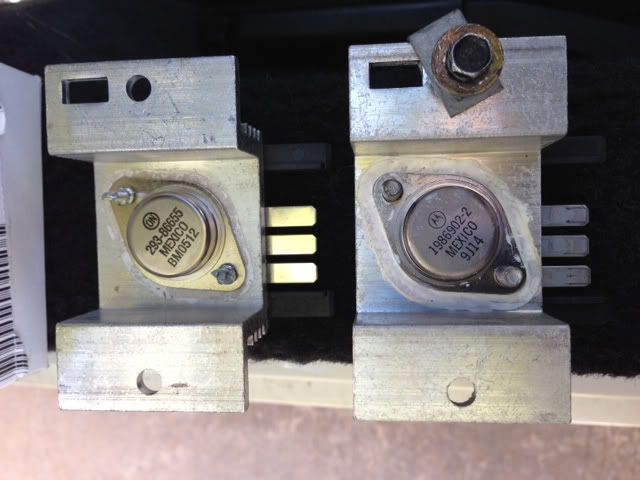
So… did the surgery and it is much improved (probably still could use new dash bulbs)
but the lighting is now stable (not going dim to bright to dim as I drive) or is too dim to see at night.
Some pictures of replacing the dimmer switch IC and testing it
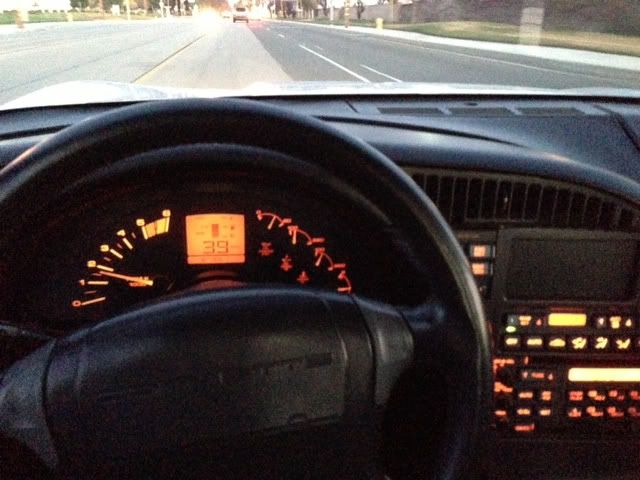
Heres my dash with the dim LCD speedo when its working its best, most of the time its even dimmer
This information given by HookedOnVettes looks very promising, so much so that I bought one of the devices right of Amazon as recommended and will try putting it in today. Wish I had info on how to get to the device under the dash, but I guess ill have to just try removing the cover under the dash and see if that gets me there.
Heres the AC Delco instrument panel dimmer switch (power amp) I bought for $35
So… did the surgery and it is much improved (probably still could use new dash bulbs)
but the lighting is now stable (not going dim to bright to dim as I drive) or is too dim to see at night.
Some pictures of replacing the dimmer switch IC and testing it
Last edited by AV8R_; Jan 11, 2013 at 11:27 PM.