



How to Use Plug
Thread Starter
Racer


Joined: Aug 2008
Posts: 326
Likes: 5
From: central Florida Florida

Yes, thanks, the numbers did work. Still trying to figure out what the numbers mean. According to the the last posts, my blm's are 126 now, which sound normal. Car still stumbling at slight throttle and code 42 43. I am in the process of replacing ESC module and pick up coil. After that, I have no idea.
Thread Starter
Racer
Joined: Aug 2008
Posts: 326
Likes: 5
From: central Florida Florida
Thread Starter
Racer
Joined: Aug 2008
Posts: 326
Likes: 5
From: central Florida Florida
Yes, thanks, the numbers did work. Still trying to figure out what the numbers mean. According to the the last posts, my blm's are 126 now, which sound normal. Car still stumbling at slight throttle and code 42 43. I am in the process of replacing ESC module and pick up coil. After that, I have no idea.

Drifting


Joined: Aug 2010
Posts: 1,704
Likes: 8
Do you use a FSM?if you haven't buy one for your My,best investment.when i start a diagnosis i start at the basics.car has to be at perfect base condition:timing,fuel pressure,minimum idle set up,good ignition,no vacuum leak.
ceck your timing with esc disconnected for 6 degrees.
ceck your TPS at .54.base idling
ceck your fp at 38-40 psi (1985 My uses larger 24lb injcs vs lower fuel pressure 35-38)
ceck ignition good wires ,plugs with gap,good coil
ceck/clean your IAC and reset
ceck good steady vacuum,no leaks,good hoses
when your car meets these basics conditions then start your diagnosis.
BTW i see from the album pic you didn't use Tunerpro RT but Winaldl.download tunerprort 5 and start using this powerfull software.
ceck your timing with esc disconnected for 6 degrees.
ceck your TPS at .54.base idling
ceck your fp at 38-40 psi (1985 My uses larger 24lb injcs vs lower fuel pressure 35-38)
ceck ignition good wires ,plugs with gap,good coil
ceck/clean your IAC and reset
ceck good steady vacuum,no leaks,good hoses
when your car meets these basics conditions then start your diagnosis.
BTW i see from the album pic you didn't use Tunerpro RT but Winaldl.download tunerprort 5 and start using this powerfull software.
Thread Starter
Racer
Joined: Aug 2008
Posts: 326
Likes: 5
From: central Florida Florida
Do you use a FSM?if you haven't buy one for your My,best investment.when i start a diagnosis i start at the basics.car has to be at perfect base condition:timing,fuel pressure,minimum idle set up,good ignition,no vacuum leak.
ceck your timing with esc disconnected for 6 degrees.
ceck your TPS at .54.base idling
ceck your fp at 38-40 psi (1985 My uses larger 24lb injcs vs lower fuel pressure 35-38)
ceck ignition good wires ,plugs with gap,good coil
ceck/clean your IAC and reset
ceck good steady vacuum,no leaks,good hoses
when your car meets these basics conditions then start your diagnosis.
BTW i see from the album pic you didn't use Tunerpro RT but Winaldl.download tunerprort 5 and start using this powerfull software.
ceck your timing with esc disconnected for 6 degrees.
ceck your TPS at .54.base idling
ceck your fp at 38-40 psi (1985 My uses larger 24lb injcs vs lower fuel pressure 35-38)
ceck ignition good wires ,plugs with gap,good coil
ceck/clean your IAC and reset
ceck good steady vacuum,no leaks,good hoses
when your car meets these basics conditions then start your diagnosis.
BTW i see from the album pic you didn't use Tunerpro RT but Winaldl.download tunerprort 5 and start using this powerfull software.
I have already downloaded the Tunerpro rt, but I hate to say , I almost need step by step instructions to figure out how to use it. This is why I am using the Winaldl.... it was easier to set up.
Drifting
Joined: Aug 2010
Posts: 1,704
Likes: 8
yes i know bro',first do you set the port com onto your laptop?
to use your serial/usb aldl cable for datalog you need cable driver serial 232/usb,when you load the cable driver in the devices manager you'll find your cable as device serial/usb
[IMG]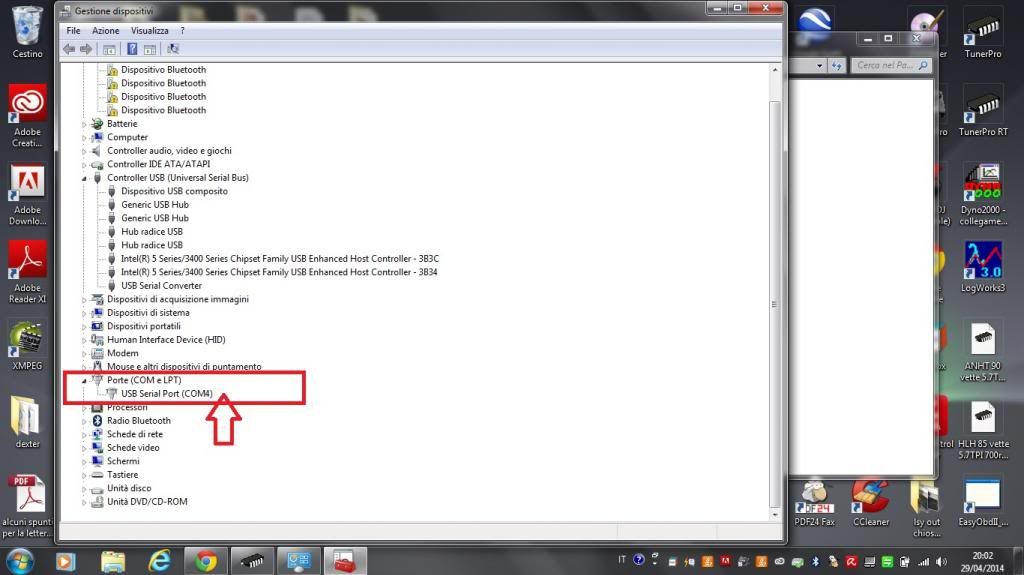 [/IMG]
as you can see the serial device is set on port com 4 in my pc
then you must set port com 4 into tunerpro under tool> preferences>data acquisition emulation
[IMG]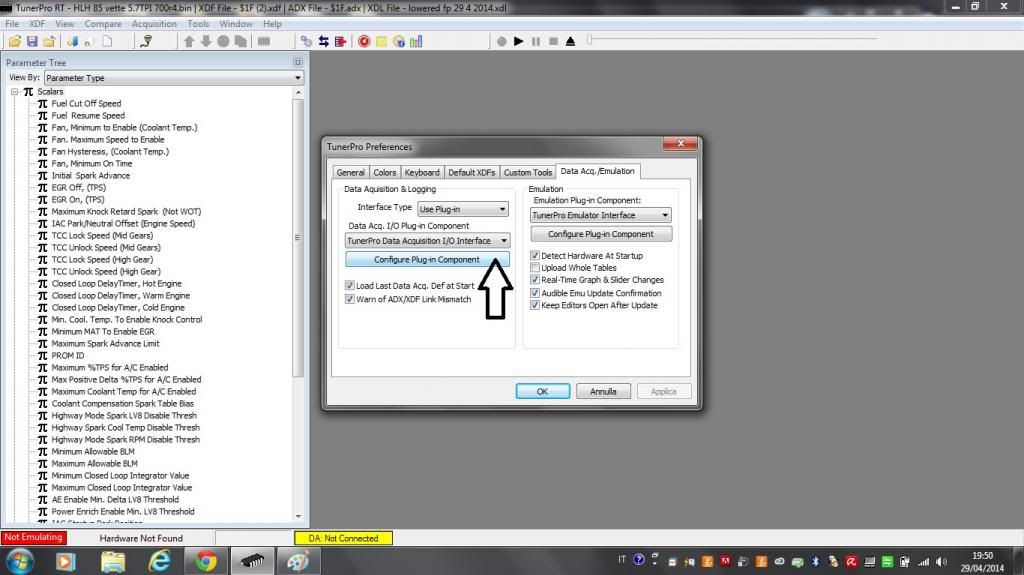 [/IMG]
[IMG]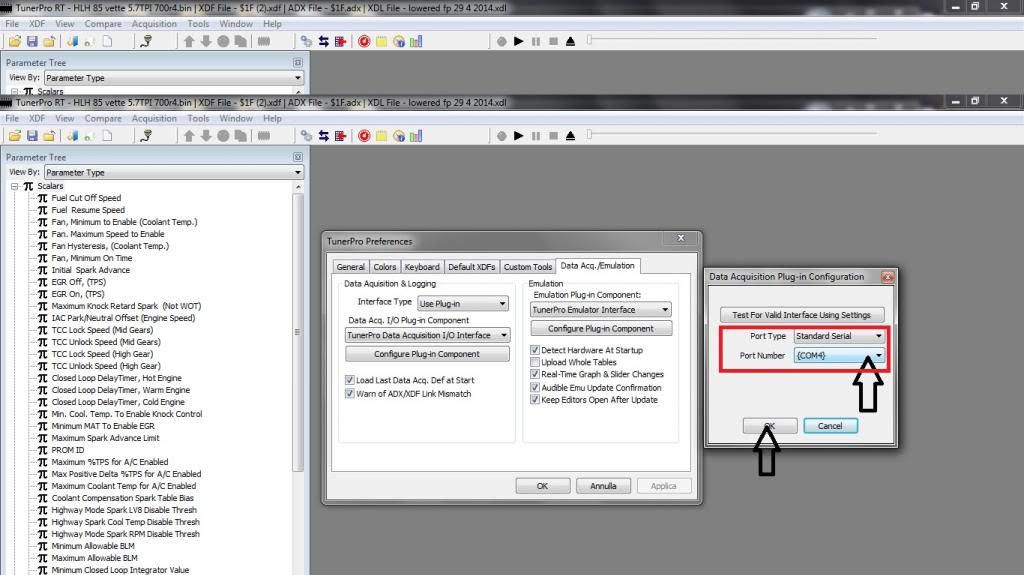 [/IMG]
press ok.
Now to load the files .bin,.xdf,.adx:
tunerpro,file,open bin
[IMG]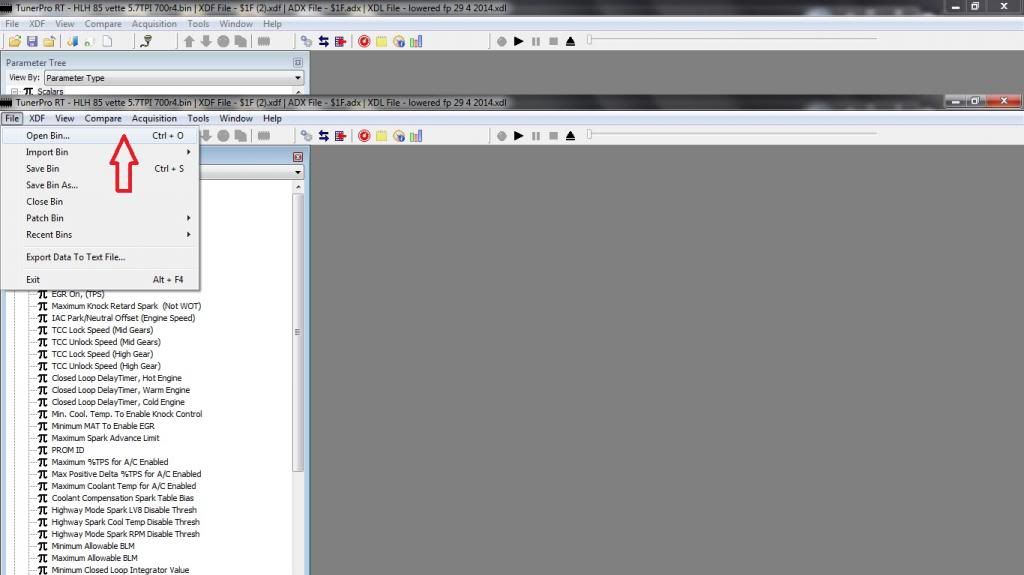 [/IMG]
this is the bin file for a 85' corvette
[IMG]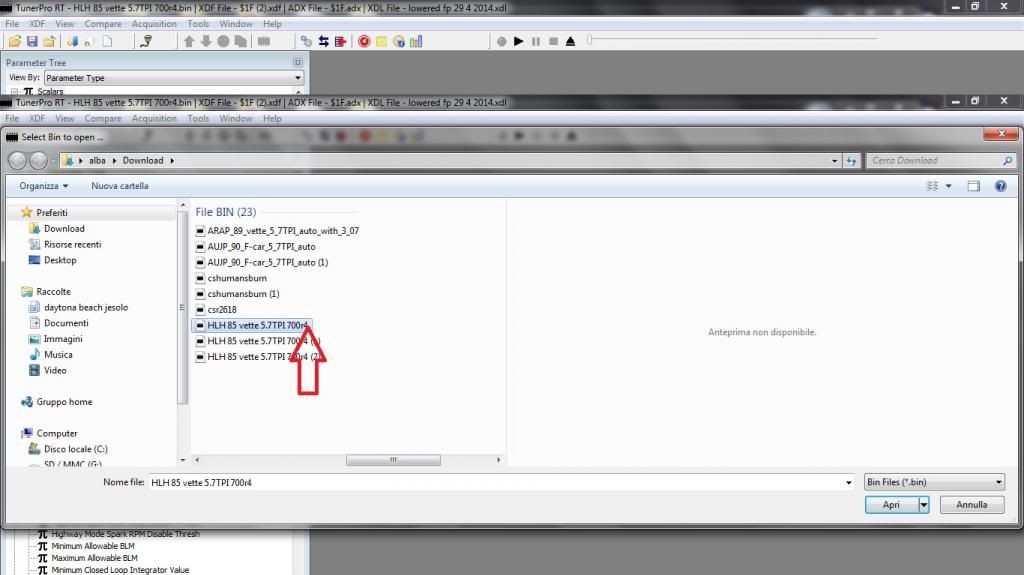 [/IMG]
then load the xdf file:
xdf>select xdf
[IMG]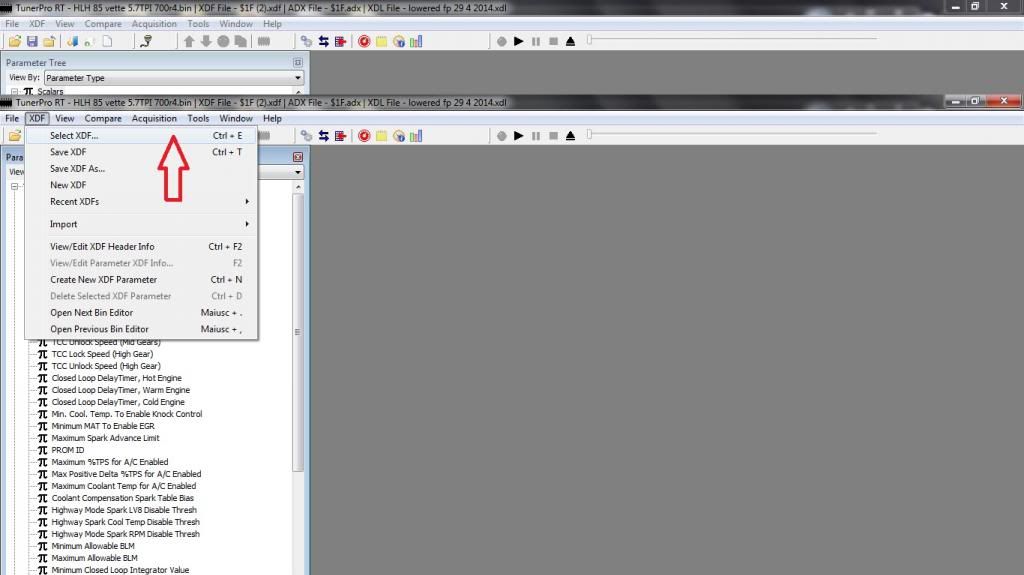 [/IMG]
[IMG]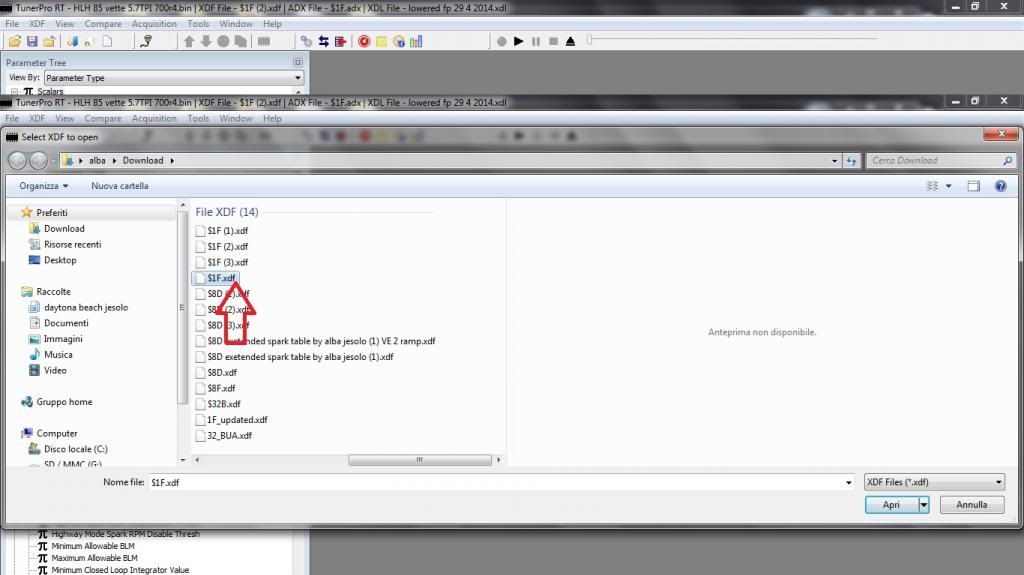 [/IMG]
then a tricky part
acquisition>import definition>FROM ADS here you open an ads file (previous version)then save it as adx lattest version for tunerpro rt5
[IMG]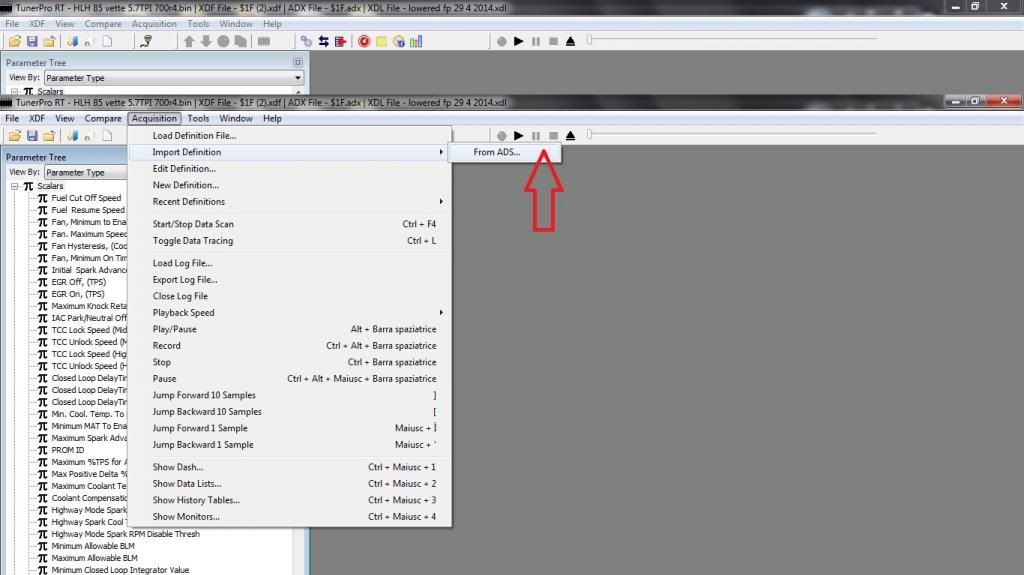 [/IMG]
[IMG]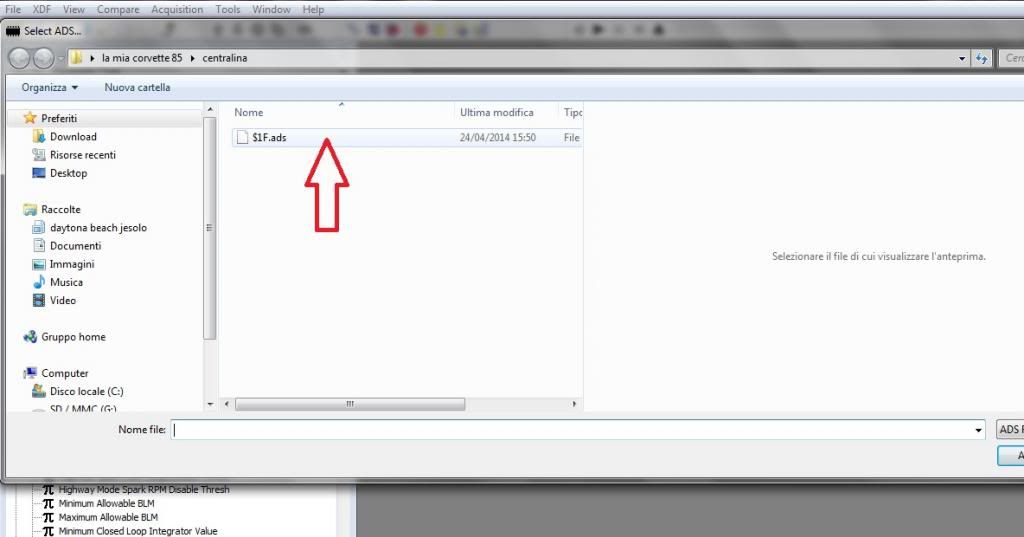 [/IMG]
now save it and load the file as adx,so you can use it in version 5 of tunerpro
now if you follow me just press connect button and start datalogging
[IMG]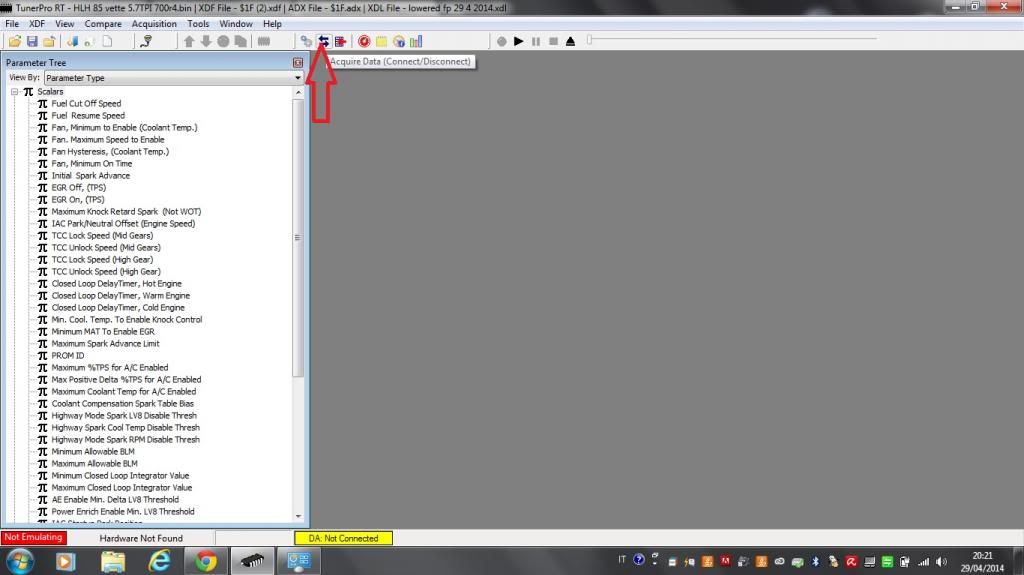 [/IMG]
to use your serial/usb aldl cable for datalog you need cable driver serial 232/usb,when you load the cable driver in the devices manager you'll find your cable as device serial/usb
[IMG]
 [/IMG]
as you can see the serial device is set on port com 4 in my pc
then you must set port com 4 into tunerpro under tool> preferences>data acquisition emulation
[IMG]
 [/IMG]
[IMG]
 [/IMG]
press ok.
Now to load the files .bin,.xdf,.adx:
tunerpro,file,open bin
[IMG]
 [/IMG]
this is the bin file for a 85' corvette
[IMG]
 [/IMG]
then load the xdf file:
xdf>select xdf
[IMG]
 [/IMG]
[IMG]
 [/IMG]
then a tricky part
acquisition>import definition>FROM ADS here you open an ads file (previous version)then save it as adx lattest version for tunerpro rt5
[IMG]
 [/IMG]
[IMG]
 [/IMG]
now save it and load the file as adx,so you can use it in version 5 of tunerpro
now if you follow me just press connect button and start datalogging
[IMG]
 [/IMG]
Corvette Stories
The Best of Corvette for Corvette Enthusiasts

Top 10 Most Explosive Corvettes Ever Made: Power-to-Weight Ratio Ranked!
Joe Kucinski
150 hp to 1,250 hp: Every Corvette Generation Compared by the Specs That Matter
Joe Kucinski
8 Coolest Corvette Pace Cars (and Replicas) of All Time
Verdad Gallardo
Top 10 Corvette Engines RANKED by Peak Torque (70+ Years of Muscle!)
Joe Kucinski
Corvette ZR1X Will Be Pacing the Indy 500, And Could Probably Race, Too!
Verdad Gallardo
Top 10 Corvettes Coming to Mecum Indy 2026!
Brett Foote
Top 10 C9 Corvette MUST-HAVES to Fix These C8 Generation Flaws!
Michael S. Palmer
10 Revolutionary 'Corvette Firsts' Most People Don't Know
Joe Kucinski
5 Reasons to Upgrade to an LS6-Powered Corvette; 5 Reasons to Stay LT2
Michael S. Palmer
Thread Starter
Racer
Joined: Aug 2008
Posts: 326
Likes: 5
From: central Florida Florida
yes i know bro',first do you set the port com onto your laptop?
to use your serial/usb aldl cable for datalog you need cable driver serial 232/usb,when you load the cable driver in the devices manager you'll find your cable as device serial/usb
[IMG][/IMG]
as you can see the serial device is set on port com 4 in my pc
then you must set port com 4 into tunerpro under tool> preferences>data acquisition emulation
[IMG][/IMG]
[IMG][/IMG]
press ok.
Now to load the files .bin,.xdf,.adx:
tunerpro,file,open bin
[IMG][/IMG]
this is the bin file for a 85' corvette
[IMG][/IMG]
then load the xdf file:
xdf>select xdf
[IMG][/IMG]
[IMG][/IMG]
then a tricky part
acquisition>import definition>FROM ADS here you open an ads file (previous version)then save it as adx lattest version for tunerpro rt5
[IMG][/IMG]
[IMG][/IMG]
now save it and load the file as adx,so you can use it in version 5 of tunerpro
now if you follow me just press connect button and start datalogging
[IMG][/IMG]
to use your serial/usb aldl cable for datalog you need cable driver serial 232/usb,when you load the cable driver in the devices manager you'll find your cable as device serial/usb
[IMG]
[/IMG]as you can see the serial device is set on port com 4 in my pc
then you must set port com 4 into tunerpro under tool> preferences>data acquisition emulation
[IMG]
[/IMG][IMG]
[/IMG]press ok.
Now to load the files .bin,.xdf,.adx:
tunerpro,file,open bin
[IMG]
[/IMG]this is the bin file for a 85' corvette
[IMG]
[/IMG]then load the xdf file:
xdf>select xdf
[IMG]
[/IMG][IMG]
[/IMG]then a tricky part
acquisition>import definition>FROM ADS here you open an ads file (previous version)then save it as adx lattest version for tunerpro rt5
[IMG]
[/IMG][IMG]
[/IMG]now save it and load the file as adx,so you can use it in version 5 of tunerpro
now if you follow me just press connect button and start datalogging
[IMG]
[/IMG]