






iPOD2CAR
Thread Starter
Instructor


Joined: Jan 2008
Posts: 127
Likes: 0
From: Cottonwood CA
 iPOD2CAR
Hey all,
I have read a number of threads on the iPOD2CAR product. Somewhere along the line, I think I read that if you don't have the CD Changer, you can order a cable that plugs into the CD Changer cable that is located somewhere around the passenger area. Anyone have that info? I really don't want to take out the radio if I don't have to. Think I am gonna stick it in the glove compartment or fabrarig a holder into the ash tray area.
Thanks
JP
I have read a number of threads on the iPOD2CAR product. Somewhere along the line, I think I read that if you don't have the CD Changer, you can order a cable that plugs into the CD Changer cable that is located somewhere around the passenger area. Anyone have that info? I really don't want to take out the radio if I don't have to. Think I am gonna stick it in the glove compartment or fabrarig a holder into the ash tray area.
Thanks
JP

Team Owner


Joined: Aug 2003
Posts: 24,987
Likes: 26
From: Kerrville, Texas USA Hook 'em Horns!
CentralTX Events Coordinator
St. Jude Donor '03-'04-'05-'06-'07-'08-'09-'10-'11-'12-'13-'14-'15-'16-'17
Yes, you can hook up to the CD changer. It is located in the rear section of the car and run a cable to wherever you want it.
Details can be found here.
http://forums.corvetteforum.com/show....php?t=1752127
Details can be found here.
http://forums.corvetteforum.com/show....php?t=1752127
Safety Car


Joined: Feb 2001
Posts: 3,725
Likes: 53
From: Warrington Pa.
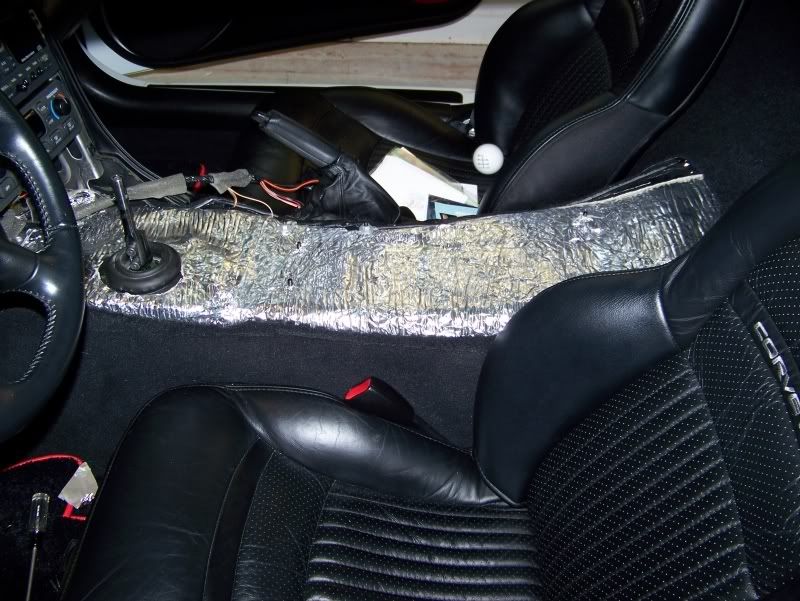
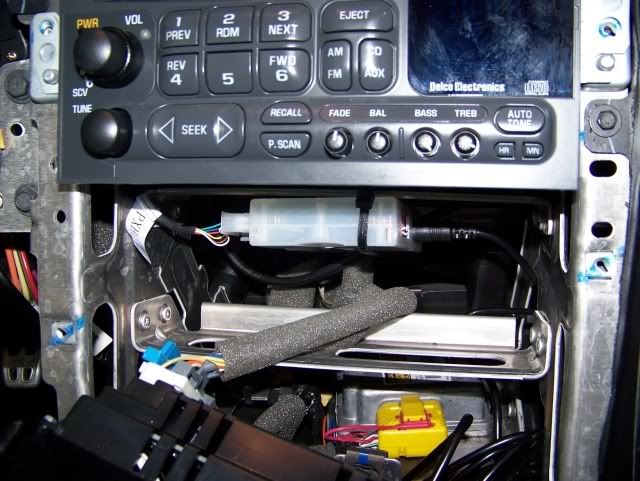
I didn't have the changer so I had to hook it into the back of the radio, no big deal. From start to finish it was less than 1 hr. Also when I had the console out I did some frost king on the tunnel area and a new e-brake boot, still less than an hour.


Intermediate
Joined: Mar 2008
Posts: 28
Likes: 0
From: Denton Texas
If you hook it up to the back of the radio than you can no longer use your cd player. I made that mistake and was ticked off that I took the center console out when I didn't need to. This cable (see link) will allow you to hook it up to the Aux connection of the car if you don't already have the cable for the 12 disc changer that some cars came with.
http://www.myradiostore.com/auxadapt...s/cor-har.html
The connection for this is in the passenger foot well where all the fuses are connected (on the right side). Mine was secured to the sidewall and was easy to disconnect. On the ipod2car box you have to set switches 3 and 8 to on.
The hardest part is trying to find out where you want to put the freaken ipod. The cable they provide is long enough to do just about anywhere but most spots are in the way. Your choice on that one I decided to be unique and put it on my passenger side visor, just ran the cable behind the panels and up the inside of the pillar. I can see it perfectly from the driver's seat, the passenger can access it as well and the visor is sturdy enough that it doesn't move when I push the buttons. No problems when I put the visor up either, can't see it much and never falls down. Oh and don't mind my dirty mirror, I've cleaned it since!

If there's an easier or cheaper way to do it than I dunno what it is
http://www.myradiostore.com/auxadapt...s/cor-har.html
The connection for this is in the passenger foot well where all the fuses are connected (on the right side). Mine was secured to the sidewall and was easy to disconnect. On the ipod2car box you have to set switches 3 and 8 to on.
The hardest part is trying to find out where you want to put the freaken ipod. The cable they provide is long enough to do just about anywhere but most spots are in the way. Your choice on that one
I decided to be unique and put it on my passenger side visor, just ran the cable behind the panels and up the inside of the pillar. I can see it perfectly from the driver's seat, the passenger can access it as well and the visor is sturdy enough that it doesn't move when I push the buttons. No problems when I put the visor up either, can't see it much and never falls down. Oh and don't mind my dirty mirror, I've cleaned it since!If there's an easier or cheaper way to do it than I dunno what it is
Safety Car
Joined: Feb 2001
Posts: 3,725
Likes: 53
From: Warrington Pa.
If you hook it up to the back of the radio than you can no longer use your cd player. I made that mistake and was ticked off that I took the center console out when I didn't need to. This cable (see link) will allow you to hook it up to the Aux connection of the car if you don't already have the cable for the 12 disc changer that some cars came with.
http://www.theistore.com/peripheral_...FRa_WAodTTg5fw
This is the reason I purchased this setup. It was a plug and play with all original radio/cd functions still able to work. It cost a few dollars more but works perfect and my cd player still works as it did before the install. Bill
Last edited by Bill Vett; May 9, 2008 at 10:41 PM.
Intermediate
Joined: Mar 2008
Posts: 28
Likes: 0
From: Denton Texas
Ah I see. I wasn't aware that they had one that plugged into the back like that and still allowed you to use the cd player. Just as an info note though, my setup still has everything working as it always did too. Only difference is the ipod is under Aux where before there was nothing.
Corvette Stories
The Best of Corvette for Corvette Enthusiasts

Top 10 Most Expensive Corvettes Ever Sold on Bring A Trailer
Brett Foote
10 Things Every Corvette Owner Needs (2026 Edition)
Michael S. Palmer
8 Most "Only Corvette Owners Understand" Quirks and Problems
Pouria Savadkouei
10 Reasons the C6 Z06 is Still A Performance Benchmark After 20 Years
Joe Kucinski
How Much Horsepower Every Corvette Engine "LOST" in 1972
Joe Kucinski
Top 10 DOs and DON'Ts for Protecting Your Convertible Top!
Michael S. Palmer
Top 10 Most Explosive Corvettes Ever Made: Power-to-Weight Ratio Ranked!
Joe Kucinski
150 hp to 1,250 hp: Every Corvette Generation Compared by the Specs That Matter
Joe Kucinski
8 Coolest Corvette Pace Cars (and Replicas) of All Time
Verdad Gallardo
Burning Brakes

Joined: Jul 2007
Posts: 799
Likes: 16
From: Kansas City area
If you have the twelve disc changer, the interface cable you need is number PXHGM2. The factory connection unplugs from the CD changer and plugs into the PXHGM2 (which then plugs into the ipod2car PXDP.
You can no longer use the twelve disc changer at this point. You can use the in-dash single disc.
You can no longer use the twelve disc changer at this point. You can use the in-dash single disc.
Racer

Joined: Apr 2008
Posts: 408
Likes: 6
From: Santa Clarita CA
Well I didn't want to hassle with any permanent mods, so I bought the product listed at the bottom of this post for my IPOD Nano (2nd Gen). It used be made by another company but it was the same product, then Scoche bought the company or the product out and it's packaged under the Scoche name now. Essentially it's both an excellent FM trasmitter and a wireless remote built in one and it works great.
The nano slides into the adapter then a plastic shield slips over the Nano to protect it from scratches while still providing access to the click wheel (which you don't need to touch). I bought a $5 IPOD AC adapter and plugged it in in my center console compartment, so the IPOD is completely out of sight and out of mind, and is always charged. The remote RF remote is tiny and since it's RF not IR, it works flawlessly through solid objects like the console.
You have control over songs, playlist, shuffle, volume, play, pause etc. from the remote so you never need to touch the IPOD unless you want to play a particular song and you have too many songs in that playlist to skip through them to find the one you want. In that rare instance, just open the center console, grab the IPOD, and select the song you want.
Don't know about anyone else but 99% of the time I have it on random so the only thing I use the remote for is to skip to another song if I don't want to hear the current one, and once in a while I might select a different playlist. I keep the remote in my shirt pocket or the ashtray or the cup holder when I'm driving (or in my hand since it's so small), but it could quite easily be mounted somewhere with velcro etc..
You can easily set this device to use different radio frequencies with a small button on the side of it, so you just select a frequency that isn't being used in your area and program that freqeuncy as one of your memories on your radio. If you want to listen to your IPOD you just select that memory number, it's basically like having your own private radio station.
This solution no doubt isn't right for everyone, and I'm not sure if they make a model for the standard IPOD, but it's perfect for me and my 8GB Nano, and I'm sure it would be perfect for some others out there. No installation whatsoever, no loss of your CD system, hidden completely out of sight, and complete wireless control... I love it!
http://www.newegg.com/Product/Produc...82E16855997620
The nano slides into the adapter then a plastic shield slips over the Nano to protect it from scratches while still providing access to the click wheel (which you don't need to touch). I bought a $5 IPOD AC adapter and plugged it in in my center console compartment, so the IPOD is completely out of sight and out of mind, and is always charged. The remote RF remote is tiny and since it's RF not IR, it works flawlessly through solid objects like the console.
You have control over songs, playlist, shuffle, volume, play, pause etc. from the remote so you never need to touch the IPOD unless you want to play a particular song and you have too many songs in that playlist to skip through them to find the one you want. In that rare instance, just open the center console, grab the IPOD, and select the song you want.
Don't know about anyone else but 99% of the time I have it on random so the only thing I use the remote for is to skip to another song if I don't want to hear the current one, and once in a while I might select a different playlist. I keep the remote in my shirt pocket or the ashtray or the cup holder when I'm driving (or in my hand since it's so small), but it could quite easily be mounted somewhere with velcro etc..
You can easily set this device to use different radio frequencies with a small button on the side of it, so you just select a frequency that isn't being used in your area and program that freqeuncy as one of your memories on your radio. If you want to listen to your IPOD you just select that memory number, it's basically like having your own private radio station
.This solution no doubt isn't right for everyone, and I'm not sure if they make a model for the standard IPOD, but it's perfect for me and my 8GB Nano, and I'm sure it would be perfect for some others out there. No installation whatsoever, no loss of your CD system, hidden completely out of sight, and complete wireless control... I love it!
http://www.newegg.com/Product/Produc...82E16855997620
Last edited by EDenney; May 10, 2008 at 02:21 AM.
Racer
Joined: Apr 2005
Posts: 256
Likes: 1
From: Delta BC
I ordered an aux2car which is made by peripheral along with a pxhgm4 from discount car audio for $115 shipped. This was the cheapest solution I found, the changer harness costs ~ $70. If you want to run an aux port this works well, and you can run it into the center console pretty easily if you want to by removing the aux power found in the center console. Take a look here:
http://forums.corvetteforum.com/show....php?t=1996602
The aux2car gives an aux port and all of the controlling would have to be done through the ipod or you could buy something like the harmon kardon drive + play which I did, pics of a stingray71's install can be seen here, he helped me out with my questions during my install:
http://forums.corvetteforum.com/show...post1563325250
The drive + play can be bought pretty cheap now, I got mine for $25 from Best buy with a price match to Amazon.com.
http://forums.corvetteforum.com/show....php?t=1996602
The aux2car gives an aux port and all of the controlling would have to be done through the ipod or you could buy something like the harmon kardon drive + play which I did, pics of a stingray71's install can be seen here, he helped me out with my questions during my install:
http://forums.corvetteforum.com/show...post1563325250
The drive + play can be bought pretty cheap now, I got mine for $25 from Best buy with a price match to Amazon.com.