


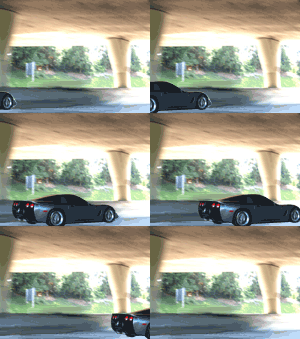


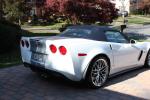





C5 and Darkness... Image Heavy.

Instructor

Joined: Mar 2007
Posts: 104
Likes: 0
From: Regina Saskatchewan

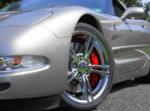
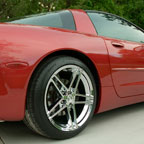
why does your car always look so good and perfect in all your pictures! Love it! Maybe its your great photography skills but sometimes you see people take pictures of the C5 and well they just sort of look "blehh" especially on a weird angle..keep it up though looking good....and i love love those rims...what kind are they?
Thread Starter
Race Director

Joined: Jul 2007
Posts: 18,681
Likes: 47
From: Reno is so close to Hell you can see Sparks , State Of Confusion
St. Jude Donor '12-'13-'14
why does your car always look so good and perfect in all your pictures! Love it! Maybe its your great photography skills but sometimes you see people take pictures of the C5 and well they just sort of look "blehh" especially on a weird angle..keep it up though looking good....and i love love those rims...what kind are they?
Le Mans Master


Joined: May 2006
Posts: 5,987
Likes: 18
From: DuBois PA
St. Jude Donor '11-'12-'13-'14-'15
Perfect time of day for photography! Your shots are always perfect Bill! at least the ones you post... 
Do you set a custom White Balance prior to each shoot??? Your shots always seem to pop and the colors are perfect!
Do you set a custom White Balance prior to each shoot??? Your shots always seem to pop and the colors are perfect!
Corvette Stories
The Best of Corvette for Corvette Enthusiasts

Every 2027 Corvette Engine Explained
Joe Kucinski
Designer Imagines A Corvette That Looks More Like a Corvette Than the Corvette
Verdad Gallardo
10 Ugly Corvettes That We Still Kinda Love
Joe Kucinski
Top 10 Most Expensive Corvettes Ever Sold on Bring A Trailer
Brett Foote
10 Things Every Corvette Owner Needs (2026 Edition)
Michael S. Palmer
8 Most "Only Corvette Owners Understand" Quirks and Problems
Pouria Savadkouei
10 Reasons the C6 Z06 is Still A Performance Benchmark After 20 Years
Joe Kucinski
How Much Horsepower Every Corvette Engine "LOST" in 1972
Joe Kucinski
Top 10 DOs and DON'Ts for Protecting Your Convertible Top!
Michael S. Palmer
Administrator


Joined: Mar 2001
Posts: 368,531
Likes: 24,824
From: In a parallel universe. Currently own 2014 Stingray Coupe.
C7 of the Year - Modified Finalist 2021
MO Events Coordinator
St. Jude Co-Organizer
St. Jude Donor '03 thru '26
NCM Sinkhole Donor
CI 5, 8 & 11 Veteran
Your car always looks good, Bill. You took some really good shots of it.


 Nice
Nice
Thread Starter
Race Director
Joined: Jul 2007
Posts: 18,681
Likes: 47
From: Reno is so close to Hell you can see Sparks , State Of Confusion
St. Jude Donor '12-'13-'14
I have tried setting a custom white balance. I now shoot in raw so I can correct white balance, exposure and such. I haven't shot in jpg in years....
Instructor
Joined: Nov 2006
Posts: 237
Likes: 0
Le Mans Master
Joined: May 2006
Posts: 5,987
Likes: 18
From: DuBois PA
St. Jude Donor '11-'12-'13-'14-'15
I shoot RAW and JPG at the same time, although I must admit I'm a bit challenged with RAW editing...
Tim
Instructor
Joined: Nov 2006
Posts: 237
Likes: 0
Raw editing is not that much different than editing in Photoshop. Think of Raw file format as your original "negative". It gives you the most latitude for adjustment with no ill effects. A story I like to tell is a few years ago, I had a manual flash unit set improperly at 2 stops over exposure. I photographed a church event with WHITE robes! Needless to say, I was worried but was able to adjust the raw files back with no ill effects! (I probably moved the exposure 4 stops)
If you have Photoshop CS2 or newer, shoot raw and adjust as much as possible in Adobe Raw. Get it as close as possible in raw then convert to whatever format you want. The beauty is that you can always go back to camera settings and start over.

Le Mans Master
Joined: May 2006
Posts: 5,987
Likes: 18
From: DuBois PA
St. Jude Donor '11-'12-'13-'14-'15
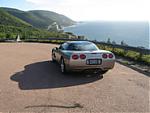
Thanx... I have Elements 6 but use the software that came with my camera for RAW editing. I think my problem is there are so many variables in the editing that I don't know when to guite! Then there's filters and masks to play with, it's enough to set my ADD off!
Here's a pretty good example of me going overboard with editing and not knowing when to guite;


It would be great if we could start a Thread on editing basics and general photography for our cars... hint hint hint Bill!
Tim
QUOTE=kcbeagle;1569799954]Hey Tim,
Raw editing is not that much different than editing in Photoshop. Think of Raw file format as your original "negative". It gives you the most latitude for adjustment with no ill effects. A story I like to tell is a few years ago, I had a manual flash unit set improperly at 2 stops over exposure. I photographed a church event with WHITE robes! Needless to say, I was worried but was able to adjust the raw files back with no ill effects! (I probably moved the exposure 4 stops)
If you have Photoshop CS2 or newer, shoot raw and adjust as much as possible in Adobe Raw. Get it as close as possible in raw then convert to whatever format you want. The beauty is that you can always go back to camera settings and start over.[/QUOTE]
Then there's filters and masks to play with, it's enough to set my ADD off!Here's a pretty good example of me going overboard with editing and not knowing when to guite;
It would be great if we could start a Thread on editing basics and general photography for our cars... hint hint hint Bill!
Tim
QUOTE=kcbeagle;1569799954]Hey Tim,
Raw editing is not that much different than editing in Photoshop. Think of Raw file format as your original "negative". It gives you the most latitude for adjustment with no ill effects. A story I like to tell is a few years ago, I had a manual flash unit set improperly at 2 stops over exposure. I photographed a church event with WHITE robes! Needless to say, I was worried but was able to adjust the raw files back with no ill effects! (I probably moved the exposure 4 stops)
If you have Photoshop CS2 or newer, shoot raw and adjust as much as possible in Adobe Raw. Get it as close as possible in raw then convert to whatever format you want. The beauty is that you can always go back to camera settings and start over.[/QUOTE]
