



Need Fonts,C5

Thread Starter
Burning Brakes


Joined: Nov 2002
Posts: 804
Likes: 1
From: Some where in Ontario Canada
 Need Fonts,C5
I need your help!
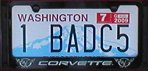
I need an example to the letter C and the number 5 to digitize for embroidery.
I want the fonts to match the style found on the bumper.
Thanks, Tom.
I need an example to the letter C and the number 5 to digitize for embroidery.
I want the fonts to match the style found on the bumper.
Thanks, Tom.

Administrator


Joined: Mar 2001
Posts: 368,053
Likes: 24,730
From: In a parallel universe. Currently own 2014 Stingray Coupe.
C7 of the Year - Modified Finalist 2021
MO Events Coordinator
St. Jude Co-Organizer
St. Jude Donor '03 thru '25
NCM Sinkhole Donor
CI 5, 8 & 11 Veteran
Within the past week there was a thread on this same topic. It had a link to download the Corvette font. Do a search on Corvette Font and you should find something.
If you can't find it, e-mail me and I can send you an attachment that has the font.
If you can't find it, e-mail me and I can send you an attachment that has the font.

Team Owner


Joined: Jan 2002
Posts: 23,234
Likes: 4
From: All that glitters is Gold - Hockey Is CANADA'S game
Cruise-In VI Veteran
Cruise-In VII Veteran
St. Jude Donor '05-'06

Instructor

Joined: Nov 2004
Posts: 161
Likes: 0
From: Randleman NC
Thanks...Ive been needing for that font myself. I am the graphic artist for my Vette Club and I'm always looking for Corvette fonts and clipart.
Any other fonts or clipart available???? Links would highly be helpful!
Any other fonts or clipart available???? Links would highly be helpful!
Thread Starter
Burning Brakes
Joined: Nov 2002
Posts: 804
Likes: 1
From: Some where in Ontario Canada
I'm having trouble operating this file.
Could you just forward me the letter "C" and the number "5".
Can you size them at about two inches,
tbone@ebtech.net
Thank you.
Could you just forward me the letter "C" and the number "5".
Can you size them at about two inches,
tbone@ebtech.net
Thank you.
Last edited by Tombone; Nov 16, 2004 at 03:38 PM.

Le Mans Master

Joined: Jul 2004
Posts: 8,142
Likes: 0
From: Time is a great teacher. Unfortunately, it kills all its pupils.
Cruise-In VIII Veteran
St. Jude Donor '07

Burning Brakes
Joined: Oct 2004
Posts: 924
Likes: 0
From: Calgary
Originally Posted by jaxgator
Right click and "Save as..." >>> CORVETTE.TTF


Corvette Stories
The Best of Corvette for Corvette Enthusiasts

Top 10 Most Explosive Corvettes Ever Made: Power-to-Weight Ratio Ranked!
Joe Kucinski
150 hp to 1,250 hp: Every Corvette Generation Compared by the Specs That Matter
Joe Kucinski
8 Coolest Corvette Pace Cars (and Replicas) of All Time
Verdad Gallardo
Top 10 Corvette Engines RANKED by Peak Torque (70+ Years of Muscle!)
Joe Kucinski
Corvette ZR1X Will Be Pacing the Indy 500, And Could Probably Race, Too!
Verdad Gallardo
Top 10 Corvettes Coming to Mecum Indy 2026!
Brett Foote
Top 10 C9 Corvette MUST-HAVES to Fix These C8 Generation Flaws!
Michael S. Palmer
10 Revolutionary 'Corvette Firsts' Most People Don't Know
Joe Kucinski
5 Reasons to Upgrade to an LS6-Powered Corvette; 5 Reasons to Stay LT2
Michael S. Palmer
Thread Starter
Burning Brakes
Joined: Nov 2002
Posts: 804
Likes: 1
From: Some where in Ontario Canada
Originally Posted by Vette Dream
What he said, but it will help if you save it to your \Windows\Fonts folder. That way, you can start up your word processor such as MS Word, and choose the CORVETTE font, and there you GO

Safety Car


Joined: Dec 2002
Posts: 4,010
Likes: 1
From: SE Idaho
St. Jude Contributor
Originally Posted by Vette Dream
What he said, but it will help if you save it to your \Windows\Fonts folder. That way, you can start up your word processor such as MS Word, and choose the CORVETTE font, and there you GO
Thanks.




Burning Brakes
Joined: Oct 2004
Posts: 924
Likes: 0
From: Calgary
Originally Posted by WhiteC5Vette
How? I'm running XP (SP2) and it will not allow me to copy the CORVETTE file to the Fonts folder. Is there a secret to performing this function?
Thanks.
Thanks.
I did it on XP SP2 by simply copying the file to the Windows\Fonts folder, worked like magic.
Enjoy!
