





Audio Upgrade
Thread Starter
Pro

Joined: Mar 2006
Posts: 595
Likes: 1
From: Columbus Ohio
 Audio Upgrade
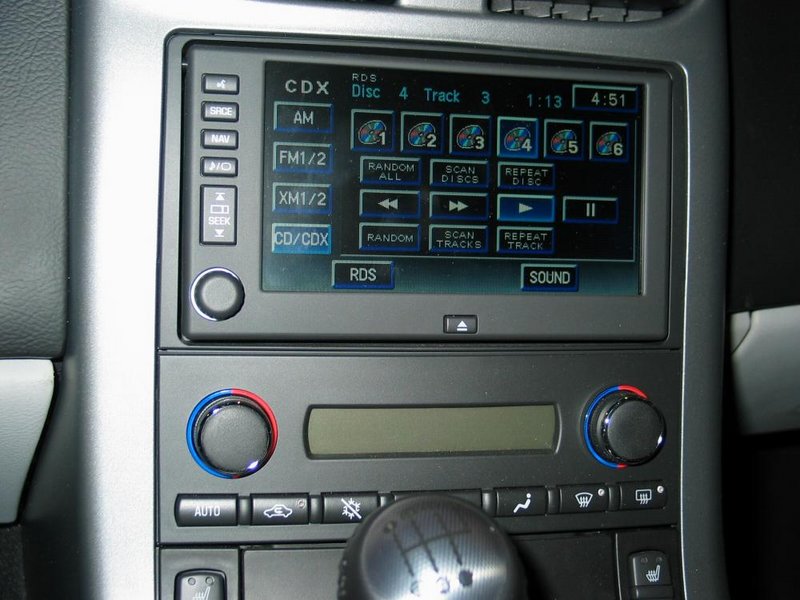
I have navigation and only one CD drive. I want to get a GM 6 CD changer deck installed in one of the trunk floor compartments (that seems to be the location for placement). What is the cost of the GM 6 CD changer and dealer installation?
I take it that the radio is already has the necessary software interface for the 6 CD deck and will be controlled directly from my display screen like the other audio and navigation controls... yes?
Thanks,
Gburg

I take it that the radio is already has the necessary software interface for the 6 CD deck and will be controlled directly from my display screen like the other audio and navigation controls... yes?
Thanks,
Gburg
Le Mans Master


Joined: May 2005
Posts: 5,865
Likes: 2
From: Hope, Arkansas - '07 LMB Coupe
Cruise-In VIII Veteran
Yes, the NAV unit will control the changer. Assume you have already considered the fact that the in-dash CD player will play MP3s and the changer will not play MP3s.
Thread Starter
Pro
Joined: Mar 2006
Posts: 595
Likes: 1
From: Columbus Ohio
Originally Posted by wanta06
Yes, the NAV unit will control the changer. Assume you have already considered the fact that the in-dash CD player will play MP3s and the changer will not play MP3s.
Thanks for the tip.
 I did not know about the MP3 issue on the changer. I do not have any MP3s, at present. Perhaps I should get serious about burning some MP3s. Much cheaper than any 6 CD changer. But the problem is that I do not have any MP3 hardware. My PC at home has a CD and a DVD deck. This is all that I would have to work with. Can this set-up be employed?
Gburg

Race Director


Joined: Oct 2004
Posts: 10,089
Likes: 14
Originally Posted by Gburg
Thanks for the tip. I did not know about the MP3 issue on the changer. I do not have any MP3s, at present. Perhaps I should get serious about burning some MP3s. Much cheaper than any 6 CD changer. But the problem is that I do not have any MP3 hardware. My PC at home has a CD and a DVD deck. This is all that I would have to work with. Can this set-up be employed?
Gburg
I did not know about the MP3 issue on the changer. I do not have any MP3s, at present. Perhaps I should get serious about burning some MP3s. Much cheaper than any 6 CD changer. But the problem is that I do not have any MP3 hardware. My PC at home has a CD and a DVD deck. This is all that I would have to work with. Can this set-up be employed?Gburg
Thread Starter
Pro
Joined: Mar 2006
Posts: 595
Likes: 1
From: Columbus Ohio
Originally Posted by shopdog
Assuming your CD drive will burn CDs as well as play them, a reasonable assumption for a combo drive in a fairly modern computer, then all you need to do is download a program to rip music and burn MP3 CDs. I use iTunes, a free download from Apple. There's a bit of a learning curve, but it works fine once you have everything configured properly. Just make sure you configure it to use Version 1.0 ID3, otherwise the player in the car gets confused.
Can this be done with pre-recorded CDs? I do not have MP3 hardware because I have never been interested in downloading music from the Internet. Especially now with satellite radio. The music that I have on the pre-recorded CDs would never be on the Internet to download any way.
Gburg


Le Mans Master

Joined: Jun 2004
Posts: 9,289
Likes: 16
From: Skippack PA
St Jude Donor '13
Originally Posted by Gburg
Can this be done with pre-recorded CDs? I do not have MP3 hardware because I have never been interested in downloading music from the Internet. Especially now with satellite radio. The music that I have on the pre-recorded CDs would never be on the Internet to download any way.
Gburg
Gburg
Yes, it can be done with CD's. iTunes will "rip" the CD's to your hard drive to create MP3 files - this is an option you must set in iTunes BEFORE ripping as otherwise it will rip them as AAC files. Then once you have the songs on your computer you create a Playlist and you can burn the playlist from there.
Race Director
Joined: Oct 2004
Posts: 10,089
Likes: 14
Originally Posted by TheKomoman
Yes, it can be done with CD's. iTunes will "rip" the CD's to your hard drive to create MP3 files - this is an option you must set in iTunes BEFORE ripping as otherwise it will rip them as AAC files. Then once you have the songs on your computer you create a Playlist and you can burn the playlist from there.
 That's the way I did my whole music library. You have to make a decision about the MP3 data compression rate (note this is different from audio compression) before you rip your existing CDs. The greater the amount of data compression, the more songs you can put on one disc, but the sound quality suffers if you compress the data too much (MP3 is a lossy data compression standard). Given the normal noise levels in the car, I chose to rip at 192kb/s. This preserves most of what you'd actually be able to hear while allowing more than 130 songs per disc. You could push 200 songs with 128kb/s compression, or get near perfect fidelity with 320kb/s. Try a few discs at different compressions before committing your whole library.
Corvette Stories
The Best of Corvette for Corvette Enthusiasts

Top 10 Most Expensive Corvettes Ever Sold on Bring A Trailer
Brett Foote
10 Things Every Corvette Owner Needs (2026 Edition)
Michael S. Palmer
8 Most "Only Corvette Owners Understand" Quirks and Problems
Pouria Savadkouei
10 Reasons the C6 Z06 is Still A Performance Benchmark After 20 Years
Joe Kucinski
How Much Horsepower Every Corvette Engine "LOST" in 1972
Joe Kucinski
Top 10 DOs and DON'Ts for Protecting Your Convertible Top!
Michael S. Palmer
Top 10 Most Explosive Corvettes Ever Made: Power-to-Weight Ratio Ranked!
Joe Kucinski
150 hp to 1,250 hp: Every Corvette Generation Compared by the Specs That Matter
Joe Kucinski
8 Coolest Corvette Pace Cars (and Replicas) of All Time
Verdad Gallardo
Burning Brakes

Joined: Jan 2005
Posts: 1,238
Likes: 14
From: Charlotte NC
Originally Posted by Gburg
I take it that the radio is already has the necessary software interface for the 6 CD deck and will be controlled directly from my display screen like the other audio and navigation controls... yes?
Melting Slicks

Joined: Jan 2006
Posts: 3,003
Likes: 1
From: Life ain't no dress rehearsal, are you gonna wait to get your toys til AFTER you have a heart attack?
Originally Posted by wanta06
Yes, the NAV unit will control the changer. Assume you have already considered the fact that the in-dash CD player will play MP3s and the changer will not play MP3s.