



New C6 advice
Racer


Joined: Jul 2006
Posts: 340
Likes: 0
From: San Diego CA

Originally Posted by ldigiorgio
The nav does not play dvd movies, it's only for the nav disk. Also I was told by the dealer you get 2 yearly upgrades, after that it's about $600.
I have the GM nav unit and would suggest it over an aftermarket one based on the integration with the HUD. That's a very nice feature. Theft is something to think about as well. Aftermarket tends to draw a lot more theifs than the factory unit (not much resale value on a factory one compared to an aftermarket one).
Melting Slicks

Joined: Mar 2004
Posts: 2,130
Likes: 5
From: Seattle WA
I went aftermarket with an AVIC-D2. Some advantages:
1. XM Nav Traffic which displays on the nav
2. iPod interface which is directly connected and controlled from the nav display
I don't know enough about the stock nav to point out other advantages, but the two above were big for me and you are unable to do it with the stock unit.
Lastly, you obviously have to want all the other options necessary to get the nav. If you don't, you can do better with the aftermarket.
1. XM Nav Traffic which displays on the nav
2. iPod interface which is directly connected and controlled from the nav display
I don't know enough about the stock nav to point out other advantages, but the two above were big for me and you are unable to do it with the stock unit.
Lastly, you obviously have to want all the other options necessary to get the nav. If you don't, you can do better with the aftermarket.
Instructor

Joined: Nov 2006
Posts: 184
Likes: 0
From: Silicon Valley CA
Nav
I love the Nav unit in my Z06 Vet. I added an aftermarket Ipod adaptor and I am very happy with the result.
I could still add the CD changer in the rear storage bin. But so far, no need.
The integration of the factory nav with the HUD is nice.
I could still add the CD changer in the rear storage bin. But so far, no need.
The integration of the factory nav with the HUD is nice.

Heel & Toe
Joined: Aug 2006
Posts: 15
Likes: 0
From: Crescent City California
Go with the factory NAV system. Not only does it up the resale value, it is a great unit. It takes me to the front door of every address I've ever punched in. I do have a Tom Tom 910 which I bought for my Pontiac Solstice and like it better. It has better graphics and is blue tooth for my cell phone.
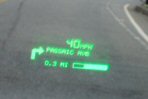
Will someone please tell this ignorant old fool how the NAV system works with the HUD. Thanks!
Will someone please tell this ignorant old fool how the NAV system works with the HUD. Thanks!
Le Mans Master

Joined: May 2005
Posts: 5,865
Likes: 2
From: Hope, Arkansas - '07 LMB Coupe
Cruise-In VIII Veteran
Originally Posted by Seacruisevette
...Will someone please tell this ignorant old fool how the NAV system works with the HUD. Thanks!
Corvette Stories
The Best of Corvette for Corvette Enthusiasts

5 Best & 5 Worst Corvette Daily Drivers
Joe Kucinski
The Headlights of Every Corvette Generation Explained
Joe Kucinski
5 Best & 5 Most Overrated Corvette Track Packages of All Time!
Joe Kucinski
Every 2027 Corvette Engine Explained
Joe Kucinski
Designer Imagines A Corvette That Looks More Like a Corvette Than the Corvette
Verdad Gallardo
10 Ugly Corvettes That We Still Kinda Love
Joe Kucinski
Top 10 Most Expensive Corvettes Ever Sold on Bring A Trailer
Brett Foote
10 Things Every Corvette Owner Needs (2026 Edition)
Michael S. Palmer
8 Most "Only Corvette Owners Understand" Quirks and Problems
Pouria Savadkouei
Thread Starter
Instructor

Joined: Nov 2006
Posts: 156
Likes: 0
From: Greenville South Carolina
S2K, did you do your own install? Also, can you play a DVD i.e. a concert while you are driving. I was reading about the Z1 and if i read it correctly it will not play DVDs while you are driving. There is a tie-in to the park break. That would not be a big deal to bypass if that is all the interface does.
I like the voice recognition for destinations and your song library that the Z1 has. Also, I too would be doing the Ipod adapter.
I like the voice recognition for destinations and your song library that the Z1 has. Also, I too would be doing the Ipod adapter.

Le Mans Master


Joined: Aug 2004
Posts: 6,412
Likes: 1,296
From: Bluffton, SC
Am I the only one who doesn't have or need a NAV in my car? I have no use for one and can actually still use a map if I have to.
I think if you're frequently driving in areas you're not familiar with, the NAV can be a tremendous asset. If, on the other hand, you usually are in areas you know, or can plot out a trip on a map, the NAV is really not a necessity.
The choice of getting the NAV or not, like almost every other issue involving your choice of accessories, depends on how you intend to use your car and what is important to you. The C6 still does a pretty good job, either way.
I think if you're frequently driving in areas you're not familiar with, the NAV can be a tremendous asset. If, on the other hand, you usually are in areas you know, or can plot out a trip on a map, the NAV is really not a necessity.
The choice of getting the NAV or not, like almost every other issue involving your choice of accessories, depends on how you intend to use your car and what is important to you. The C6 still does a pretty good job, either way.



Team Owner


Joined: Sep 2000
Posts: 25,029
Likes: 2,719
From: Far NW 'burbs of Chicago
St. Jude Donor '13
Originally Posted by StanNH
Am I the only one who doesn't have or need a NAV in my car?
....
....

(First time I've ever disagreed with Stan, couldn't resist)
Seriously, some people drive in areas where navigation is no problem. Others prefer the challange and involvement of using a map.
I flew glass cockpit airplanes for 15 years before retirement, so the C6 nav seems natural for me.
We used our C5 for lots of looong road trips and often wished we had a nav. When we got one in the C6, it turned out to be a tremendously useful tool, despite a few quirks. But, I still keep the Rand McNally properly unfolded inside one of those big clear envelopes, because there is much more to life than just the road you are on at this moment. I would also recommend getting the factory unit instead of aftermarket because of warranty, HUD integration, and the clean installation.


Racer
Joined: Jul 2006
Posts: 340
Likes: 0
From: San Diego CA
This last post reminded me of something to share. The GM NAV unit is useless in a convertible with the top down during the day. It pretty much completely washes out the display. It is nice to have the directions show up in the HUD though so you can still use it that way. Not certain how an aftermarket behaves in sunlight.

Instructor
Joined: Nov 2004
Posts: 116
Likes: 0
From: Bristol CT
It's not just the fact that you have Nav, but the interface is so much cleaner! I love the look of the screen and having all of the radio controls be touch control instead of a bunch of ugly buttons and *****.
If you want the 6CD changer, get the GM one that interfaces with the nav system. I did and I love it!
Of course, the bad news for those of us with 2005, we don't get the 2 free upgrades over the next 5 years like the 2006 and 2007 owners.
If you want the 6CD changer, get the GM one that interfaces with the nav system. I did and I love it!
Of course, the bad news for those of us with 2005, we don't get the 2 free upgrades over the next 5 years like the 2006 and 2007 owners.

Burning Brakes

Joined: Dec 2004
Posts: 793
Likes: 0
From: Wheaton Illinois
I use it all the time. You will really aprpreciate it when driving at night in an unfamiliar city, trying to find your hotel or that restaurant someone recommended. It is also handy when you want a quick milage/time calculation from one place to another. Coupled with the HUD, it's my favorite option.
Instructor
Joined: Sep 2005
Posts: 182
Likes: 0
From: Caldwell NJ
Originally Posted by gota07
Then as you approach a turn along your route an arrow will indicate the direction of the turn, a gage similar to a vertical progress meter counts down the distance to the turn, and the name of the street you will be turning onto will all be displayed on the HUD.

EDIT: Well, up a little ways from where the arrow is directly pointing, but you get the idea :-\
Burning Brakes
Joined: Jul 2000
Posts: 761
Likes: 0
From: Tucson AZ
Endorsements.
......Well, NAV systems and Onstar have been recommended by the "Fraternal Association of Pizza Delivery Drivers" and the "National Advicates of Altzheimers Research Foundation".
