




Nav questions...
Thread Starter
Instructor


Joined: Oct 2007
Posts: 213
Likes: 0
From: Orlando FL
 Nav questions...
I have an AO Coupe with Nav on order and I have some questions. I have been reading all the posts on the Nav, a lot of which are negative, and I'm not real excited about it at this point. I have an Acura TL w/Nav which makes it even worse as Acura/Honda have some of the best factory Nav units out there. Anyway, here goes...
One thing that I find to be an annoyance is the fact that you can only control the stereo from the Nav screen itself, and that you can only see the radio information on the Nav screen. I understand you can get radio information on the HUD as well.
- Does the radio information show up on all HUD modes?
- What exactly is displayed on the HUD for the radio information?
- Is the only way to turn on the radio by turning on the Nav first?
- If you have the radio on playing station XYX, or CD on track 5 and you turn off the car w/o turning off the radio/nav, then turn the car back on, does the radio automatically come back on playing the same station/CD or do you have to manually turn the radio/nav back on?
- I assume there is no other voice command button on the steering wheel anywhere, only on the nav unit? (This seems crazy to me coming from the TL with the voice button on the wheel right at your fingertips. Of course, whoever designed the steering wheel controls and put them on the right side of the wheel must not drive much, especially not manual cars).
- When you have the map displayed on the Nav unit, does it show the name of the street you are on?
- When using the Nav and you are coming up on a turn, does it tell you just to "turn left" or does it show the name of the street to turn?
- This may be a stretch but does anyone have any pictures of the nav screen in map and radio mode?
Sorry for all the questions but I have been thinking about changing my order to a non-nav unit. However with the non-nav unit, I really don't need 6 CDs but I do like the MP3 jack. Except that the person who designed this jack must be the same one who put the stereo controls on the right side of the wheel. I mean what idiot would put the jack on the top of the center stack??? Most ALL other cars with MP3 jacks have them inside the center consoles where they belong along with a 12VDC jack for power. Some common sense would be nice.
Thanks.
Lou S.
One thing that I find to be an annoyance is the fact that you can only control the stereo from the Nav screen itself, and that you can only see the radio information on the Nav screen. I understand you can get radio information on the HUD as well.
- Does the radio information show up on all HUD modes?
- What exactly is displayed on the HUD for the radio information?
- Is the only way to turn on the radio by turning on the Nav first?
- If you have the radio on playing station XYX, or CD on track 5 and you turn off the car w/o turning off the radio/nav, then turn the car back on, does the radio automatically come back on playing the same station/CD or do you have to manually turn the radio/nav back on?
- I assume there is no other voice command button on the steering wheel anywhere, only on the nav unit? (This seems crazy to me coming from the TL with the voice button on the wheel right at your fingertips. Of course, whoever designed the steering wheel controls and put them on the right side of the wheel must not drive much, especially not manual cars).
- When you have the map displayed on the Nav unit, does it show the name of the street you are on?
- When using the Nav and you are coming up on a turn, does it tell you just to "turn left" or does it show the name of the street to turn?
- This may be a stretch but does anyone have any pictures of the nav screen in map and radio mode?
Sorry for all the questions but I have been thinking about changing my order to a non-nav unit. However with the non-nav unit, I really don't need 6 CDs but I do like the MP3 jack. Except that the person who designed this jack must be the same one who put the stereo controls on the right side of the wheel. I mean what idiot would put the jack on the top of the center stack??? Most ALL other cars with MP3 jacks have them inside the center consoles where they belong along with a 12VDC jack for power. Some common sense would be nice.
Thanks.
Lou S.
Last edited by LouS; Dec 13, 2007 at 11:39 PM.
Pro


Joined: Feb 2006
Posts: 679
Likes: 5
From: Caught between the moon and New York City TX
I have an AO Coupe with Nav on order and I have some questions. I have been reading all the posts on the Nav, a lot of which are negative, and I'm not real excited about it at this point. I have an Acura TL w/Nav which makes it even worse as Acura/Honda have some of the best factory Nav units out there. Anyway, here goes...
One thing that I find to be an annoyance is the fact that you can only control the stereo from the Nav screen itself, and that you can only see the radio information on the Nav screen. I understand you can get radio information on the HUD as well.
- Does the radio information show up on all HUD modes? No, only in street mode.
- What exactly is displayed on the HUD for the radio information? Not much...like the tuned frequency...and only for a short while when you change the station.
- Is the only way to turn on the radio by turning on the Nav first? No, the radio controls are separate. You can have the radio/CD on without ever engaging the NAV.
- If you have the radio on playing station XYX, or CD on track 5 and you turn off the car w/o turning off the radio/nav, then turn the car back on, does the radio automatically come back on playing the same station/CD or do you have to manually turn the radio/nav back on? If you shut the car down with the radio on or a CD playing, when you restart the car the radio comes back on to the station that it was on or if a CD will begin playing the track you were listening to when you turned the car off.
- I assume there is no other voice command button on the steering wheel anywhere, only on the nav unit? (This seems crazy to me coming from the TL with the voice button on the wheel right at your fingertips. Of course, whoever designed the steering wheel controls and put them on the right side of the wheel must not drive much, especially not manual cars). The voice command button doesn't really matter because the voice command is semi-worthless. It just doesn't get it right very often.
- When you have the map displayed on the Nav unit, does it show the name of the street you are on? Yes, along the bottom of the map.
- When using the Nav and you are coming up on a turn, does it tell you just to "turn left" or does it show the name of the street to turn? I don't think so. I think it just tells you to turn in XXX feet. I don't remember for sure.
Sorry for all the questions but I have been thinking about changing my order to a non-nav unit. However with the non-nav unit, I really don't need 6 CDs but I do like the MP3 jack. Except that the person who designed this jack must be the same one who put the stereo controls on the right side of the wheel. I mean what idiot would put the jack on the top of the center stack??? Most ALL other cars with MP3 jacks have them inside the center consoles where they belong along with a 12VDC jack for power. Some common sense would be nice. Can't help you with this one since I have an '06 and don't have any MP3 jacks.
Thanks.
Lou S.
One thing that I find to be an annoyance is the fact that you can only control the stereo from the Nav screen itself, and that you can only see the radio information on the Nav screen. I understand you can get radio information on the HUD as well.
- Does the radio information show up on all HUD modes? No, only in street mode.
- What exactly is displayed on the HUD for the radio information? Not much...like the tuned frequency...and only for a short while when you change the station.
- Is the only way to turn on the radio by turning on the Nav first? No, the radio controls are separate. You can have the radio/CD on without ever engaging the NAV.
- If you have the radio on playing station XYX, or CD on track 5 and you turn off the car w/o turning off the radio/nav, then turn the car back on, does the radio automatically come back on playing the same station/CD or do you have to manually turn the radio/nav back on? If you shut the car down with the radio on or a CD playing, when you restart the car the radio comes back on to the station that it was on or if a CD will begin playing the track you were listening to when you turned the car off.
- I assume there is no other voice command button on the steering wheel anywhere, only on the nav unit? (This seems crazy to me coming from the TL with the voice button on the wheel right at your fingertips. Of course, whoever designed the steering wheel controls and put them on the right side of the wheel must not drive much, especially not manual cars). The voice command button doesn't really matter because the voice command is semi-worthless. It just doesn't get it right very often.
- When you have the map displayed on the Nav unit, does it show the name of the street you are on? Yes, along the bottom of the map.
- When using the Nav and you are coming up on a turn, does it tell you just to "turn left" or does it show the name of the street to turn? I don't think so. I think it just tells you to turn in XXX feet. I don't remember for sure.
Sorry for all the questions but I have been thinking about changing my order to a non-nav unit. However with the non-nav unit, I really don't need 6 CDs but I do like the MP3 jack. Except that the person who designed this jack must be the same one who put the stereo controls on the right side of the wheel. I mean what idiot would put the jack on the top of the center stack??? Most ALL other cars with MP3 jacks have them inside the center consoles where they belong along with a 12VDC jack for power. Some common sense would be nice. Can't help you with this one since I have an '06 and don't have any MP3 jacks.
Thanks.
Lou S.
Good luck with your decision.


PHOTOSHOP SPECIALIST


Joined: Aug 2007
Posts: 16,433
Likes: 40
St. Jude Donor '07-'08-'09-'10-'11-'12-'13-'14-'15-'16
I have an AO Coupe with Nav on order and I have some questions. I have been reading all the posts on the Nav, a lot of which are negative, and I'm not real excited about it at this point. I have an Acura TL w/Nav which makes it even worse as Acura/Honda have some of the best factory Nav units out there. Anyway, here goes...
One thing that I find to be an annoyance is the fact that you can only control the stereo from the Nav screen itself, and that you can only see the radio information on the Nav screen. I understand you can get radio information on the HUD as well.
- Does the radio information show up on all HUD modes?
- What exactly is displayed on the HUD for the radio information?
- Is the only way to turn on the radio by turning on the Nav first?
- If you have the radio on playing station XYX, or CD on track 5 and you turn off the car w/o turning off the radio/nav, then turn the car back on, does the radio automatically come back on playing the same station/CD or do you have to manually turn the radio/nav back on?
- I assume there is no other voice command button on the steering wheel anywhere, only on the nav unit? (This seems crazy to me coming from the TL with the voice button on the wheel right at your fingertips. Of course, whoever designed the steering wheel controls and put them on the right side of the wheel must not drive much, especially not manual cars).
- When you have the map displayed on the Nav unit, does it show the name of the street you are on?
- When using the Nav and you are coming up on a turn, does it tell you just to "turn left" or does it show the name of the street to turn?
- This may be a stretch but does anyone have any pictures of the nav screen in map and radio mode?
Sorry for all the questions but I have been thinking about changing my order to a non-nav unit. However with the non-nav unit, I really don't need 6 CDs but I do like the MP3 jack. Except that the person who designed this jack must be the same one who put the stereo controls on the right side of the wheel. I mean what idiot would put the jack on the top of the center stack??? Most ALL other cars with MP3 jacks have them inside the center consoles where they belong along with a 12VDC jack for power. Some common sense would be nice.
Thanks.
Lou S.
One thing that I find to be an annoyance is the fact that you can only control the stereo from the Nav screen itself, and that you can only see the radio information on the Nav screen. I understand you can get radio information on the HUD as well.
- Does the radio information show up on all HUD modes?
- What exactly is displayed on the HUD for the radio information?
- Is the only way to turn on the radio by turning on the Nav first?
- If you have the radio on playing station XYX, or CD on track 5 and you turn off the car w/o turning off the radio/nav, then turn the car back on, does the radio automatically come back on playing the same station/CD or do you have to manually turn the radio/nav back on?
- I assume there is no other voice command button on the steering wheel anywhere, only on the nav unit? (This seems crazy to me coming from the TL with the voice button on the wheel right at your fingertips. Of course, whoever designed the steering wheel controls and put them on the right side of the wheel must not drive much, especially not manual cars).
- When you have the map displayed on the Nav unit, does it show the name of the street you are on?
- When using the Nav and you are coming up on a turn, does it tell you just to "turn left" or does it show the name of the street to turn?
- This may be a stretch but does anyone have any pictures of the nav screen in map and radio mode?
Sorry for all the questions but I have been thinking about changing my order to a non-nav unit. However with the non-nav unit, I really don't need 6 CDs but I do like the MP3 jack. Except that the person who designed this jack must be the same one who put the stereo controls on the right side of the wheel. I mean what idiot would put the jack on the top of the center stack??? Most ALL other cars with MP3 jacks have them inside the center consoles where they belong along with a 12VDC jack for power. Some common sense would be nice.
Thanks.
Lou S.
To help you make up your mind about getting the nav, it would probably be a good idea to look at the NAV Manual (see below) and read about all the features that the unit offers. Hopefully, it will help you make a more informed decision.

2008 Corvette Navigation System Manual
Last edited by *FAÇADE*; Dec 14, 2007 at 12:56 AM.

Safety Car


Joined: Oct 2005
Posts: 3,775
Likes: 19
From: Santa Clara, CA
I'll answer a couple. Explaining software can take all day so I will keep it to a simple situation.
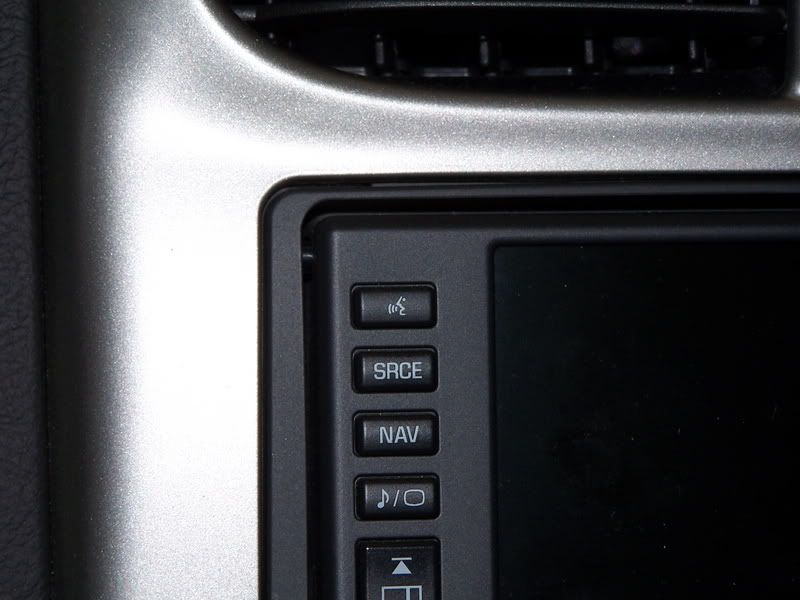
When you are using the nav and listening to xm, cd or radio, you push the "source" & "NAV" button to toggle back and forth between the nav map and these features. When you get close to a turn, the music volume decreases and the woman's voice comes on to inform you what your next move is.
The HUD shows station/track changes for the radio/xm and CD. It shows the name of the street, how far away it is and which way to turn when the nav is being used.
Overall it is pretty cool.
When you are using the nav and listening to xm, cd or radio, you push the "source" & "NAV" button to toggle back and forth between the nav map and these features. When you get close to a turn, the music volume decreases and the woman's voice comes on to inform you what your next move is.
The HUD shows station/track changes for the radio/xm and CD. It shows the name of the street, how far away it is and which way to turn when the nav is being used.
Overall it is pretty cool.

Safety Car
Joined: Dec 2006
Posts: 4,642
Likes: 9
From: Dalllas/Ft Worth Area TX
I'll answer a couple. Explaining software can take all day so I will keep it to a simple situation.
When you are using the nav and listening to xm, cd or radio, you push the "source" & "NAV" button to toggle back and forth between the nav map and these features. When you get close to a turn, the music volume decreases and the woman's voice comes on to inform you what your next move is.
The HUD shows station/track changes for the radio/xm and CD. It shows the name of the street, how far away it is and which way to turn when the nav is being used.
Overall it is pretty cool.
When you are using the nav and listening to xm, cd or radio, you push the "source" & "NAV" button to toggle back and forth between the nav map and these features. When you get close to a turn, the music volume decreases and the woman's voice comes on to inform you what your next move is.
The HUD shows station/track changes for the radio/xm and CD. It shows the name of the street, how far away it is and which way to turn when the nav is being used.
Overall it is pretty cool.


Le Mans Master

Joined: May 2005
Posts: 5,865
Likes: 2
From: Hope, Arkansas - '07 LMB Coupe
Cruise-In VIII Veteran
As you approach a turn in a route, the NAV screen will go to a split screen with the map on the left side and a detailed schematic of the turn on the right side. It shows the street you will be turning on and it's name, the direction you will be turning, and has a bar graph (like a progress meter) that counts down as you approach the turn. The map screen also shows the route you will be taking as a red line. The HUD, when in street mode, will display the name of the street to turn on, an arrow for the direction of the turn and the bar graph to count down the distance to the turn.
Wait to see for yourself what the screen looks like yourself before you form an opinion on it. I think it shows you everything you need in a useful format.
Wait to see for yourself what the screen looks like yourself before you form an opinion on it. I think it shows you everything you need in a useful format.

Drifting

Joined: Jan 2007
Posts: 1,711
Likes: 193
From: By The Hook NJ
Best part about the Nav is the integration into the HUD.
Don't worry about the lack of steering wheel voice button. At least for me, when I have my hand on the shift, the Nav buttons are only a fingertip away.
I have a Pioneer Z2 in my F150. It's a great system but it too has it's faults.
If I got to order my vette, I would've gone no Nav and put an aftermarket in.
Don't worry about the lack of steering wheel voice button. At least for me, when I have my hand on the shift, the Nav buttons are only a fingertip away.
I have a Pioneer Z2 in my F150. It's a great system but it too has it's faults.
If I got to order my vette, I would've gone no Nav and put an aftermarket in.
Safety Car


Joined: Aug 2005
Posts: 4,279
Likes: 82
From: North Strand, NMB, SC; Retired x 2 (US Army: 70-90 AD) (US Army: 91-16 DAC); yea, I'm old.
I'll answer a couple. Explaining software can take all day so I will keep it to a simple situation.
When you are using the nav and listening to xm, cd or radio, you push the "source" & "NAV" button to toggle back and forth between the nav map and these features. When you get close to a turn, the music volume decreases and the woman's voice comes on to inform you what your next move is.
The HUD shows station/track changes for the radio/xm and CD. It shows the name of the street, how far away it is and which way to turn when the nav is being used.
Overall it is pretty cool.
When you are using the nav and listening to xm, cd or radio, you push the "source" & "NAV" button to toggle back and forth between the nav map and these features. When you get close to a turn, the music volume decreases and the woman's voice comes on to inform you what your next move is.
The HUD shows station/track changes for the radio/xm and CD. It shows the name of the street, how far away it is and which way to turn when the nav is being used.
Overall it is pretty cool.
1.
When you get close to a turn, the music volume decreases and the woman's voice comes on to inform you what your next move is.
2.
The HUD shows station/track changes for the radio/xm and CD. It shows the name of the street, how far away it is and which way to turn when the nav is being used.
Corvette Stories
The Best of Corvette for Corvette Enthusiasts

Top 10 Most Expensive Corvettes Ever Sold on Bring A Trailer
Brett Foote
10 Things Every Corvette Owner Needs (2026 Edition)
Michael S. Palmer
8 Most "Only Corvette Owners Understand" Quirks and Problems
Pouria Savadkouei
10 Reasons the C6 Z06 is Still A Performance Benchmark After 20 Years
Joe Kucinski
How Much Horsepower Every Corvette Engine "LOST" in 1972
Joe Kucinski
Top 10 DOs and DON'Ts for Protecting Your Convertible Top!
Michael S. Palmer
Top 10 Most Explosive Corvettes Ever Made: Power-to-Weight Ratio Ranked!
Joe Kucinski
150 hp to 1,250 hp: Every Corvette Generation Compared by the Specs That Matter
Joe Kucinski
8 Coolest Corvette Pace Cars (and Replicas) of All Time
Verdad Gallardo
Team Owner

Joined: Aug 2002
Posts: 35,617
Likes: 167
Tech Contributor
Cruise-In 11 Veteran
NCM Ambassador
St. Jude Donor '05-'06-'07-'10
Most of your questions have been acurately answered. I just wanted to add that the navigation unit in the Corvette is not nearly as bad as the reputation it has garnered here on the forum.
Many if not most of the problems that people report about bad directions and erroneous recalculations are simply user error. With that said, the OEM unit is not as easy to use as most portables nor as intuitive as most other OEM units. It can be learned and used very effectively for what it was intended to do. You need to invest the time to learn to use it properly so that you are not surprised by things it does. If you tell it you want to take the fastest route it may go out of its way to take the highway...including taking you out of your way to get on the highway.
I much prefer the touchscreen interface to that of a conventional radio. I much prefer the HUD integration to any alternative GPS.
Have a look at the manual from the link provided above and judge for yourself. I think you will find that it is quite beneficial.
Many if not most of the problems that people report about bad directions and erroneous recalculations are simply user error. With that said, the OEM unit is not as easy to use as most portables nor as intuitive as most other OEM units. It can be learned and used very effectively for what it was intended to do. You need to invest the time to learn to use it properly so that you are not surprised by things it does. If you tell it you want to take the fastest route it may go out of its way to take the highway...including taking you out of your way to get on the highway.
I much prefer the touchscreen interface to that of a conventional radio. I much prefer the HUD integration to any alternative GPS.
Have a look at the manual from the link provided above and judge for yourself. I think you will find that it is quite beneficial.

Le Mans Master
Joined: Feb 2007
Posts: 8,514
Likes: 235
From: Currently somewhere in IL,IN,KY,TN,MO,AR,MS,AL, or FL
DON'T CHANGE YOUR ORDER!!! Lots of people bash the nav (many who have never seen it hate it) but I think it is very good. Not perfect but very good. This is from someone who has used portable Garmins for over 10 years.
The voice commands work at least 95% of the time for me and when it doesn't a second try almost always works. Yes, it would be nice if the button was on the steering wheel but the top left of the nav is almost as good since you can easily find it without looking. You just have to speak clearly and say words it understands rather than trying to make up a new language that makes sense to you. For example, "Get rid of the icons" doesn't work but "POI off" does.
Yes, there is a street name on the HUD for turns as well as a bar graph countdown of distance to the turn and the direction to turn. It even knows the difference between turn right and bear right.
It DOES recalculate the route if you miss a turn (or just want to go another way). Yes, it might tell you to make a U-turn if that is the best way but since I keep mine set for quickest it almost never does that. Set it for Normal and it will want to put you on Interstates whenever possible. Shortest will run you down alleys if it is shorter. It is only doing what you asked it to do. And it is constantly calculating the route you asked for to the destination you specified. (Some people don't understand how to set destinations and waypoints and the difference between them.)
Finally you CAN set destinations while moving. It is just a limited set. You have 6 preset destinations and you can pick any of those while moving. You can also select from emergency destinations (closest hospital, police, etc.) while moving. You can NOT decide while you're moving that you want to enter a phone number of a business and go there. You have to pull off the road (it seems to be about 5mph where it comes on) to start a destination from scratch.
Finally there are several map displays. Full screen maps, splits screen with map and turn list, split with full map and detail map, split with map and BIG turn arrow, 3D, etc. None of this is really covered in the manual. You just have to push buttons and see what happens. The one thing GM could do to improve the nav tremendously is rewrite the manual and include all the features (and remove the errors).
The voice commands work at least 95% of the time for me and when it doesn't a second try almost always works. Yes, it would be nice if the button was on the steering wheel but the top left of the nav is almost as good since you can easily find it without looking. You just have to speak clearly and say words it understands rather than trying to make up a new language that makes sense to you. For example, "Get rid of the icons" doesn't work but "POI off" does.
Yes, there is a street name on the HUD for turns as well as a bar graph countdown of distance to the turn and the direction to turn. It even knows the difference between turn right and bear right.
It DOES recalculate the route if you miss a turn (or just want to go another way). Yes, it might tell you to make a U-turn if that is the best way but since I keep mine set for quickest it almost never does that. Set it for Normal and it will want to put you on Interstates whenever possible. Shortest will run you down alleys if it is shorter. It is only doing what you asked it to do. And it is constantly calculating the route you asked for to the destination you specified. (Some people don't understand how to set destinations and waypoints and the difference between them.)
Finally you CAN set destinations while moving. It is just a limited set. You have 6 preset destinations and you can pick any of those while moving. You can also select from emergency destinations (closest hospital, police, etc.) while moving. You can NOT decide while you're moving that you want to enter a phone number of a business and go there. You have to pull off the road (it seems to be about 5mph where it comes on) to start a destination from scratch.
Finally there are several map displays. Full screen maps, splits screen with map and turn list, split with full map and detail map, split with map and BIG turn arrow, 3D, etc. None of this is really covered in the manual. You just have to push buttons and see what happens. The one thing GM could do to improve the nav tremendously is rewrite the manual and include all the features (and remove the errors).

Advanced
Joined: Sep 2004
Posts: 84
Likes: 0
From: Hilton Head Island SC
Navigation is worthless. I have lived on the same street for 7 years and when I get near my own street the nav unit says it will not continue to show guidance. When I pull into my driveway, it says I have arrived. The worst system have ever seen. My Garmin Nuvi is so intuitive and accurate that you do not need an instruction booklet. It also calls out the name of the street where you are to turn, the GM does not. On my next trip I will bring the Garmin with me and not use the GM unit as it does not recalculate the directions. Waste of money and I could have had a 6 disc changer instead of this expensive garbage. One learns from experiences and I have sure learned my lesson. GM is always behind the curve, however, so are the other automobile manufacturers when it comes to really hi tech. One day GM will learn that cheapest prices don't necessarily lead to best quality. A lesson they still haven't learned. Corporate profits seem more important, so if a manufacturer can sell them junk at cheap prices, there are there like a flash. There isn't even an I pod plug available if you order the nav. I should have known better. Sounds like I am mad about the nav. unit and you would be absolutely correct. It belongs in the garbage, not on my console. Now I feel better after shooting off my mouth, gets rid of the frustration and anger. Also good for the blood pressure.
Leon Resnick
Leon Resnick

Moderator

Joined: Dec 2002
Posts: 40,898
Likes: 4,350
From: Lakewood Ranch, FL
But be sure to preview your route because this thing (NAV) is stuborn and it will not recalulate, once on going home from the Texas Hill Country it wanted me to do a "U" turn when I was less than 20 miles from home to do it, "its way". It tried for 75 miles, yes 75 miles, you think a woman is stubborn, this tops it. I finally turned the volume off on voice directions and finally cancelled it after 75 miles, I wanted to see if it would straightened out. This is a "GM jewel" this navigation. NAV = Cheap.

Drifting
Joined: Jul 2007
Posts: 1,587
Likes: 90
I also have a Honda w/Navi and much prefer it. Having said that, the vette version takes a bit of adjustment to a different style, and somewhat less robust operating system, but I find it does an acceptable job. Voice commands in a vert top down, just won't work. I can't even talk to the passenger. Don't even think about 'dialing' a phone call at 65 w/top down.
Not the best, but better than nothing.
Not the best, but better than nothing.

Melting Slicks

Joined: May 2006
Posts: 2,324
Likes: 0
From: MN
But be sure to preview your route because this thing (NAV) is stuborn and it will not recalulate, once on going home from the Texas Hill Country it wanted me to do a "U" turn when I was less than 20 miles from home to do it, "its way". It tried for 75 miles, yes 75 miles, you think a woman is stubborn, this tops it. I finally turned the volume off on voice directions and finally cancelled it after 75 miles, I wanted to see if it would straightened out. This is a "GM jewel" this navigation. NAV = Cheap.
As for the nav itself, a couple of things to remember. First, it is a generation behind the newest stuff. This nav was designed in 2002-2003 to be put into the 2005 C6 in mid-2004, so it doesn't work as well as the newest stuff. That said, it still works quite well.
The voice prompt will tell you major road names, streets, etc. Mine does it all the time ("Turn left onto 4th St.," "Bear right onto I-35 South," etc.). I don't know what others' are doing, but mine says it all the time.
The voice recognition, I have to agree, is next to worthless UNLESS you are sitting still with the engine off. Why? The microphone is in the A-Pillar, driver's side. Any wind noise on the glass, etc. cancels out your voice. Same problem with OnStar and the phone - the wind/road/engine noise cancels out the microphone a lot of the time. Don't bother.
Thread Starter
Instructor
Joined: Oct 2007
Posts: 213
Likes: 0
From: Orlando FL
So if you can have the radio on w/o engaging the Nav, where does the radio information get displayed? On the Nav screen?
Reason I am asking is in my TL, when the car is first turned on, the Nav system boots up and actually takes about 25 seconds to get to the "agree" screen (so the 7-10 seconds I've heard about the C6 nav is not that bad really). However, I can hit the "audio" button and have the radio information displayed on the nav screen immediately, even if the Nav is still booting up. Difference with the TL, there is a separate LED screen that displays the radio info and clock so if you want, you don't have to use the Nav screen at all (as if it is washed out in the sunlight when the sun roof is open).
Thanks for all the responses too.
Lou S.
Team Owner
Joined: Aug 2002
Posts: 35,617
Likes: 167
Tech Contributor
Cruise-In 11 Veteran
NCM Ambassador
St. Jude Donor '05-'06-'07-'10
So if you can have the radio on w/o engaging the Nav, where does the radio information get displayed? On the Nav screen?
Reason I am asking is in my TL, when the car is first turned on, the Nav system boots up and actually takes about 25 seconds to get to the "agree" screen (so the 7-10 seconds I've heard about the C6 nav is not that bad really). However, I can hit the "audio" button and have the radio information displayed on the nav screen immediately, even if the Nav is still booting up. Difference with the TL, there is a separate LED screen that displays the radio info and clock so if you want, you don't have to use the Nav screen at all (as if it is washed out in the sunlight when the sun roof is open).
Thanks for all the responses too.
Lou S.
Reason I am asking is in my TL, when the car is first turned on, the Nav system boots up and actually takes about 25 seconds to get to the "agree" screen (so the 7-10 seconds I've heard about the C6 nav is not that bad really). However, I can hit the "audio" button and have the radio information displayed on the nav screen immediately, even if the Nav is still booting up. Difference with the TL, there is a separate LED screen that displays the radio info and clock so if you want, you don't have to use the Nav screen at all (as if it is washed out in the sunlight when the sun roof is open).
Thanks for all the responses too.
Lou S.

Last edited by talon90; Dec 14, 2007 at 11:52 AM.


Safety Car
Joined: May 2006
Posts: 3,732
Likes: 710
From: Shelton, Connecticut
St. Jude Donor '08-'09-'10-'11-'12-'13-'14-'15-'16
Go aftermarket
My wife has had the Solara NAV and now the Lincoln NAV. Both worked great. I tried the GM system and it was nowhere as intuitive as the Toyota or Linc system. I didn't bother with the GM NAV and went with the Pioneer.
From what I can garner from the forum and NAV owners I have met, I made the right decision. Yeah, the Pioneer isn't perfect, but, it is much closer in operation to the other factory systems we have had.
BTW, if you look at the trade in value of the factory NAV, it is nothing to write home about. At least you can remove the aftermarket unit.
From what I can garner from the forum and NAV owners I have met, I made the right decision. Yeah, the Pioneer isn't perfect, but, it is much closer in operation to the other factory systems we have had.
BTW, if you look at the trade in value of the factory NAV, it is nothing to write home about. At least you can remove the aftermarket unit.
Last edited by jaki30; Dec 14, 2007 at 12:14 PM.

Le Mans Master

Joined: Dec 2003
Posts: 7,457
Likes: 144
From: NC
To LouS, it will show on the NAV screen. There is a screen for the map and then a screen for the radio information. In addition, if you are in street mode on your HUD, the radio station will show up there as well.
I just bought this NAV and just sold it. I guess I am spoiled. I have a Nissan Titan for my daily driver and it has the NAV. I now know that it is a really really good NAV. Just didn't have anything to compare it to until I bought this GM NAV.
The biggest thing that was a deal breaker for me is that it doesn't have the ability to show your route in a different color even if the roads you will be on are the "incomplete map data" roads, a.k.a. side streets that are not main routes.
For example, If I go from A to B with the Nissan NAV and there are roads that are side streets not considered to be main roads that the NAV has full information on, the Nissan NAV will say "Entering the road with incomplete map data" but still hightlight these roads so you know exactly which one(s) you should be on. It may take 4 or 5+ side roads to get to your destination but the NAV will have them highlighted in green so you know which ones to take.
The GM NAV says something near the same about incomplete map data but doesn't highlight the side roads that you are going to need to take. If it is several miles of side roads with several turns, you're nearly screwed. To make the matter worse, the side roads are very faint on the screen regardless of the screen settings.
Just not very impressive. I remember saying to myself how I can't believe that I just went through all this BS to add this NAV and this is what my prize was.
I have the NUVI 650 on its way. Was a great price too and I feel a hell of a lot better about using it.
Oh ya, one other thing, the head unit for just playing music is better in the 6-disk head unit vs the NAV head unit. I am starting to think that a lot of the complaints of the factory stereo come from people who have the NAV head unit. The NAV head unit regarding playing music was just ok. The 6-disk head unit jams rather well and noticeably better.
I just bought this NAV and just sold it. I guess I am spoiled. I have a Nissan Titan for my daily driver and it has the NAV. I now know that it is a really really good NAV. Just didn't have anything to compare it to until I bought this GM NAV.
The biggest thing that was a deal breaker for me is that it doesn't have the ability to show your route in a different color even if the roads you will be on are the "incomplete map data" roads, a.k.a. side streets that are not main routes.
For example, If I go from A to B with the Nissan NAV and there are roads that are side streets not considered to be main roads that the NAV has full information on, the Nissan NAV will say "Entering the road with incomplete map data" but still hightlight these roads so you know exactly which one(s) you should be on. It may take 4 or 5+ side roads to get to your destination but the NAV will have them highlighted in green so you know which ones to take.
The GM NAV says something near the same about incomplete map data but doesn't highlight the side roads that you are going to need to take. If it is several miles of side roads with several turns, you're nearly screwed. To make the matter worse, the side roads are very faint on the screen regardless of the screen settings.
Just not very impressive. I remember saying to myself how I can't believe that I just went through all this BS to add this NAV and this is what my prize was.
I have the NUVI 650 on its way. Was a great price too and I feel a hell of a lot better about using it.
Oh ya, one other thing, the head unit for just playing music is better in the 6-disk head unit vs the NAV head unit. I am starting to think that a lot of the complaints of the factory stereo come from people who have the NAV head unit. The NAV head unit regarding playing music was just ok. The 6-disk head unit jams rather well and noticeably better.