





Mp3 cd

Le Mans Master


Joined: Feb 2007
Posts: 8,514
Likes: 235
From: Currently somewhere in IL,IN,KY,TN,MO,AR,MS,AL, or FL

Nero create MP3 disc (not data)
25 + ".mp3" file names (A.F.5)
29 character folder names.
No VBR.
ID3 version 1.x tags (ID3TagIt)
If there are any issues left after using these 5 pointers, describe the problem.
25 + ".mp3" file names (A.F.5)
29 character folder names.
No VBR.
ID3 version 1.x tags (ID3TagIt)
If there are any issues left after using these 5 pointers, describe the problem.
Le Mans Master
Joined: Feb 2007
Posts: 8,514
Likes: 235
From: Currently somewhere in IL,IN,KY,TN,MO,AR,MS,AL, or FL

Drifting


Joined: Sep 2008
Posts: 1,268
Likes: 21
From: Durham NC
If you're running windows, you can do it the same way you would burn any file to a cd, whether it be a word file, text file, etc.
Open the drive that contains your blank cd in "my computer". Drag and drop all of the mp3 files into that window. Select file-"write these files to cd". Then select "data cd" (not "audio cd"), next, next, etc.
Open the drive that contains your blank cd in "my computer". Drag and drop all of the mp3 files into that window. Select file-"write these files to cd". Then select "data cd" (not "audio cd"), next, next, etc.
Le Mans Master
Joined: Feb 2007
Posts: 8,514
Likes: 235
From: Currently somewhere in IL,IN,KY,TN,MO,AR,MS,AL, or FL
Once you have it, to do a batch conversion:
I use 2 batch files the first I will call lamebat.bat and consists of 3 lines as follows:
-----
rem This batch file will convert 1 track in directory c:\erase\mp3s\VBR to 192 CBR in directory c:\erase\mp3s\test
rem the 9 parameters allow up to 8 spaces in the file names
"c:\program files\eac\lame" --mp1input -b192 -h -m a "c:\erase\mp3s\VBR\%1 %2 %3 %4 %5 %6 %7 %8 %9" "c:\erase\mp3s\test\%1 %2 %3 %4 %5 %6 %7 %8 %9"
-----
Make sure when you create this batch file that you use an editor which doesn't throw in extra line feeds. I added a blank line between each of the 3 lines. I think you can see where you would set the final bit rate.
The second batch file is the one that points to all the individual tracks and is the one you run directly. A sample is as follows:
-----
call lamebat 75_01 Love Will Keep Us Together.mp3
call lamebat 75_02 Rhinestone Cowboy.mp3
call lamebat 75_03 Philadelphia Freedom.mp3
call lamebat 75_04 Before The Next Teardrop Falls.mp3
-----
Again I inserted an unneeded blank line between lines to make it easier to see what each of the 4 line were. I create this file by first piping a directory to a file. Go to the source directory and at a command line type "dir >runthis.bat" without the quotes. This will generate a file named runthis.bat with a list of all files. Dir /s >runthis.bat would list all files in the "root" directory and all subdirectories. I then use a simple text editor to massage each line as needed and remove the extra lines of the directories. Just make sure you don't have word wrap turned on in the editor or it will screw up longer lines.
This probably sounds more complicated than it really is once you do it a couple of times. I can set up a disc with 5 subdirectories for conversion in less than 5 minutes. This then allows me to go do other things while each conversion is being done rather than sitting there for hours typing another name as each finishes.

Drifting

Joined: Dec 2008
Posts: 1,767
Likes: 2
From: Melbourne, Arkansas
Cruise-In X Veteran
I'm trying it now but can't you just use Windows Media Player? I rip'd my CD's as mp3 files using best quality, then Burned them using Burn speed "Fastest", Checked Apply volume leveling across CD's, Add a list of all burned files to the disk in this format "M3U", checked use media information to arrange files in folders on the disk and selected convert to 192Kbps - Best Quality.
I'll let you know if it works.....
Mark
I'll let you know if it works.....
Mark
Corvette Stories
The Best of Corvette for Corvette Enthusiasts

How Much Horsepower Every Corvette Engine "LOST" in 1972
Joe Kucinski
Top 10 DOs and DON'Ts for Protecting Your Convertible Top!
Michael S. Palmer
Top 10 Most Explosive Corvettes Ever Made: Power-to-Weight Ratio Ranked!
Joe Kucinski
150 hp to 1,250 hp: Every Corvette Generation Compared by the Specs That Matter
Joe Kucinski
8 Coolest Corvette Pace Cars (and Replicas) of All Time
Verdad Gallardo
Top 10 Corvette Engines RANKED by Peak Torque (70+ Years of Muscle!)
Joe Kucinski
Corvette ZR1X Will Be Pacing the Indy 500, And Could Probably Race, Too!
Verdad Gallardo
Top 10 Corvettes Coming to Mecum Indy 2026!
Brett Foote
Top 10 C9 Corvette MUST-HAVES to Fix These C8 Generation Flaws!
Michael S. Palmer
Le Mans Master
Joined: Feb 2007
Posts: 8,514
Likes: 235
From: Currently somewhere in IL,IN,KY,TN,MO,AR,MS,AL, or FL
If you're running windows, you can do it the same way you would burn any file to a cd, whether it be a word file, text file, etc.
Open the drive that contains your blank cd in "my computer". Drag and drop all of the mp3 files into that window. Select file-"write these files to cd". Then select "data cd" (not "audio cd"), next, next, etc.
Open the drive that contains your blank cd in "my computer". Drag and drop all of the mp3 files into that window. Select file-"write these files to cd". Then select "data cd" (not "audio cd"), next, next, etc.
Le Mans Master
Joined: Feb 2007
Posts: 8,514
Likes: 235
From: Currently somewhere in IL,IN,KY,TN,MO,AR,MS,AL, or FL
I'm trying it now but can't you just use Windows Media Player? I rip'd my CD's as mp3 files using best quality, then Burned them using Burn speed "Fastest", Checked Apply volume leveling across CD's, Add a list of all burned files to the disk in this format "M3U", checked use media information to arrange files in folders on the disk and selected convert to 192Kbps - Best Quality.
I'll let you know if it works.....
Mark
I'll let you know if it works.....
Mark

Drifting
Joined: Dec 2008
Posts: 1,767
Likes: 2
From: Melbourne, Arkansas
Cruise-In X Veteran
I've never heard of anyone who got that to work. Again, Windows plays discs that are created by Windows and Media Player says it will create MP3 discs because it creates data discs that can be read by Windows but the don't work in the car. Let me know if it works because I am VERY interested in finding out why it could work for someone.

Mark

Burning Brakes

Joined: Jun 2008
Posts: 1,096
Likes: 1
From: Chesapeake Va
If you have a PC, set Windowa Media Player to rip MP3, setting your sample rate, and you're done. Rip yoru music cd's, then drag and drop to the right menu. Burn. It works great for me. Set it up correctly in the preferences under file menu (iirc). MP3 cd's are data, not audio. If you select audio it will convert the ripped mp3's into wav or wma files.
John
John
Drifting
Joined: Sep 2008
Posts: 1,268
Likes: 21
From: Durham NC
Have you ever tried that? It sure doesn't work on most of our systems. You must create an MP3 disc and not a data disc for the nav to be able to read it as a valid disc. And then the disc must be finalized (which software that creates MP3 discs rather than data discs typically does automatically). Yes, the discs you create with Windows will read just fine in Windows but the car will say "No Valid Disc Loaded".
Drifting
Joined: Dec 2008
Posts: 1,767
Likes: 2
From: Melbourne, Arkansas
Cruise-In X Veteran
If you have a PC, set Windowa Media Player to rip MP3, setting your sample rate, and you're done. Rip yoru music cd's, then drag and drop to the right menu. Burn. It works great for me. Set it up correctly in the preferences under file menu (iirc). MP3 cd's are data, not audio. If you select audio it will convert the ripped mp3's into wav or wma files.
John
John
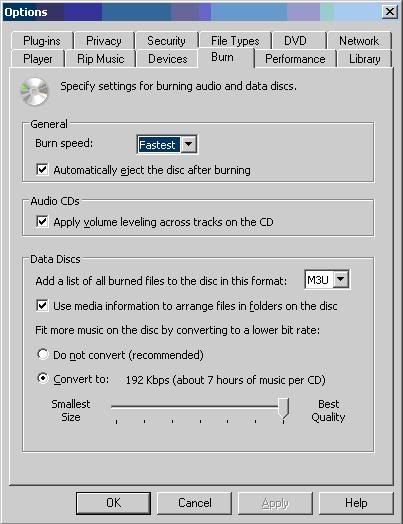
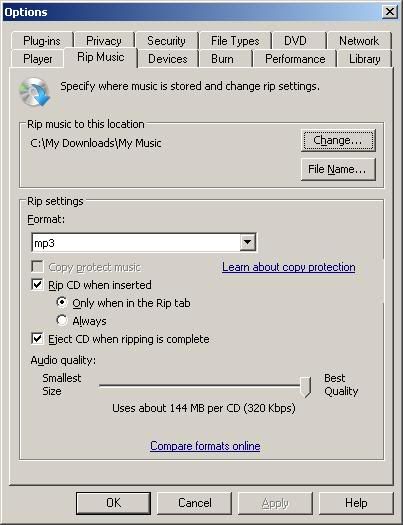
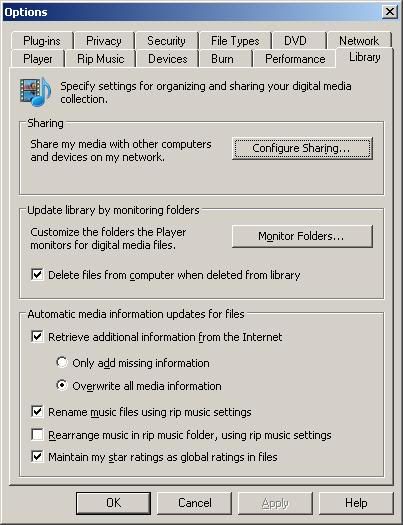
If it does not have the "Classic" Windows Tool Bars across the top you can hit "Ctrl M" and it will bring them up. Then select "Tools" then "Options" to get to the above options tabs....
Mark
Safety Car


Joined: Mar 2009
Posts: 4,101
Likes: 719
From: Northeast MA & Mad Beach FL
If you have a PC, set Windowa Media Player to rip MP3, setting your sample rate, and you're done. Rip yoru music cd's, then drag and drop to the right menu. Burn. It works great for me. Set it up correctly in the preferences under file menu (iirc). MP3 cd's are data, not audio. If you select audio it will convert the ripped mp3's into wav or wma files.
John
John
message said not correct disc format, or something to that effect

Most importantly:
keep in mind, some of these methods work, in a 6 CD player without NAV or the 6 CD player added to the car that has NAV..
and some other vehicles with NAV that have the Factory 6 CD player ( Escalade etc )...
but..
They do not work in the VETTE with NAV setup and single CD player !
Listen to ForMorganAl,.. he's been able to get them to work in the single CD player with NAV in the VETTE.
he knows what he is talking about

Here's another thread that explains a LOT about why and why not the discs will and will not work and what to do to make them work correctly.
http://forums.corvetteforum.com/c6-c...-with-nav.html
Drifting
Joined: Dec 2008
Posts: 1,767
Likes: 2
From: Melbourne, Arkansas
Cruise-In X Veteran
Well just tried it in my 08 Impala. It has the GM single disk cd player with am/fm/xm and aux input. It worked Great!! It read the folders as the different Albums and displayed the song titles! Will try it tonight in the Vette when I get home as it has the Nav System in it. I would think that if it works in my Impala's GM sound system that it should work in the other.......but who knows......
Mark
Mark
Mark


Le Mans Master
Joined: Feb 2007
Posts: 8,514
Likes: 235
From: Currently somewhere in IL,IN,KY,TN,MO,AR,MS,AL, or FL
Well It didn't work in the Vette..... Not having any luck getting any MP3 data files to work. Guess I will have to break down and buy some software...... Just hope that when I finally get it to work in the Vette it will still work in my Impala..... Hate to have to make 2 different CD's....
Mark
Mark
In my experience the Corvette nav is the pickiest to get working. Once you learn the tricks they are easy to create and work perfectly but the learning curve to get the first one burned correctly can be steep. It is a very similar situation to using the nav for navigation. Some people hate it because they have never taken to time to figure out how it works. Others love it because they don't have any problems at all.
Before you buy a program, ITunes will work but I found it very difficult to get the desired folders and play order. It can be done but it is hard. I am burning a disc with Media Monkey at this moment and it was easier than ITunes to organize. I'll be back in a little while and let you know if it works in the nav.
EDIT! IT WORKS! Media Monkey created a disc that worked. I still used ID3TagIt and A.F.5 to massage the files first and you need to create your own directory structure but it worked! The magic incantation to get the right directory structure was, after starting to burn, the "disc format" should be "<folder:2>\<filename:25>" were "2" is the number of parent directories to ignore before creating directories on the CD. I used 2 because I had C:\erase\test\1, C:\erase\test\2, etc. and I wanted just directory 1, 2, etc. on the CD. I burned 84 songs (about half the disc) and, so far, I haven't found an error.
Media Monkey
P.S. I'm not saying Media Monkey is the best. I still prefer Nero. Media Monkey, like ITunes is over kill and too complex just to burn discs but it does work and it is a free download. You can purchase a Gold version that burns discs faster (among other things).
Last edited by FortMorganAl; May 22, 2009 at 08:33 AM. Reason: IT WORKS!

Advanced

Joined: Jan 2007
Posts: 71
Likes: 1
I drive rentals often and take MP3s that I have made for the Corvette and none have failed as far as I can tell. Some of the requirements I talk about here are obscure enough that some people might not notice (vbr leaving an extra 2 seconds of silence or cutting off 1/2 a second early, one long named song out of 100 missing, etc.) I would expect an MP3 that works in the Corvette nav unit will work almost anywhere.
In my experience the Corvette nav is the pickiest to get working. Once you learn the tricks they are easy to create and work perfectly but the learning curve to get the first one burned correctly can be steep. It is a very similar situation to using the nav for navigation. Some people hate it because they have never taken to time to figure out how it works. Others love it because they don't have any problems at all.
Before you buy a program, ITunes will work but I found it very difficult to get the desired folders and play order. It can be done but it is hard. I am burning a disc with Media Monkey at this moment and it was easier than ITunes to organize. I'll be back in a little while and let you know if it works in the nav.
EDIT! IT WORKS! Media Monkey created a disc that worked. I still used ID3TagIt and A.F.5 to massage the files first and you need to create your own directory structure but it worked! The magic incantation to get the right directory structure was, after starting to burn, the "disc format" should be "<folder:2>\<filename:25>" were "2" is the number of parent directories to ignore before creating directories on the CD. I used 2 because I had C:\erase\test\1, C:\erase\test\2, etc. and I wanted just directory 1, 2, etc. on the CD. I burned 84 songs (about half the disc) and, so far, I haven't found an error.
Media Monkey
P.S. I'm not saying Media Monkey is the best. I still prefer Nero. Media Monkey, like ITunes is over kill and too complex just to burn discs but it does work and it is a free download. You can purchase a Gold version that burns discs faster (among other things).
In my experience the Corvette nav is the pickiest to get working. Once you learn the tricks they are easy to create and work perfectly but the learning curve to get the first one burned correctly can be steep. It is a very similar situation to using the nav for navigation. Some people hate it because they have never taken to time to figure out how it works. Others love it because they don't have any problems at all.
Before you buy a program, ITunes will work but I found it very difficult to get the desired folders and play order. It can be done but it is hard. I am burning a disc with Media Monkey at this moment and it was easier than ITunes to organize. I'll be back in a little while and let you know if it works in the nav.
EDIT! IT WORKS! Media Monkey created a disc that worked. I still used ID3TagIt and A.F.5 to massage the files first and you need to create your own directory structure but it worked! The magic incantation to get the right directory structure was, after starting to burn, the "disc format" should be "<folder:2>\<filename:25>" were "2" is the number of parent directories to ignore before creating directories on the CD. I used 2 because I had C:\erase\test\1, C:\erase\test\2, etc. and I wanted just directory 1, 2, etc. on the CD. I burned 84 songs (about half the disc) and, so far, I haven't found an error.
Media Monkey
P.S. I'm not saying Media Monkey is the best. I still prefer Nero. Media Monkey, like ITunes is over kill and too complex just to burn discs but it does work and it is a free download. You can purchase a Gold version that burns discs faster (among other things).