



MP3 in Nav sys,

Drifting


Joined: Dec 2008
Posts: 1,767
Likes: 2
From: Melbourne, Arkansas
Cruise-In X Veteran

See the programs in previous link for easy trimming and tagging. Try Media Monkey creating a disc readable by MP3 players to solve the No Valid Disc issue but Nero should have worked if you made an MP3 disc and not a data disc.
The message “No Valid Disc Loaded” occurs when the player can’t read the directory structure. Typically this occurs with a disc that doesn’t have the correct directory structure due to the software used to create it or the software didn’t’ finalize the disc before ejecting. The definition of an MP3 disc includes finalizing it to create the correct directory structure. Unfinalized data discs don’t work in the nav although they will work in other places. Windows Media Player says it will create an MP3 disc but if you dig deep enough on the Microsoft website in the help area for WMP, it says “If your CD player can't play CDs that have not been finalized, you must use another CD burning or authoring software program to burn a finalized CD.” Guess what?
To use Media Monkey
The message “No Valid Disc Loaded” occurs when the player can’t read the directory structure. Typically this occurs with a disc that doesn’t have the correct directory structure due to the software used to create it or the software didn’t’ finalize the disc before ejecting. The definition of an MP3 disc includes finalizing it to create the correct directory structure. Unfinalized data discs don’t work in the nav although they will work in other places. Windows Media Player says it will create an MP3 disc but if you dig deep enough on the Microsoft website in the help area for WMP, it says “If your CD player can't play CDs that have not been finalized, you must use another CD burning or authoring software program to burn a finalized CD.” Guess what?
To use Media Monkey
- Create a working directory with the files and folders just as you want them on the final CD.
- Start Media Monkey and, using the tree on the left, select "All" under the working directory.
- Press "Ctl A" to select (highlight) all files. Notice at the bottom you get a total number of files, size, and running time. Make sure the total size is 700 MB or less. If you are just a little long you can hold down ctl and deselect individual files.
- Press "Shift-Ctl-D" or click the burn icon.
- Select "Burn Data CD/DVD" and click Next (I know I say don’t make a data disc. Don’t worry. This will create an MP3 disc with the correct structure because Media Monkey is a multimedia program and not a data program so the author knows what to do.)
- Click Next again. It will use the files you have selected.
- In the Disc Format field enter "<folder:2><filename:25>" This will remove 2 root folders so C:\ERASE\WORKING\Storm Front on the computer becomes Storm Front on the CD. The 25 after the file name ensures you don't have any file names longer than 25 + "mp3"
- Uncheck the 4 checkboxes because the car doesn't care about playlists or artwork.
- Scroll through the file name display to make sure they are all yellow. Red indicates there is a problem with the file names. If you are in a hurry you can deselect individual files here also by unchecking the check box next to them.
- Insert a blank unformatted disc and click next.
- Ensure the correct drive is selected. You should see a green bar next to the buttons. Click Burn.
I also tried this way of burning mp3's that someone else had posted using Media Monkey and it didn't work for me.....
"Create a play list of music you want to burn and drag the files to the play list. select the play list and hit the burn icon.
Chose Burn Data CD/DVD and hit next. If you selected the play list already, the Edit Data Content window will show a check mark next to Pre-selected tracks. Click Next.
Since the Corvette wants to see file and folder names of a certain lenth, you need to make a couple of changes to the Disk Format line. I used \Music\<Album:30>\<Filename:22> for the parameters. That sets all folders to a fixed lenth of 30 and filenames to 22.
The only other option I left checked was to Burn .m3u Play Lists. That seems to save all the id3 Tag info (artist, album,etc.) in a play list file. So even though filenames will be truncated on the Nav Display, the id3 Tag info will all show on the screen once the song is playing.
Click next to get to burn settings. I left these at the default settings. Then hit burn."
Like I said above I tried the above but still got the "No Valid Disk" screen.
 Please Help!!!!
 Mark


Le Mans Master


Joined: Feb 2007
Posts: 8,514
Likes: 235
From: Currently somewhere in IL,IN,KY,TN,MO,AR,MS,AL, or FL
So I now have C:\ERASE\WORKING\1\1A\bunch of files, C:\ERASE\WORKING\1\1B\bunch of files, and C:\ERASE\WORKING\2\bunch of files. Burn that with the Disc Format field "<folder:2><filename:25>" and you should get a valid CD with the structure 1\1A\bunch of files, 1\1B\bunch of files, and 2\bunch of files.
Since you are having trouble, you should try setting the checkbox "Verify data on disk after burning" on the last window before clicking burn. If that last test fails then the problem is on your computer or the discs you are using and not in the car.
Safety Car


Joined: Sep 2006
Posts: 4,075
Likes: 6
From: Wilmington NC
My Granddaughter (with the help of her Mom) gave me a MP3 disk with my favorite songs. I played it in my 07 Vette with Nav never giving it a thought that it might not work. It worked pefectly.

Team Owner

Joined: Aug 2007
Posts: 136,140
Likes: 2,433
From: I live my life by 2 rules. 1) Never share everything you know. 2)
St. Jude Donor '11-'12-'13, '16-'17-'18
I too fought the MP3 nightmare with my '07 Nav. Tried pretty much everything mentioned in this thread but still never got 100% flawless operation (As a Sys Admin, I ain't exactly computer illiterate).
Solved the problem completely by investing $250 in an iPod Nano and Coastaletech's iPod LockPick.
http://www.coastaletech.com/CORVETTEIPOD.htm
(CD's make excellent targets at the range )
)
Solved the problem completely by investing $250 in an iPod Nano and Coastaletech's iPod LockPick.
http://www.coastaletech.com/CORVETTEIPOD.htm
(CD's make excellent targets at the range
)

Tech Contributor
Joined: Dec 2006
Posts: 10,962
Likes: 29
From: Van Buren Arkansas
Wounded Warrior Escort '11
I use Nero, Mode 1, ISO9600, no multisession, max 31 chars ACSII and check the do not add ";l" extension. Works fine for me... I also insure there are no special characters in the file names.
Drifting
Joined: Dec 2008
Posts: 1,767
Likes: 2
From: Melbourne, Arkansas
Cruise-In X Veteran
Step 1, Create a working directory with the files and folders just as you want them on the final CD. I have a direct rory called erase where I do lots of temporary stuff that sometimes isn't as temporary as I like. That is where I start. I said to create a working directory so lets call that "WORKING". So now I have a directory path of "C:\ERASE\WORKING". In that directory I create whatever I want the final CD to look like. Since this is just an example I'll keep it simple and short. Create a directory called 1 and a second directory called 2. Under directory 1 create directories 1A and 1B. Dump mp3 files in each of the 3 lowest directories (1A, 1B, and 2).
So I now have C:\ERASE\WORKING\1\1A\bunch of files, C:\ERASE\WORKING\1\1B\bunch of files, and C:\ERASE\WORKING\2\bunch of files. Burn that with the Disc Format field "<folder:2><filename:25>" and you should get a valid CD with the structure 1\1A\bunch of files, 1\1B\bunch of files, and 2\bunch of files.
Since you are having trouble, you should try setting the checkbox "Verify data on disk after burning" on the last window before clicking burn. If that last test fails then the problem is on your computer or the discs you are using and not in the car.
So I now have C:\ERASE\WORKING\1\1A\bunch of files, C:\ERASE\WORKING\1\1B\bunch of files, and C:\ERASE\WORKING\2\bunch of files. Burn that with the Disc Format field "<folder:2><filename:25>" and you should get a valid CD with the structure 1\1A\bunch of files, 1\1B\bunch of files, and 2\bunch of files.
Since you are having trouble, you should try setting the checkbox "Verify data on disk after burning" on the last window before clicking burn. If that last test fails then the problem is on your computer or the discs you are using and not in the car.

Here are some screen shots. I thought I followed your direction completely....
This is the file structure that I created on the C: drive.
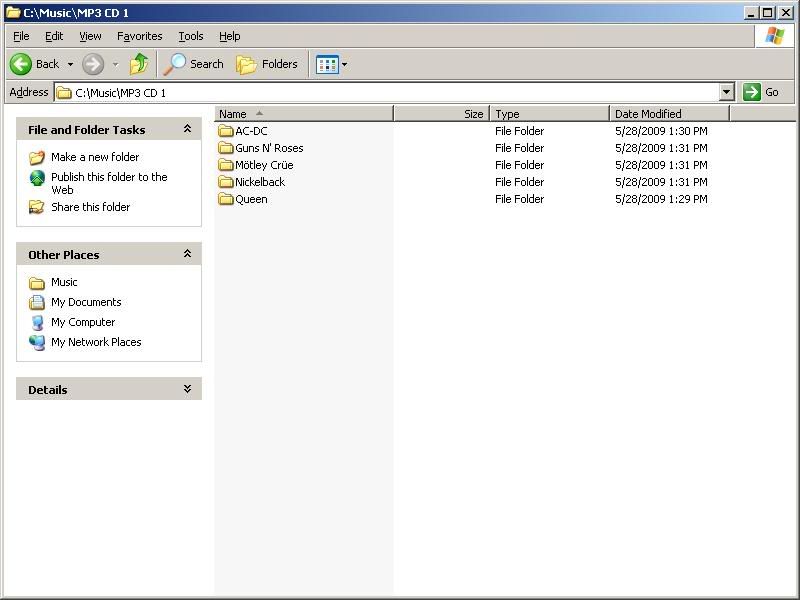
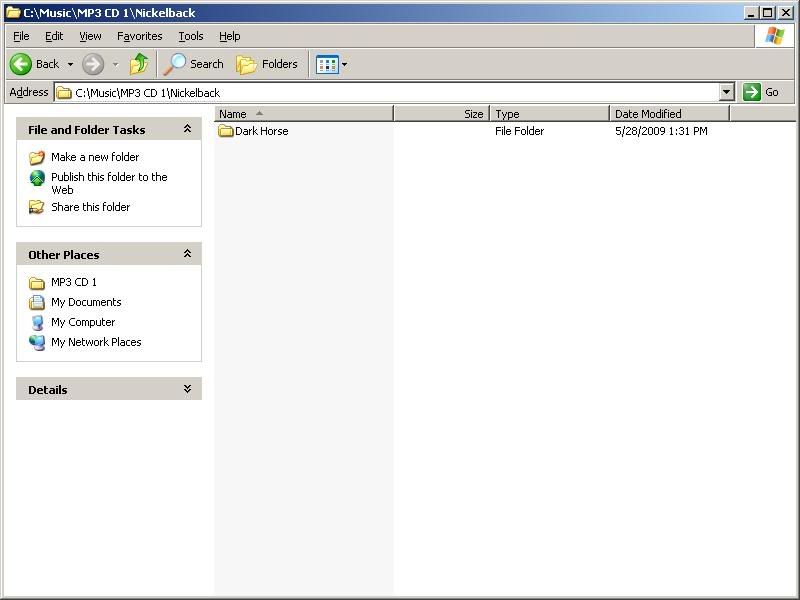
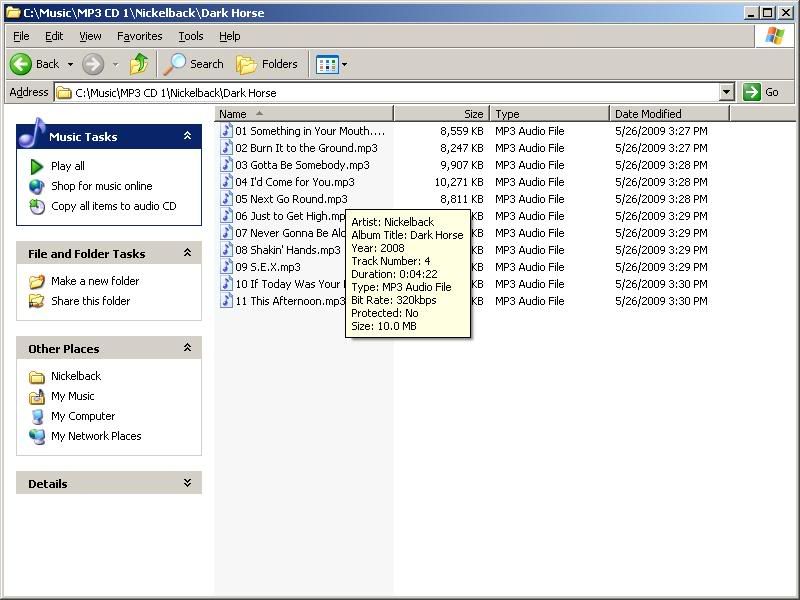
I then went into Media Monkey and went under "File" then "Add/Rescan" and then selected the folder "Music" and then did the following.....
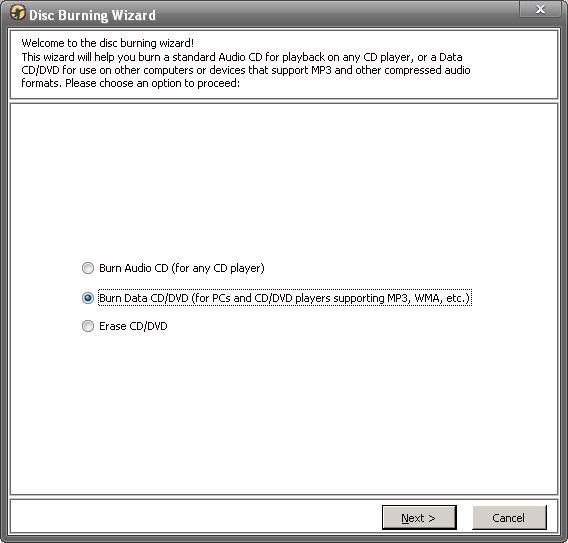
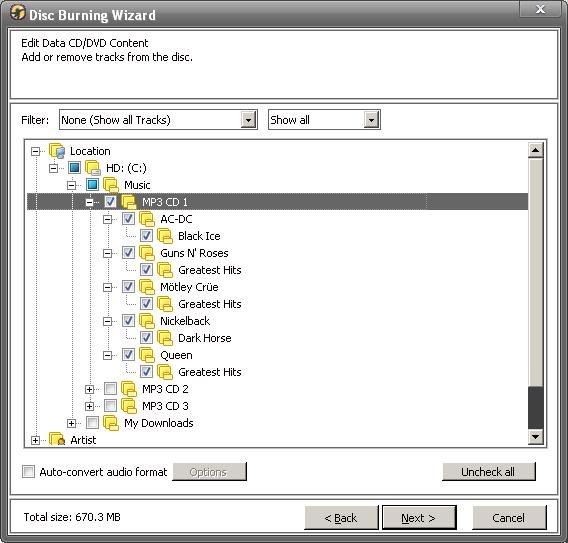
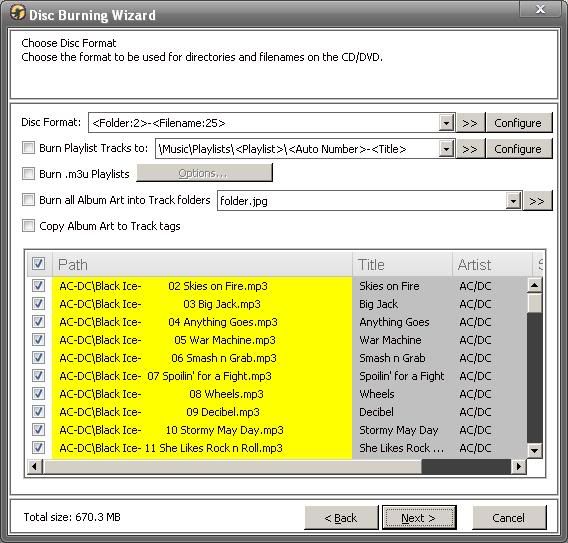
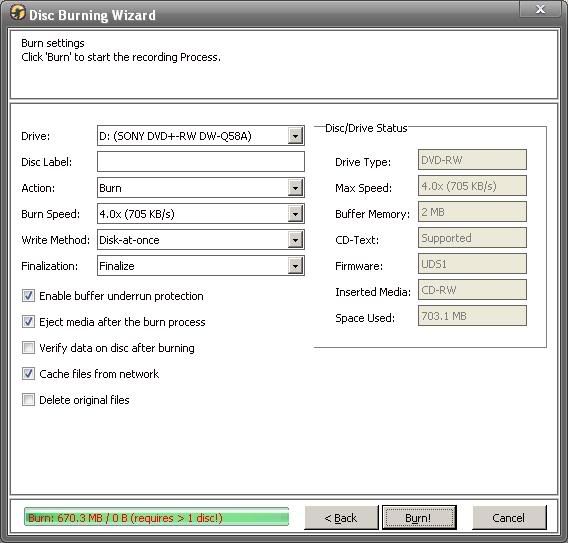
When I finished this is what was on the disk......
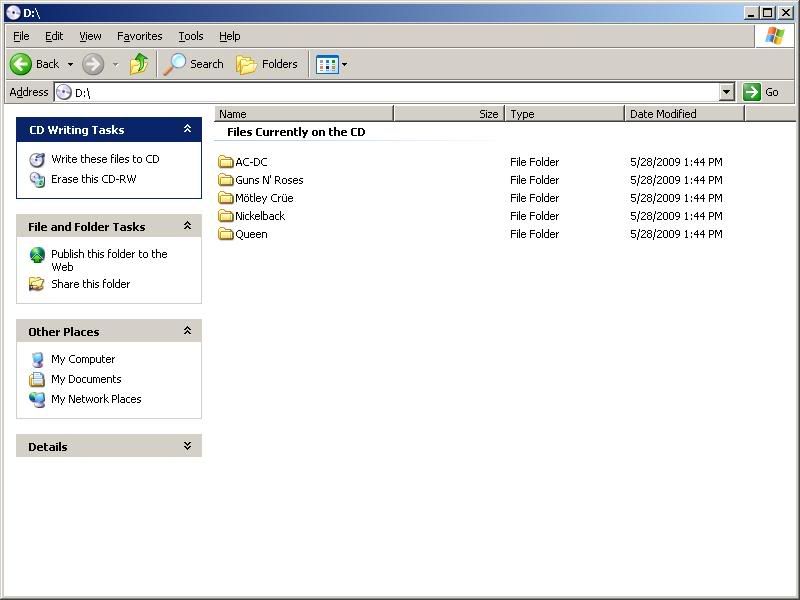
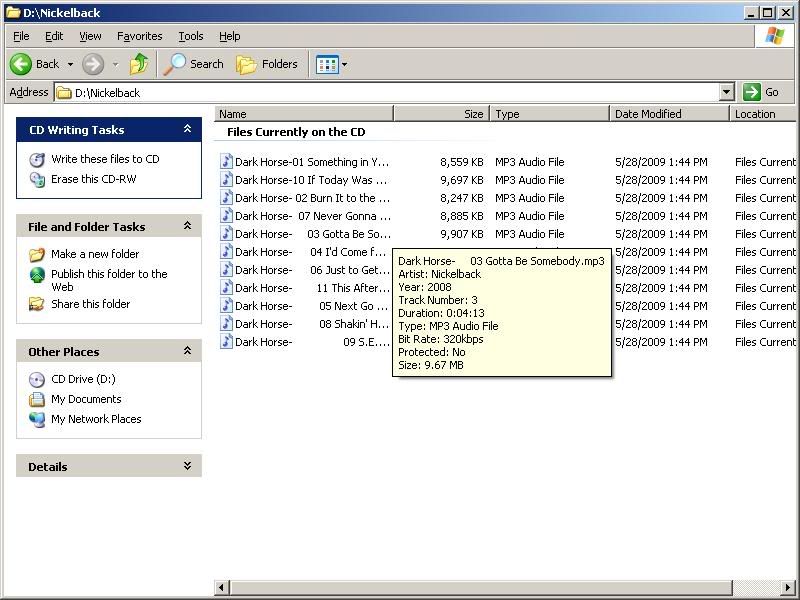
The MP3 files I converted from 256kb VBR to 320kb CBR using Media Monkey's "Convert Audio Format" under tools.
Thanks for all the help with this.......
Mark

Le Mans Master
Joined: Feb 2007
Posts: 8,514
Likes: 235
From: Currently somewhere in IL,IN,KY,TN,MO,AR,MS,AL, or FL
"<Folder:2><Filename:25>" not "<Folder:2>-<Filename:25>"
When you are at this step the yellow names should look correct and not like they are randomly tabbed to the right.
Edit: AH! You are also using a CD-RW. Some people say these work but I have never gotten one to work on the nav. The manual says they will work but try a CD-R.
When you are at this step the yellow names should look correct and not like they are randomly tabbed to the right.
Edit: AH! You are also using a CD-RW. Some people say these work but I have never gotten one to work on the nav. The manual says they will work but try a CD-R.
Last edited by FortMorganAl; May 28, 2009 at 05:08 PM.
Drifting
Joined: Dec 2008
Posts: 1,767
Likes: 2
From: Melbourne, Arkansas
Cruise-In X Veteran
"<Folder:2><Filename:25>" not "<Folder:2>-<Filename:25>"
When you are at this step the yellow names should look correct and not like they are randomly tabbed to the right.
Edit: AH! You are also using a CD-RW. Some people say these work but I have never gotten one to work on the nav. The manual says they will work but try a CD-R.
When you are at this step the yellow names should look correct and not like they are randomly tabbed to the right.
Edit: AH! You are also using a CD-RW. Some people say these work but I have never gotten one to work on the nav. The manual says they will work but try a CD-R.
Thanks again......
Mark
Edit: Why is it that on the disk you have the one folder as say AC/DC then the other folder that was the album name is now part of the file name???
Mark
Last edited by 08VRZ06; May 28, 2009 at 06:20 PM.
Corvette Stories
The Best of Corvette for Corvette Enthusiasts

Every 2027 Corvette Engine Explained
Joe Kucinski
Designer Imagines A Corvette That Looks More Like a Corvette Than the Corvette
Verdad Gallardo
10 Ugly Corvettes That We Still Kinda Love
Joe Kucinski
Top 10 Most Expensive Corvettes Ever Sold on Bring A Trailer
Brett Foote
10 Things Every Corvette Owner Needs (2026 Edition)
Michael S. Palmer
8 Most "Only Corvette Owners Understand" Quirks and Problems
Pouria Savadkouei
10 Reasons the C6 Z06 is Still A Performance Benchmark After 20 Years
Joe Kucinski
How Much Horsepower Every Corvette Engine "LOST" in 1972
Joe Kucinski
Top 10 DOs and DON'Ts for Protecting Your Convertible Top!
Michael S. Palmer
Drifting
Joined: Oct 2007
Posts: 1,565
Likes: 2
From: The Great Pacific Northwest...........I carry a gun cause a cops too heavy.
Le Mans Master
Joined: Feb 2007
Posts: 8,514
Likes: 235
From: Currently somewhere in IL,IN,KY,TN,MO,AR,MS,AL, or FL
I got rid of the minus "-" between folders and Filename but they are still randomly tabbed to the right. The only way it doesn't do it is if you get rid if the :25 and just have <Filename>. I'm trying to reburn it again but if it still does not work then I will bring in some CD-R's in the am to try....
Thanks again......
Mark
Edit: Why is it that on the disk you have the one folder as say AC/DC then the other folder that was the album name is now part of the file name???
Mark
Thanks again......
Mark
Edit: Why is it that on the disk you have the one folder as say AC/DC then the other folder that was the album name is now part of the file name???
Mark
Without the "\" in the format it thinks you are just creating a filename and not a folder and file. Whatever you ask for in the format line is what it is going to create off the root on the CD. You want "AC-DC\Black Ice\02 Skies On Fire.mp3". Take out that last "\" and replace it with some tabs and... Black Ice becomes part of the filename in a single directory AC-DC.
Again, sorry, my fault. I told you wrong. And I hope I'm wrong again but I'll bet it still doesn't work until you use a CD-R.
Le Mans Master
Joined: Feb 2007
Posts: 8,514
Likes: 235
From: Currently somewhere in IL,IN,KY,TN,MO,AR,MS,AL, or FL
Safety Car

Joined: Mar 2009
Posts: 4,101
Likes: 719
From: Northeast MA & Mad Beach FL
I have 2 questions.
1. Do the files/songs being burned to the CD have to be "Originally" mp3 files ?
2. Can wma files be converted to mp3 files so it will work.
I used Media Monkey:
converted songs to mp3 files and tried all the different ways listed in this thread to burn the CD.
The CD's work Great, in an Escalade with Nav/six CD changer
But not in the Vette = "No Valid Disc" .
On my last try, I burned 100 songs and put the CD in the Vette and it worked.
BUT,
there were only 2 songs it could read.
They just happen to be 2 "Original" mp3 songs that were downloaded off the web.
1. Do the files/songs being burned to the CD have to be "Originally" mp3 files ?
2. Can wma files be converted to mp3 files so it will work.
I used Media Monkey:
converted songs to mp3 files and tried all the different ways listed in this thread to burn the CD.
The CD's work Great, in an Escalade with Nav/six CD changer
But not in the Vette = "No Valid Disc" .
On my last try, I burned 100 songs and put the CD in the Vette and it worked.
BUT,
there were only 2 songs it could read.
They just happen to be 2 "Original" mp3 songs that were downloaded off the web.
Last edited by Dif; May 28, 2009 at 10:38 PM.
Drifting
Joined: Oct 2007
Posts: 1,565
Likes: 2
From: The Great Pacific Northwest...........I carry a gun cause a cops too heavy.

Mine are just random songs, about 180 per cd all in one folder. Each folder is a seperate iTunes playlist.
Burning Brakes

Joined: Aug 2008
Posts: 835
Likes: 0
From: Phoenix NY
 I think I have tried every idea on this subject and have a pile of CD's marked NFG.. I have spent 100 bucks on software and have downloaded some for free..
 Some work to some degree and some just don't do anything, About ready to give up..
Drifting
Joined: Dec 2008
Posts: 1,767
Likes: 2
From: Melbourne, Arkansas
Cruise-In X Veteran
Ok, DUH! My mistake. The minus you had in there should have been a "\". Sorry 'bout that.
Without the "\" in the format it thinks you are just creating a filename and not a folder and file. Whatever you ask for in the format line is what it is going to create off the root on the CD. You want "AC-DC\Black Ice\02 Skies On Fire.mp3". Take out that last "\" and replace it with some tabs and... Black Ice becomes part of the filename in a single directory AC-DC.
Again, sorry, my fault. I told you wrong. And I hope I'm wrong again but I'll bet it still doesn't work until you use a CD-R.
Without the "\" in the format it thinks you are just creating a filename and not a folder and file. Whatever you ask for in the format line is what it is going to create off the root on the CD. You want "AC-DC\Black Ice\02 Skies On Fire.mp3". Take out that last "\" and replace it with some tabs and... Black Ice becomes part of the filename in a single directory AC-DC.
Again, sorry, my fault. I told you wrong. And I hope I'm wrong again but I'll bet it still doesn't work until you use a CD-R.
Mark
Le Mans Master
Joined: Feb 2007
Posts: 8,514
Likes: 235
From: Currently somewhere in IL,IN,KY,TN,MO,AR,MS,AL, or FL
I used Media Monkey:
converted songs to mp3 files and tried all the different ways listed in this thread to burn the CD.
The CD's work Great, in an Escalade with Nav/six CD changer
But not in the Vette = "No Valid Disc" .
On my last try, I burned 100 songs and put the CD in the Vette and it worked.
BUT,
there were only 2 songs it could read.
They just happen to be 2 "Original" mp3 songs that were downloaded off the web.
converted songs to mp3 files and tried all the different ways listed in this thread to burn the CD.
The CD's work Great, in an Escalade with Nav/six CD changer
But not in the Vette = "No Valid Disc" .
On my last try, I burned 100 songs and put the CD in the Vette and it worked.
BUT,
there were only 2 songs it could read.
They just happen to be 2 "Original" mp3 songs that were downloaded off the web.
That's what I found in addition to finding it hard to control the playing order. That many songs in a single folder is going to make it slow to switch between songs as well as find a particular song. The manual recommends a maximum 18 songs per folder.
Tech Contributor
Joined: Dec 2006
Posts: 10,962
Likes: 29
From: Van Buren Arkansas
Wounded Warrior Escort '11
The playing order is alphabetical only. You can get around this by first putting before the file name a 01, 02, 03...10, 11, 12 and so on. That will force it to play them the way you wish too, but those numbers will appear, therefore less for the actual title.

Melting Slicks


Joined: Jan 2002
Posts: 2,578
Likes: 36
From: RI
St. Jude Donor '14-'15, '17, '19
I don't need the nav and never would have got it if I knew it had a problem playing MP3s. I am taking my new vette for warranty work on the nav B/C it won't play MP3s as advertised. It's a defect. If they give me the "it will work if you spend 22 hours formatting all your music to burn a disk” I don't want to hear that. It's like saying the car will only start if you say two Our Fathers Three Hail Mary's, set the radio to 630AM, push the cig lighter in, and kick the left tire, pull up the parking brake, blow the horn and the car will start. Something’s wrong!!!!!!!!!!!!!!!!!!!
Safety Car
Joined: Mar 2009
Posts: 4,101
Likes: 719
From: Northeast MA & Mad Beach FL
So what did you do different on the last try that at least gave some results? At this point the standard response for a disc that only has a few tracks is that the missing tracks have long file names. But 98 out of 100 seems hard to imagine.
That's what I found in addition to finding it hard to control the playing order. That many songs in a single folder is going to make it slow to switch between songs as well as find a particular song. The manual recommends a maximum 18 songs per folder.
That's what I found in addition to finding it hard to control the playing order. That many songs in a single folder is going to make it slow to switch between songs as well as find a particular song. The manual recommends a maximum 18 songs per folder.
I'll say first I don't feel I know enough of what I'm doing and am simply trying things
I started by trying to burn songs from the playlist and going through the proceedure with <folder:2><filename:25> etc. etc.
All went well and the files were all Yellow.
Numerous times, .. I know the info was burned on the disc but no luck having it work. At least not in the Vette.!!
Then I saw the info about making a working directory folder and made one in "My Music" .
Then, Catagorized Artists songs in separate folders inside the "My Music" directory folder.
I forget exactly how but through Media Monkey I send the songs to the folder under a Convertion tab to make them into mp3 files.
When they were finally all in the "My Music" folder they all had the mp3 ending on filename/song title etc.
Then I went back to trying to burn the songs by taking them directly from the "My Music" Directory,.. instead of the Play list.
No results.
Next I transfered the songs into the Media Monkey Library.
They became mixed into all the other songs in the Library when I did that.
So, I hand picked out each song ( they all had the mp3 tag on them ) and put them into the Play/Burn list.
Then went through the Burn proceedure to burn them to the Disc.
This is when I got it to work but as I mentioned, only the 2 "Originally" mp3 songs were read by the player and worked.
Now, here's an Update:
I checked the disc and it actually only had the 2 "Originally" mp3 songs on it but,
also had a Folder that was labeled : "My Documents" .. and it was Empty.
And, that's Exactly how it looked on the Nav screen in the Vette.
It had the 2 songs listed and the "My Documents" Folder listed.
When I touched the "My Documents" Folder to see if it would play, it said it was Empty

It seems to me, and just a guess on my part...
Some how, the My Document Folder was representative of all the songs I Converted to mp3 songs from WMA songs.
But again, it was Empty
and for some reason all songs Converted to mp3 files, did not even burn onto the disc

