When you click on links to various merchants on this site and make a purchase, this can result in this site earning a commission. Affiliate programs and affiliations include, but are not limited to, the eBay Partner Network.
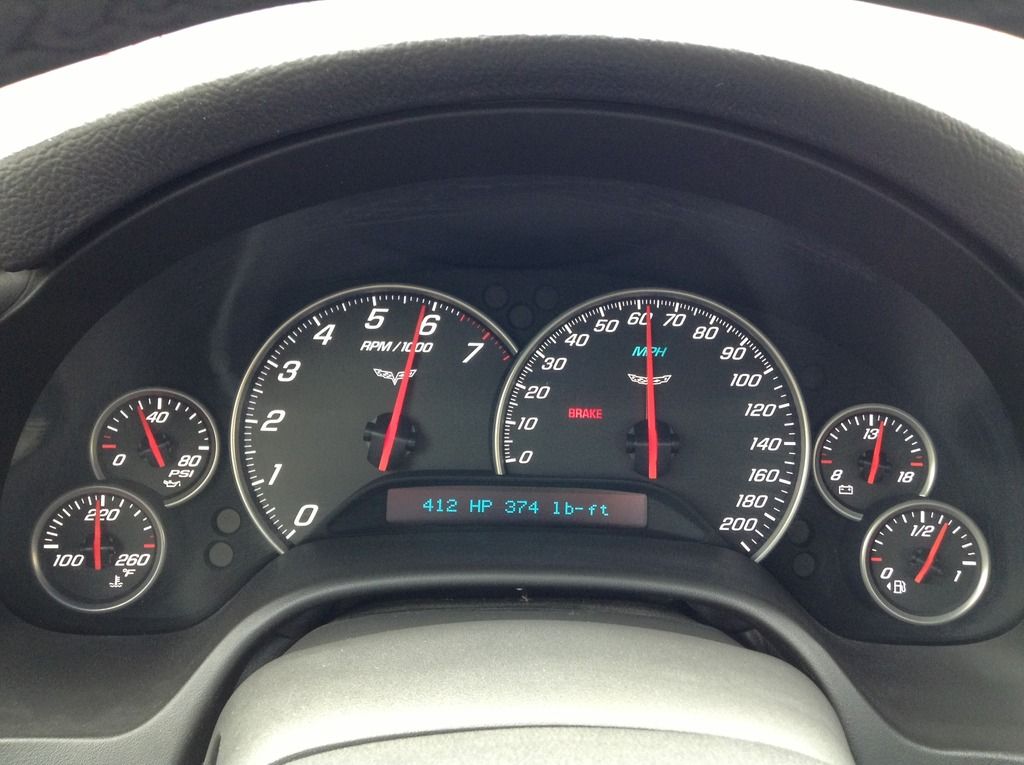
DashControl is the most advanced way of displaying vehicle data to date. There is nothing to install, no programing, no changes to your vehicle in any way. Simply plug in the DashControl device to your vehicles OBD-II port and DashControl turns your factory dashboard display into a fully customizable gauge canvas. See all of the data your vehicle has to offer on your Driver Information Center or Head-Up Display. DashControl doesn't stop there, you can also customize visual and audible alerts that you set to any condition for any vehicle value, fully customizable by you. Just in case your car doesn't have a sensor for a value you would like to watch, DashControl also has two auxiliary inputs so you can add up to two aftermarket sensors to be viewed on your DIC or HUD as well as be used for alerts. The DashControl alerts system is a very advanced tool, this is not your run of the mill type of simple alert that only watches one value. DashControl will take into account several conditions for one alert, all of those conditions fully customizable by you. DashControl also tests your performance, use DashControl to get your calculated HP & TQ, 0-60 time as well as your 60 foot, 1/8th mile, 1/4 mile, 1/2 mile, and standing 1 mile times recorded with a trap speed.
Q; I purchased a P399 pressure sensor and wiring harness that I would like to use to monitor fuel pressure - do I simply supply 13.8v power to the ducer, and wire it up (output) to the Aux input ports in the DL?
It has 0-5v output. What is the code or channel number/designation to read it?
Thanks
Originally Posted by DashLogic
... DashControl doesn't stop there, you can also customize visual and audible alerts that you set to any condition for any vehicle value, fully customizable by you. Just in case your car doesn't have a sensor for a value you would like to watch, DashControl also has two auxiliary inputs so you can add up to two aftermarket sensors to be viewed on your DIC or HUD as well as be used for alerts
Last edited by Chiselchst; Oct 14, 2016 at 04:21 PM.
Palmerperformance.com seems to be down???
from where else can I get that software to configure my wideband to work with it??
Bought an innovate lc2 and in need for a formula for it too....?
Thanks.
Palmerperformance.com seems to be down???
from where else can I get that software to configure my wideband to work with it??
Bought an innovate lc2 and in need for a formula for it too....?
Thanks.
The formula for AFR for an Innovate LC2 is
((pid(10001) * 3.008)+7.35)
PID 10001 was used to place it in the DL library, but either 01 or 02 can be used.
If you want to use Lambda instead:
((pid(10002) * 3.008) + 7.35) * (0.06803)
Here PID 10002 was used.
And, maybe just for clarity, I built the Lambda formula from scratch. There is more than one way to arrive at the same end result, so if you find a different formula out there, that could be why. I have tested used mine for several month now, both of these formulas are correct.
Also, if you use both (I do) and you don't see a perfectly aligned trace in a DL it is BC the Lambda formula is doing a proportional calculation which will have rounding averages being instantly calculated in real time.
Last edited by BlindSpot; Jun 4, 2017 at 11:36 AM.
PID 10001 was used to place it in the DL library, but either 01 or 02 can be used.
If you want to use Lambda instead:
((pid(10002) * 3.008) + 7.35) * (0.06803)
Here PID 10002 was used.
And, maybe just for clarity, I built the Lambda formula from scratch. There is more than one way to arrive at the same end result, so if you find a different formula out there, that could be why. I have tested used mine for several month now, both of these formulas are correct.
Also, if you use both (I do) and you don't see a perfectly aligned trace in a DL it is BC the Lambda formula is doing a proportional calculation which will have rounding averages being instantly calculated in real time.
thank you. Now remains the thing, where to download software to configure the dashlogic...???
Palmerperformance.com is down.
Q; I purchased a P399 pressure sensor and wiring harness that I would like to use to monitor fuel pressure - do I simply supply 13.8v power to the ducer, and wire it up (output) to the Aux input ports in the DL?
It has 0-5v output. What is the code or channel number/designation to read it?
Thanks
You're going to need a formula for the 5v output to DL. This has to come from the device manufacturer. In other words, for a given voltage between 0 and 5; what is the pressure? This might be in the form of a range like - at 1V = xpsi; at 5v = ypsi. From that you can create a proportional formula (multiplier x v) + base psi....something like that
The analog PIDS in DL - 10001; 10002. Either one. First you need to build the formula, then you need to place the PID you chose on a profile and a page and place (HUD, DIC) in DL.
Last edited by BlindSpot; Jun 4, 2017 at 12:04 PM.
thanks, did went thru.. Too fast passed it!
Give it a try tomorrow.
can´t do anything with that update whithout the program.... need that dashlogic software before i can update it or my new laptop just can´t open anything???
there is no way to install that firmware to my laptop I´m missing something or that works only from palmer?????
innovat gauge going to the vette now.
Yeah, I tried Palmer too...definitely down. The V2.02 in the post #46 is a dropbox. Although I haven't tried it, that should work, unless the SW is not really there and only a link to Palmer WS.
Remember anyone here, the Dashlogic SW documentation is pretty confusing and leaves most people stranded with getting an analog PID up and running. To simplify it, it is two steps:
1. Use the calculation tab and create an analog PID with some formula that DL needs to interpret the 5v signal. Then save it in the PID Library. Library is my word not DL.
2. THEN, you must assign that PID (either 10001 or 10002) to a profile > HUD or DIC > page > Line.
Without BOTH steps, you won't see any output from your device. If you get all this right and doesn't work, check your formula. All of the DL conventions must comply, spaces, parens, etc.
Last edited by BlindSpot; Jun 5, 2017 at 08:09 AM.
Yeah, I tried Palmer too...definitely down. The V2.02 in the post #46 is a dropbox. Although I haven't tried it, that should work, unless the SW is not really there and only a link to Palmer WS.
Remember anyone here, the Dashlogic SW documentation is pretty confusing and leaves most people stranded with getting an analog PID up and running. To simplify it, it is two steps:
1. Use the calculation tab and create an analog PID with some formula that DL needs to interpret the 5v signal. Then save it in the PID Library. Library is my word not DL.
2. THEN, you must assign that PID (either 10001 or 10002) to a profile > HUD or DIC > page > Line.
Without BOTH steps, you won't see any output from your device. If you get all this right and doesn't work, check your formula. All of the DL conventions must comply, spaces, parens, etc.
palmer is back!! and things started rolling now! updated the firmware now thad pid thing to go..........!
There's not much info on their site....I imagine IATs are an option with this device??
True, on the Dashlogic. You have to be a self-sufficient kinda person to make DL work. Even as a Mechanical Engineer, I had to say "huh?" to myself a few times. They could use a good technical writer as very few can look at their configuration guide and get it right even on the second try.
To your Q about IATs, yes, I monitor IATs in one of my screens.
Pics of the HUD never come out very well. Crystal clear when looking at it. Here are BAD pics of two of 8 screens I use to monitor my boosted app.
Pics are reversed and FTs is first
On this screen I am monitoring RPM, Lambda, Boost and PE. Since fueling is pretty critical when boost starts coming on and switches into PE, you can also set an audible alarm if your AFR rises above a critical limit. I ddon't use the alarm as I am always DLing in HPT and I am confident about my fueling.
Another screen I use to monitor fuel trims.
Last edited by BlindSpot; Jun 8, 2017 at 09:45 AM.






 Dashlogic DashControl C6