





CD Player Problems
Thread Starter
Drifting


Joined: Feb 2017
Posts: 1,752
Likes: 699
From: Covington KY
2022 C6 of the Year Finalist - Unmodified
 CD Player Problems
I have a '05 with the nav radio and 6 disc in dash CD player. When I put a disc in I get "no disc detected" on the display. I have tried a couple different disc's, same result. I have tried blowing canned air inside the player to clean the lens with no luck. Should I try a cleaning disc or some other method or is this CD player shot? Has anyone had success getting one of these units to work again?

Burning Brakes

Joined: Oct 2015
Posts: 1,139
Likes: 108
From: Arlington Texas
Sometimes a can of air doesn't cut it. Find someone with an air compressor where you can crank it up to 80 psi. That may do it. I've been getting by on another vehicle I have doing this. Be advised, if there is a CD stuck in there you may destroy the CD with that much air pressure. I know eventually though I will probably have to take it apart and clean the sensors in there to make it right.

Race Director


Joined: Dec 2013
Posts: 12,502
Likes: 3,631
Yes, and if standard disc cleaners don't work, then the problem is not dust on the top of the main lens, but dust down in the refractive mirror assembly of the laser instead.

Hence you have to pull the radio apart so you can get to the laser assembly of the disc player, pull the main cover off, and blow out/wide out the dust off the mirrors to solve the problem.
As for the c6 nav radio, the top slot is your music CD slot for the singe disc only (not a 6 disc player in the Nav radio), and the bottom slot is for the Nav DVD disco only. If you do have a 6 disc player in the car with the Nav radio as well, then will be a separate CD player back in the chubby hole in the rear hatch area.
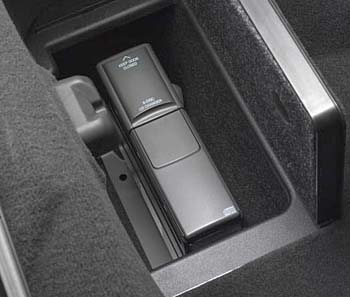
Note, both the nav CD and the 6 CD player will play standard mp3 discs. So by covering a standard CD wave files to MP3 file, you can get a lot of standard wave file type CD's onto one MP3 disc isntead.
Last edited by Dano523; Nov 25, 2017 at 01:02 AM.
Thread Starter
Drifting
Joined: Feb 2017
Posts: 1,752
Likes: 699
From: Covington KY
2022 C6 of the Year Finalist - Unmodified
Thanks, my nav works fine just the cd I can't get to work. I am not wanting to tear the unit apart but I will definitely get a cleaner disc. By "chubby" in rear hatch do you mean the small storage areas on each side all the way to the rear? Both of mine are empty.

Race Director


Joined: Sep 2009
Posts: 11,351
Likes: 2,445
From: Eastern


Corvette Stories
The Best of Corvette for Corvette Enthusiasts

Top 10 Most Expensive Corvettes Ever Sold on Bring A Trailer
Brett Foote
10 Things Every Corvette Owner Needs (2026 Edition)
Michael S. Palmer
8 Most "Only Corvette Owners Understand" Quirks and Problems
Pouria Savadkouei
10 Reasons the C6 Z06 is Still A Performance Benchmark After 20 Years
Joe Kucinski
How Much Horsepower Every Corvette Engine "LOST" in 1972
Joe Kucinski
Top 10 DOs and DON'Ts for Protecting Your Convertible Top!
Michael S. Palmer
Top 10 Most Explosive Corvettes Ever Made: Power-to-Weight Ratio Ranked!
Joe Kucinski
150 hp to 1,250 hp: Every Corvette Generation Compared by the Specs That Matter
Joe Kucinski
8 Coolest Corvette Pace Cars (and Replicas) of All Time
Verdad Gallardo
Race Director
Joined: Dec 2013
Posts: 12,502
Likes: 3,631
Great post, and if needed with just the top radio cover removed, will give you enough room to use something like a canned air to blast down under the tops lens section to possible blow the dust from the lower mirror section to resolve the problem as well.
Thread Starter
Drifting
Joined: Feb 2017
Posts: 1,752
Likes: 699
From: Covington KY
2022 C6 of the Year Finalist - Unmodified
Well I tried cleaner disc's, one I bought and one I made but neither worked although the bought one seemed to work at first. The CD player recognized it and it said cleaning complete but still won't recognize a regular CD. Then I tried blowing compressed air thru a small WD-40 type straw that I fashioned onto a blow nozzle but that didn't have any effect either. At this point I may leave well enough alone as I don't really need the CD player but it is the only feature on my '05 that does not work like the day it was made!
Burning Brakes
Joined: Oct 2015
Posts: 1,139
Likes: 108
From: Arlington Texas
Well I tried cleaner disc's, one I bought and one I made but neither worked although the bought one seemed to work at first. The CD player recognized it and it said cleaning complete but still won't recognize a regular CD. Then I tried blowing compressed air thru a small WD-40 type straw that I fashioned onto a blow nozzle but that didn't have any effect either. At this point I may leave well enough alone as I don't really need the CD player but it is the only feature on my '05 that does not work like the day it was made!
I did not try to blow compressed air throught a WD40 type straw. That cuts down the airflow too much. Just get that compressor up to 80 PSI and use a standard blow nozzle right at the opening changing air direction up/down and sideways as you do so. It may take a couple of tries. Surprised you could rig up something like that without it flying apart.
Melting Slicks

Joined: Dec 2013
Posts: 2,232
Likes: 315
From: Bridgewater New Jersey
Well I tried cleaner disc's, one I bought and one I made but neither worked although the bought one seemed to work at first. The CD player recognized it and it said cleaning complete but still won't recognize a regular CD. Then I tried blowing compressed air thru a small WD-40 type straw that I fashioned onto a blow nozzle but that didn't have any effect either. At this point I may leave well enough alone as I don't really need the CD player but it is the only feature on my '05 that does not work like the day it was made!
Ultimately, I think if the unit can be cleaned by getting inside, it should work fine afterwards.
