




LockPick iPod adapter does not fit - help! (pics)
Thread Starter
Safety Car


Joined: May 1999
Posts: 4,693
Likes: 10
From: Carefree, Arizona
2017 C7 of Year Finalist
 LockPick iPod adapter does not fit - help! (pics)
Hi,
I just removed my console to install the LockPick iPod Interface for corvettes, but I was surprised when the cables did not fit into the NAV Unix (I have no XM). I bought the car as a 1ZL option and had the factory radio installed before delivery.
- So is this really an original factory C6 Unit?
- Does anyone have the pin layout of the connectors in the back, especially the little black connector since one cable was plugged in there on pin 3? I went through the FAQ but could not find them.
Thanks a bunch


I just removed my console to install the LockPick iPod Interface for corvettes, but I was surprised when the cables did not fit into the NAV Unix (I have no XM).
I bought the car as a 1ZL option and had the factory radio installed before delivery.- So is this really an original factory C6 Unit?
- Does anyone have the pin layout of the connectors in the back, especially the little black connector since one cable was plugged in there on pin 3? I went through the FAQ but could not find them.
Thanks a bunch

Safety Car

Joined: Jan 2008
Posts: 4,711
Likes: 3
From: Middle of No where AK
thats the original unit but I think your problem is that you dont have rca preouts. I was going to get one of those ipod set ups but found out it wouldnt work with my factory unit. What does the ipod kit plug in look like?
Thread Starter
Safety Car
Joined: May 1999
Posts: 4,693
Likes: 10
From: Carefree, Arizona
2017 C7 of Year Finalist
Thanks

Thread Starter
Safety Car
Joined: May 1999
Posts: 4,693
Likes: 10
From: Carefree, Arizona
2017 C7 of Year Finalist
Thread Starter
Safety Car
Joined: May 1999
Posts: 4,693
Likes: 10
From: Carefree, Arizona
2017 C7 of Year Finalist
This is what I received from the CoastalETech Support:
I guess that little piece of information was not in the instructions - duh!  .
.
Can anyone show me where the XM tuner is supposed to be located? Thx!
Even if you do not have an XM subscription you should have the xm tuner which is in the rear quarter panel on the drivers side interior. You plug the ipod interface in there- not into the nav unit.
Please let me know if I may assist you further : )
Please let me know if I may assist you further : )
. Can anyone show me where the XM tuner is supposed to be located? Thx!
Last edited by andy82; Feb 23, 2009 at 11:50 AM.
Corvette Stories
The Best of Corvette for Corvette Enthusiasts

Top 10 Most Expensive Corvettes Ever Sold on Bring A Trailer
Brett Foote
10 Things Every Corvette Owner Needs (2026 Edition)
Michael S. Palmer
8 Most "Only Corvette Owners Understand" Quirks and Problems
Pouria Savadkouei
10 Reasons the C6 Z06 is Still A Performance Benchmark After 20 Years
Joe Kucinski
How Much Horsepower Every Corvette Engine "LOST" in 1972
Joe Kucinski
Top 10 DOs and DON'Ts for Protecting Your Convertible Top!
Michael S. Palmer
Top 10 Most Explosive Corvettes Ever Made: Power-to-Weight Ratio Ranked!
Joe Kucinski
150 hp to 1,250 hp: Every Corvette Generation Compared by the Specs That Matter
Joe Kucinski
8 Coolest Corvette Pace Cars (and Replicas) of All Time
Verdad Gallardo
Racer

Joined: Jul 2008
Posts: 260
Likes: 0
Tech Contributor


Joined: Jul 2002
Posts: 14,950
Likes: 264
From: St. Louis, MO
St. Jude Donor '08
Lockpick. What a great mod.
What a snap this is to hook up. I did it in 2 minutes.
The XM receiver on the convertible is behind the waterfall. two screws and 3 push pins and that's out. I don't have XM on my NAV system so the wires for XM were tucked under the carpet. I pulled them out (they were nicely taped with black masking tape upon themselves), plugged the factory plug for XM into the Lockpick female coupler on the adapter cable, plugged the adapter cable into the Lockpick, plugged the iPhone cable into the lockpick and ran it under the console to come out by the seat (by just tucking it under) and viola, it works perfectly! 2 screws and 3 push pins and the waterfall was back on.
I think, but am not sure, on coupes the XM reciever is behind the trim on the driver's b-pillar. Perhaps a coupe guy can chime in.
What a great product. All plug and play.
This Lockpick is awesome. I don't have play lists set up so I need to get that done to make it work perfectly for selecting from the radio (and as I have an 05 I don't have steering wheel controls). But I find it easy enough to stop the ipod portion of the iPhone, then select my song I want on the iPhone and it starts playing (with great fidelity) on the car radio.
But...what is truly awesome is that I use the Wunderradio App on my iPHone to listen to stations across the country, and the Lockpick plays them over my car stereo!! Who needs XM Radiio with internet radio. What an awesome mod.
The XM receiver on the convertible is behind the waterfall. two screws and 3 push pins and that's out. I don't have XM on my NAV system so the wires for XM were tucked under the carpet. I pulled them out (they were nicely taped with black masking tape upon themselves), plugged the factory plug for XM into the Lockpick female coupler on the adapter cable, plugged the adapter cable into the Lockpick, plugged the iPhone cable into the lockpick and ran it under the console to come out by the seat (by just tucking it under) and viola, it works perfectly! 2 screws and 3 push pins and the waterfall was back on.
I think, but am not sure, on coupes the XM reciever is behind the trim on the driver's b-pillar. Perhaps a coupe guy can chime in.
What a great product. All plug and play.
This Lockpick is awesome. I don't have play lists set up so I need to get that done to make it work perfectly for selecting from the radio (and as I have an 05 I don't have steering wheel controls). But I find it easy enough to stop the ipod portion of the iPhone, then select my song I want on the iPhone and it starts playing (with great fidelity) on the car radio.
But...what is truly awesome is that I use the Wunderradio App on my iPHone to listen to stations across the country, and the Lockpick plays them over my car stereo!! Who needs XM Radiio with internet radio. What an awesome mod.

Safety Car


Joined: Dec 2005
Posts: 4,157
Likes: 37
From: North Carolina
St. Jude Donor '07-'08-'09-'11-'12
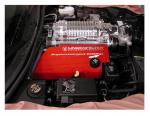
It is located above the driver's side rear tire in the coupe. The unit in this pic is a SIR-GM1 that replaced the original XM receiver in the same location.
By the way, for those wanting just to have an aux input to connect an MP3 player, a Sirius docking radio, or anything with a headphone jack, you can just splice in an 1/8" female cjack from a headphone extension cord from Radio Shack for $8.00. In the harness coming out of the XM Radio adapter, you just need to splice in
Connector side => XM Radio Harness
Right Channel => Green/White
Left Channel => Brown/White
Shield/Ground => Tan/White
I did it in my car, and I play my Ipod (no charging, just sound), or my Sirius, or the output from my Garmin, which gives me MP3s, directions and Bluetooth cell phone through the C6 stereo, as Joe says, with GREAT sound quality.
By the way, for those wanting just to have an aux input to connect an MP3 player, a Sirius docking radio, or anything with a headphone jack, you can just splice in an 1/8" female cjack from a headphone extension cord from Radio Shack for $8.00. In the harness coming out of the XM Radio adapter, you just need to splice in
Connector side => XM Radio Harness
Right Channel => Green/White
Left Channel => Brown/White
Shield/Ground => Tan/White
I did it in my car, and I play my Ipod (no charging, just sound), or my Sirius, or the output from my Garmin, which gives me MP3s, directions and Bluetooth cell phone through the C6 stereo, as Joe says, with GREAT sound quality.
Last edited by Craigster05; Feb 28, 2009 at 03:36 PM.
Instructor
Joined: Feb 2008
Posts: 163
Likes: 0
From: Lebanon Ohio
Will this work on my car???
Hey guys...can anyone tell me if this Lockpick adapter will work on the base factory stereo or do you have to have the nav package/ungraded factory stereo). My car is a 1LT package, just a single CD player/radio.
Tech Contributor
Joined: Jul 2002
Posts: 14,950
Likes: 264
From: St. Louis, MO
St. Jude Donor '08
It is located above the driver's side rear tire in the coupe. The unit in this pic is a SIR-GM1 that replaced the original XM receiver in the same location.
By the way, for those wanting just to have an aux input to connect an MP3 player, a Sirius docking radio, or anything with a headphone jack, you can just splice in an 1/8" female cjack from a headphone extension cord from Radio Shack for $8.00. In the harness coming out of the XM Radio adapter, you just need to splice in
Connector side => XM Radio Harness
Right Channel => Green/White
Left Channel => Brown/White
Shield/Ground => Tan/White
I did it in my car, and I play my Ipod (no charging, just sound), or my Sirius, or the output from my Garmin, which gives me MP3s, directions and Bluetooth cell phone through the C6 stereo, as Joe says, with GREAT sound quality.
By the way, for those wanting just to have an aux input to connect an MP3 player, a Sirius docking radio, or anything with a headphone jack, you can just splice in an 1/8" female cjack from a headphone extension cord from Radio Shack for $8.00. In the harness coming out of the XM Radio adapter, you just need to splice in
Connector side => XM Radio Harness
Right Channel => Green/White
Left Channel => Brown/White
Shield/Ground => Tan/White
I did it in my car, and I play my Ipod (no charging, just sound), or my Sirius, or the output from my Garmin, which gives me MP3s, directions and Bluetooth cell phone through the C6 stereo, as Joe says, with GREAT sound quality.
But what is a "cjack"?

Tech Contributor
Joined: Jul 2002
Posts: 14,950
Likes: 264
From: St. Louis, MO
St. Jude Donor '08
Update - they are going to send me a new unit
I got a very nice call today from Coastal Electronics based on my email. Kelly told me that since I don't have XM in needed another unit, and they are going to send it out to me tomorrow that should cure my DBS problem.
I mentioned to her that the instructions on the website and the written instructions don't specify that, and in fact the instructions tell me to plug it into the back of the radio which isn't possible, and she said she was going have her team revise the information as appropriate.
She also asked me to send back the old unit, on their nickel, and to please get back to them to let them know that it fixed my problem.
Hey, it's a new product and I'm happy to help debug it a little if they are willing to offer good service like this. I'll keep you all posted too.
I mentioned to her that the instructions on the website and the written instructions don't specify that, and in fact the instructions tell me to plug it into the back of the radio which isn't possible, and she said she was going have her team revise the information as appropriate.
She also asked me to send back the old unit, on their nickel, and to please get back to them to let them know that it fixed my problem.
Hey, it's a new product and I'm happy to help debug it a little if they are willing to offer good service like this. I'll keep you all posted too.
Tech Contributor
Joined: Jul 2002
Posts: 14,950
Likes: 264
From: St. Louis, MO
St. Jude Donor '08
Good news!
Well, the new LockPick works!! Thanks for the new unit Coastal. It's been 2 days now and no dead battery, all is fine.
It's a great product, just be sure to specify when you order if you have XM or not, apparently there different units.
By the way Craigster, I tried your trick for a cheap port for the iPod/iPhone, and it only works if you have XM...when I plug in the wires I can't choose XM on my radio unless I have the LockPick plugged in. It just says FM1 or FM2, separate buttons. Great idea though!
It's a great product, just be sure to specify when you order if you have XM or not, apparently there different units.
By the way Craigster, I tried your trick for a cheap port for the iPod/iPhone, and it only works if you have XM...when I plug in the wires I can't choose XM on my radio unless I have the LockPick plugged in. It just says FM1 or FM2, separate buttons. Great idea though!
