





NAV System

Burning Brakes


Joined: May 2013
Posts: 1,059
Likes: 117
From: Pennsylvania and New Jersey Shore

Mercedes charges an incredible amount for map updates as well (and the Nav system is sub par to start with). I've never forked the dough over since I bought my car in 2011 for any updates and it still gets me where I am going, but it's clunky as hell.
From what I have seen of the C7 Nav, it is superior.
From what I have seen of the C7 Nav, it is superior.

Racer


Joined: Nov 2005
Posts: 405
Likes: 2
From: STL
The technology to mirror the smart phones display in the Spark is encouraging. This really is what the display in the car should be anyway... a dumb terminal that does nothing more than displays the phone's content on it and allow you to control it via touch.
When the phone isn't hooked up, it can play a built in radio interface and still use the usb for a thumb drive.
And PLEASE don't make it iPhone specific. There are other devices out there.
When the phone isn't hooked up, it can play a built in radio interface and still use the usb for a thumb drive.
And PLEASE don't make it iPhone specific. There are other devices out there.
Burning Brakes
Joined: Jun 2013
Posts: 1,193
Likes: 342
From: St. Louis MO
How long do you think it will take somebody to develop an iPad mount for that fancy grab bar on the left side of the passenger seat ? That would be a perfect place an iPad for NAV, iTunes, etc. Bigger screen than the in-dash NAV, better graphics and Google Maps. The airlines are going to it for flight manuals a Jeppesem Maps, etc., why not cars ?
I think I'll lay something out on my AutoCAD system and have one of thes 3D printer vendors make something. All I need are a few measurements from my car.....oh $hit its still in cyberspace somewhere between Detroit and Bowling Green. Damn the luck !!
I think I'll lay something out on my AutoCAD system and have one of thes 3D printer vendors make something. All I need are a few measurements from my car.....oh $hit its still in cyberspace somewhere between Detroit and Bowling Green. Damn the luck !!

Team Owner


Joined: Sep 2000
Posts: 25,032
Likes: 2,720
From: Far NW 'burbs of Chicago
St. Jude Donor '13
But if you have to make an appointment and leave your car for the morning, and still pay $200+, then it will be a major step backwards.
Stay tuned for further developments...

Racer
Joined: Nov 2012
Posts: 268
Likes: 50
What makes it different?
GM should provide a comprehensive demonstration or overview of the Corvette navigation system, to promote sales and interest in the feature. Moreover, GM needs to clearly articulate what makes the Stingray version of MyLink/Navigation a special "must have" option.
Last edited by live2drive; Jul 16, 2013 at 07:25 PM.
Race Director

Joined: May 2008
Posts: 10,742
Likes: 629
From: Manheim Pennsylvania
 That system is super. I opted for the navigation system in my Leaf and I'm impressed. I'm still learning, the display seems similar to Tesla's but not quite as detailed. If the C7 navigation unit is as integrated into the car as the Nissan Leaf's system, you definately want it. The updates are part of the Nissan Wings system and is included with car's purchase for three years.

Drifting


Joined: Jun 2013
Posts: 1,764
Likes: 10
From: Cumming GA
On order: Torch Red Z51
2014 Infotainment
Here's the 2014 infotainment system for the new Impala. The C7 books aren't out yet. But it should tell you what you want to know as far as the C7 goes except for maybe the HUD. That is unless other things will be available but I don't know what they'd be.
http://www.chevrolet.com/content/dam...mpala_info.pdf
http://www.chevrolet.com/content/dam...mpala_info.pdf
Corvette Stories
The Best of Corvette for Corvette Enthusiasts

5 Best & 5 Worst Corvette Daily Drivers
Joe Kucinski
The Headlights of Every Corvette Generation Explained
Joe Kucinski
5 Best & 5 Most Overrated Corvette Track Packages of All Time!
Joe Kucinski
Every 2027 Corvette Engine Explained
Joe Kucinski
Designer Imagines A Corvette That Looks More Like a Corvette Than the Corvette
Verdad Gallardo
10 Ugly Corvettes That We Still Kinda Love
Joe Kucinski
Top 10 Most Expensive Corvettes Ever Sold on Bring A Trailer
Brett Foote
10 Things Every Corvette Owner Needs (2026 Edition)
Michael S. Palmer
8 Most "Only Corvette Owners Understand" Quirks and Problems
Pouria Savadkouei
Burning Brakes
Joined: Jan 2005
Posts: 1,055
Likes: 24
From: Cary NC
Melting Slicks


Joined: Apr 2001
Posts: 2,108
Likes: 755
From: Bridgewater NJ
My Audi uses Google Maps for its navigation system, and the maps automatically update over the Internet, without any dealer involvement. It also has the option of displaying the Google satellite images (like "hybrid" mode if you're viewing on the web), which is just amazing.
It's possible because the car has a built-in cellular data connection. You plug a SIM card in the dash and activate the service through T-Mobile. It's a little expensive, but having that cellular data connection opens up a ton of very useful features, not just the map updates. You pay a flat monthly fee for the connection, and there are no data limits or caps.
It's possible because the car has a built-in cellular data connection. You plug a SIM card in the dash and activate the service through T-Mobile. It's a little expensive, but having that cellular data connection opens up a ton of very useful features, not just the map updates. You pay a flat monthly fee for the connection, and there are no data limits or caps.
Le Mans Master

Joined: Jul 2009
Posts: 9,526
Likes: 12
From: Los Angeles California
This is an interesting article that may help you decide if you want the factory NAV. Will the C7 let you use your smartphone to integrate with the C7 display screen ?
http://www.bloomberg.com/news/2013-0...oard-maps.html
http://www.bloomberg.com/news/2013-0...oard-maps.html
At the moment, there's no technology standard that would allow you to transmit the video of what is on your phone wirelessly other than WiDi. And although you can use HDMI (MHL) output on some phones, you still wouldn't be able to control it through the touch screen for a dozen reasons.
So don't get your hopes up. The technology isn't there and there are a ton of legal issues with it too.
This is the reason there are integration apps. Apps give you some flexibility to integrate certain aspects of your phone with your infotainment system. It's limited both in terms of what can be done with existing technology and what can be done within the legal limits.
The technology to mirror the smart phones display in the Spark is encouraging. This really is what the display in the car should be anyway... a dumb terminal that does nothing more than displays the phone's content on it and allow you to control it via touch.
When the phone isn't hooked up, it can play a built in radio interface and still use the usb for a thumb drive.
And PLEASE don't make it iPhone specific. There are other devices out there.
When the phone isn't hooked up, it can play a built in radio interface and still use the usb for a thumb drive.
And PLEASE don't make it iPhone specific. There are other devices out there.
In any case, the Sonic's system doesn't mirror what is on your phone. The technological capabilities aren't really there yet.
Last edited by SCM_Crash; Jul 16, 2013 at 11:04 PM.

Team Owner

Joined: Aug 2002
Posts: 35,617
Likes: 167
Tech Contributor
Cruise-In 11 Veteran
NCM Ambassador
St. Jude Donor '05-'06-'07-'10
I have navigation in two vehicles, but rarely use it. I am thinking about going with Garmin or smartphone apps in the Stingray.
GM should provide a comprehensive demonstration or overview of the Corvette navigation system, to promote sales and interest in the feature. Moreover, GM needs to clearly articulate what makes the Stingray version of MyLink/Navigation a special "must have" option.
GM should provide a comprehensive demonstration or overview of the Corvette navigation system, to promote sales and interest in the feature. Moreover, GM needs to clearly articulate what makes the Stingray version of MyLink/Navigation a special "must have" option.
http://www.corvettemuseum.org/regist...ion/info.shtml

Thread Starter
Le Mans Master
Joined: Oct 2004
Posts: 6,813
Likes: 287
From: Toronto Ontario Canada
I'd be happy with the factory NAV if it came with built-in WiFi so when I pull into my garage, it could automatically connect to my router and check for free map updates. I just bought a refurbished top-of-the-line portable Garmin that came with free map updates for life, and it only cost $165. Garmin typically charges only an extra $50 for free-maps-for-life units, and you can update them quarterly. Now I'm getting mailings from VW offering a one-time update for the two-year-old NAV in my DD...for "only" $200. A guy over on one of the Porsche forums just had his dealer update the NAV maps in his car...and he was charged $550! Do any of these people actually live in the real world? Do they really believe that their customers will, volunarily, get raped in this way every year or two? Something's got to give...

Team Owner


Joined: Sep 2005
Posts: 29,113
Likes: 2,194
From: Big Bend Country, TX
St. Jude Donor '06-'07-'08-'09-'10-'11-'12-'13-'14-'15- '16-'17-‘18-‘19-'20-'21
NCM Lifetime Member
I am afraid that having the dealer doing the MAP update via USB is going to be pricey. Embedded NAV systems are easy money for GM and they are not about to let that go. I think NAV updates should be free and GM should allow you to download to USB and install by yourself.
Drifting
Joined: Jun 2013
Posts: 1,764
Likes: 10
From: Cumming GA
On order: Torch Red Z51
This is from the 2014 Impala manual in the posted link. To me it doesn't infer any cost for the updates. But I've been wrong before so ....
Black plate (61,1)
Chevrolet Impala Infotainment System (GMNA-Localizing-U.S./Canada-
5772222) - 2014 - CRC - 1/10/13
Infotainment System 61
To recalibrate the vehicle's position
on the map, park with the vehicle
running for two to five minutes, until
the vehicle position updates. Make
sure the vehicle is parked in a
location that is safe and has a clear
view of the sky and away from large
obstructions.
If the System Needs
Service
If the navigation system needs
service and the steps listed here
have been followed but there are
still problems, see
Problems with
Route Guidance on page 60
.
Map Data Updates
The map data in the vehicle is
the most up-to-date information
available when the vehicle was
produced. The map data is updated
periodically, provided that the map
information has changed.
United States and Canada
For questions about the operation of
the navigation system or the update
process, contact the GM Nav Disc
Center toll-free phone number,
[IMG]chrome://skype_ff_extension/skin/numbers_button_skype_logo.png[/IMG]1-877-NAV-DISC ( [IMG]chrome://skype_ff_extension/skin/numbers_button_skype_logo.png[/IMG]1-877-628-3472 )
or go to the center
’
s website,
www.gmnavdisc.com. If updates
are needed, call the GM Nav Disc
Center or order online.
To order, have the vehicle
’
s Vehicle
Identification Number (VIN)
available. This helps the center
make sure that the correct and
most up-to-date map data for the
vehicle is received. See
“
Vehicle
Identification Number (VIN)
”
in the
owner manual
Black plate (61,1)
Chevrolet Impala Infotainment System (GMNA-Localizing-U.S./Canada-
5772222) - 2014 - CRC - 1/10/13
Infotainment System 61
To recalibrate the vehicle's position
on the map, park with the vehicle
running for two to five minutes, until
the vehicle position updates. Make
sure the vehicle is parked in a
location that is safe and has a clear
view of the sky and away from large
obstructions.
If the System Needs
Service
If the navigation system needs
service and the steps listed here
have been followed but there are
still problems, see
Problems with
Route Guidance on page 60
.
Map Data Updates
The map data in the vehicle is
the most up-to-date information
available when the vehicle was
produced. The map data is updated
periodically, provided that the map
information has changed.
United States and Canada
For questions about the operation of
the navigation system or the update
process, contact the GM Nav Disc
Center toll-free phone number,
[IMG]chrome://skype_ff_extension/skin/numbers_button_skype_logo.png[/IMG]1-877-NAV-DISC ( [IMG]chrome://skype_ff_extension/skin/numbers_button_skype_logo.png[/IMG]1-877-628-3472 )
or go to the center
’
s website,
www.gmnavdisc.com. If updates
are needed, call the GM Nav Disc
Center or order online.
To order, have the vehicle
’
s Vehicle
Identification Number (VIN)
available. This helps the center
make sure that the correct and
most up-to-date map data for the
vehicle is received. See
“
Vehicle
Identification Number (VIN)
”
in the
owner manual
I am afraid that having the dealer doing the MAP update via USB is going to be pricey. Embedded NAV systems are easy money for GM and they are not about to let that go. I think NAV updates should be free and GM should allow you to download to USB and install by yourself.
Thread Starter
Le Mans Master
Joined: Oct 2004
Posts: 6,813
Likes: 287
From: Toronto Ontario Canada
I think Talon90 should have the information about cost. Maybe the first update is free.

Melting Slicks
Joined: May 2004
Posts: 2,421
Likes: 138
I used the factory nav in my RX350 far more than I realized. When I was unfamiliar with an area and had to get around a blocked route or a spot of traffic, I constantly relied on the nav map to see all the side streets to plot a different route. That alone is worth the cost.
Drifting
Joined: Jun 2013
Posts: 1,764
Likes: 10
From: Cumming GA
On order: Torch Red Z51
I'm in total agreement with you. Most C7's are going to approach or reach over $70k, so why leave off one of the most important devices for information? But I'm confused on one thing you said, what's $5 bucks a month?
BTW, I have the RX450h with everything but the HUD and really looking forward to one even better.
BTW, I have the RX450h with everything but the HUD and really looking forward to one even better
.Just like the MSRC option is underrated (mostly because it also includes PTM). I believe the $795 NAV option is understated. Mostly because it includes MyLink & color HUD integration. There is no way I would buy a C7 without out. One of the most attractive things to me about the C7.. is the updated technology. The VASTLY updated in the C7 cockpit is a big part of what makes the C6 seem old & outdated.
Driving my 2007 C6, the technology feels like something from C5 era.. not something that is 6 years old. Where is bluetooth, where is the navigation, where is the USB connectivity, where is the smartphone integration? BMW was doing all of this way back in 2004.. Why wasn't GM doing it in 2007? In fact the technology in my 2007 C6 is pretty much the same exact setup I have in my 1999 Lincoln Navigator.
I love the NAV software on my iPhone 5.. I have Google Maps, Waze, Apple Maps and TomTom. That said, using my smartphone for GPS in the car is always troublesome in many ways. The screen is small and hard to see while driving, the audible directions are helpful but not as helpful as visual cues, the GPS antenna kills the battery so the phone must be plugged in on longer trips and of course new primary offfense "distracted driving" laws mean that if a cop sees you using your phone for any reason in the DC/MD/VA area.. that you can get pulled out. Who wants to get pulled over and harrassed for using GPS on their phone.. and trying to prove that as your way out of a ticket.
Furthermore why spend upwards of $60,000 on a car.. then cheap out on one of the best technical items because you want to save $795. For a financed car, thats saving what $5 bucks a month to skip the NAV option? Seriously??
As I said earlier.. the C7's NAV system gets you more than just simple directions to where you need to go. First you get touchscreen input for navigation use on not just one, but TWO different 8inch high resolution screens. One directly in front of you and one in the center console. The navigation information shows up on BOTH screens. Best of all the navigation information also shows up in color, on the HUD. This seems WAY better than trying to figure what is showing on my tiny 4" smartphone screen that I have to keep looking down to see. In addition to NAV, you get MyLink apps & the upcoming Spark project technology. Where your smartphone now intergrates more with your vehicle.
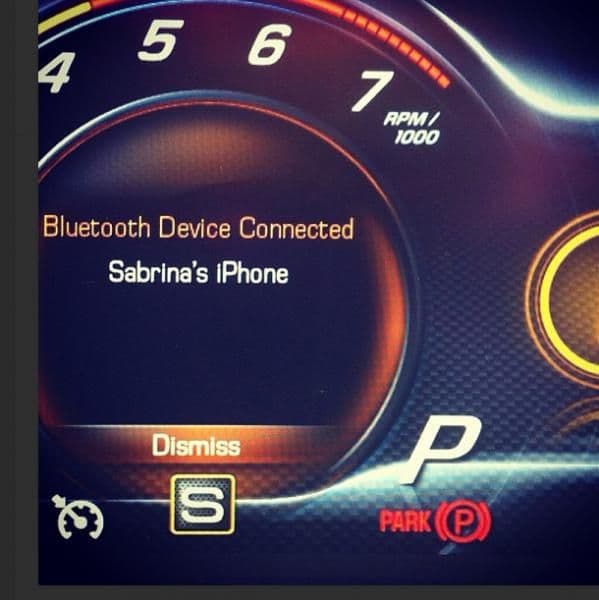
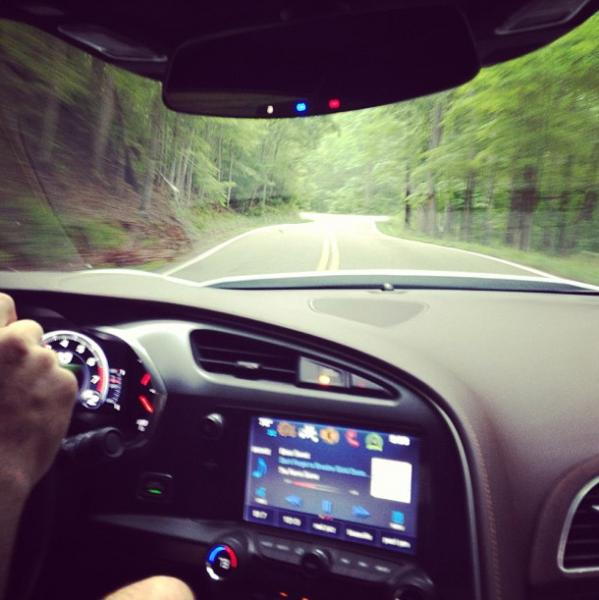
Take a look at these pictures and tell me if you really think skipping this option is worth saving $5 a month. Want to save $5 a month.. try skipping a trip to Starbucks.
These pictures REALLY make the interior of the C6 look old & outdated.
Driving my 2007 C6, the technology feels like something from C5 era.. not something that is 6 years old. Where is bluetooth, where is the navigation, where is the USB connectivity, where is the smartphone integration? BMW was doing all of this way back in 2004.. Why wasn't GM doing it in 2007? In fact the technology in my 2007 C6 is pretty much the same exact setup I have in my 1999 Lincoln Navigator.
I love the NAV software on my iPhone 5.. I have Google Maps, Waze, Apple Maps and TomTom. That said, using my smartphone for GPS in the car is always troublesome in many ways. The screen is small and hard to see while driving, the audible directions are helpful but not as helpful as visual cues, the GPS antenna kills the battery so the phone must be plugged in on longer trips and of course new primary offfense "distracted driving" laws mean that if a cop sees you using your phone for any reason in the DC/MD/VA area.. that you can get pulled out. Who wants to get pulled over and harrassed for using GPS on their phone.. and trying to prove that as your way out of a ticket.
Furthermore why spend upwards of $60,000 on a car.. then cheap out on one of the best technical items because you want to save $795. For a financed car, thats saving what $5 bucks a month to skip the NAV option? Seriously??
As I said earlier.. the C7's NAV system gets you more than just simple directions to where you need to go. First you get touchscreen input for navigation use on not just one, but TWO different 8inch high resolution screens. One directly in front of you and one in the center console. The navigation information shows up on BOTH screens. Best of all the navigation information also shows up in color, on the HUD. This seems WAY better than trying to figure what is showing on my tiny 4" smartphone screen that I have to keep looking down to see. In addition to NAV, you get MyLink apps & the upcoming Spark project technology. Where your smartphone now intergrates more with your vehicle.
Take a look at these pictures and tell me if you really think skipping this option is worth saving $5 a month. Want to save $5 a month.. try skipping a trip to Starbucks.
These pictures REALLY make the interior of the C6 look old & outdated.

Safety Car

Joined: Feb 2011
Posts: 4,205
Likes: 21
From: Arlington VA
Just like the MSRC option is underrated (mostly because it also includes PTM). I believe the $795 NAV option is understated. Mostly because it includes MyLink & color HUD integration. There is no way I would buy a C7 without out. One of the most attractive things to me about the C7.. is the updated technology. The VASTLY updated in the C7 cockpit is a big part of what makes the C6 seem old & outdated.
Driving my 2007 C6, the technology feels like something from C5 era.. not something that is 6 years old. Where is bluetooth, where is the navigation, where is the USB connectivity, where is the smartphone integration? BMW was doing all of this way back in 2004.. Why wasn't GM doing it in 2007? In fact the technology in my 2007 C6 is pretty much the same exact setup I have in my 1999 Lincoln Navigator.
I love the NAV software on my iPhone 5.. I have Google Maps, Waze, Apple Maps and TomTom. That said, using my smartphone for GPS in the car is always troublesome in many ways. The screen is small and hard to see while driving, the audible directions are helpful but not as helpful as visual cues, the GPS antenna kills the battery so the phone must be plugged in on longer trips and of course new primary offfense "distracted driving" laws mean that if a cop sees you using your phone for any reason in the DC/MD/VA area.. that you can get pulled out. Who wants to get pulled over and harrassed for using GPS on their phone.. and trying to prove that as your way out of a ticket.
Furthermore why spend upwards of $60,000 on a car.. then cheap out on one of the best technical items because you want to save $795. For a financed car, thats saving what $5 bucks a month to skip the NAV option? Seriously??
As I said earlier.. the C7's NAV system gets you more than just simple directions to where you need to go. First you get touchscreen input for navigation use on not just one, but TWO different 8inch high resolution screens. One directly in front of you and one in the center console. The navigation information shows up on BOTH screens. Best of all the navigation information also shows up in color, on the HUD. This seems WAY better than trying to figure what is showing on my tiny 4" smartphone screen that I have to keep looking down to see. In addition to NAV, you get MyLink apps & the upcoming Spark project technology. Where your smartphone now intergrates more with your vehicle.
Take a look at these pictures and tell me if you really think skipping this option is worth saving $5 a month. Want to save $5 a month.. try skipping a trip to Starbucks.
These pictures REALLY make the interior of the C6 look old & outdated.
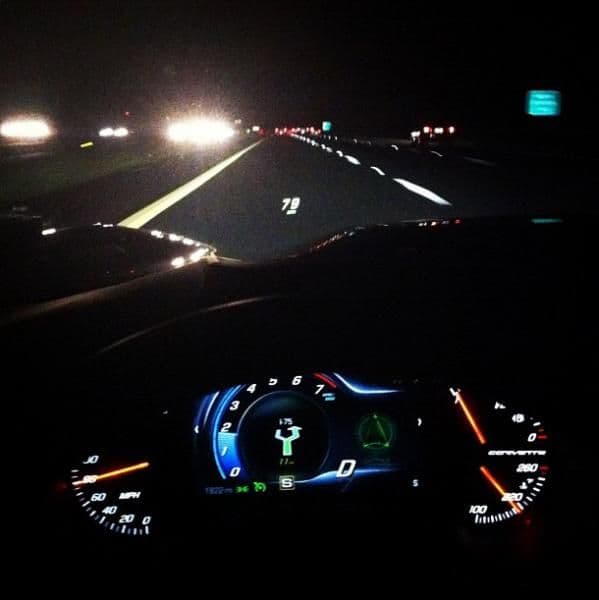
Driving my 2007 C6, the technology feels like something from C5 era.. not something that is 6 years old. Where is bluetooth, where is the navigation, where is the USB connectivity, where is the smartphone integration? BMW was doing all of this way back in 2004.. Why wasn't GM doing it in 2007? In fact the technology in my 2007 C6 is pretty much the same exact setup I have in my 1999 Lincoln Navigator.
I love the NAV software on my iPhone 5.. I have Google Maps, Waze, Apple Maps and TomTom. That said, using my smartphone for GPS in the car is always troublesome in many ways. The screen is small and hard to see while driving, the audible directions are helpful but not as helpful as visual cues, the GPS antenna kills the battery so the phone must be plugged in on longer trips and of course new primary offfense "distracted driving" laws mean that if a cop sees you using your phone for any reason in the DC/MD/VA area.. that you can get pulled out. Who wants to get pulled over and harrassed for using GPS on their phone.. and trying to prove that as your way out of a ticket.
Furthermore why spend upwards of $60,000 on a car.. then cheap out on one of the best technical items because you want to save $795. For a financed car, thats saving what $5 bucks a month to skip the NAV option? Seriously??
As I said earlier.. the C7's NAV system gets you more than just simple directions to where you need to go. First you get touchscreen input for navigation use on not just one, but TWO different 8inch high resolution screens. One directly in front of you and one in the center console. The navigation information shows up on BOTH screens. Best of all the navigation information also shows up in color, on the HUD. This seems WAY better than trying to figure what is showing on my tiny 4" smartphone screen that I have to keep looking down to see. In addition to NAV, you get MyLink apps & the upcoming Spark project technology. Where your smartphone now intergrates more with your vehicle.
Take a look at these pictures and tell me if you really think skipping this option is worth saving $5 a month. Want to save $5 a month.. try skipping a trip to Starbucks.
These pictures REALLY make the interior of the C6 look old & outdated.
Drifting
Joined: Jun 2013
Posts: 1,764
Likes: 10
From: Cumming GA
On order: Torch Red Z51
Learning curve
When I 1st got my 2010 RX450h it had taken such a leap in technology it's like you said, no way the dealer can insert all the capability into your head in an hour (or less). It came with with 5 separate manuals (totaling about 10lbs) that helped me get to sleep at night  . And I spent quite a bit of time in the driveway and garage going page by page through some of the newer and more technical stuff the operator can do and set. It reminded me even as a crew-member of going to school to learn new cockpit features. At least now I'm sure the manuals will be available in PDF format at least weeks before my new love 'Shirley' arrives. And from what I've already seen the technical side of the dash will be a match for cars of any price. To say I'm really excited and anxious aren't words that describe my feelings adequately enough.
. And I spent quite a bit of time in the driveway and garage going page by page through some of the newer and more technical stuff the operator can do and set. It reminded me even as a crew-member of going to school to learn new cockpit features. At least now I'm sure the manuals will be available in PDF format at least weeks before my new love 'Shirley' arrives. And from what I've already seen the technical side of the dash will be a match for cars of any price. To say I'm really excited and anxious aren't words that describe my feelings adequately enough.Have you actually seen the interior in person? I have and those screens are so clear and crisp I assure you it looks nothing like a Nintendo.
I can say, there is no way a dealer is going to be able to teach a customer how to use all the functionality built into the dash. Not sure how GM is going to go about showing all the functionality.
I would think it would be cool to have a youtube channel just for showing how to do stuff with the dash technology.
I can say, there is no way a dealer is going to be able to teach a customer how to use all the functionality built into the dash. Not sure how GM is going to go about showing all the functionality.
I would think it would be cool to have a youtube channel just for showing how to do stuff with the dash technology.