




Infotainment screen sensitivity

Thread Starter
Le Mans Master


Joined: Nov 2005
Posts: 6,099
Likes: 64
From: Houston TX
St. Jude Donor '09
 Infotainment screen sensitivity
Is there a way to adjust the touch sensitivity of the Infotainment screen? Mine you have to push your finger down hard. I thought I saw that it could be adjusted in one of the manuals I skimmed, but now I can't seem to find it. Thanks.

Instructor

Joined: Jan 2014
Posts: 125
Likes: 37
From: Raleigh NC
The screen can be calibrated to your touch. Use Vehicle Settings > Display > Calibrate and follow the prompts. It's mentioned on page 70 of the Infotainment Manual. Keep in mind that sometimes the touch is accepted when you first touch the screen and sometimes the touch is accepted when you remove your finger. The later means that pressure doesn't activate the screen but releasing pressure does so you may be fooled into thinking that you have to press very hard when all you really have to do is remove your finger. I suggest you calibrate the screen which will involve a series of touches, comfortable for you, in each corner of the screen and in the center. Once done, then you can experiment to see which functions require the press and which require the release. Hey, it's technology. You didn't think it would be simple did you?

Race Director


Joined: Jun 2006
Posts: 10,352
Likes: 9,631
From: Lawton, OK
C7 & C8 Events Correspondent
Tech Contributor
2020 C8 of the Year Finalist - Unmodified
2020 Corvette of the Year (track prepared)
2020 Corvette of the Year Finalist (appearance mods)
C7 of Year Winner (appearance mods) 2019
2017 C7 of Year Finalist
2015 C7 of the Year
St. Jude Donor '14-'15-'16-'17-'18-'19
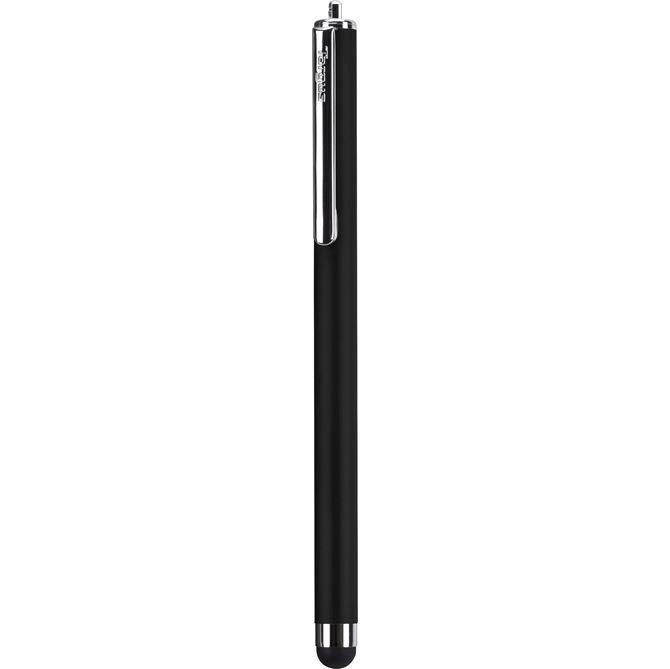
I used to have this problem and then started using a rubber tipped stylus on the screen and haven't had a problem since. Plus it cuts down on how much I have to clean prints off the screen. I do know that those of us with dry hands/fingers will have a lower screen response than those with oily hands/fingers.

Melting Slicks


Joined: May 2008
Posts: 2,162
Likes: 114
From: Prosper, TX
There are several different LCD touch sensitive display types on the market. In a nutshell, this is a pressure sensitive system due to some people wearing gloves while driving. There is no method of adjusting the touch sensitivity response, only calibrating the touch location.
Thread Starter
Le Mans Master
Joined: Nov 2005
Posts: 6,099
Likes: 64
From: Houston TX
St. Jude Donor '09
There are several different LCD touch sensitive display types on the market. In a nutshell, this is a pressure sensitive system due to some people wearing gloves while driving. There is no method of adjusting the touch sensitivity response, only calibrating the touch location.

Melting Slicks
Joined: Apr 2002
Posts: 2,439
Likes: 590
From: Tellico Plains Tennessee
I find the touch system to be frustrating, too. And I hate all the finger prints on the screen. I was surprised to find that most of the functions on the infotainment system can be done from the steering wheel. I use it as much as possible. I'm also trying to get used to the voice command system. I hadn't thought to try a stylus but will give that a try for the things that do require touching the screen. Now, where to keep the stylus so that its handy yet not a nuisance? Always something. 
Corvette Stories
The Best of Corvette for Corvette Enthusiasts

Top 10 Most Expensive Corvettes Ever Sold on Bring A Trailer
Brett Foote
10 Things Every Corvette Owner Needs (2026 Edition)
Michael S. Palmer
8 Most "Only Corvette Owners Understand" Quirks and Problems
Pouria Savadkouei
10 Reasons the C6 Z06 is Still A Performance Benchmark After 20 Years
Joe Kucinski
How Much Horsepower Every Corvette Engine "LOST" in 1972
Joe Kucinski
Top 10 DOs and DON'Ts for Protecting Your Convertible Top!
Michael S. Palmer
Top 10 Most Explosive Corvettes Ever Made: Power-to-Weight Ratio Ranked!
Joe Kucinski
150 hp to 1,250 hp: Every Corvette Generation Compared by the Specs That Matter
Joe Kucinski
8 Coolest Corvette Pace Cars (and Replicas) of All Time
Verdad Gallardo
Race Director
Joined: Jun 2006
Posts: 10,352
Likes: 9,631
From: Lawton, OK
C7 & C8 Events Correspondent
Tech Contributor
2020 C8 of the Year Finalist - Unmodified
2020 Corvette of the Year (track prepared)
2020 Corvette of the Year Finalist (appearance mods)
C7 of Year Winner (appearance mods) 2019
2017 C7 of Year Finalist
2015 C7 of the Year
St. Jude Donor '14-'15-'16-'17-'18-'19
Last edited by E.T.D. Corvettes; Feb 12, 2015 at 10:03 AM.
Melting Slicks
Joined: May 2008
Posts: 2,162
Likes: 114
From: Prosper, TX
The iDrive system in my BMW is leaps and bounds better than the Vette. With your hand on the controller, you could manipulate any function by feel - never taking your eyes off the road. No fingerprints, no distractions, and no swiping what feels like a 1st generation iPad (only worse).

Melting Slicks


Joined: Mar 2013
Posts: 3,104
Likes: 626
From: Baton Rouge LA
I use this one: http://targus.com/us/stylus-for-ipad and keep it in one of the cup holders for quick access. It has a rubber tip and perfectly interacts with the screen. Bought it at WalMart.
Race Director
Joined: Jun 2006
Posts: 10,352
Likes: 9,631
From: Lawton, OK
C7 & C8 Events Correspondent
Tech Contributor
2020 C8 of the Year Finalist - Unmodified
2020 Corvette of the Year (track prepared)
2020 Corvette of the Year Finalist (appearance mods)
C7 of Year Winner (appearance mods) 2019
2017 C7 of Year Finalist
2015 C7 of the Year
St. Jude Donor '14-'15-'16-'17-'18-'19
Melting Slicks
Joined: Mar 2013
Posts: 3,104
Likes: 626
From: Baton Rouge LA
It works fine but I'm having trouble finding a place to put it. Anywhere on the console causes it to slide away easily, so I may try putting it in the cup holder as Jagamajajaran suggested, although I don't particularly like leaving it open all the time with a stylus pen poking out. I've been looking for a pen holder that fits on the visor or a stick-on for some other location.
Race Director
Joined: Jun 2006
Posts: 10,352
Likes: 9,631
From: Lawton, OK
C7 & C8 Events Correspondent
Tech Contributor
2020 C8 of the Year Finalist - Unmodified
2020 Corvette of the Year (track prepared)
2020 Corvette of the Year Finalist (appearance mods)
C7 of Year Winner (appearance mods) 2019
2017 C7 of Year Finalist
2015 C7 of the Year
St. Jude Donor '14-'15-'16-'17-'18-'19
It works fine but I'm having trouble finding a place to put it. Anywhere on the console causes it to slide away easily, so I may try putting it in the cup holder as Jagamajajaran suggested, although I don't particularly like leaving it open all the time with a stylus pen poking out. I've been looking for a pen holder that fits on the visor or a stick-on for some other location.

Instructor
Joined: May 2011
Posts: 154
Likes: 0
From: Cordova Tn
It works fine but I'm having trouble finding a place to put it. Anywhere on the console causes it to slide away easily, so I may try putting it in the cup holder as Jagamajajaran suggested, although I don't particularly like leaving it open all the time with a stylus pen poking out. I've been looking for a pen holder that fits on the visor or a stick-on for some other location.