When you click on links to various merchants on this site and make a purchase, this can result in this site earning a commission. Affiliate programs and affiliations include, but are not limited to, the eBay Partner Network.
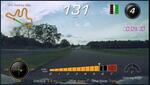
Silly question, perhaps, but I've watched plenty of videos of C7 driver's PDR video while driving around various tracks, and their position on the track is updated in real-time in the upper-left corner of the screen. Question is...how do you get the map of the track in the PDR? I understand that GPS is in play, but how do you get the actual track map in the PDR overlay? Is there a library of popular tracks that comes with the PDR, or available via download somewhere?
also check this thread to grab preloaded tracks.. if you don't wanna have to worry about it when youre out there on the line ready to go.. I always get too excited and forget. smh.
And you only have to create it once. Also, dont try to set it from pit lane it might not be close enough.
If I could add to this. You only have to set it once as long as you keep the same SD card. Also, you don't have to set it at the finish line. You can set it right as you come out of the pits and onto the track. It will just make the point at which you press the button the start finish for that lap.
If you switch SD cards, then you can come to the link above and get the map file that includes the mark for that track. Just put it on the new SD card and you are good for that track.
It is a little different than what is described. I have run two different track configurations at VIR. When I set my PDR at the S/F line I got a picture of what is called the Full Course. You do not get pictures of the North Course or the Grand Course which share the same S/F line. Here are a few pictures showing how the display changes during a lap on the North Course.
Here is the display showing the track map just before turning off the Full Course onto the North Course short cut.
In this still you can see the barriers across the Track ahead and the sharp right hand up hill turn into the North Course short cut.
This view shows the down hill roller coaster on the full course just after coming out of the North Course short cut. As soon as I hit the S/F line the green line through the short cut will disappear and it will not be shown on the map. I suspect the Grand Course map shows the same way since it uses part of this short cut plus the South Course in addition to most of the Full Course.
Maybe if I had first run the North Course when I set up my S/F line only the North Course would be shown even if I was running Full Course. Maybe I should have reset the S/F line when I went to run the North Course and it would have mapped it on the first lap.
I have a question if anyone has experienced this...I transferred my track maps from my 2022 C8 to a 2024 Z06 and I just ran NCM and Nashville Superspeedway on back-to-back weekends. I finally got to sit down and watch my videos and the playback from the Z06 does NOT include the track map or lap times on the playback. If I load it up in Cosworth Toolbox, I can see the lap times on the Stats display so I can see it's capturing it and the Corners Tab shows the map but on the video playback, I get nothing of the sort. It just shows 1/4 mile; 0-60, and 0-100 times like I'm drag racing....and this is all road course. Ideas?









 PDR Track Maps