When you click on links to various merchants on this site and make a purchase, this can result in this site earning a commission. Affiliate programs and affiliations include, but are not limited to, the eBay Partner Network.
DashControl is available for the Corvette C7, Base, Z51, and Z06 from www.dashlogic.com.
Use Code:'Corvette' for a forum discount on the entire DashLogic site.
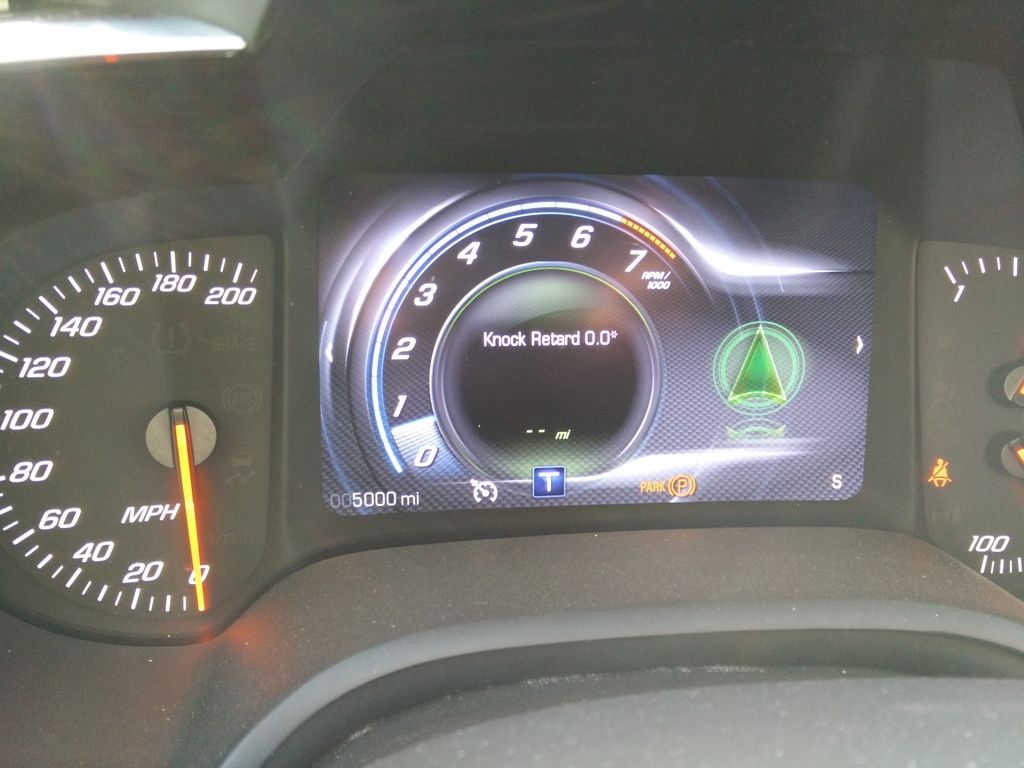
DashControl is the most advanced way of displaying vehicle data to date. There is nothing to install, no programing, no changes to your vehicle in any way. Simply plug in the DashControl device to your vehicles OBD-II port and DashControl turns your factory dashboard display into a fully customizable gauge canvas. See all of the data your vehicle has to offer on your Driver Information Center. DashControl doesn't stop there, you can also customize visual and audible alerts that you set to any condition for any vehicle value, fully customizable by you. Just in case your car doesn't have a sensor for a value you would like to watch, DashControl also has two auxiliary inputs so you can add up to two aftermarket sensors to be viewed on your DIC as well as be used for alerts. The DashControl alerts system is a very advanced tool, this is not your run of the mill type of simple alert that only watches one value. DashControl will take into account several conditions for one alert, all of those conditions fully customizable by you. DashControl also tests your performance, use DashControl to get your calculated HP & TQ, 0-60 time as well as your 1/8th mile, 1/4 mile, 1/2 mile, and standing 1 mile times recorded with a trap speed.
We went out and tested this, we found LTFT to be right with any other OBD-II app we tried it against. I am not sure why HPTuners is showing such a different value?
Where are the firmware updates located? It looks like you updated your website and removed them, and AutoMeter doesn't have any firmware updates on their website either.
Where are the firmware updates located? It looks like you updated your website and removed them, and AutoMeter doesn't have any firmware updates on their website either.
DashControl shows 12% bank 1 and 20% bank 2.
Actual at the time reading was photographed was 2.3% on both banks.
No it isn't showing 12 and 20%, look at your config you posted above, FT1 {5} means its show a static "FT1" with the value of 2. Same goes for the FT2. HPTuners reads the data at a rate about 50 times faster than any other device, also are you trying to use a splitter and pull the data at the same time? If so, the OBD data is getting corrupted, you can not reliably pull data from the port with 2 different devices at the same time, the data will get skewed 20-75% of the time.
Last edited by ktoonsez; Aug 28, 2016 at 11:35 PM.
That was the original website when they were sold by Palmer Performance, and were called DashLogic. Since then, they were bought out by Autometer and changed the name to Dash Control, and there has been no updates to their websites. I've see a employee and forum member upload current firmware to dropbox for users to download, but it would be nice to have a one stop shop for users to update theirs.
No it isn't showing 12 and 20%, look at your config you posted above, FT1 {5} means its show a static "FT1" with the value of 2. Same goes for the FT2. HPTuners reads the data at a rate about 50 times faster than any other device, also are you trying to use a splitter and pull the data at the same time? If so, the OBD data is getting corrupted, you can not reliably pull data from the port with 2 different devices at the same time, the data will get skewed 20-75% of the time.
FT1 and FT2 is text I added. The 5 and 7 inside the brackets are the PID's DashControl assigns to LTFT. % is the default.
The display will change over time but the readings are not correct.
Each device was connected separately through the OBD port during the engine run cycle.
All the other supported PID's display correctly but updates are very slow.
Do you have a DashControl unit and have you programed it?
FT1 and FT2 is text I added. The 5 and 7 inside the brackets are the PID's DashControl assigns to LTFT. % is the default.
The display will change over time but the readings are not correct.
Each device was connected separately through the OBD port during the engine run cycle.
All the other supported PID's display correctly but updates are very slow.
Do you have a DashControl unit and have you programed it?
Yes I have the device and made a lot of screens and shared them here that is how I know you are just not getting it. So rather than try to explain it again I want you to change the text on that page to this (see below) and you will see what I am trying to say:
FT {5} {7}
Thats it and you will see the proper values without a leading 1 and 2 like you currently have, this way will also allow more space since 99% of the time LTFT's are negative. Trust me the values will be correct
Last edited by ktoonsez; Aug 29, 2016 at 07:36 PM.
Yes I have the device and made a lot of screens and shared them here that is how I know you are just not getting it. So rather than try to explain it again I want you to change the text on that page to this (see below) and you will see what I am trying to say:
FT {5} {7}
Thats it and you will see the proper values without a leading 1 and 2 like you currently have, this way will also allow more space since 99% of the time LTFT's are negative. Trust me the values will be correct
Where have you shared these screens? I started a thread in the C7 tech section for dash display owners to share their code.
Anyone else having an issue updating it? Once I select the update file it seems like the unit disconnects and then I get a flashing red light on the controller. Error on the screen is "Failed to open device".
Anyone else having an issue updating it? Once I select the update file it seems like the unit disconnects and then I get a flashing red light on the controller. Error on the screen is "Failed to open device".
Did u read the manual the device comes with? I don't remember but pretty sure the dip switch needs to be in certain position. Not at my pc so I can't look it up but I did use that file to fix the keep close issue of the exhaust flaps.
Did u read the manual the device comes with? I don't remember but pretty sure the dip switch needs to be in certain position. Not at my pc so I can't look it up but I did use that file to fix the keep close issue of the exhaust flaps.
I'm glad that it fixes that issue. I was worried that was due to signal degradation from the OBD splitter I'm using. Now I just need to get it updated!
I'm glad that it fixes that issue. I was worried that was due to signal degradation from the OBD splitter I'm using. Now I just need to get it updated!
Best,
Gene
Yes that was it. Wield it doeant work for u. U r using the original cable right?
Yes that was it. Wield it doeant work for u. U r using the original cable right?
I have so many micro USB cables I'm not sure but this cable was able to handle updating the code. I'm doing it through Parallels on XPsp2 but I can't imagine that's causing the issue.
Who even makes this thing these days? There must be some kind of tech support.





 DashControl for C7











 There must be some kind of tech support.