



































OTA Updates - General Information

Thread Starter
Moderator


Joined: Feb 2006
Posts: 39,134
Likes: 17,983
From: DFW Area TX
 OTA Updates - General Information
Found some interesting information on the OTA process. This GM TechLink explanation to its Technicians will be helpful in at least some ways.
.
VIP (Vehicle Intelligence Platform) was formerly referred to as Global B architecture.
Note that it says that updates will never be applied without the customers consent.
Source: GM TechLink
.
Over-the-Air (OTA) software updates (Fig. 1) that are pushed to vehicles remotely continue to expand in frequency and use on GM models. Vehicles using the Global A electrical architecture can support three modules for OTA updates, such as the radio, OnStar, and Serial Data Gateway modules.
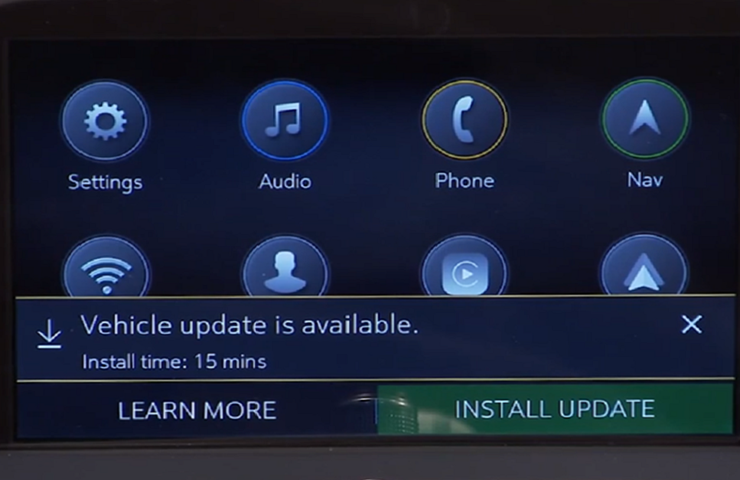 Fig. 1
The new Vehicle Intelligence Platform (VIP) electrical architecture, introduced on some 2020 and 2021 model year vehicles, powers a new electronic system that is capable of managing up to 4.5 terabytes of data processing power per hour, which is a fivefold increase in capability over the previous Global A electrical architecture. On vehicles using the VIP architecture, virtually all modules can support OTA updates, which means that the OTA software is not only for the infotainment system.
When an OTA update has been downloaded to a vehicle and is available to be installed, a message is displayed on the infotainment screen notifying the driver of the impending update. The message to accept and install an OTA update will not appear until the minimum values for the battery State of Charge (SOC) and Outside Ambient Temperature (OAT) are met.
OTA Software Download
In order for an OTA update to be pushed to a vehicle, the vehicle must be parked for the entire download process. There is not a notification to the driver that the software update is being downloaded to the vehicle. Battery SOC and OAT values are not checked before a download. These checks are only performed once the software update is downloaded and ready to be installed.
The OTA software download can occur in increments. So if the vehicle is driven during the download process, the download will be paused until the vehicle is parked and download conditions are met again.
Installing an Update
Once the OTA software is downloaded, a message on the infotainment screen will display a prompt to accept the installation. The customer does not need to remain in the vehicle during the installation of the software. However, the vehicle cannot be driven during the installation and certain vehicle features may not be available. It’s not required for the ignition to be ON for the installation to begin.
Installation time will vary based on the size of the update. The average installation will take approximately 15 minutes. (Fig. 2) Depending on the module, it may take longer to complete. The “Accept” message on the infotainment screen will provide an estimation of the approximate installation time.
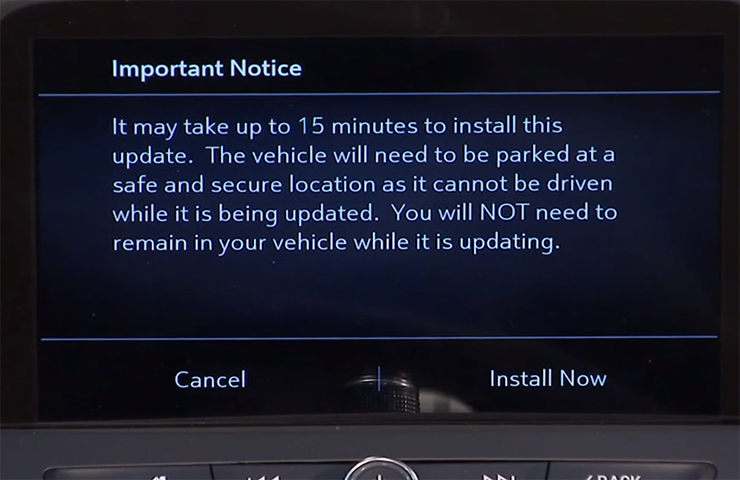 Fig. 2
Deferring or Declining an Update
When an OTA update is downloaded, customers have the option to defer or decline the installation. The standard policy for OTA software updates is to set the customer notifications to 30 ignitions cycles. If the customer does not act upon the prompts within this counter, the update package is removed from the vehicle.
If a customer ignores the notification, the ignition cycle counter decreases by one immediately.
If the customer defers the installation by selecting the “Remind Me Later” option, the ignition cycle counter decreases by one, but it will not decrease again until after the customer-selected “Remind Me Later” period, regardless of the number of ignition cycles that occur during that period.
If the OTA update installation is deferred by the customer, it can be installed at a later date through the Vehicle Software menu under Settings > System on the infotainment screen. (Fig. 3)
If the customer selects the “Decline Update” option, the update package is immediately removed from the vehicle. In this case, the vehicle will not be re-enrolled to receive the OTA update at a later date, unless the update is a Field Action. OTA updates will not be installed in a vehicle without a customer’s consent.
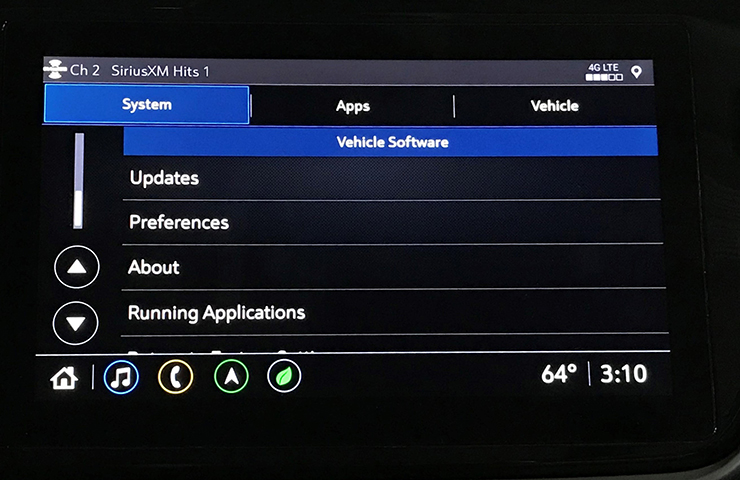 Fig. 3
Unable to Complete
There are a number of criteria that must be met in order to successfully complete the software update installation on a vehicle. The most common cause of being unable to complete an installation is the State of Charge (SOC) of the 12V battery. If the 12V battery does not meet the minimum SOC requirement of 70 percent or greater along with an Outside Ambient Temperature (OAT) greater than 14°F (-10°C), the OTA update installation will not occur. The colder the ambient air temperature is, the higher the target SOC becomes. To determine the battery SOC for VIP vehicles, go to BCM/12V Battery/Battery Sensor Module – State of Charge in GDS 2.
There may be other conditions that will affect an OTA update installation. If any of these conditions are present, a “Vehicle Conditions Not Ideal” message may display on the infotainment screen stating that conditions are not ideal to proceed with the update installation. These conditions do not indicate a failure; only that the vehicle does not meet all the criteria necessary to complete the OTA update installation. (Fig. 4)
Some customers may comment that the radio appears to stay on or is backlit after exiting the vehicle. If this occurs, it’s a telltale sign that an OTA update is in progress.
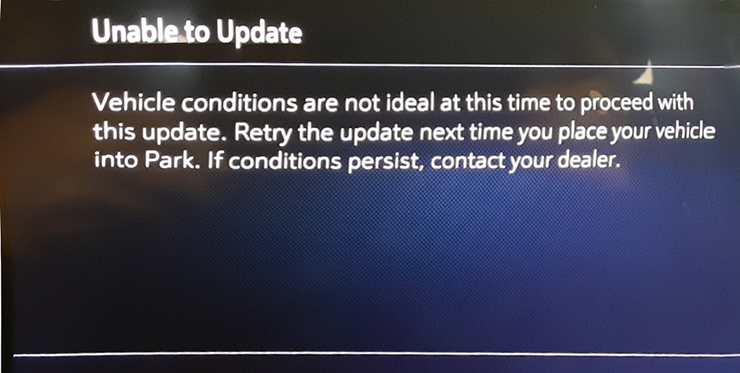 Fig. 4
.Fig. 1The new Vehicle Intelligence Platform (VIP) electrical architecture, introduced on some 2020 and 2021 model year vehicles, powers a new electronic system that is capable of managing up to 4.5 terabytes of data processing power per hour, which is a fivefold increase in capability over the previous Global A electrical architecture. On vehicles using the VIP architecture, virtually all modules can support OTA updates, which means that the OTA software is not only for the infotainment system.
When an OTA update has been downloaded to a vehicle and is available to be installed, a message is displayed on the infotainment screen notifying the driver of the impending update. The message to accept and install an OTA update will not appear until the minimum values for the battery State of Charge (SOC) and Outside Ambient Temperature (OAT) are met.
OTA Software Download
In order for an OTA update to be pushed to a vehicle, the vehicle must be parked for the entire download process. There is not a notification to the driver that the software update is being downloaded to the vehicle. Battery SOC and OAT values are not checked before a download. These checks are only performed once the software update is downloaded and ready to be installed.
The OTA software download can occur in increments. So if the vehicle is driven during the download process, the download will be paused until the vehicle is parked and download conditions are met again.
Installing an Update
Once the OTA software is downloaded, a message on the infotainment screen will display a prompt to accept the installation. The customer does not need to remain in the vehicle during the installation of the software. However, the vehicle cannot be driven during the installation and certain vehicle features may not be available. It’s not required for the ignition to be ON for the installation to begin.
Installation time will vary based on the size of the update. The average installation will take approximately 15 minutes. (Fig. 2) Depending on the module, it may take longer to complete. The “Accept” message on the infotainment screen will provide an estimation of the approximate installation time.
Fig. 2Deferring or Declining an Update
When an OTA update is downloaded, customers have the option to defer or decline the installation. The standard policy for OTA software updates is to set the customer notifications to 30 ignitions cycles. If the customer does not act upon the prompts within this counter, the update package is removed from the vehicle.
If a customer ignores the notification, the ignition cycle counter decreases by one immediately.
If the customer defers the installation by selecting the “Remind Me Later” option, the ignition cycle counter decreases by one, but it will not decrease again until after the customer-selected “Remind Me Later” period, regardless of the number of ignition cycles that occur during that period.
If the OTA update installation is deferred by the customer, it can be installed at a later date through the Vehicle Software menu under Settings > System on the infotainment screen. (Fig. 3)
If the customer selects the “Decline Update” option, the update package is immediately removed from the vehicle. In this case, the vehicle will not be re-enrolled to receive the OTA update at a later date, unless the update is a Field Action. OTA updates will not be installed in a vehicle without a customer’s consent.
Fig. 3Unable to Complete
There are a number of criteria that must be met in order to successfully complete the software update installation on a vehicle. The most common cause of being unable to complete an installation is the State of Charge (SOC) of the 12V battery. If the 12V battery does not meet the minimum SOC requirement of 70 percent or greater along with an Outside Ambient Temperature (OAT) greater than 14°F (-10°C), the OTA update installation will not occur. The colder the ambient air temperature is, the higher the target SOC becomes. To determine the battery SOC for VIP vehicles, go to BCM/12V Battery/Battery Sensor Module – State of Charge in GDS 2.
There may be other conditions that will affect an OTA update installation. If any of these conditions are present, a “Vehicle Conditions Not Ideal” message may display on the infotainment screen stating that conditions are not ideal to proceed with the update installation. These conditions do not indicate a failure; only that the vehicle does not meet all the criteria necessary to complete the OTA update installation. (Fig. 4)
Some customers may comment that the radio appears to stay on or is backlit after exiting the vehicle. If this occurs, it’s a telltale sign that an OTA update is in progress.
Fig. 4VIP (Vehicle Intelligence Platform) was formerly referred to as Global B architecture.
Note that it says that updates will never be applied without the customers consent.
Source: GM TechLink

Le Mans Master


Joined: Sep 2017
Posts: 5,767
Likes: 2,968
From: Rural NW Georgia. GO DAWGS!
2024 C8 of the Year Finalist - Unmodified
I've got that on my 2020 Silverado 2500. I've had this truck since August 2020 and it's updated twice. I got an "unsuccessful install" message last week so I sat in the truck for ten minutes the next time I parked it (in the same place) and the install worked. 
Thread Starter
Moderator
Joined: Feb 2006
Posts: 39,134
Likes: 17,983
From: DFW Area TX
No. You do not have to have Onstar or the hotspot to get OTA updates. I believe you do have to accept "connected services" (no charge) somewhere in the Vehicle Setup - but not sure about that.

Melting Slicks


Joined: May 2003
Posts: 2,720
Likes: 1,061
Corvette Stories
The Best of Corvette for Corvette Enthusiasts

Top 10 Most Expensive Corvettes Ever Sold on Bring A Trailer
Brett Foote
10 Things Every Corvette Owner Needs (2026 Edition)
Michael S. Palmer
8 Most "Only Corvette Owners Understand" Quirks and Problems
Pouria Savadkouei
10 Reasons the C6 Z06 is Still A Performance Benchmark After 20 Years
Joe Kucinski
How Much Horsepower Every Corvette Engine "LOST" in 1972
Joe Kucinski
Top 10 DOs and DON'Ts for Protecting Your Convertible Top!
Michael S. Palmer
Top 10 Most Explosive Corvettes Ever Made: Power-to-Weight Ratio Ranked!
Joe Kucinski
150 hp to 1,250 hp: Every Corvette Generation Compared by the Specs That Matter
Joe Kucinski
8 Coolest Corvette Pace Cars (and Replicas) of All Time
Verdad Gallardo
Safety Car


Joined: Aug 2004
Posts: 3,966
Likes: 1,295
From: SouthEast PA
Unmodified C8 of the Year 2021 Finalist
2018 C7 of Year Finalist
My C8 is always on my C7 tender when parked in the garage. After a drive it takes < 1hr to go from yellow to green back on charge. Been doing it this way for both my ‘14 C7 and ‘20 C8. Several weeks ago took a 30 mile drive to shop stoping only once for about 2 hours before driving back home. After pulling up to the now open garage door I put the C8 in park outside and stopped the engine for my wife to exit passenger side. Immediately got Message #1. Pressed “Install update” with Message #2 immediately following. Pressed “Install Now”, got out of the drivers side, both doors now closed, went into the house for about 30 minutes. Upon return all was dark on the dash and info center. C8 started up normally with a message on Info screen “Update Successful”. I never activated On Star when buying the C8.


Team Owner

Joined: Oct 2004
Posts: 25,583
Likes: 16,942
OnStar "activation" is only to provide you with whatever services you purchase. However, the service is operational for things like OTAs. FCA's UConnect system operates the same way and is used for OTA updates with or without a paid subscription.
Last edited by Foosh; May 25, 2021 at 11:48 AM.



Burning Brakes

Joined: Sep 2020
Posts: 807
Likes: 562

Melting Slicks

Joined: May 2021
Posts: 2,562
Likes: 1,579
Last OTA, I got the "conditions are not ideal" abort message. Second attempt it said it applied successfully.
Battery voltage and temps should have been fine, so no idea what was the initial issue.

Race Director

Joined: Aug 2016
Posts: 12,812
Likes: 10,229
From: Garden Valley CA
Some people have been blaming a bad wi-fi or cell connection for a failed update. However, once a download has been performed, I don't see any requirement for a network connection.
I'm assuming that once an update has been successfully downloaded you don't need a network connection anymore. And you won't get a request to install an update if it hasn't been successfully downloaded.
I'm assuming that once an update has been successfully downloaded you don't need a network connection anymore. And you won't get a request to install an update if it hasn't been successfully downloaded.




Race Director
Joined: Aug 2016
Posts: 12,812
Likes: 10,229
From: Garden Valley CA
Here is some more information about diagnosing OTA update problems:
https://gm-techlink.com/?p=17777
Interesting that they don't include 2020 model years.
https://gm-techlink.com/?p=17777
Interesting that they don't include 2020 model years.

Melting Slicks
Joined: May 2021
Posts: 2,562
Likes: 1,579
This old thread has been revived. My '21 2LT had a bunch of updates in the first 2 years of ownership, some of them were STUCK and OTA didn't work and the dealer handled this when I was taking it in for oil changes, etc.
That said, I haven't had an OTA update in 2 years. When I tell it to check it says there are no updates available which is the same thing it did before when in fact there WERE updates available. I am half afraid to have any updates applied given they want to kill carplay and android auto functions.
Clearly this global B system or whatever GM calls it needs revision to how the firmware update system works.
There should be a mechanism where it expects to see a NO_UPDATE message that is timestamped with current date/time, etc. When the vehicle attemtps to check for OTA's if it doesn't receive a recent NO_UPDATE message, etc. it should tell you "OTA MALFUNCTION. DEALER SERVICE REQUIRED." or something to that effect.
The dealers have a tool that they can connect to the OBD2 port that processes all updates needed.
That said, I haven't had an OTA update in 2 years. When I tell it to check it says there are no updates available which is the same thing it did before when in fact there WERE updates available. I am half afraid to have any updates applied given they want to kill carplay and android auto functions.
Clearly this global B system or whatever GM calls it needs revision to how the firmware update system works.
There should be a mechanism where it expects to see a NO_UPDATE message that is timestamped with current date/time, etc. When the vehicle attemtps to check for OTA's if it doesn't receive a recent NO_UPDATE message, etc. it should tell you "OTA MALFUNCTION. DEALER SERVICE REQUIRED." or something to that effect.
The dealers have a tool that they can connect to the OBD2 port that processes all updates needed.