





OTA Updates - General Information

Thread Starter
Moderator


Joined: Feb 2006
Posts: 39,154
Likes: 18,001
From: DFW Area TX

This old thread has been revived. My '21 2LT had a bunch of updates in the first 2 years of ownership, some of them were STUCK and OTA didn't work and the dealer handled this when I was taking it in for oil changes, etc.
That said, I haven't had an OTA update in 2 years. When I tell it to check it says there are no updates available which is the same thing it did before when in fact there WERE updates available. I am half afraid to have any updates applied given they want to kill carplay and android auto functions.
Clearly this global B system or whatever GM calls it needs revision to how the firmware update system works.
There should be a mechanism where it expects to see a NO_UPDATE message that is timestamped with current date/time, etc. When the vehicle attemtps to check for OTA's if it doesn't receive a recent NO_UPDATE message, etc. it should tell you "OTA MALFUNCTION. DEALER SERVICE REQUIRED." or something to that effect.
The dealers have a tool that they can connect to the OBD2 port that processes all updates needed.
That said, I haven't had an OTA update in 2 years. When I tell it to check it says there are no updates available which is the same thing it did before when in fact there WERE updates available. I am half afraid to have any updates applied given they want to kill carplay and android auto functions.
Clearly this global B system or whatever GM calls it needs revision to how the firmware update system works.
There should be a mechanism where it expects to see a NO_UPDATE message that is timestamped with current date/time, etc. When the vehicle attemtps to check for OTA's if it doesn't receive a recent NO_UPDATE message, etc. it should tell you "OTA MALFUNCTION. DEALER SERVICE REQUIRED." or something to that effect.
The dealers have a tool that they can connect to the OBD2 port that processes all updates needed.

Burning Brakes


Joined: May 2023
Posts: 1,034
Likes: 370
From: Ontario
Found some interesting information on the OTA process. This GM TechLink explanation to its Technicians will be helpful in at least some ways.
.
VIP (Vehicle Intelligence Platform) was formerly referred to as Global B architecture.
Note that it says that updates will never be applied without the customers consent.
Source: GM TechLink
.
Over-the-Air (OTA) software updates (Fig. 1) that are pushed to vehicles remotely continue to expand in frequency and use on GM models. Vehicles using the Global A electrical architecture can support three modules for OTA updates, such as the radio, OnStar, and Serial Data Gateway modules.
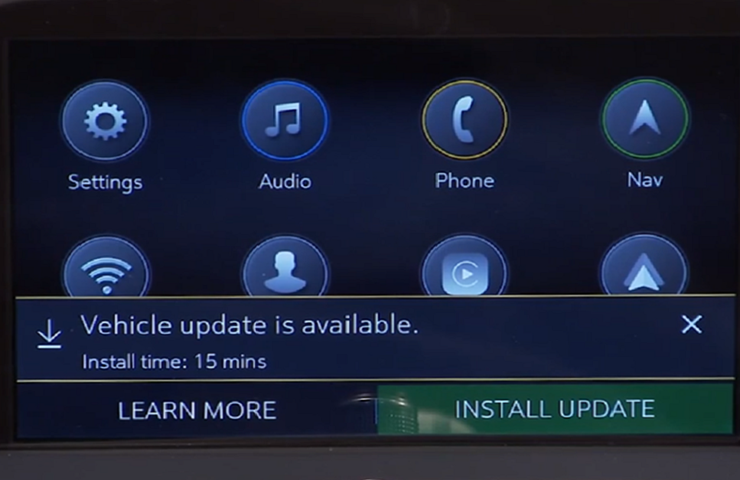 Fig. 1
The new Vehicle Intelligence Platform (VIP) electrical architecture, introduced on some 2020 and 2021 model year vehicles, powers a new electronic system that is capable of managing up to 4.5 terabytes of data processing power per hour, which is a fivefold increase in capability over the previous Global A electrical architecture. On vehicles using the VIP architecture, virtually all modules can support OTA updates, which means that the OTA software is not only for the infotainment system.
When an OTA update has been downloaded to a vehicle and is available to be installed, a message is displayed on the infotainment screen notifying the driver of the impending update. The message to accept and install an OTA update will not appear until the minimum values for the battery State of Charge (SOC) and Outside Ambient Temperature (OAT) are met.
OTA Software Download
In order for an OTA update to be pushed to a vehicle, the vehicle must be parked for the entire download process. There is not a notification to the driver that the software update is being downloaded to the vehicle. Battery SOC and OAT values are not checked before a download. These checks are only performed once the software update is downloaded and ready to be installed.
The OTA software download can occur in increments. So if the vehicle is driven during the download process, the download will be paused until the vehicle is parked and download conditions are met again.
Installing an Update
Once the OTA software is downloaded, a message on the infotainment screen will display a prompt to accept the installation. The customer does not need to remain in the vehicle during the installation of the software. However, the vehicle cannot be driven during the installation and certain vehicle features may not be available. It’s not required for the ignition to be ON for the installation to begin.
Installation time will vary based on the size of the update. The average installation will take approximately 15 minutes. (Fig. 2) Depending on the module, it may take longer to complete. The “Accept” message on the infotainment screen will provide an estimation of the approximate installation time.
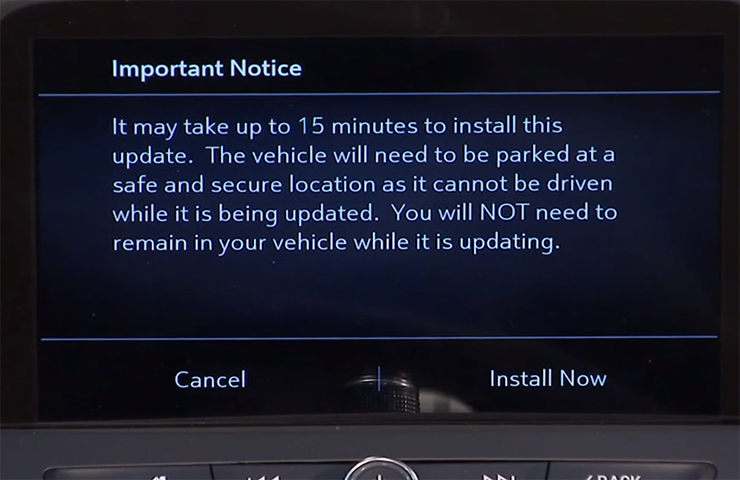 Fig. 2
Deferring or Declining an Update
When an OTA update is downloaded, customers have the option to defer or decline the installation. The standard policy for OTA software updates is to set the customer notifications to 30 ignitions cycles. If the customer does not act upon the prompts within this counter, the update package is removed from the vehicle.
If a customer ignores the notification, the ignition cycle counter decreases by one immediately.
If the customer defers the installation by selecting the “Remind Me Later” option, the ignition cycle counter decreases by one, but it will not decrease again until after the customer-selected “Remind Me Later” period, regardless of the number of ignition cycles that occur during that period.
If the OTA update installation is deferred by the customer, it can be installed at a later date through the Vehicle Software menu under Settings > System on the infotainment screen. (Fig. 3)
If the customer selects the “Decline Update” option, the update package is immediately removed from the vehicle. In this case, the vehicle will not be re-enrolled to receive the OTA update at a later date, unless the update is a Field Action. OTA updates will not be installed in a vehicle without a customer’s consent.
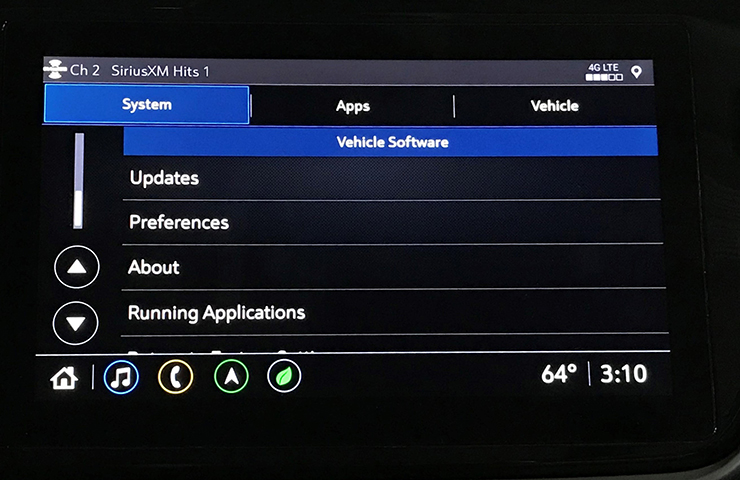 Fig. 3
Unable to Complete
There are a number of criteria that must be met in order to successfully complete the software update installation on a vehicle. The most common cause of being unable to complete an installation is the State of Charge (SOC) of the 12V battery. If the 12V battery does not meet the minimum SOC requirement of 70 percent or greater along with an Outside Ambient Temperature (OAT) greater than 14°F (-10°C), the OTA update installation will not occur. The colder the ambient air temperature is, the higher the target SOC becomes. To determine the battery SOC for VIP vehicles, go to BCM/12V Battery/Battery Sensor Module – State of Charge in GDS 2.
There may be other conditions that will affect an OTA update installation. If any of these conditions are present, a “Vehicle Conditions Not Ideal” message may display on the infotainment screen stating that conditions are not ideal to proceed with the update installation. These conditions do not indicate a failure; only that the vehicle does not meet all the criteria necessary to complete the OTA update installation. (Fig. 4)
Some customers may comment that the radio appears to stay on or is backlit after exiting the vehicle. If this occurs, it’s a telltale sign that an OTA update is in progress.
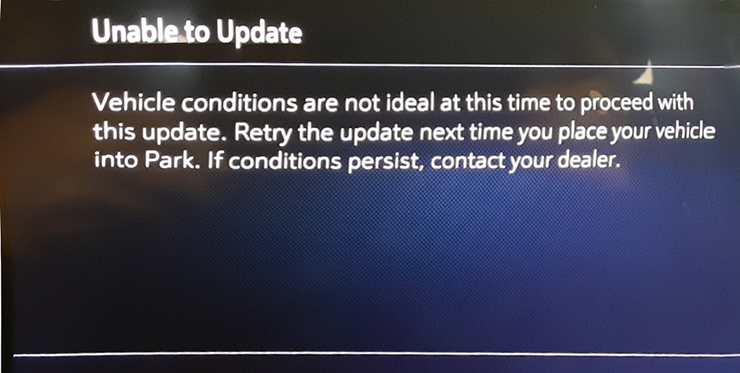 Fig. 4
.Fig. 1The new Vehicle Intelligence Platform (VIP) electrical architecture, introduced on some 2020 and 2021 model year vehicles, powers a new electronic system that is capable of managing up to 4.5 terabytes of data processing power per hour, which is a fivefold increase in capability over the previous Global A electrical architecture. On vehicles using the VIP architecture, virtually all modules can support OTA updates, which means that the OTA software is not only for the infotainment system.
When an OTA update has been downloaded to a vehicle and is available to be installed, a message is displayed on the infotainment screen notifying the driver of the impending update. The message to accept and install an OTA update will not appear until the minimum values for the battery State of Charge (SOC) and Outside Ambient Temperature (OAT) are met.
OTA Software Download
In order for an OTA update to be pushed to a vehicle, the vehicle must be parked for the entire download process. There is not a notification to the driver that the software update is being downloaded to the vehicle. Battery SOC and OAT values are not checked before a download. These checks are only performed once the software update is downloaded and ready to be installed.
The OTA software download can occur in increments. So if the vehicle is driven during the download process, the download will be paused until the vehicle is parked and download conditions are met again.
Installing an Update
Once the OTA software is downloaded, a message on the infotainment screen will display a prompt to accept the installation. The customer does not need to remain in the vehicle during the installation of the software. However, the vehicle cannot be driven during the installation and certain vehicle features may not be available. It’s not required for the ignition to be ON for the installation to begin.
Installation time will vary based on the size of the update. The average installation will take approximately 15 minutes. (Fig. 2) Depending on the module, it may take longer to complete. The “Accept” message on the infotainment screen will provide an estimation of the approximate installation time.
Fig. 2Deferring or Declining an Update
When an OTA update is downloaded, customers have the option to defer or decline the installation. The standard policy for OTA software updates is to set the customer notifications to 30 ignitions cycles. If the customer does not act upon the prompts within this counter, the update package is removed from the vehicle.
If a customer ignores the notification, the ignition cycle counter decreases by one immediately.
If the customer defers the installation by selecting the “Remind Me Later” option, the ignition cycle counter decreases by one, but it will not decrease again until after the customer-selected “Remind Me Later” period, regardless of the number of ignition cycles that occur during that period.
If the OTA update installation is deferred by the customer, it can be installed at a later date through the Vehicle Software menu under Settings > System on the infotainment screen. (Fig. 3)
If the customer selects the “Decline Update” option, the update package is immediately removed from the vehicle. In this case, the vehicle will not be re-enrolled to receive the OTA update at a later date, unless the update is a Field Action. OTA updates will not be installed in a vehicle without a customer’s consent.
Fig. 3Unable to Complete
There are a number of criteria that must be met in order to successfully complete the software update installation on a vehicle. The most common cause of being unable to complete an installation is the State of Charge (SOC) of the 12V battery. If the 12V battery does not meet the minimum SOC requirement of 70 percent or greater along with an Outside Ambient Temperature (OAT) greater than 14°F (-10°C), the OTA update installation will not occur. The colder the ambient air temperature is, the higher the target SOC becomes. To determine the battery SOC for VIP vehicles, go to BCM/12V Battery/Battery Sensor Module – State of Charge in GDS 2.
There may be other conditions that will affect an OTA update installation. If any of these conditions are present, a “Vehicle Conditions Not Ideal” message may display on the infotainment screen stating that conditions are not ideal to proceed with the update installation. These conditions do not indicate a failure; only that the vehicle does not meet all the criteria necessary to complete the OTA update installation. (Fig. 4)
Some customers may comment that the radio appears to stay on or is backlit after exiting the vehicle. If this occurs, it’s a telltale sign that an OTA update is in progress.
Fig. 4VIP (Vehicle Intelligence Platform) was formerly referred to as Global B architecture.
Note that it says that updates will never be applied without the customers consent.
Source: GM TechLink
20 minutes later, all done.

Advanced


Joined: Nov 2019
Posts: 61
Likes: 45
From: Northern Virginia
If the customer selects the “Decline Update” option, the update package is immediately removed from the vehicle. In this case, the vehicle will not be re-enrolled to receive the OTA update at a later date, unless the update is a Field Action.
I do not remember declining; I hate going to dealerships if I don't have to. Is there any way to enable/authorize OTAs?
Last edited by MildBillT; Apr 8, 2026 at 04:57 PM.

Safety Car


Joined: Nov 2012
Posts: 3,997
Likes: 2,612
From: Gettysburg PA
2020 C8 of the Year Finalist - Unmodified
On our '26 Eray, which IS AFFECTED by the Turn Signal Recall, I just went looking for the update, and when in Vehicle Software tab, it checked and said there were NO updates available and that my car was up to current software....
I'm hoping that the reason that nothing shows as available is because they roll out OTA updates in smaller batches and don't send it out to everyone at once...... maybe ????
I really don't want to have to take this to the dealer, IF an OTA update is available for this fix.
I'm hoping that the reason that nothing shows as available is because they roll out OTA updates in smaller batches and don't send it out to everyone at once...... maybe ????
I really don't want to have to take this to the dealer, IF an OTA update is available for this fix.

Racer

Joined: May 2024
Posts: 401
Likes: 251
From: Greenville, SC
Went out and my 2025 had an update pending, 67% downloaded but wasn't moving. Waited a while, no progress so went to store as planned. Now the update is gone and it says NO UPDATES. JFC GM. I wonder if they pulled it due to problems? Had a long list of fixes too.
Burning Brakes
Joined: May 2023
Posts: 1,034
Likes: 370
From: Ontario
Was trying to do an OTA for the turn signal recall. I do not see anywhere in the menus to do a vehicle update. Under the System menu, there is on Vehicle Software tab. Saw this above:
If the customer selects the “Decline Update” option, the update package is immediately removed from the vehicle. In this case, the vehicle will not be re-enrolled to receive the OTA update at a later date, unless the update is a Field Action.
I do not remember declining; I hate going to dealerships if I don't have to. Is there any way to enable/authorize OTAs?
If the customer selects the “Decline Update” option, the update package is immediately removed from the vehicle. In this case, the vehicle will not be re-enrolled to receive the OTA update at a later date, unless the update is a Field Action.
I do not remember declining; I hate going to dealerships if I don't have to. Is there any way to enable/authorize OTAs?
I also dropped both windows, JIC, and had the battery maintainer plugged in, found it, and then I selected "Install" from the menu (mine is a 2024 SR HTC Z51 FWIW).
The system message said "turn off the car" so I got out, pressed the Start button to turn it off, then had to select "Install" again, and off it went, countdown started.
Left it in the garage to do it's thing. 20 minutes later, checked and the dash was all dark. Hopped in, hit the "Start" button brake depressed and it fired up like normal.
I did not see a "completed successfully" message, but I may have missed it. I checked the Settings > Updates folder and there were "no updates available" and the one I just installed was listed as such.
Advanced
Joined: Nov 2019
Posts: 61
Likes: 45
From: Northern Virginia
I was driving around yesterday and received a notice for the turn signal update! I delayed it until 0030 hours. Checked this morning and it shows under Installed Updates. When I checked for updates previously, there were none available. I'm pleased I don't have to go to the dealer. This update system is a bit fickle though.
Corvette Stories
The Best of Corvette for Corvette Enthusiasts

Every 2027 Corvette Engine Explained
Joe Kucinski
Designer Imagines A Corvette That Looks More Like a Corvette Than the Corvette
Verdad Gallardo
10 Ugly Corvettes That We Still Kinda Love
Joe Kucinski
Top 10 Most Expensive Corvettes Ever Sold on Bring A Trailer
Brett Foote
10 Things Every Corvette Owner Needs (2026 Edition)
Michael S. Palmer
8 Most "Only Corvette Owners Understand" Quirks and Problems
Pouria Savadkouei
10 Reasons the C6 Z06 is Still A Performance Benchmark After 20 Years
Joe Kucinski
How Much Horsepower Every Corvette Engine "LOST" in 1972
Joe Kucinski
Top 10 DOs and DON'Ts for Protecting Your Convertible Top!
Michael S. Palmer
Racer
Joined: Oct 2023
Posts: 491
Likes: 388
From: Brandon, MS
2024 C8 of the Year Finalist - Unmodified
My car did an update yesterday. I had not used the car in past 3 weeks. Got in it Saturday to go grab a lunch. Everything normal. I get back home get out of car and radio is still on. So I soft reset the infotainment with hang up button. Did mot retry to see if radio cut off on exiting the car. Sunday (yesterday) I get in car to go drive and first stop I exit radio still on so I timed how long it would stay on. It stayed on about 5 minutes then car went to sleep. I’m getting frustrated at this point so I reset infotainment again. Went on about my business at that location. When I got ready to leave car pops up the update thing. I ignored it not doing that 20 miles from home. Once in my garage I went to cut car off it prompted the update again. I hit install! Went through the motions and 15 minutes later the update completed. I have not cranked it and exited since to see if radio stays on.
I am going on the record that I and pretty tired of these otas by GM. My gmc truck never updates correctly and usually ends up at the dealer to have it finalized. The vette has pulled a few tricks in 2 1/2 years at some of the worst moments to try and update the car. Almost always the car acts crazy until it gets the update. My truck just flips out and ends up at the dealership. Very aggravating, I have more to do in my daily life than to tend to a vehicle that seems to need help updating something I could care less about. Just crank, run and don’t flip out is that to much to ask.
I am going on the record that I and pretty tired of these otas by GM. My gmc truck never updates correctly and usually ends up at the dealer to have it finalized. The vette has pulled a few tricks in 2 1/2 years at some of the worst moments to try and update the car. Almost always the car acts crazy until it gets the update. My truck just flips out and ends up at the dealership. Very aggravating, I have more to do in my daily life than to tend to a vehicle that seems to need help updating something I could care less about. Just crank, run and don’t flip out is that to much to ask.
Racer
Joined: May 2024
Posts: 401
Likes: 251
From: Greenville, SC
I've done the "hold down talk button for 20 seconds" reboot of the head unit a week or so ago. Is there anythign else I can do to possibly clear the cobwebs from this stupid thing?
2025 Stringray.
Thread Starter
Moderator
Joined: Feb 2006
Posts: 39,154
Likes: 18,001
From: DFW Area TX
That's a really big update. Many people cross GM's platforms have reported this exact issue. Eventually, it seems to download successfully. Do you have your C8 setup to access your home Wi-Fi? That may give you better download speed. I think this update is the update to Android Automotive OS 14.
Racer
Joined: May 2024
Posts: 401
Likes: 251
From: Greenville, SC
That's a really big update. Many people cross GM's platforms have reported this exact issue. Eventually, it seems to download successfully. Do you have your C8 setup to access your home Wi-Fi? That may give you better download speed. I think this update is the update to Android Automotive OS 14.
Thread Starter
Moderator
Joined: Feb 2006
Posts: 39,154
Likes: 18,001
From: DFW Area TX
Certainly worth a try.
Racer
Joined: May 2024
Posts: 401
Likes: 251
From: Greenville, SC
I moved it to the 2.4GHz SSID, and also did a force reset of head unit. Still didn't find anything, but will let it sit and stew for a while.
I guess there's no chance of this update being available to just download and put on a USB stick? Was able to update a previous Outback that way, even though the update files were a gray area they worked and was easier than taking it to dealer
I guess there's no chance of this update being available to just download and put on a USB stick? Was able to update a previous Outback that way, even though the update files were a gray area they worked and was easier than taking it to dealer
Thread Starter
Moderator
Joined: Feb 2006
Posts: 39,154
Likes: 18,001
From: DFW Area TX
I moved it to the 2.4GHz SSID, and also did a force reset of head unit. Still didn't find anything, but will let it sit and stew for a while.
I guess there's no chance of this update being available to just download and put on a USB stick? Was able to update a previous Outback that way, even though the update files were a gray area they worked and was easier than taking it to dealer
I guess there's no chance of this update being available to just download and put on a USB stick? Was able to update a previous Outback that way, even though the update files were a gray area they worked and was easier than taking it to dealer
Burning Brakes
Joined: May 2023
Posts: 1,034
Likes: 370
From: Ontario
I moved it to the 2.4GHz SSID, and also did a force reset of head unit. Still didn't find anything, but will let it sit and stew for a while.
I guess there's no chance of this update being available to just download and put on a USB stick? Was able to update a previous Outback that way, even though the update files were a gray area they worked and was easier than taking it to dealer
I guess there's no chance of this update being available to just download and put on a USB stick? Was able to update a previous Outback that way, even though the update files were a gray area they worked and was easier than taking it to dealer
If you can see the problem update,there should be 4 options
Install Schedule Remind Later and Decline.
Maybe try one of those options?
Racer
Joined: May 2024
Posts: 401
Likes: 251
From: Greenville, SC
Coincidentally,I just got the 661-20 update. It installer flawlessly about an hour ago. I checked Settings -Updates and I saw the prior one 624-20? also installed end of March.
If you can see the problem update,there should be 4 options
Install Schedule Remind Later and Decline.
Maybe try one of those options?
If you can see the problem update,there should be 4 options
Install Schedule Remind Later and Decline.
Maybe try one of those options?
What year is yours? Mine's a 2025.
Burning Brakes
Joined: May 2023
Posts: 1,034
Likes: 370
From: Ontario
Problem is it gets "stuck" at 67% downloaded. It never finishes downloading to give me the options to install or schedule, etc. And then it just randomly disappears and says no updates available. I went 2 weeks between first seeing it available and failing, and today it showed up again and failed to download again.
What year is yours? Mine's a 2025.
What year is yours? Mine's a 2025.
Can you see the stuck update in the Settings Updates display in the *infotainment screen? If so, it might let you Decline which might cancel and start over. Or Remind Later which could do the same. Lastly try Schedule and see what that does?
Maybe OnStar can do something to it for you - last resort?
Thread Starter
Moderator
Joined: Feb 2006
Posts: 39,154
Likes: 18,001
From: DFW Area TX
2024 SR HTC Z51
Can you see the stuck update in the Settings Updates display in the *infotainment screen? If so, it might let you Decline which might cancel and start over. Or Remind Later which could do the same. Lastly try Schedule and see what that does?
Maybe OnStar can do something to it for you - last resort?
Can you see the stuck update in the Settings Updates display in the *infotainment screen? If so, it might let you Decline which might cancel and start over. Or Remind Later which could do the same. Lastly try Schedule and see what that does?
Maybe OnStar can do something to it for you - last resort?


Pro


Joined: Dec 2006
Posts: 615
Likes: 351
From: Westminster, CA
With my '24 after several Unsuccessful attempts to install 624.30 while in the garage, frustrated I flipped it the bird and hit Decline. I later read that others were also unsuccessful in the garage but were successful outside. About a month or so later 624.30 popped up again, I tried it in the garage and was again unsuccessful, tried it outside and it Successfully installed. When 661.20 popped up the car was outside, and it installed successfully the first time. I was thinking maybe it has to do with Onstar being able to get a connection outside for verification.