When you click on links to various merchants on this site and make a purchase, this can result in this site earning a commission. Affiliate programs and affiliations include, but are not limited to, the eBay Partner Network.
What would suggest ? SadDisk Extreme Plus 32GB Class10 Does it have Exfat built in? This is the one i was thinking about. What did you use and why. Thanks R.
Same as the above poster, I just bought the same with more storage capacity. The ones with lower record rates (i.e., less than 170 MB/s caused recording issues for me.) These are already correctly formated for the C8. You'll just need to decide whether to auto record, record with audio, and whether to over-write when it's full. These are set in the vehicle settings menu. The size of the SD card to buy depends on how much you want to store before overwriting and, of course, spend on the SD card
What would suggest ? SadDisk Extreme Plus 32GB Class10 Does it have Exfat built in? This is the one i was thinking about. What did you use and why. Thanks R.
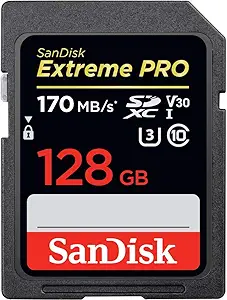
I am using the following 1 TB Sandisk SD card and have experienced no problems:
The important specs are V30 and U3. Any size from 32g to 1T. I use a 512g. No issues.
Oh, and get a good brand. They are not all created equal(ly).. I use Sandisk . Cheap brands won't always format to the stated capacity indicating bad sectors/media.
Same as the above poster, I just bought the same with more storage capacity. The ones with lower record rates (i.e., less than 170 MB/s caused recording issues for me.) These are already correctly formated for the C8. You'll just need to decide whether to auto record, record with audio, and whether to over-write when it's full. These are set in the vehicle settings menu. The size of the SD card to buy depends on how much you want to store before overwriting and, of course, spend on the SD card
This is the same exact one that I use too ! EXCELLENT choice. Lots of head room.
The PDR starts up fine and records for a few minutes and then stops. When I check the PDR icon, I have the following error:
SD Card Speed Insufficient
The SD card can't record data at the speed
required. Try using a faster card, class 10 or better,
to ensure seamless recordings.
Has anyone else encountered this problem and how was it fixed. I thought I bought the right card with plenty of space. I even deleted more than half of my recordings yesterday to make sure space wasn't an issue and I received the same message today.
Last edited by Thespian; Aug 12, 2021 at 01:40 PM.
I opened my SanDisk 32gb class 10 SD card and it was formatted as FAT. You have to reformat it to exFAT for full function according to the Spring Mountain instructor. It's easy to quick format to exFAT in Windows 10.
I opened my SanDisk 32gb class 10 SD card and it was formatted as FAT. You have to reformat it to exFAT for full function according to the Spring Mountain instructor. It's easy to quick format to exFAT in Windows 10.
I reformatted to exFAT and tried it this evening for a 75 minute drive... so far, so good. Thanks!













 Need help SD Disk for the PDR