Decline An OTA Update


Thread Starter
Safety Car


Joined: Dec 2009
Posts: 4,300
Likes: 3,199
From: Oro Valley Arizona
 Decline An OTA Update
Software updates (i.e. Windows, IOS) to all manner of devices (phones tablets PCs) have gotten geometrically better and more reliable over time. But, the 'if it ain't broke don't fix it' seems to be good advice. So our car runs fine, better than that really, starts stops top goes down, all the systems seem to function as intended. My question, what risk do I run by refusing to install an update? Seems to be enough issues with installing OTAs i.e. dead batteries, unwelcome changes, creating previously unknown issues to consider it.

Racer

Joined: Nov 2020
Posts: 353
Likes: 312
From: Rochester, MN
In June of last year, an update for my 2022 became available. The issue it "fixed" was not well defined. It ended up frying my car and I had it in the shop for two weeks as GM engineers and the dealership struggled with find the cause. I was one of at least sever car owners on this forum that had the issue with disabled cars. No updates have been pushed to my car since then. No new features, etc. GM OTA is a joke.
Here's a thread on my experience: https://www.corvetteforum.com/forums...ggestions.html
Here's a thread on my experience: https://www.corvetteforum.com/forums...ggestions.html


Race Director


Joined: Aug 2016
Posts: 12,790
Likes: 10,218
From: Garden Valley CA
Software updates (i.e. Windows, IOS) to all manner of devices (phones tablets PCs) have gotten geometrically better and more reliable over time. But, the 'if it ain't broke don't fix it' seems to be good advice. So our car runs fine, better than that really, starts stops top goes down, all the systems seem to function as intended. My question, what risk do I run by refusing to install an update? Seems to be enough issues with installing OTAs i.e. dead batteries, unwelcome changes, creating previously unknown issues to consider it.
GM has not stated their policy on whether or not OTA updates will be available after the warranty is up (at least as far as I'm aware). What would really concern me is if a OTA update causes problems our of warranty who pays for the repairs? I'm assuming it is the owner so I'm going to be very careful if I there are any OTA updates out of warranty.

Burning Brakes

Joined: Feb 2003
Posts: 935
Likes: 306
From: Long Island, NY
Software updates (i.e. Windows, IOS) to all manner of devices (phones tablets PCs) have gotten geometrically better and more reliable over time. But, the 'if it ain't broke don't fix it' seems to be good advice. So our car runs fine, better than that really, starts stops top goes down, all the systems seem to function as intended. My question, what risk do I run by refusing to install an update? Seems to be enough issues with installing OTAs i.e. dead batteries, unwelcome changes, creating previously unknown issues to consider it.

Race Director


Joined: Feb 2004
Posts: 11,039
Likes: 2,591
From: Del Boca Vista FL
I have successfully installed each OTA on my 2020 without incident and the dealership has installed a couple that would take 45 minutes or more. If I have doubt I have the dealership install it. Then if it turns into a brick they will provide me with transport home and back when they have it fixed.

Melting Slicks

Joined: May 2003
Posts: 2,720
Likes: 1,061
I have successfully installed each OTA on my 2020 without incident and the dealership has installed a couple that would take 45 minutes or more. If I have doubt I have the dealership install it. Then if it turns into a brick they will provide me with transport home and back when they have it fixed.




Drifting


Joined: Sep 2020
Posts: 1,423
Likes: 639
From: Columbia SC
My 2021 had 3 updates and 2 went perfectly, the third didn't take. I tried it the next day same result.. no joy. So I kept declining it until it went away .. Didn't count how many declines.. Then it was my 7500 mile oil and DTC filter dealer visit. Told them that one OTA won't install, they said they would get it installed. Well when I pick up my car, they told me that they could not get it to install.
4 weeks latter I got the same message to install this OTA. Tried it and no joy again. I didn't write down the number, so I don't know what its for.
What ever it is, from my seat, it does not look like the car is having a problem. So now, as it pops up I decline.
4 weeks latter I got the same message to install this OTA. Tried it and no joy again. I didn't write down the number, so I don't know what its for.
What ever it is, from my seat, it does not look like the car is having a problem. So now, as it pops up I decline.

Le Mans Master

Joined: Sep 2017
Posts: 5,767
Likes: 2,968
From: Rural NW Georgia. GO DAWGS!
2024 C8 of the Year Finalist - Unmodified
I've had one OTA on my 2021 since I picked it up in September. My C8 sits in a detached garage away from the WiFi in my house so I accepted it, got out, hooked up my battery maintainer like I do after every drive, and I guess it installed. I haven't checked and don't get any reminder messages to install it. I always install updates on my iPhones without any problems.



Moderator


Joined: Feb 2006
Posts: 39,115
Likes: 17,971
From: DFW Area TX
Some updates fix issues that can only happen in rare circumstances. However, if those circumstances happen to you, you'll wish you had the update. I've done OTA updates on my C8 and my wife's XT4 with zero issues. Also, updates can be very dependent on not only when your car was built, but also what equipment/options it has. I think declining an update is a bad idea.
Read the "Declining an Update" section below:
.
Note that you can also defer an update and that will allow you to install it at a latter date. Also note that it says that updates will never be applied without the customers consent.
Source: GM TechLink
Read the "Declining an Update" section below:
.
Over-the-Air (OTA) software updates (Fig. 1) that are pushed to vehicles remotely continue to expand in frequency and use on GM models. Vehicles using the Global A electrical architecture can support three modules for OTA updates, such as the radio, OnStar, and Serial Data Gateway modules.
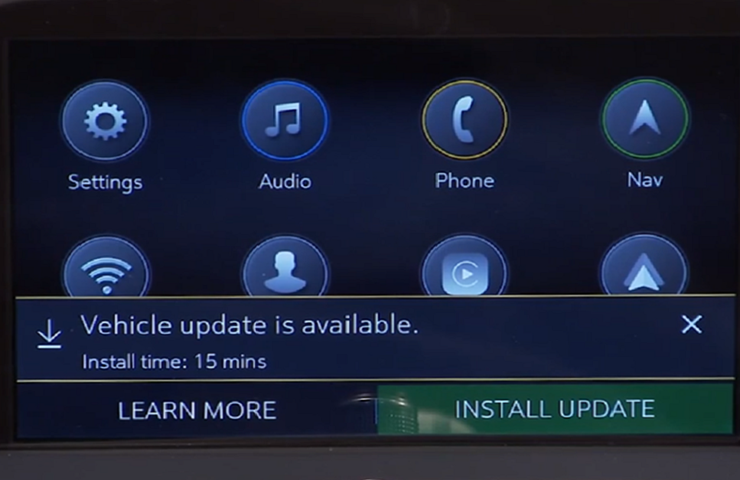 Fig. 1
The new Vehicle Intelligence Platform (VIP) electrical architecture, introduced on some 2020 and 2021 model year vehicles, powers a new electronic system that is capable of managing up to 4.5 terabytes of data processing power per hour, which is a fivefold increase in capability over the previous Global A electrical architecture. On vehicles using the VIP architecture, virtually all modules can support OTA updates, which means that the OTA software is not only for the infotainment system.
When an OTA update has been downloaded to a vehicle and is available to be installed, a message is displayed on the infotainment screen notifying the driver of the impending update. The message to accept and install an OTA update will not appear until the minimum values for the battery State of Charge (SOC) and Outside Ambient Temperature (OAT) are met.
OTA Software Download
In order for an OTA update to be pushed to a vehicle, the vehicle must be parked for the entire download process. There is not a notification to the driver that the software update is being downloaded to the vehicle. Battery SOC and OAT values are not checked before a download. These checks are only performed once the software update is downloaded and ready to be installed.
The OTA software download can occur in increments. So if the vehicle is driven during the download process, the download will be paused until the vehicle is parked and download conditions are met again.
Installing an Update
Once the OTA software is downloaded, a message on the infotainment screen will display a prompt to accept the installation. The customer does not need to remain in the vehicle during the installation of the software. However, the vehicle cannot be driven during the installation and certain vehicle features may not be available. It’s not required for the ignition to be ON for the installation to begin.
Installation time will vary based on the size of the update. The average installation will take approximately 15 minutes. (Fig. 2) Depending on the module, it may take longer to complete. The “Accept” message on the infotainment screen will provide an estimation of the approximate installation time.
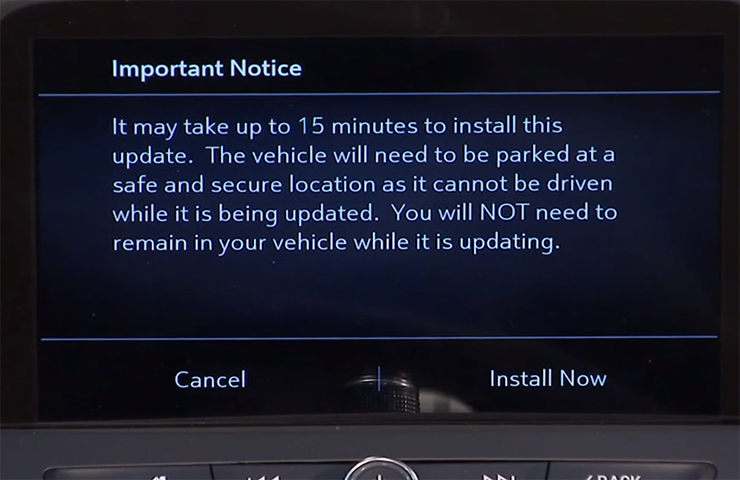 Fig. 2
Deferring or Declining an Update
When an OTA update is downloaded, customers have the option to defer or decline the installation. The standard policy for OTA software updates is to set the customer notifications to 30 ignitions cycles. If the customer does not act upon the prompts within this counter, the update package is removed from the vehicle.
If a customer ignores the notification, the ignition cycle counter decreases by one immediately.
If the customer defers the installation by selecting the “Remind Me Later” option, the ignition cycle counter decreases by one, but it will not decrease again until after the customer-selected “Remind Me Later” period, regardless of the number of ignition cycles that occur during that period.
If the OTA update installation is deferred by the customer, it can be installed at a later date through the Vehicle Software menu under Settings > System on the infotainment screen. (Fig. 3)
If the customer selects the “Decline Update” option, the update package is immediately removed from the vehicle. In this case, the vehicle will not be re-enrolled to receive the OTA update at a later date, unless the update is a Field Action. OTA updates will not be installed in a vehicle without a customer’s consent.
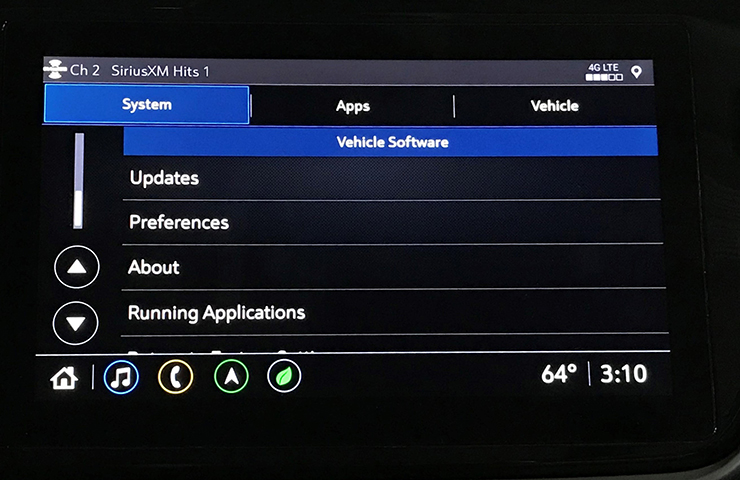 Fig. 3
Unable to Complete
There are a number of criteria that must be met in order to successfully complete the software update installation on a vehicle. The most common cause of being unable to complete an installation is the State of Charge (SOC) of the 12V battery. If the 12V battery does not meet the minimum SOC requirement of 70 percent or greater along with an Outside Ambient Temperature (OAT) greater than 14°F (-10°C), the OTA update installation will not occur. The colder the ambient air temperature is, the higher the target SOC becomes. To determine the battery SOC for VIP vehicles, go to BCM/12V Battery/Battery Sensor Module – State of Charge in GDS 2.
There may be other conditions that will affect an OTA update installation. If any of these conditions are present, a “Vehicle Conditions Not Ideal” message may display on the infotainment screen stating that conditions are not ideal to proceed with the update installation. These conditions do not indicate a failure; only that the vehicle does not meet all the criteria necessary to complete the OTA update installation. (Fig. 4)
Some customers may comment that the radio appears to stay on or is backlit after exiting the vehicle. If this occurs, it’s a telltale sign that an OTA update is in progress.
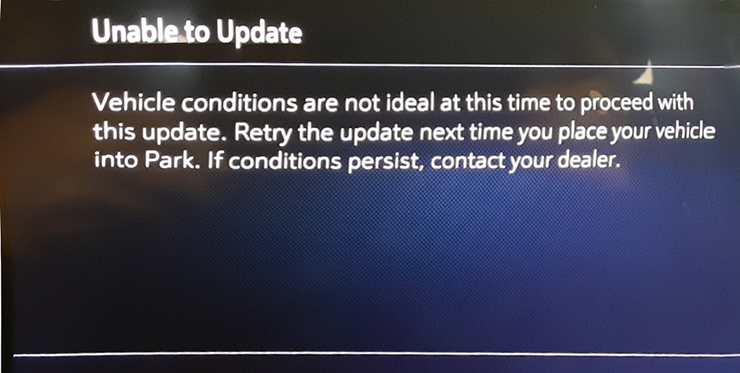 Fig. 4
.
VIP (Vehicle Intelligence Platform) was formerly referred to as Global B architecture.
.Fig. 1The new Vehicle Intelligence Platform (VIP) electrical architecture, introduced on some 2020 and 2021 model year vehicles, powers a new electronic system that is capable of managing up to 4.5 terabytes of data processing power per hour, which is a fivefold increase in capability over the previous Global A electrical architecture. On vehicles using the VIP architecture, virtually all modules can support OTA updates, which means that the OTA software is not only for the infotainment system.
When an OTA update has been downloaded to a vehicle and is available to be installed, a message is displayed on the infotainment screen notifying the driver of the impending update. The message to accept and install an OTA update will not appear until the minimum values for the battery State of Charge (SOC) and Outside Ambient Temperature (OAT) are met.
OTA Software Download
In order for an OTA update to be pushed to a vehicle, the vehicle must be parked for the entire download process. There is not a notification to the driver that the software update is being downloaded to the vehicle. Battery SOC and OAT values are not checked before a download. These checks are only performed once the software update is downloaded and ready to be installed.
The OTA software download can occur in increments. So if the vehicle is driven during the download process, the download will be paused until the vehicle is parked and download conditions are met again.
Installing an Update
Once the OTA software is downloaded, a message on the infotainment screen will display a prompt to accept the installation. The customer does not need to remain in the vehicle during the installation of the software. However, the vehicle cannot be driven during the installation and certain vehicle features may not be available. It’s not required for the ignition to be ON for the installation to begin.
Installation time will vary based on the size of the update. The average installation will take approximately 15 minutes. (Fig. 2) Depending on the module, it may take longer to complete. The “Accept” message on the infotainment screen will provide an estimation of the approximate installation time.
Fig. 2Deferring or Declining an Update
When an OTA update is downloaded, customers have the option to defer or decline the installation. The standard policy for OTA software updates is to set the customer notifications to 30 ignitions cycles. If the customer does not act upon the prompts within this counter, the update package is removed from the vehicle.
If a customer ignores the notification, the ignition cycle counter decreases by one immediately.
If the customer defers the installation by selecting the “Remind Me Later” option, the ignition cycle counter decreases by one, but it will not decrease again until after the customer-selected “Remind Me Later” period, regardless of the number of ignition cycles that occur during that period.
If the OTA update installation is deferred by the customer, it can be installed at a later date through the Vehicle Software menu under Settings > System on the infotainment screen. (Fig. 3)
If the customer selects the “Decline Update” option, the update package is immediately removed from the vehicle. In this case, the vehicle will not be re-enrolled to receive the OTA update at a later date, unless the update is a Field Action. OTA updates will not be installed in a vehicle without a customer’s consent.
Fig. 3Unable to Complete
There are a number of criteria that must be met in order to successfully complete the software update installation on a vehicle. The most common cause of being unable to complete an installation is the State of Charge (SOC) of the 12V battery. If the 12V battery does not meet the minimum SOC requirement of 70 percent or greater along with an Outside Ambient Temperature (OAT) greater than 14°F (-10°C), the OTA update installation will not occur. The colder the ambient air temperature is, the higher the target SOC becomes. To determine the battery SOC for VIP vehicles, go to BCM/12V Battery/Battery Sensor Module – State of Charge in GDS 2.
There may be other conditions that will affect an OTA update installation. If any of these conditions are present, a “Vehicle Conditions Not Ideal” message may display on the infotainment screen stating that conditions are not ideal to proceed with the update installation. These conditions do not indicate a failure; only that the vehicle does not meet all the criteria necessary to complete the OTA update installation. (Fig. 4)
Some customers may comment that the radio appears to stay on or is backlit after exiting the vehicle. If this occurs, it’s a telltale sign that an OTA update is in progress.
Fig. 4.
VIP (Vehicle Intelligence Platform) was formerly referred to as Global B architecture.
Note that you can also defer an update and that will allow you to install it at a latter date. Also note that it says that updates will never be applied without the customers consent.
Source: GM TechLink