









Try wifi for update

Thread Starter
Racer


Joined: Jun 2021
Posts: 443
Likes: 382
 Try wifi for update
Maybe this will help others that are having update issues...
I just did mine a couple days ago, '22 delivered in Febuary. I let OnStar expire and my update failed three times, in and out of the garage, but it always woke up and started. I then connected to my home wifi and tried again. It finished successfully in 5 minutes.
GM needs a way to back out an update if it causes issues or bricks the car. As my software engineer friend says "amateures"
I just did mine a couple days ago, '22 delivered in Febuary. I let OnStar expire and my update failed three times, in and out of the garage, but it always woke up and started. I then connected to my home wifi and tried again. It finished successfully in 5 minutes.
GM needs a way to back out an update if it causes issues or bricks the car. As my software engineer friend says "amateures"

Livin the Life


Joined: Feb 2021
Posts: 1,687
Likes: 1,800
From: Simi Valley, CA
2024 C8 of the Year Winner - Modified
Using my home WiFi is the only way I have done the updates….each one was successful without a hitch. I do however roll the windows down and plug in the CTEK just in case! Haven’t had an update in about 6 months however……

Safety Car


Joined: Sep 2011
Posts: 3,913
Likes: 395
From: Cary NC
A lot of people’s issues with updates have not been with downloading, but with installing. After downloading, the process waits until the car is turned off in order to start the install. A less than full battery appears to be the culprit in failed installations. Hooking the car up to my CTEK assured successful installation. But never had an issue using the built in 4g to do the downloads.

Moderator


Joined: Feb 2006
Posts: 39,135
Likes: 17,985
From: DFW Area TX
So much misinformation on OTA updates. Please read the following (originally posted in OTA Updates - General Information thread. A link to this thread can also be found in the Manuals, Reference Material, FAQs, DIY Threads sticky thread):
Over-the-Air (OTA) software updates (Fig. 1) that are pushed to vehicles remotely continue to expand in frequency and use on GM models. Vehicles using the Global A electrical architecture can support three modules for OTA updates, such as the radio, OnStar, and Serial Data Gateway modules.
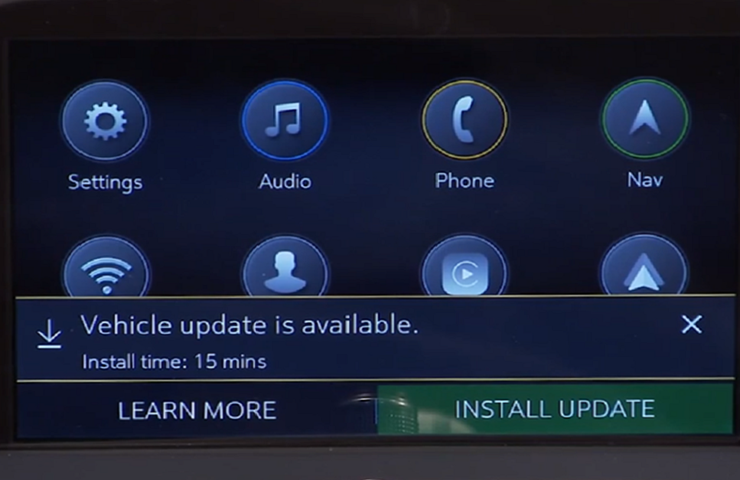 Fig. 1
The new Vehicle Intelligence Platform (VIP) electrical architecture, introduced on some 2020 and 2021 model year vehicles, powers a new electronic system that is capable of managing up to 4.5 terabytes of data processing power per hour, which is a fivefold increase in capability over the previous Global A electrical architecture. On vehicles using the VIP architecture, virtually all modules can support OTA updates, which means that the OTA software is not only for the infotainment system.
When an OTA update has been downloaded to a vehicle and is available to be installed, a message is displayed on the infotainment screen notifying the driver of the impending update. The message to accept and install an OTA update will not appear until the minimum values for the battery State of Charge (SOC) and Outside Ambient Temperature (OAT) are met.
OTA Software Download
In order for an OTA update to be pushed to a vehicle, the vehicle must be parked for the entire download process. There is not a notification to the driver that the software update is being downloaded to the vehicle. Battery SOC and OAT values are not checked before a download. These checks are only performed once the software update is downloaded and ready to be installed.
The OTA software download can occur in increments. So if the vehicle is driven during the download process, the download will be paused until the vehicle is parked and download conditions are met again.
Installing an Update
Once the OTA software is downloaded, a message on the infotainment screen will display a prompt to accept the installation. The customer does not need to remain in the vehicle during the installation of the software. However, the vehicle cannot be driven during the installation and certain vehicle features may not be available. It’s not required for the ignition to be ON for the installation to begin.
Installation time will vary based on the size of the update. The average installation will take approximately 15 minutes. (Fig. 2) Depending on the module, it may take longer to complete. The “Accept” message on the infotainment screen will provide an estimation of the approximate installation time.
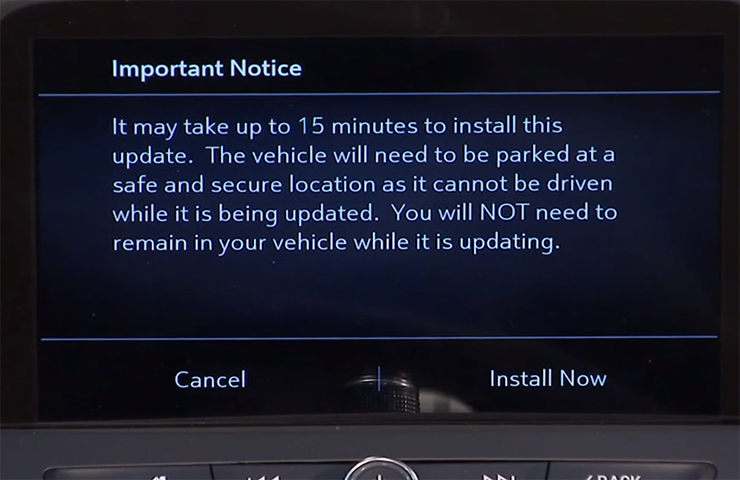 Fig. 2
Deferring or Declining an Update
When an OTA update is downloaded, customers have the option to defer or decline the installation. The standard policy for OTA software updates is to set the customer notifications to 30 ignitions cycles. If the customer does not act upon the prompts within this counter, the update package is removed from the vehicle.
If a customer ignores the notification, the ignition cycle counter decreases by one immediately.
If the customer defers the installation by selecting the “Remind Me Later” option, the ignition cycle counter decreases by one, but it will not decrease again until after the customer-selected “Remind Me Later” period, regardless of the number of ignition cycles that occur during that period.
If the OTA update installation is deferred by the customer, it can be installed at a later date through the Vehicle Software menu under Settings > System on the infotainment screen. (Fig. 3)
If the customer selects the “Decline Update” option, the update package is immediately removed from the vehicle. In this case, the vehicle will not be re-enrolled to receive the OTA update at a later date, unless the update is a Field Action. OTA updates will not be installed in a vehicle without a customer’s consent.
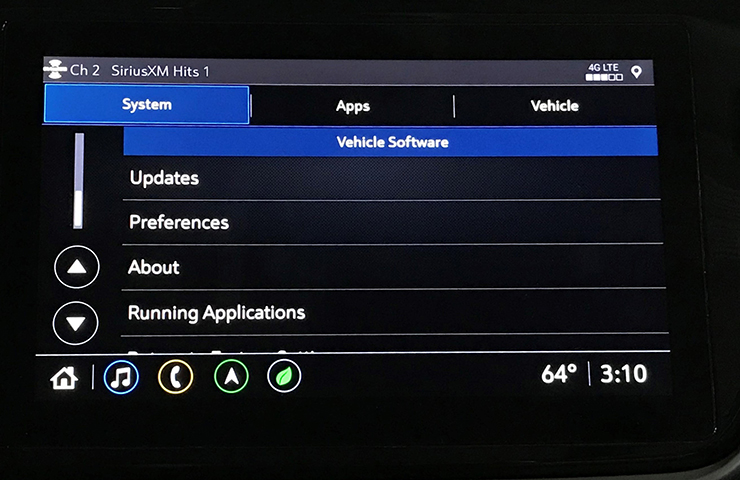 Fig. 3
Unable to Complete
There are a number of criteria that must be met in order to successfully complete the software update installation on a vehicle. The most common cause of being unable to complete an installation is the State of Charge (SOC) of the 12V battery. If the 12V battery does not meet the minimum SOC requirement of 70 percent or greater along with an Outside Ambient Temperature (OAT) greater than 14°F (-10°C), the OTA update installation will not occur. The colder the ambient air temperature is, the higher the target SOC becomes. To determine the battery SOC for VIP vehicles, go to BCM/12V Battery/Battery Sensor Module – State of Charge in GDS 2.
There may be other conditions that will affect an OTA update installation. If any of these conditions are present, a “Vehicle Conditions Not Ideal” message may display on the infotainment screen stating that conditions are not ideal to proceed with the update installation. These conditions do not indicate a failure; only that the vehicle does not meet all the criteria necessary to complete the OTA update installation. (Fig. 4)
Some customers may comment that the radio appears to stay on or is backlit after exiting the vehicle. If this occurs, it’s a telltale sign that an OTA update is in progress.
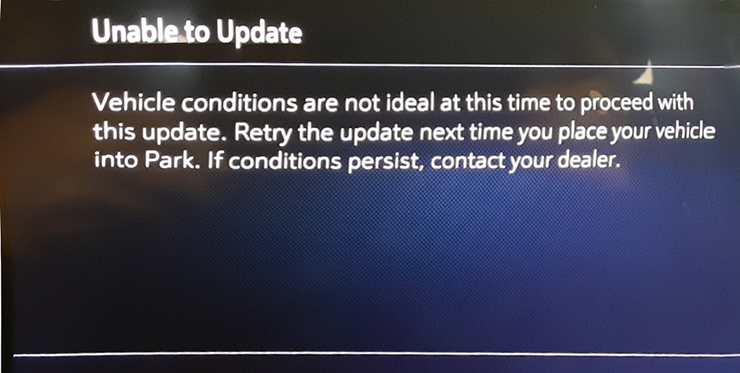 Fig. 4
.
VIP (Vehicle Intelligence Platform) was formerly referred to as Global B architecture.
Note that it says that updates will never be applied without the customers consent.
Source: GM TechLink
Fig. 1The new Vehicle Intelligence Platform (VIP) electrical architecture, introduced on some 2020 and 2021 model year vehicles, powers a new electronic system that is capable of managing up to 4.5 terabytes of data processing power per hour, which is a fivefold increase in capability over the previous Global A electrical architecture. On vehicles using the VIP architecture, virtually all modules can support OTA updates, which means that the OTA software is not only for the infotainment system.
When an OTA update has been downloaded to a vehicle and is available to be installed, a message is displayed on the infotainment screen notifying the driver of the impending update. The message to accept and install an OTA update will not appear until the minimum values for the battery State of Charge (SOC) and Outside Ambient Temperature (OAT) are met.
OTA Software Download
In order for an OTA update to be pushed to a vehicle, the vehicle must be parked for the entire download process. There is not a notification to the driver that the software update is being downloaded to the vehicle. Battery SOC and OAT values are not checked before a download. These checks are only performed once the software update is downloaded and ready to be installed.
The OTA software download can occur in increments. So if the vehicle is driven during the download process, the download will be paused until the vehicle is parked and download conditions are met again.
Installing an Update
Once the OTA software is downloaded, a message on the infotainment screen will display a prompt to accept the installation. The customer does not need to remain in the vehicle during the installation of the software. However, the vehicle cannot be driven during the installation and certain vehicle features may not be available. It’s not required for the ignition to be ON for the installation to begin.
Installation time will vary based on the size of the update. The average installation will take approximately 15 minutes. (Fig. 2) Depending on the module, it may take longer to complete. The “Accept” message on the infotainment screen will provide an estimation of the approximate installation time.
Fig. 2Deferring or Declining an Update
When an OTA update is downloaded, customers have the option to defer or decline the installation. The standard policy for OTA software updates is to set the customer notifications to 30 ignitions cycles. If the customer does not act upon the prompts within this counter, the update package is removed from the vehicle.
If a customer ignores the notification, the ignition cycle counter decreases by one immediately.
If the customer defers the installation by selecting the “Remind Me Later” option, the ignition cycle counter decreases by one, but it will not decrease again until after the customer-selected “Remind Me Later” period, regardless of the number of ignition cycles that occur during that period.
If the OTA update installation is deferred by the customer, it can be installed at a later date through the Vehicle Software menu under Settings > System on the infotainment screen. (Fig. 3)
If the customer selects the “Decline Update” option, the update package is immediately removed from the vehicle. In this case, the vehicle will not be re-enrolled to receive the OTA update at a later date, unless the update is a Field Action. OTA updates will not be installed in a vehicle without a customer’s consent.
Fig. 3Unable to Complete
There are a number of criteria that must be met in order to successfully complete the software update installation on a vehicle. The most common cause of being unable to complete an installation is the State of Charge (SOC) of the 12V battery. If the 12V battery does not meet the minimum SOC requirement of 70 percent or greater along with an Outside Ambient Temperature (OAT) greater than 14°F (-10°C), the OTA update installation will not occur. The colder the ambient air temperature is, the higher the target SOC becomes. To determine the battery SOC for VIP vehicles, go to BCM/12V Battery/Battery Sensor Module – State of Charge in GDS 2.
There may be other conditions that will affect an OTA update installation. If any of these conditions are present, a “Vehicle Conditions Not Ideal” message may display on the infotainment screen stating that conditions are not ideal to proceed with the update installation. These conditions do not indicate a failure; only that the vehicle does not meet all the criteria necessary to complete the OTA update installation. (Fig. 4)
Some customers may comment that the radio appears to stay on or is backlit after exiting the vehicle. If this occurs, it’s a telltale sign that an OTA update is in progress.
Fig. 4.
VIP (Vehicle Intelligence Platform) was formerly referred to as Global B architecture.
Note that it says that updates will never be applied without the customers consent.
Source: GM TechLink

Race Director

Joined: Aug 2016
Posts: 12,812
Likes: 10,229
From: Garden Valley CA
The vehicle will use the AT&T 4G network to download the update even if you don't have a paid OnStar subscription. It will also use wi-fi to download the update if the vehicle is connected to wi-fi.
Corvette Stories
The Best of Corvette for Corvette Enthusiasts

Top 10 Most Expensive Corvettes Ever Sold on Bring A Trailer
Brett Foote
10 Things Every Corvette Owner Needs (2026 Edition)
Michael S. Palmer
8 Most "Only Corvette Owners Understand" Quirks and Problems
Pouria Savadkouei
10 Reasons the C6 Z06 is Still A Performance Benchmark After 20 Years
Joe Kucinski
How Much Horsepower Every Corvette Engine "LOST" in 1972
Joe Kucinski
Top 10 DOs and DON'Ts for Protecting Your Convertible Top!
Michael S. Palmer
Top 10 Most Explosive Corvettes Ever Made: Power-to-Weight Ratio Ranked!
Joe Kucinski
150 hp to 1,250 hp: Every Corvette Generation Compared by the Specs That Matter
Joe Kucinski
8 Coolest Corvette Pace Cars (and Replicas) of All Time
Verdad Gallardo


Race Director
Joined: Aug 2016
Posts: 12,812
Likes: 10,229
From: Garden Valley CA
The message means it has been downloaded and is ready to install. It doesn't ask permission to download. It won't download if you have the download option turned off so you will never get a message of the download option is turned off.