When you click on links to various merchants on this site and make a purchase, this can result in this site earning a commission. Affiliate programs and affiliations include, but are not limited to, the eBay Partner Network.
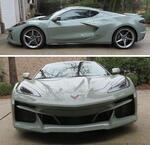
Brand new C8 z51 3LT, just picked it up on Tuesday
As I was driving, I noticed the speed limit wouldn't populate on the HUD or speedometer. I clicked Nav and get this error:
SD Card Error
SD card has been removed.
(0×40000.0x.0x.4272.0x)
I did a search and found this is a common issue it looks like, but I can't seem to resolve it with the methods that were listed. Software is up to date
So far, i've tried:
1. Play no music (I actually turned off my phone, with no USB plugged in, nothing else plugged in other than the nav SD card)
2. Tried with the card both locked and unlocked.
3. Went with this method on midengine forums
Start the car with you in it
Pull out the NAV SD card
Turn the car off
Open and close the door
Sit in the car for 2 minutes, or longer but definitely 2 minutes
start the car
Reinsert the NAV SD card
So far, no luck with any of them. Anybody have any resolutions, other than taking to the dealer? Obviously, that's my next step, but i'm hoping it's something I can do.
^^^^ You're in luck! Had the issue for about a year! Many posts asking for help. Tried all suggestions. Found the solution, switched to another brand flash drive as discovered on a GM Service Computer Note by my great C8 Trained tech. Here are the details:
One member figured out the issue. It's the Flash Drive and NAV loading on the same buss when you start the car. He was able to eliminate the issue by reducing the bit rate on all his recorded songs below 160 bps. Funny I found mine was accruing 1/3 of the time and ~1/3 of my songs had bit rates above 160 bps. Daughter who was in charge of Academic Computing at her Alma Mater recommended Open Office software that did it in one stroke! You'll find the software, as I have, good for ripping current songs as it safe and on your computer, Audacity. BUT in my case only reduced the frequency to 10 to 15% of my starts. PIA as you can't just restart instantly and have it work. Like you, I found the issue when HUD was not displaying street speed limit.
Error started after year one as did not have anything plugged into the USB, was using free XM Radio. Whenn FREE was up, I plugged in the several flash drives I had used successfully in my 2 C7s, a 2014 Z51 and my 2017 Grand Sport and it started. First about a 1/3 of the time then 10 to 15%. So while at the dealer for service mentioned it to the great C8 Trained Tech. As yourself I found it's an issue with other GM cars than Corvettes if you look at the Net. BTW not a lot of folks on his foum who use their CELL phone etc and NOT flash drives for music. Mentioned to him and he loaded the latest GM Infotainment software. No help.
THEN THE TECH LOOKED AT THE GM SERVCIE COMPUTER NOTES AND IT SAID IF USING A SANDISK FLSH DRIVE CAN BE THE CAUSE.
I asked why and he said techs often put in notes and in this case no explanation, just what he found. NOW BEFORE ANYONE GETS THIER SORTS IN A KNOT, I believe I found the reason. In fact, have been using SanDisk for years with no issue, they are the market leader and probably the cause!
Mention some folks not reading ahead and being upset because they use SanDisk as have I for years. On another Forum an OLD AH said I had posted this for years about SanDisk! That is total BS. Up to this occurrence 4 or 5 months ago when the C8 tech found the solution I never raised an issue. never considered that an issue. I asked this AH in a PM to remove that stupid statement. He refused! Even though in that past as I have in all after I found the solution I clarified as it was probably a bootleg flash drive! Was 1st upset but then thought, very thankful my memory is still very sharp at 80 years old! And since I exercise 7 days a week and have for almost 40 years as have my own gym I'm thankfully in excellent physical shape. In fact on Back Day do 3 sets of 10 pull ups as part of that routine. I then felt sorry for the old dude as it's probably just onset of Alzheimer's!
Error I was getting ~1/3 of my starts and after using a solution a forum member found after defining the reason it reduced to 10 to 15% of the starts, in my case. Still PIA. BTW could not just shut the car off and immediately restart. Had to be off for a period of time before the next start.
Even purchased an updated NAV SC Card. No help. Actually, has nothing to do with the NAV Card, Card Reader etc. Some dealers installed new card renders, I cleaned and even shimmed the flash drive thinking it was a contact issue. HAS NOTHING TO DO WIT THE NAV SC CARD!
C8 Tech tried uploading the latest infotainment software. No help. Only thing I found was a Bulletin on another Chevy car that said it was a software anomaly and had no solution! Tech found on the GM Service Computer a note another Tech posted saying it could be a SanDisk flash drive! Was no explanation and my great tech said that is comment we put notes in when we find something but may not know why! Bought this Verbatim flash drive and it's been working fine for 4 or 5 months! Internet sources said there are many bootleg flash drives and SD cards. My industrial experience is parts copiers pick the market leader to copy! Our Trademark Heliarc TIG torches and parts, collets, collet bodies, gas lenes, etc started to be copied years ago when our patents ran out. Wrote many letters saying can't even say Heliarc welding at that is still OUR trademark name for TIG welding. So copiers use different names, but many use our none trademarked part number that have become like Xerox, Generic! Heck even out leading competitors sell copies (probably made in China!) You' see that mentioned in my old PDF as well.
^^^Just to clarify above and apologizes to OP for going off-topic as this has nothing to do with your problem...
I've had no problems whatsoever using both Sandisk SD and Sandisk flash drive...Just be careful where you purchase them as there are corrupted drives coming out of China and sold on various websites....This is the reason why some others have had problems...Only purchased from a trusted source!
Here is what I'm using with no conflicts or issues:
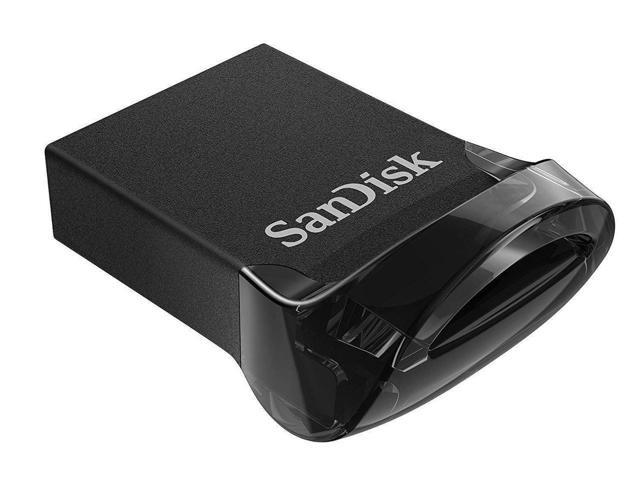
SanDisk 32GB 3-Pack Ultra Fit USB 3.1 Flash Drive
SanDisk 256GB High Endurance Video microSDXC Card with Adapter
^^^^ You're in luck! Had the issue for about a year! Many posts asking for help. Tried all suggestions. Found the solution, switched to another brand flash drive as discovered on a GM Service Computer Note by my great C8 Trained tech. Here are the details:
One member figured out the issue. It's the Flash Drive and NAV loading on the same buss when you start the car. He was able to eliminate the issue by reducing the bit rate on all his recorded songs below 160 bps. Funny I found mine was accruing 1/3 of the time and ~1/3 of my songs had bit rates above 160 bps. Daughter who was in charge of Academic Computing at her Alma Mater recommended Open Office software that did it in one stroke! You'll find the software, as I have, good for ripping current songs as it safe and on your computer, Audacity. BUT in my case only reduced the frequency to 10 to 15% of my starts. PIA as you can't just restart instantly and have it work. Like you, I found the issue when HUD was not displaying street speed limit.
Error started after year one as did not have anything plugged into the USB, was using free XM Radio. Whenn FREE was up, I plugged in the several flash drives I had used successfully in my 2 C7s, a 2014 Z51 and my 2017 Grand Sport and it started. First about a 1/3 of the time then 10 to 15%. So while at the dealer for service mentioned it to the great C8 Trained Tech. As yourself I found it's an issue with other GM cars than Corvettes if you look at the Net. BTW not a lot of folks on his foum who use their CELL phone etc and NOT flash drives for music. Mentioned to him and he loaded the latest GM Infotainment software. No help.
THEN THE TECH LOOKED AT THE GM SERVCIE COMPUTER NOTES AND IT SAID IF USING A SANDISK FLSH DRIVE CAN BE THE CAUSE.
I asked why and he said techs often put in notes and in this case no explanation, just what he found. NOW BEFORE ANYONE GETS THIER SORTS IN A KNOT, I believe I found the reason. In fact, have been using SanDisk for years with no issue, they are the market leader and probably the cause!
mention some folks not reading ahead and being upset because they use SanDisk as have I for years. On another Forum an OLD AH said I had posted this for years about SanDisk! That is total BS. Up to this occurrence 4 or 5 months ago when the C8 tech found the solution I never raised an issue. I asked this AH in a PM to remove that stupid statement. He refused! Even though in that past as I have in all after I found the solution I clarified as it was probably a bootleg flash drive! Was 1st upset but then thought, very thankful my memory is still very sharp at 80 years old! And since I exercise 7 days a week and have for almost 40 years as have my own gym I'm thankfully in excellent physical shape. In fact on Back Day do 3 sets of 10 pull ups as part of that routine. I then felt sorry for the old dude as it's probably just onset of Alzheimer's!
Error I was getting ~1/3 of my starts and after using a solution a forum member found after defining the reason it reduced to 10 to 15% of the starts, in my case. Still PIA. BTW could not just shut the car off and immediately restart. Had to be off for a period of time before the next start.
Even purchased an updated NAV SC Card. No help. Actually, has nothing to do with the NAV Card, Card Reader etc. Some dealers installed new card renders, I cleaned and even shimmed the flash drive thinking it was a contact issue. HAS NOTHING TO DO WIT THE NAV SC CARD!
C8 Tech tried uploading the latest infotainment software. No help. Only thing I found was a Bulletin on another Chevy car that said it was a software anomaly and had no solution! Tech found on the GM Service Computer a note another Tech posted saying it could be a SanDisk flash drive! Was no explanation and my great tech said that is comment we put notes in when we find something but may not know why! Bought this Verbatim flash drive and it's been working fine for 4 or 5 months! Internet sources said there are many bootleg flash drives and SD cards. My industrial experience is parts copiers pick the market leader to copy! Our Trademark Heliarc TIG torches and parts, collets, collet bodies, gas lenes, etc started to be copied years ago when our patents ran out. Wrote many letters saying can't even say Heliarc welding at that is still OUR trademark name for TIG welding. So copiers use different names, but many use our none trademarked part number that have become like Xerox, Generic! Heck even out leading competitors sell copies (probably made in China!) You' see that mentioned in my old PDF as well.
Thank you. I'm kind of confused though, I don't have anything other than the nav SD card plugged into the car. No flash drive, no other memory card (not even PDR)
[QUOTE=JerryU;1606393224]^^^^ You're in luck! Had the issue for about a year! ............../QUOTE]
Jerry, my car was delivered with a Nav SD card, already populated with the Map data. I don't see where the OP says he replaced it with a different one. Wouldn't the Nav SD card already in the car from the factory be correct? I get that there are inferior cards out there, and it would be a problem if the OP had used a bad card for the PDR or replaced the Nav SD card with a bad one. I'm not seeing where that happened here.
I've had no problems whatsoever using both Sandisk SD and Sandisk flash drive...Just be careful where you purchase them as there are corrupted drives coming out of China and sold on various websites....This is the reason why some others have had problems...Only purchased from a trusted source!
Here is what I'm using with no conflicts or issues:
SanDisk 32GB 3-Pack Ultra Fit USB 3.1 Flash Drive
SanDisk 256GB High Endurance Video microSDXC Card with Adapter
Same with me. Have used them for years. It was only when the C8 Tech found the note on the GM SERCISE COMPUTER did I have a clue that could be the case. BUT in fairness these were the exact same SanDisk flash drives I have used successfully for 8 years in my 2014 C7 and 2017 Grand Sport. It is possible that the C8 requires a faster read time as the USB flash drive and the NAV SD Card apparently are loading on the same Buss.
Just relaying what was a frustrating year of having NO solution. Many Posts looking for an answer and tried many possible solutions. Including buying an updated NAV SC Card from GM. That was no help. Tried cleaning and even shimming my NAV SD Card with no luck.
^^^^ You're in luck! Had the issue for about a year! ............../QUOTE]
Jerry, my car was delivered with a Nav SD card, already populated with the Map data. I don't see where the OP says he replaced it with a different one. Wouldn't the Nav SD card already in the car from the factory be correct? I get that there are inferior cards out there, and it would be a problem if the OP had used a bad card for the PDR or replaced the Nav SD card with a bad one. I'm not seeing where that happened here.
Andy all cars with NAV come with a GM NAV SD Card, as did mine. Part of the issue it the error has NOTHING TO DO WITH THE NAV SD CARD! It's just that the flash drive and NAV initiate on the same BUSS and it's the flash drive that prevents the NAV SC Card from loading. have no idea what brand of SD Card it is and as I said even bought an updated one from GM to see if that was the issue. It was not same error.. Operated the same still NAV HAS BEEN REMOVED Error!
If you had the issue for a year as I did you would see on this forum and other Chevy car and trucks forums that use the same infotainment system folks got the same error. Dealers replaced NAV card readers and no help. As I said found a Bulletin on another Chevy that said as a Bottom-Line Software Anomaly with NO solution!
Thank you. I'm kind of confused though, I don't have anything other than the nav SD card plugged into the car. No flash drive, no other memory card (not even PDR)
I thought that is what you said. In your case it seems like it isn't associated with interference with another card. Likely either a bad NAV card or a bad reader. It looks like you tried everything reasonable and it requires a dealer visit to resolve.
Thank you. I'm kind of confused though, I don't have anything other than the nav SD card plugged into the car. No flash drive, no other memory card (not even PDR)
Hmm, other things initiate on that same BUSS. My guess is something is causing the loading conflict. For some like me it was the USB flash drive that caused the NAV not to initiate.
Have anything else plugged in or your phone trying to connect?
Hmm, other things initiate on that same BUSS. My guess is something is causing the loading conflict. For some like me it was the USB flash drive that caused the NAV not to initiate.
Have anything else plugged in or your phone trying to connect?
Nope, phone is totally off. Not a single thing plugged in to the car - although I'm going to unpair it maybe too? Then try again
Im down for trying anything, not only for this, but just in general. Even if it doesn't work, chances are you learn something along the way.
Originally Posted by LeJerk
So what's the TL;DR solution? Even though I tried to read that giant wall of text. A faster SD card?
Nope. the GM NAV SD Card is their own, have no chocie. Is a faster flash drive needed. Perhaps from the 8 year old ones I tried that failed. But part of my year long effort I had bought a new SanDisk one as mentioned in my PDF. SanDisk has been my brand source. BUT I bought the new one from Amazon as well. That was before the Tech Found the comment.
I would buy a flash drive from a reliable source and frankly hard to tell on Amazon of the many suppliers who might be selling bootleg copies! However, the OP's issue is NOT flash drive related. Apparently same message as may have gotten.
For the OP have no answer. As I said I tried a new Nav Card bought from GM. Even talked with them on the phone. No help.
Others had the dealer (with flash drive/NAV SD Card failure message with no help. As listed in my PDF, quoting: "I found a Technical Service Bulletin 19-NA-279 with the Subject - Radio Software Version V807. I looked at the Bulletin and although not for the C8 it states: “SD Card Error code 0x40000 • SD Card Removed message when card has not been removed • Cause The cause of the condition may be "software anomalies.” Bottom Line: What GM Bulletin States Is No Help!"
My guess is dealer will replace the SD Card reader. Hope in this case it works. Hope OP posts the final solution, when found.
I had the same problem on my 2022. Took it to the dealer yesterday. They gave me a new Nav SD card and it’s fixed now (under warranty). I don't use the usb port for music.
Brand new C8 z51 3LT, just picked it up on Tuesday
As I was driving, I noticed the speed limit wouldn't populate on the HUD or speedometer. I clicked Nav and get this error:
SD Card Error
SD card has been removed.
(0×40000.0x.0x.4272.0x)
I did a search and found this is a common issue it looks like, but I can't seem to resolve it with the methods that were listed. Software is up to date
So far, i've tried:
1. Play no music (I actually turned off my phone, with no USB plugged in, nothing else plugged in other than the nav SD card)
2. Tried with the card both locked and unlocked.
3. Went with this method on midengine forums
Start the car with you in it
Pull out the NAV SD card
Turn the car off
Open and close the door
Sit in the car for 2 minutes, or longer but definitely 2 minutes
start the car
Reinsert the NAV SD card
So far, no luck with any of them. Anybody have any resolutions, other than taking to the dealer? Obviously, that's my next step, but i'm hoping it's something I can do.
Designer Imagines A Corvette That Looks More Like a Corvette Than the Corvette
Slideshow: A Jaguar designer's personal project imagines what a modern front-engined Corvette might look like if Chevrolet revisited the golden age of the Stingray.




 Nav SD Card Error