


Corvetteforum HELP FAQ
Thread Starter
Burning Brakes

Joined: Dec 2002
Posts: 1,062
Likes: 5
From: Hasbrouck Heights NJ
 Corvetteforum HELP FAQ
The purpose of this thread is to demonstrate some of the basic and advanced features available on the forum. There are several threads already available on the forum that discuss a lot of these topics, they are tied into this one thread to simplify the “how do I” questions. You can read the entire thread or simply click the link below for details on a topic:
Basic forum details – Site navigation tips.
Forum search – Details on advanced search.
Thread Formatting – Details on quote, bold, italics, and pasting links.
Inserting pictures all members – details on inserting pictures in your threads.
Inserting pictures / files supporting members – Additional capabilities for paid subscribers.
Spell check
Browser basics – Things you probably already know but perhaps not.
Internet basics – Describe common internet terms used in this thread.
Supporting member details (pay to play, additional features)
Stars defined
General help forum – Post “how do I” questions in this forum if not found in this thread.
Test forum – This is where you should familiarize yourself with these tips
Forum main FAQ
Basic forum details – Site navigation tips.
Forum search – Details on advanced search.
Thread Formatting – Details on quote, bold, italics, and pasting links.
Inserting pictures all members – details on inserting pictures in your threads.
Inserting pictures / files supporting members – Additional capabilities for paid subscribers.
Spell check
Browser basics – Things you probably already know but perhaps not.
Internet basics – Describe common internet terms used in this thread.
Supporting member details (pay to play, additional features)
Stars defined
General help forum – Post “how do I” questions in this forum if not found in this thread.
Test forum – This is where you should familiarize yourself with these tips
Forum main FAQ
Last edited by bweaver999; Nov 18, 2006 at 02:24 AM.
Thread Starter
Burning Brakes
Joined: Dec 2002
Posts: 1,062
Likes: 5
From: Hasbrouck Heights NJ
Basic forum details – Site navigation tips.
Okay, you found and became a member of CorvetteForum. A few nice to know things about the site:
Basic navigation
BasicNavigation.JPG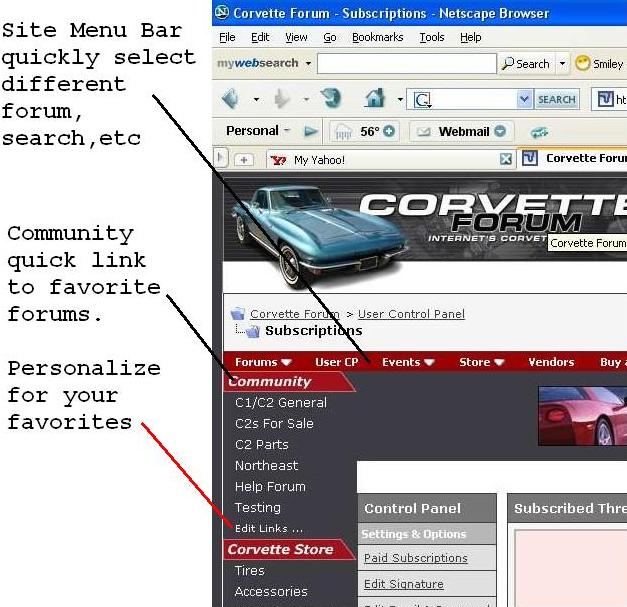
User CP (Control Panel) You should check out your CP and verify notofication settings for PM. Believe the default is no notification so if you recieve a PM you won't be notified. Check "Edit Options".
UserCP.JPG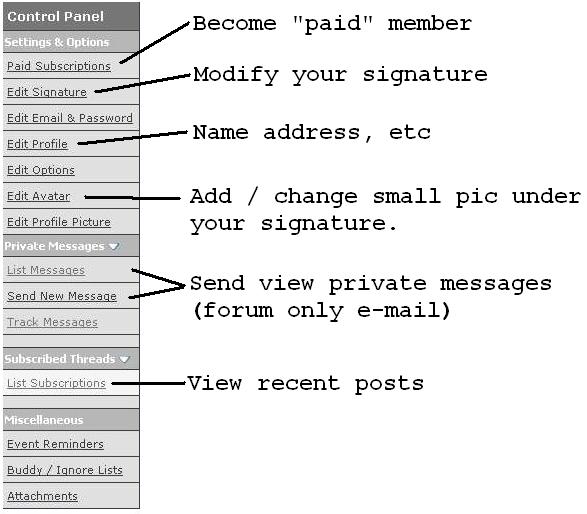
Also view the forum FAQ for additional details.
Basic navigation
BasicNavigation.JPG
User CP (Control Panel) You should check out your CP and verify notofication settings for PM. Believe the default is no notification so if you recieve a PM you won't be notified. Check "Edit Options".
UserCP.JPG
Also view the forum FAQ for additional details.
Last edited by bweaver999; Dec 28, 2006 at 01:32 AM.
Thread Starter
Burning Brakes
Joined: Dec 2002
Posts: 1,062
Likes: 5
From: Hasbrouck Heights NJ
Forum search – Details on advanced search.
The main forum bar has a search button, simply click on it for a quick search of “active articles. It has an advanced button to search which is well described in this thread:
Advanced earch tip http://forums.corvetteforum.com/show...84&postcount=3
Note: Advanced search can return current as well as archived articles. Archived articles can be viewed but are closed and cannot re-opened. If you find a closed article close to your question but does not fully answer it, you need to open a new thread and preferably paste a link to the archive.
Normal thread.
OpenThread.jpg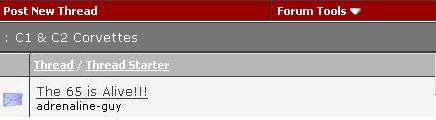
Search screen, closed / archived thread.
ArchiveClosedThreadSearch.jpg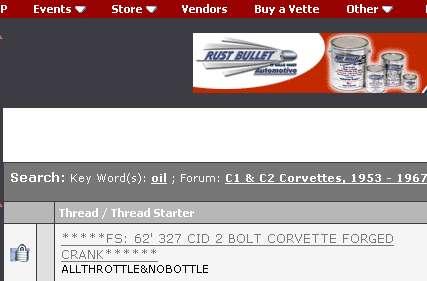
View of closed / archived thread.
ArchiveClosedThread.jpg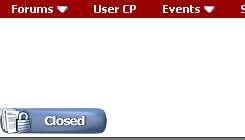
When viewing a closed thread, closed is displayed where you would normally see a post icon. You can not post a reply.
Advanced earch tip http://forums.corvetteforum.com/show...84&postcount=3
Note: Advanced search can return current as well as archived articles. Archived articles can be viewed but are closed and cannot re-opened. If you find a closed article close to your question but does not fully answer it, you need to open a new thread and preferably paste a link to the archive.
Normal thread.
OpenThread.jpg
Search screen, closed / archived thread.
ArchiveClosedThreadSearch.jpg
View of closed / archived thread.
ArchiveClosedThread.jpg
When viewing a closed thread, closed is displayed where you would normally see a post icon. You can not post a reply.
Last edited by bweaver999; Nov 18, 2006 at 02:13 AM.
Thread Starter
Burning Brakes
Joined: Dec 2002
Posts: 1,062
Likes: 5
From: Hasbrouck Heights NJ
Thread Formatting – Details on quote, bold, italics, and pasting links.
To familiarize yourself with format commands, click this line and use the test forum.
To format text (quote box, bold, etc.) you must use HTML tags. The forum editor has buttons to simplify this but you need to be aware of HTML tag basics. An HTML tag tells your browser where to start a function and where to end it. The braces [] signify a tag start. Braces with a / [/] signifies a function stop. Some tags also use double quote ["] marks. The best way to show tags is in the attached image file and text file:
FormatImage.jpj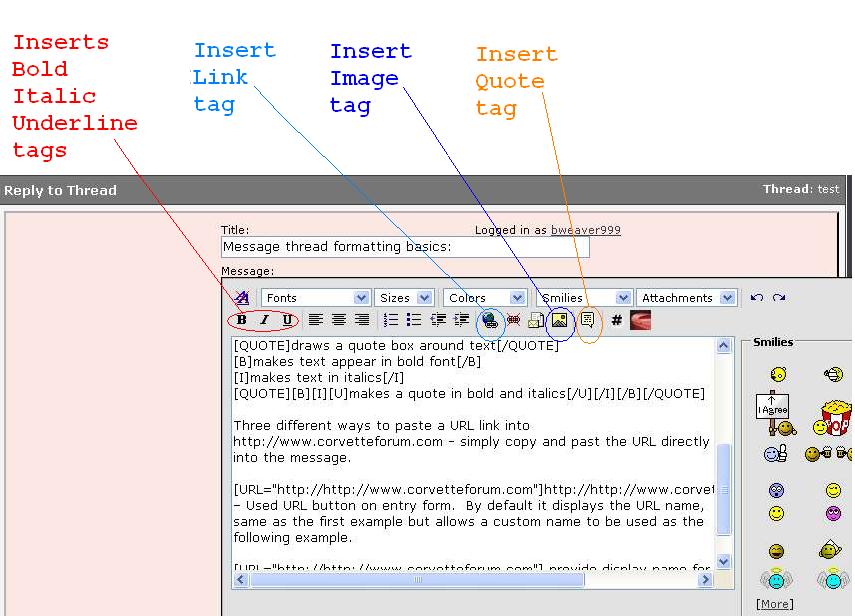
FormatText.txtFormatText.txt You may browser may ask about opening a .txt file, typically clicking okay will display the file.
The critical part of this, if you edit tagged text, do not modify the HTML tags or the finished message will not display correctly.
makes text appear in bold font
makes text in italics
Three different ways to paste a URL link into
https://www.corvetteforum.com - simply copy and past the URL directly into the message.
http://https://www.corvetteforum.com – Used URL button on entry form. By default it displays the URL name, same as the first example but allows a custom name to be used as the following example.
provide display name for URL – Used URL button on entry form then edited the display name. Note the URL button adds all the HTML syntax and leaves the information you should edit selected. Simply type in the text to display. Be careful with delete and backspace keys.
Members may also post photos in the Gallery PhotoAlbum, this post provides details to Upload, Catagorize, Delete
Notes:
1. When using the URL button, it will automatically start with http://. Pasting in a full URL will include it so you could end up with http://http://site. That will not work correctly, insure only one http:// is saved.
2. The URL button, after pasting in the URL, click okay. The "display title" will be highlighted, simply begin typing the name you want to display. Do not use delete or BackSpace, see Note 3.
3. Be careful when editing messages with HTML tags, deleting or over-typing a [ or " where it is needed will cause the resulting display to be wrong. You can use Preview in the editor to catch most problems, can also edit your own posts later if need be. The forum editor has limited line length and URL's will wrap around making it difficult to edit. It's a pain but fairly easy with short posts.
4. While I am referring to what the forum editor uses as HTML tags, they are not real HTML tags. The forum editor uses syntax that is close to real HTML but it is different. The forum software converts the editor's tags to "real" HTML tags when messages are displayed.
To format text (quote box, bold, etc.) you must use HTML tags. The forum editor has buttons to simplify this but you need to be aware of HTML tag basics. An HTML tag tells your browser where to start a function and where to end it. The braces [] signify a tag start. Braces with a / [/] signifies a function stop. Some tags also use double quote ["] marks. The best way to show tags is in the attached image file and text file:
FormatImage.jpj
FormatText.txtFormatText.txt You may browser may ask about opening a .txt file, typically clicking okay will display the file.
The critical part of this, if you edit tagged text, do not modify the HTML tags or the finished message will not display correctly.
draws a quote box around text
makes text in italics
makes a quote in bold and italics
https://www.corvetteforum.com - simply copy and past the URL directly into the message.
http://https://www.corvetteforum.com – Used URL button on entry form. By default it displays the URL name, same as the first example but allows a custom name to be used as the following example.
provide display name for URL – Used URL button on entry form then edited the display name. Note the URL button adds all the HTML syntax and leaves the information you should edit selected. Simply type in the text to display. Be careful with delete and backspace keys.
Members may also post photos in the Gallery PhotoAlbum, this post provides details to Upload, Catagorize, Delete
Notes:
1. When using the URL button, it will automatically start with http://. Pasting in a full URL will include it so you could end up with http://http://site. That will not work correctly, insure only one http:// is saved.
2. The URL button, after pasting in the URL, click okay. The "display title" will be highlighted, simply begin typing the name you want to display. Do not use delete or BackSpace, see Note 3.
3. Be careful when editing messages with HTML tags, deleting or over-typing a [ or " where it is needed will cause the resulting display to be wrong. You can use Preview in the editor to catch most problems, can also edit your own posts later if need be. The forum editor has limited line length and URL's will wrap around making it difficult to edit. It's a pain but fairly easy with short posts.
4. While I am referring to what the forum editor uses as HTML tags, they are not real HTML tags. The forum editor uses syntax that is close to real HTML but it is different. The forum software converts the editor's tags to "real" HTML tags when messages are displayed.
Last edited by bweaver999; Nov 18, 2006 at 02:24 AM.
Thread Starter
Burning Brakes
Joined: Dec 2002
Posts: 1,062
Likes: 5
From: Hasbrouck Heights NJ
Inserting pictures all members – details on inserting pictures in your threads.
Any member can add images to their post, basic members (non-paying) must post their pictures on another site and link it into the thread. There are basically two options; past a link to your image in the message which requires viewers to click to view or use the IMG HTML tag so the image displays automatically.
When inserting images, best if they are 640x480 resolution or set for e-mail. Your camera or scanner should provide software to adjust the resolution. You’ll lose some detail but they will be smaller images which display faster and fit the forum screen better.
FormatText.txt shows the IMG tag usage. FormatText.txt
Several threads discuss this in detail:
Post pics via PhotoBucket (popular free picture host site) http://forums.corvetteforum.com/show....php?t=1110207
Photobucket tutorial with pictures http://forums.corvetteforum.com/show....php?t=1575565
Sign up details for PhotoBucket http://forums.corvetteforum.com/show....php?t=1336733
Alternate photo hosting sites http://forums.corvetteforum.com/show....php?t=1512350
When inserting images, best if they are 640x480 resolution or set for e-mail. Your camera or scanner should provide software to adjust the resolution. You’ll lose some detail but they will be smaller images which display faster and fit the forum screen better.
FormatText.txt shows the IMG tag usage. FormatText.txt
Several threads discuss this in detail:
Post pics via PhotoBucket (popular free picture host site) http://forums.corvetteforum.com/show....php?t=1110207
Photobucket tutorial with pictures http://forums.corvetteforum.com/show....php?t=1575565
Sign up details for PhotoBucket http://forums.corvetteforum.com/show....php?t=1336733
Alternate photo hosting sites http://forums.corvetteforum.com/show....php?t=1512350
Last edited by bweaver999; Dec 17, 2006 at 01:39 AM.
Thread Starter
Burning Brakes
Joined: Dec 2002
Posts: 1,062
Likes: 5
From: Hasbrouck Heights NJ
Inserting pictures / files supporting members
Supporting members https://www.corvetteforum.com/supporting/ have additional picture options. They can upload attachments files or pictures that can be used in a post.
Valid file extensions: bmp doc gif html jpe jpeg jpg mp3 pdf png psd txt wav wmv xls zip. You need to be aware that other users may not be able to display all format types, best to stick to jpg or jpeg for images, html (web page) or txt for simple text files. Anyone should be able to view these file types.
To attach files / images, click the Manage Attachments button below the edit window:
AttachManage.jpg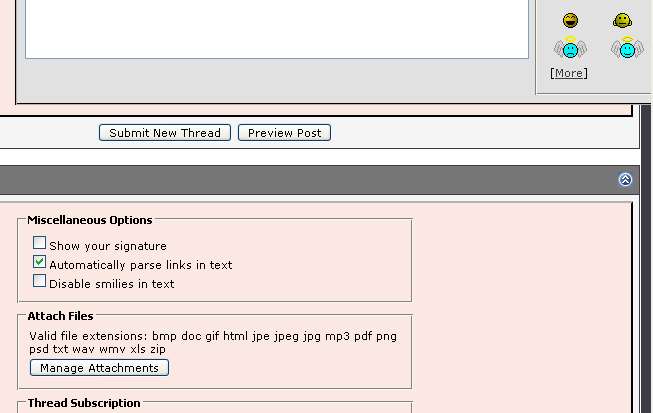
That will open a screen to allow you to browse / upload files:
AttachUpload.jpg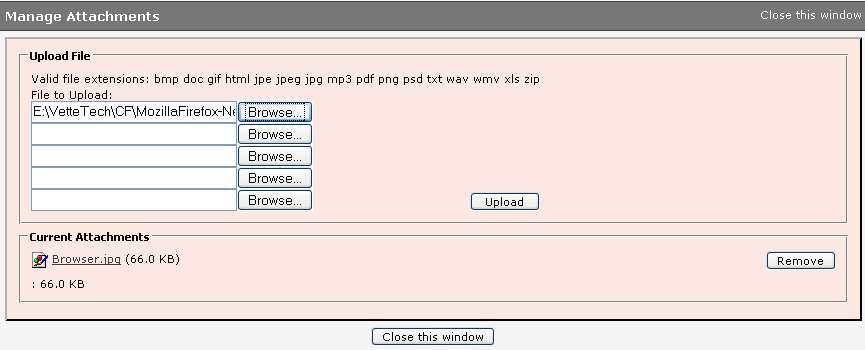
After uploading files (be sure to click the upload icon), the attached documents will display as thumbnails in an Attachment box or you can place them in specific locations of the edit window via the Attachments drop down:
AttachPlace.jpg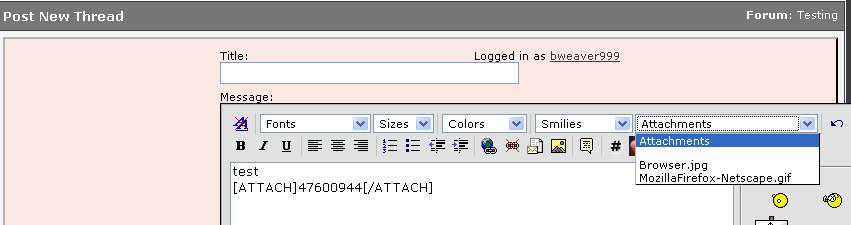
The Attacment drop down should display the file names you attached. If it does not, click the preview button, they should then appear. Select the file name, the post editor will apply an HTML tag with a number in it, this number represents the file.
The attachment box displays for any attachments that have not been placed in the post via the attach drop down menu:
Valid file extensions: bmp doc gif html jpe jpeg jpg mp3 pdf png psd txt wav wmv xls zip. You need to be aware that other users may not be able to display all format types, best to stick to jpg or jpeg for images, html (web page) or txt for simple text files. Anyone should be able to view these file types.
To attach files / images, click the Manage Attachments button below the edit window:
AttachManage.jpg
That will open a screen to allow you to browse / upload files:
AttachUpload.jpg
After uploading files (be sure to click the upload icon), the attached documents will display as thumbnails in an Attachment box or you can place them in specific locations of the edit window via the Attachments drop down:
AttachPlace.jpg
The Attacment drop down should display the file names you attached. If it does not, click the preview button, they should then appear. Select the file name, the post editor will apply an HTML tag with a number in it, this number represents the file.
The attachment box displays for any attachments that have not been placed in the post via the attach drop down menu:
Last edited by bweaver999; Nov 18, 2006 at 02:17 AM.
Thread Starter
Burning Brakes
Joined: Dec 2002
Posts: 1,062
Likes: 5
From: Hasbrouck Heights NJ
Spell check
The forum does not provide spell checking. For lengthy posts, you may want to type your message in a word processor, then copy / paste when finished. If you do a lot of posting, I found a package called FreeSpell at http://hcidesign.com/freespell/prospell.html. It’s a bit quirky, they also have one called ProSpell they want $10 for. Still a bit quirky but much better than copying and pasting things between programs, you simply select the text to spell check and press Windows-C keys together. The spell check is performed in the browser. Perhaps someday the browser will include a spell check facility.
You might also want to try the Mozilla Firefox browser:
http://www.mozilla.com/en-US/firefox/
It's an Open Source browser so it's free to use. It includes a spell check utility. As you type a post, mis-spelled words get a red underline to indicate a mis-spell. Simply "right click" on the underlined word to get a list of alternate spellings.
Also check this thread for info on iespell, a spell checker for IE:
http://forums.corvetteforum.com/show....php?t=1751397
You might also want to try the Mozilla Firefox browser:
http://www.mozilla.com/en-US/firefox/
It's an Open Source browser so it's free to use. It includes a spell check utility. As you type a post, mis-spelled words get a red underline to indicate a mis-spell. Simply "right click" on the underlined word to get a list of alternate spellings.
Also check this thread for info on iespell, a spell checker for IE:
http://forums.corvetteforum.com/show....php?t=1751397
Last edited by bweaver999; Jul 9, 2007 at 06:30 PM.
Thread Starter
Burning Brakes
Joined: Dec 2002
Posts: 1,062
Likes: 5
From: Hasbrouck Heights NJ
Browser basics – Things you probably already know but perhaps not.
Internet Explorer (IE) is the most popular browser on the market. It is included with every Windows PC. Other Popular browsers are Mozilla Firefox and Netscape. Netscape uses the Mozilla Firefox as it’s base so it looks very similar. IE is different enough to cause showing both browsers. All offer similar capabilities, they have a refresh button that re-loads the page from the web site and have an address bar which displays the current URL (web site and page information). The browser basically allows navigation of the web and displays the HTML pages on various web sites.
All browsers allow you to save a link to a site / page locally. IE calls it a “Favorite”. Mozilla Firefox and Netscape call it “Bookmarks”. While viewing a thread in IE, you can save a link by clicking the “Favorite” menu and select “Add to Favorites”. Same thing with Bookmarks in the others, click the “Bookmarks” menu and select Bookmark this page.
Note that the URL in the address bar can be selected, copied, and pasted into a thread. In most browsers, simply left click the mouse on the address. That will highlight the entire URL. You can then press CTRL-C (CTRL and C key at the same time) or select the Edit menu / copy function. To add the “copied” URL in a thread, simply click the mouse at the desired location and CTRL-V or Edit menu / paste function.
Picture of browsers
All browsers allow you to save a link to a site / page locally. IE calls it a “Favorite”. Mozilla Firefox and Netscape call it “Bookmarks”. While viewing a thread in IE, you can save a link by clicking the “Favorite” menu and select “Add to Favorites”. Same thing with Bookmarks in the others, click the “Bookmarks” menu and select Bookmark this page.
Note that the URL in the address bar can be selected, copied, and pasted into a thread. In most browsers, simply left click the mouse on the address. That will highlight the entire URL. You can then press CTRL-C (CTRL and C key at the same time) or select the Edit menu / copy function. To add the “copied” URL in a thread, simply click the mouse at the desired location and CTRL-V or Edit menu / paste function.
Picture of browsers
Last edited by bweaver999; Nov 18, 2006 at 02:18 AM.
Corvette Stories
The Best of Corvette for Corvette Enthusiasts

5 Best & 5 Worst Corvette Daily Drivers
Joe Kucinski
The Headlights of Every Corvette Generation Explained
Joe Kucinski
5 Best & 5 Most Overrated Corvette Track Packages of All Time!
Joe Kucinski
Every 2027 Corvette Engine Explained
Joe Kucinski
Designer Imagines A Corvette That Looks More Like a Corvette Than the Corvette
Verdad Gallardo
10 Ugly Corvettes That We Still Kinda Love
Joe Kucinski
Top 10 Most Expensive Corvettes Ever Sold on Bring A Trailer
Brett Foote
10 Things Every Corvette Owner Needs (2026 Edition)
Michael S. Palmer
8 Most "Only Corvette Owners Understand" Quirks and Problems
Pouria Savadkouei
Thread Starter
Burning Brakes
Joined: Dec 2002
Posts: 1,062
Likes: 5
From: Hasbrouck Heights NJ
Internet basics – Describe common internet terms used in this thread.
This post minimally describes common internet terms. While it’s more than you need to know for simple posts, some of it comes in handy when you want to start using more advanced features on CorvetteForum. I have provided Wikipedia links for more details, web searches on these terms will provide more information if you are interested.
URL stands for Uniform Resource Locator - the human name for a web site that may point to a web site and a specific page or thread https://www.corvetteforum.com - http://en.wikipedia.org/wiki/URL
WWW stands for World Wide Web - the www in https://www.corvetteforum.com - http://en.wikipedia.org/wiki/Www
HTTP stands for HyperText Transfer Protocol - the http:// in https://www.corvetteforum.com - http://en.wikipedia.org/wiki/Http
HTML stands for HyperText Markup Language - programming languange used by web sites to render or draw pages in your browser. It is designed to insure a web page looks the same no matter what type browser or computer you view web pages or sites with. - http://en.wikipedia.org/wiki/Html
TCPIP stands for Transmission Control Protocol/Internet Protocol - 66.110.24.220 computer address or phone number of www.CorvetteForum.com - http://en.wikipedia.org/wiki/TCPIP
DNS stands for Domain Name System - Converts the human https://www.corvetteforum.com to CorvetteForum's TCPIP address. - http://en.wikipedia.org/wiki/Dns
Domain Name is a site name registered with DNS. It simply provides a “human name” to a sites TCPIP address. - http://en.wikipedia.org/wiki/Domain_name
All computers on the web have a TCPIP address. Yours does as does CorvetteForum.
Your browser will display the URL of the site and document you are currently reading. It may look like https://www.corvetteforum.com/forumhelp/index.php which could be represented as http://66.110.24.220/forumhelp/index.php if a domain name was not registered. Some members have web sites running on their PC which they post pictures or files on the forum but have registered a Domain Name for it.
Note that typically when a site with no domain name is re-booted, the TCPIP name may change which will cause the link to no longer work. If you see a post with a TCPIP address and the link does not work, this is the likely cause.
URL stands for Uniform Resource Locator - the human name for a web site that may point to a web site and a specific page or thread https://www.corvetteforum.com - http://en.wikipedia.org/wiki/URL
WWW stands for World Wide Web - the www in https://www.corvetteforum.com - http://en.wikipedia.org/wiki/Www
HTTP stands for HyperText Transfer Protocol - the http:// in https://www.corvetteforum.com - http://en.wikipedia.org/wiki/Http
HTML stands for HyperText Markup Language - programming languange used by web sites to render or draw pages in your browser. It is designed to insure a web page looks the same no matter what type browser or computer you view web pages or sites with. - http://en.wikipedia.org/wiki/Html
TCPIP stands for Transmission Control Protocol/Internet Protocol - 66.110.24.220 computer address or phone number of www.CorvetteForum.com - http://en.wikipedia.org/wiki/TCPIP
DNS stands for Domain Name System - Converts the human https://www.corvetteforum.com to CorvetteForum's TCPIP address. - http://en.wikipedia.org/wiki/Dns
Domain Name is a site name registered with DNS. It simply provides a “human name” to a sites TCPIP address. - http://en.wikipedia.org/wiki/Domain_name
All computers on the web have a TCPIP address. Yours does as does CorvetteForum.
Your browser will display the URL of the site and document you are currently reading. It may look like https://www.corvetteforum.com/forumhelp/index.php which could be represented as http://66.110.24.220/forumhelp/index.php if a domain name was not registered. Some members have web sites running on their PC which they post pictures or files on the forum but have registered a Domain Name for it.
Note that typically when a site with no domain name is re-booted, the TCPIP name may change which will cause the link to no longer work. If you see a post with a TCPIP address and the link does not work, this is the likely cause.
Last edited by bweaver999; Nov 16, 2006 at 01:48 AM.
Thread Starter
Burning Brakes
Joined: Dec 2002
Posts: 1,062
Likes: 5
From: Hasbrouck Heights NJ
Trouble shooting
The thread has a URL link but nothing or an error happens when I click it. This could be caused by a few things, if the URL has a TCPIP address, it probably changed. Would need to post a message or PM the owner of the post to see if that is the case. Other causes could be the web site is down, no longer exists or the file simply got deleted or moved.
I formatted a message it it does not look correct. You most likely deleted some of the HTML tag information. Open your post in edit mode and compare against format post.
Why are there duplicate images in your gallery?
Other issues, open a thread in the help forum. The moderators are pretty good at answering questions.
I formatted a message it it does not look correct. You most likely deleted some of the HTML tag information. Open your post in edit mode and compare against format post.
Why are there duplicate images in your gallery?
Other issues, open a thread in the help forum. The moderators are pretty good at answering questions.
Last edited by bweaver999; Nov 18, 2006 at 02:19 AM.




Team Owner


Joined: Jun 2001
Posts: 24,922
Likes: 0
From: Knoxville, TN
CI 3-4-5-6-7-8 Veteran
St. Jude '03 thru '26



Pro

Joined: Mar 2008
Posts: 553
Likes: 0
From: Cajun Cruise Missile NC/Louisiana
St. Jude Donor '08-'09
remove post?
How do I remove a posted thread? I posted a topic thread recieved enough fedback and wish to lock or remove the post. I deleted the orginal post and it is still recieving hits. I would like to know what I missed in the instructions on how to do this.


