


help with posting pics
Thread Starter
Racer


Joined: Jul 2004
Posts: 383
Likes: 0
From: Pembroke Pines Florida
 help with posting pics
I'm computer dumb, could someone please give me a call to help walk me through the process of poosting pics along with my car for sale.
C-4 vette.
954-240-2822 ask for Dave
Thanks
C-4 vette.
954-240-2822 ask for Dave
Thanks
Thread Starter
Racer
Joined: Jul 2004
Posts: 383
Likes: 0
From: Pembroke Pines Florida
I have pics on a cd right now. can't seem tp attach to my for sale ad that is now on CF.
The cd is loaded right now, can't find where or how to post on for sale ad.
If you call, I'll call you back on land line, or include your phone # and I'll call you from here.
dave
The cd is loaded right now, can't find where or how to post on for sale ad.
If you call, I'll call you back on land line, or include your phone # and I'll call you from here.
dave

Race Director


Joined: Jun 2004
Posts: 13,966
Likes: 710
From: WI
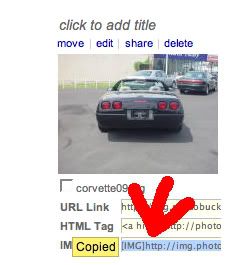
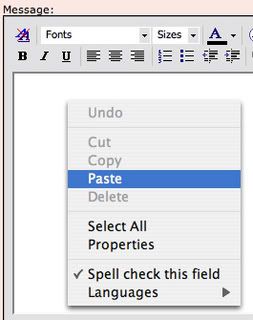
 Photobucket is easy. You just click that red circled area and a small splash screen says "copied". That you right click in the text area and select paste. To upload in Photobucket there is the browse button, you use that to locate the photo file on your computer. In this case, browse to your CD drive.
Thread Starter
Racer
Joined: Jul 2004
Posts: 383
Likes: 0
From: Pembroke Pines Florida
ok, i'm not making myself clear here. i have an ad on cf right now without pics. i cannot find where or how to post the pics on the ad. how do i get the pics i have on the ad, could not find a browse button on the ad. savvy
Drifting


Joined: May 2004
Posts: 1,543
Likes: 1
From: Levittown NY
Setting up a photobucket account
1) Open up your web browser and go to www.photobucket.com
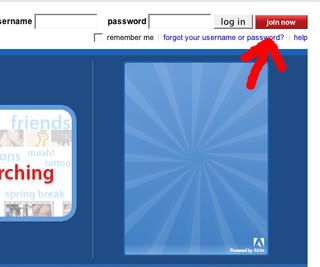
2) Create an account by clicking "join now" on the top right of your screen.
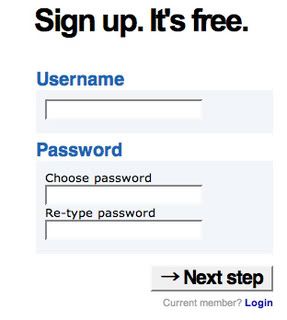
3) Type desired user name and password then click "next step"
4) fill in info then click "i accept sign me up"
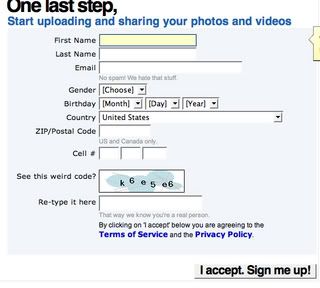
5) Click "browse". a little window will open to browse your pc to find the desired image you want to upload. once you click the image click "open". the little window will disappear.

6) Click "upload" and wait until the page refreshes
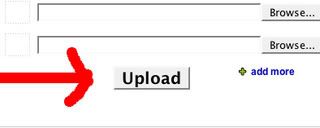
7) Click in the IMG text. it should say "Copied" (if not you need to select it then right click it and click copy)
8) Right click in the message box. a menu should come up. left click "paste"

1) Open up your web browser and go to www.photobucket.com
2) Create an account by clicking "join now" on the top right of your screen.
3) Type desired user name and password then click "next step"
4) fill in info then click "i accept sign me up"
5) Click "browse". a little window will open to browse your pc to find the desired image you want to upload. once you click the image click "open". the little window will disappear.
6) Click "upload" and wait until the page refreshes
7) Click in the IMG text. it should say "Copied" (if not you need to select it then right click it and click copy)
8) Right click in the message box. a menu should come up. left click "paste"
Last edited by ynk1121; Jun 1, 2007 at 09:28 PM.

Melting Slicks

Joined: Aug 1999
Posts: 2,619
Likes: 1
From: Whidbey Island Washington

When I pasted it showed only the img address but after I posted this response the picture was there. Good luck, Bill
Corvette Stories
The Best of Corvette for Corvette Enthusiasts

Every 2027 Corvette Engine Explained
Joe Kucinski
Designer Imagines A Corvette That Looks More Like a Corvette Than the Corvette
Verdad Gallardo
10 Ugly Corvettes That We Still Kinda Love
Joe Kucinski
Top 10 Most Expensive Corvettes Ever Sold on Bring A Trailer
Brett Foote
10 Things Every Corvette Owner Needs (2026 Edition)
Michael S. Palmer
8 Most "Only Corvette Owners Understand" Quirks and Problems
Pouria Savadkouei
10 Reasons the C6 Z06 is Still A Performance Benchmark After 20 Years
Joe Kucinski
How Much Horsepower Every Corvette Engine "LOST" in 1972
Joe Kucinski
Top 10 DOs and DON'Ts for Protecting Your Convertible Top!
Michael S. Palmer

Team Owner


Joined: Jun 2001
Posts: 24,921
Likes: 0
From: Knoxville, TN
CI 3-4-5-6-7-8 Veteran
St. Jude '03 thru '26
Several sticky threads here that can help if you want to do it yourself. You cannot post the pics directly from your cd. You will have to host them on a web site first.
Melting Slicks
Joined: Aug 1999
Posts: 2,619
Likes: 1
From: Whidbey Island Washington
great instructions re Photobucket!
Setting up a photobucket account
1) Open up your web browser and go to www.photobucket.com
2) Create an account by clicking "join now" on the top right of your screen.
3) Type desired user name and password then click "next step"
4) fill in info then click "i accept sign me up"
5) Click "browse". a little window will open to browse your pc to find the desired image you want to upload. once you click the image click "open". the little window will disappear.
6) Click "upload" and wait until the page refreshes
7) Click in the IMG text. it should say "Copied" (if not you need to select it then right click it and click copy)
8) Right click in the message box. a menu should come up. left click "paste"
1) Open up your web browser and go to www.photobucket.com
2) Create an account by clicking "join now" on the top right of your screen.
3) Type desired user name and password then click "next step"
4) fill in info then click "i accept sign me up"
5) Click "browse". a little window will open to browse your pc to find the desired image you want to upload. once you click the image click "open". the little window will disappear.
6) Click "upload" and wait until the page refreshes
7) Click in the IMG text. it should say "Copied" (if not you need to select it then right click it and click copy)
8) Right click in the message box. a menu should come up. left click "paste"
 Thanks, Bill Strowbridge, aka ZRWON
Drifting
Joined: May 2004
Posts: 1,543
Likes: 1
From: Levittown NY
thanks. i figured that this question pops up on a weekly basis. i might as well write it up complete so all i had to do from now on is copy and paste it all.
