


Friends Request


Thread Starter
Safety Car


Joined: Aug 2006
Posts: 4,347
Likes: 25
From: Apache Junction AZ
 Friends Request
I have received a Friends request from a forum vendor that I can't get rid of. I have unchecked the avatar and selected the do not accept button and saved changes but I still have a bold 1 in my Your Notifications in my log in section. Help!!!
BJK
BJK

IB Staff


Joined: Feb 2009
Posts: 10,574
Likes: 4
You must check (not uncheck) the avatar of the friend request, click on Do not Accept option, then it should be gone after pressing Save Changes. You stated you "unchecked" the avatar, which de-selects the user from whatever options you make.
Thread Starter
Safety Car
Joined: Aug 2006
Posts: 4,347
Likes: 25
From: Apache Junction AZ
BJK
UPDATE: I finally got rid of the request by adding the name to the friends list and then unchecking the avatar and saving that change and the request cleared out. Seems strange but it was the only thing that would work. Opening the request did not clear the notification from my welcome box.
Last edited by 07MontRedcp; Nov 9, 2009 at 11:20 AM.


Team Owner


Joined: Jun 2001
Posts: 26,714
Likes: 344
From: Houston, TX
I've tried everything several times to accept a friends request. There needs to be a sticky explaining the process. To say it is not intuitive would be an understatement.
If someone could tell me how to accept a friend request I'd appreciate it. The odd thing is that I have done it several times in the past and have several friends, but this time nothing I do works.
If someone could tell me how to accept a friend request I'd appreciate it. The odd thing is that I have done it several times in the past and have several friends, but this time nothing I do works.
IB Staff
Joined: Feb 2009
Posts: 10,574
Likes: 4
At the bottom section, you will see an Incoming Friend Requests section.
You will notice an empty checkbox in the upper-left corner for the member who sent you the Friend Request. See the attachment and the green arrow in the example below.
You need to manually select a checkmark in the checkbox for the member and then click on the Save Changes button to accept the member's Friend Request, which will then clear your notification.
If you don't manually enter a checkmark in the checkbox for the member that sent you the request and you just click on the Save Changes button, no changes will be made nor any error will be given. This feature is a native vBulletin feature so the issue is in the software and impacts all vBulletin-based forums of this generation.
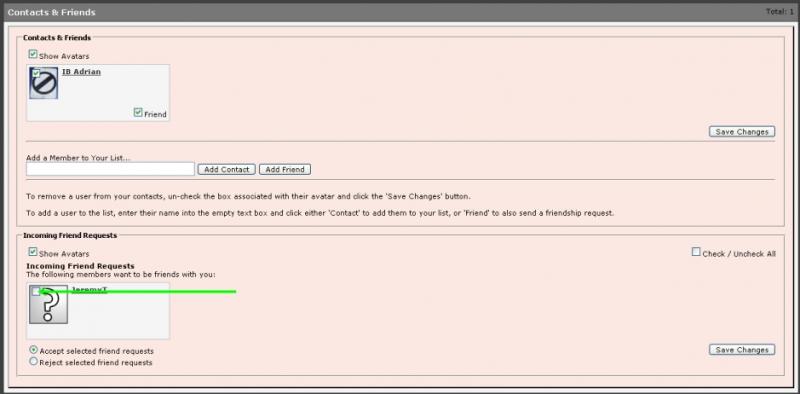
You will notice an empty checkbox in the upper-left corner for the member who sent you the Friend Request. See the attachment and the green arrow in the example below.
You need to manually select a checkmark in the checkbox for the member and then click on the Save Changes button to accept the member's Friend Request, which will then clear your notification.
If you don't manually enter a checkmark in the checkbox for the member that sent you the request and you just click on the Save Changes button, no changes will be made nor any error will be given. This feature is a native vBulletin feature so the issue is in the software and impacts all vBulletin-based forums of this generation.
I've tried everything several times to accept a friends request. There needs to be a sticky explaining the process. To say it is not intuitive would be an understatement.
If someone could tell me how to accept a friend request I'd appreciate it. The odd thing is that I have done it several times in the past and have several friends, but this time nothing I do works.
If someone could tell me how to accept a friend request I'd appreciate it. The odd thing is that I have done it several times in the past and have several friends, but this time nothing I do works.










