


friend request


Thread Starter
Drifting


Joined: Apr 2005
Posts: 1,620
Likes: 3
From: Vancouver WA
 friend request
I got a request from another member. I cannot accept it or reject it. Nothing happens when I try to do anything to it. How do I make it work or if that doesn't work delete it?
thanks
thanks

Team Owner


Joined: May 2004
Posts: 82,175
Likes: 1,319
From: McKinney TX
St. Jude Donor '21-'22-'23-'24
Thread Starter
Drifting
Joined: Apr 2005
Posts: 1,620
Likes: 3
From: Vancouver WA
Ed
Team Owner
Joined: May 2004
Posts: 82,175
Likes: 1,319
From: McKinney TX
St. Jude Donor '21-'22-'23-'24
Sorry, I thought JT's post for which I provided the link was very well explained and illustrated.
If you selected both the little box next to "accept selected friend request" AND the tiny box on the left side of the screen under the "incoming friend requests", then clicked "Save Changes", I don't know what's wrong. I guess we'll need to wait for JT to weigh in and tell you what to do next.
I thought I was saving him some time by posting a link to his previous explanation..
If you selected both the little box next to "accept selected friend request" AND the tiny box on the left side of the screen under the "incoming friend requests", then clicked "Save Changes", I don't know what's wrong. I guess we'll need to wait for JT to weigh in and tell you what to do next.
I thought I was saving him some time by posting a link to his previous explanation..

IB Staff


Joined: Feb 2009
Posts: 10,579
Likes: 4
Like Jim said, when you view the Friend Page, it will look similar to below:
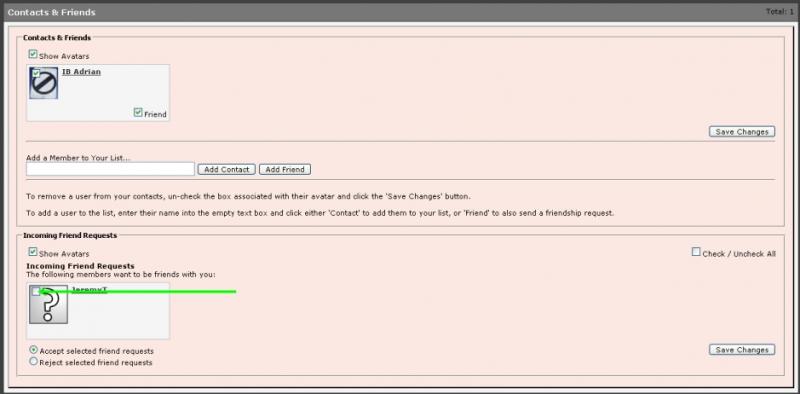
At the bottom section, you will see an Incoming Friend Requests section.
You will notice an empty checkbox in the upper-left corner of the member's name/avatar that sent you the Friend Request. You need to manually select a checkmark in the checkbox of that member's name/avatar and then click on the Save Changes button to accept the member's Friend Request, which will then clear your notification.
At the bottom section, you will see an Incoming Friend Requests section.
You will notice an empty checkbox in the upper-left corner of the member's name/avatar that sent you the Friend Request. You need to manually select a checkmark in the checkbox of that member's name/avatar and then click on the Save Changes button to accept the member's Friend Request, which will then clear your notification.








