


photobucket



IB Staff


Joined: Feb 2009
Posts: 10,579
Likes: 4

Photobucket's website is below:
http://www.photobucket.com
CorvetteForum is not affiliated with Photobucket and so if you have technical questions or issues, it might be best to contact them.
BTW, you don't need a Photobucket account to post pictures. You can upload them to CorvetteForum as Attachments:
1) Click on Manage Attachments below the area you type your message in as seen below:

2) Click on Browse button to locate the file on your computer as shown below:
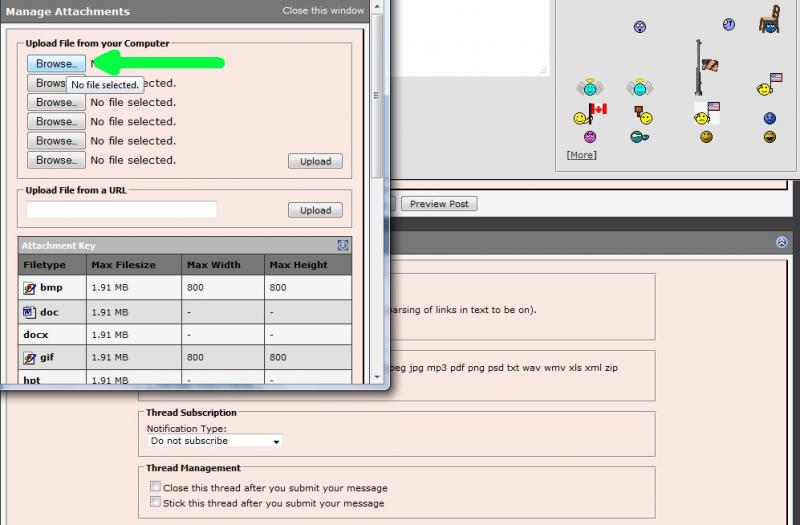
3) Locate the file on your computer, select it, then click on Open as shown below:

4) If you have more files to upload, repeat step 2 and 3
5) When finished, click on the Upload button and verify the files are listed below the Current Attachments before clicking on the Close Window as shown below:

The attachments are added to your message. You simply continue to post your message as you normally would.
I would recommend you also review the Help Guide:
http://forums.corvetteforum.com/help...elp-guide.html
http://www.photobucket.com
CorvetteForum is not affiliated with Photobucket and so if you have technical questions or issues, it might be best to contact them.
BTW, you don't need a Photobucket account to post pictures. You can upload them to CorvetteForum as Attachments:
1) Click on Manage Attachments below the area you type your message in as seen below:
2) Click on Browse button to locate the file on your computer as shown below:
3) Locate the file on your computer, select it, then click on Open as shown below:
4) If you have more files to upload, repeat step 2 and 3
5) When finished, click on the Upload button and verify the files are listed below the Current Attachments before clicking on the Close Window as shown below:
The attachments are added to your message. You simply continue to post your message as you normally would.
I would recommend you also review the Help Guide:
http://forums.corvetteforum.com/help...elp-guide.html








