


Dumbfounded?


Thread Starter
Advanced

Joined: Nov 2013
Posts: 54
Likes: 0
From: Mount Pleasant South Carolina
 Dumbfounded?
I know by now that I am not the brightest star in the galaxy BUT I will be darned that I cannot post a photo of my prized new 014.
I have even had my co-pilot press the buttons to no avail.
Every time the load throws a drop down that it failed to load. What gives? Size is well within the guidelines.
I have even had my co-pilot press the buttons to no avail.
Every time the load throws a drop down that it failed to load. What gives? Size is well within the guidelines.

IB Staff


Joined: Feb 2009
Posts: 10,581
Likes: 4
Are you trying to post it as an Attachment to a post? What is the size of the picture?
Have you followed these steps:
1) Click on Manage Attachments below the area you type your message in as seen below:

2) Click on Browse button to locate the file on your computer as shown below:
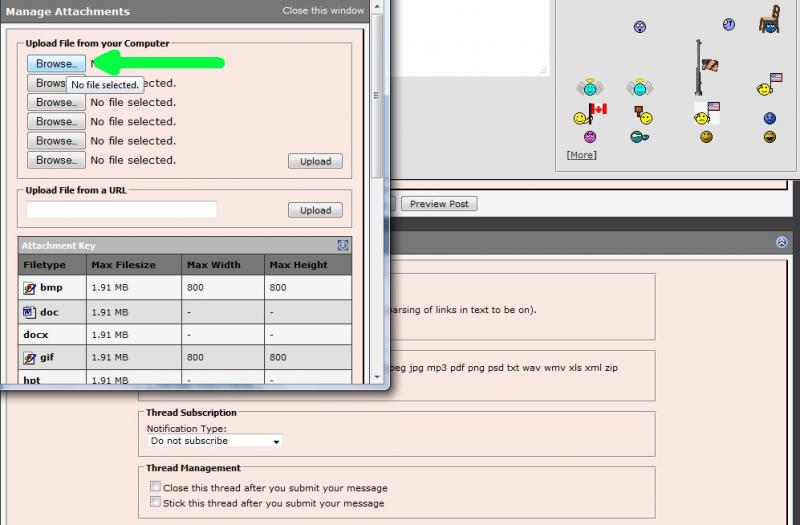
3) Locate the file on your computer, select it, then click on Open as shown below:

4) If you have more files to upload, repeat step 2 and 3
5) When finished, click on the Upload button and verify the files are listed below the Current Attachments before clicking on the Close Window as shown below:

The attachments are added to your message. You simply continue to post your message as you normally would.
Have you followed these steps:
1) Click on Manage Attachments below the area you type your message in as seen below:
2) Click on Browse button to locate the file on your computer as shown below:
3) Locate the file on your computer, select it, then click on Open as shown below:
4) If you have more files to upload, repeat step 2 and 3
5) When finished, click on the Upload button and verify the files are listed below the Current Attachments before clicking on the Close Window as shown below:
The attachments are added to your message. You simply continue to post your message as you normally would.
Thread Starter
Advanced
Joined: Nov 2013
Posts: 54
Likes: 0
From: Mount Pleasant South Carolina
I am very appreciative of your time and effort. I have been able to post photos to a "thread or reply", have been able to put stuff in my garage etc.
What I have not been able to do is to see my profile photo appear in a reply or new post. Now mind you I am not a hound for publicity but it make me wonder how the rest do such.
I have selected a resized photo per the guidelines. Then when save and load it says each time the loading has failed.
Maybe I need to put a Sherman Tank in the photo??
Jim
What I have not been able to do is to see my profile photo appear in a reply or new post. Now mind you I am not a hound for publicity but it make me wonder how the rest do such.
I have selected a resized photo per the guidelines. Then when save and load it says each time the loading has failed.
Maybe I need to put a Sherman Tank in the photo??
Jim
IB Staff
Joined: Feb 2009
Posts: 10,581
Likes: 4
Profile photos don't appear in posts. Only Avatars (to the left of your message) and signatures (below your message). You show to have an avatar. A few of these common questions are outlined in the Help Guide if you want to take a look:
http://forums.corvetteforum.com/help...elp-guide.html
The Upload Failed error is a general error like a Service Engine Soon light. However, usually, it means the file being uploaded is larger than allowed. Each area that you can upload to has specific limitations as outlined in the upload manager for those areas.
http://forums.corvetteforum.com/help...elp-guide.html
The Upload Failed error is a general error like a Service Engine Soon light. However, usually, it means the file being uploaded is larger than allowed. Each area that you can upload to has specific limitations as outlined in the upload manager for those areas.
I am very appreciative of your time and effort. I have been able to post photos to a "thread or reply", have been able to put stuff in my garage etc.
What I have not been able to do is to see my profile photo appear in a reply or new post. Now mind you I am not a hound for publicity but it make me wonder how the rest do such.
I have selected a resized photo per the guidelines. Then when save and load it says each time the loading has failed.
Maybe I need to put a Sherman Tank in the photo??
Jim
What I have not been able to do is to see my profile photo appear in a reply or new post. Now mind you I am not a hound for publicity but it make me wonder how the rest do such.
I have selected a resized photo per the guidelines. Then when save and load it says each time the loading has failed.
Maybe I need to put a Sherman Tank in the photo??
Jim







