


pics posting


Thread Starter
Instructor


Joined: May 2009
Posts: 164
Likes: 1
From: Milton Florida
 pics posting
Somehow it just will not fall in line. I have pics on my computer however I don't know how to get them attached to the post.
The way I got a pic on my avatar was to email the pic to a friend (in France) who posted the pic for me.
Is there an instruction on how to get a pic from your computer to the post??? cutnout aka Charlie
its obvious I don't know a lot. If I set next to someone doing it then I could do it with ease.
The way I got a pic on my avatar was to email the pic to a friend (in France) who posted the pic for me.
Is there an instruction on how to get a pic from your computer to the post??? cutnout aka Charlie
its obvious I don't know a lot. If I set next to someone doing it then I could do it with ease.

IB Staff


Joined: Feb 2009
Posts: 10,563
Likes: 4
You can upload them to CorvetteForum as Attachments:
1) Click on Manage Attachments below the area you type your message in as seen below:

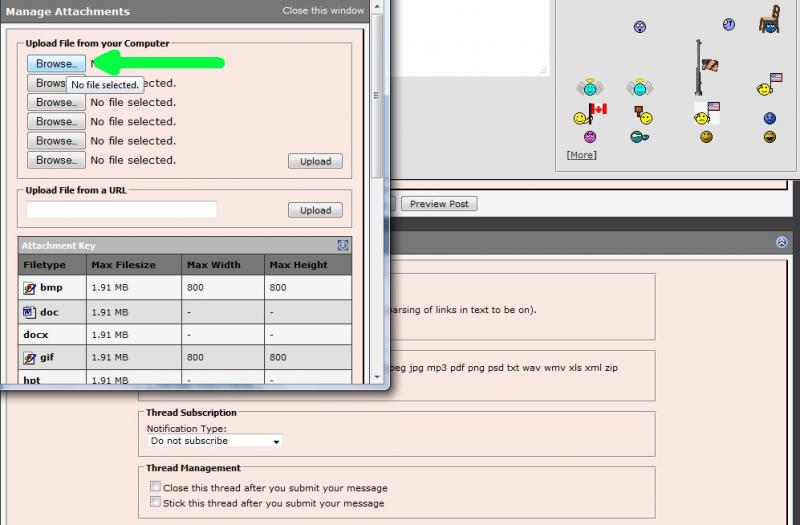
2) Click on Browse button to locate the file on your computer as shown below:
3) Locate the file on your computer, select it, then click on Open as shown below:

4) If you have more files to upload, repeat step 2 and 3
5) When finished, click on the Upload button and verify the files are listed below the Current Attachments before clicking on the Close Window as shown below:

The attachments are added to your message. You simply continue to post your message as you normally would.
I would recommend you also review the Help Guide:
http://forums.corvetteforum.com/help...elp-guide.html
For instructions on using the Photo Album, please see the Help Guide:
http://forums.corvetteforum.com/help...elp-guide.html
1) Click on Manage Attachments below the area you type your message in as seen below:
2) Click on Browse button to locate the file on your computer as shown below:
3) Locate the file on your computer, select it, then click on Open as shown below:
4) If you have more files to upload, repeat step 2 and 3
5) When finished, click on the Upload button and verify the files are listed below the Current Attachments before clicking on the Close Window as shown below:
The attachments are added to your message. You simply continue to post your message as you normally would.
I would recommend you also review the Help Guide:
http://forums.corvetteforum.com/help...elp-guide.html
For instructions on using the Photo Album, please see the Help Guide:
http://forums.corvetteforum.com/help...elp-guide.html









