





directions for posting pics

Le Mans Master


Joined: Sep 2006
Posts: 9,598
Likes: 960
From: Palm Harbor not far from Sebring Florida
St. Jude Donor '11
Oldtimer

Get a Photobucket account it does not doesn't you anything, then go to this link, http://forums.corvetteforum.com/help...irections.html

Melting Slicks


Joined: Oct 2013
Posts: 2,056
Likes: 211
From: Central Ohio
How to post pictures in a few easy steps
If you start a new thread you will see the paperclip Icon
click on the paperclip Icon (just to the right of the smiley face)
click on the browse button
find your photos & upload
IF
you are replying to a thread click on "go advanced" button at the bottom of the screen and follow the directions above
click on the paperclip Icon (just to the right of the smiley face)
click on the browse button
find your photos & upload
IF
you are replying to a thread click on "go advanced" button at the bottom of the screen and follow the directions above

IB Staff


Joined: Feb 2009
Posts: 10,579
Likes: 4
You can upload them to CorvetteForum as Attachments:
1) Click on Manage Attachments below the area you type your message in as seen below:

2) Click on Browse button to locate the file on your computer as shown below:
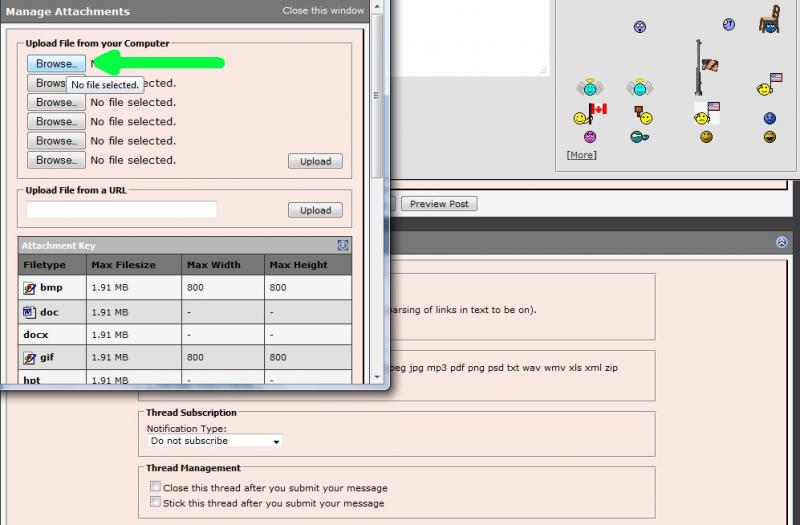
3) Locate the file on your computer, select it, then click on Open as shown below:

4) If you have more files to upload, repeat step 2 and 3
5) When finished, click on the Upload button and verify the files are listed below the Current Attachments before clicking on the Close Window as shown below:

The attachments are added to your message. You simply continue to post your message as you normally would.
I would recommend you also review the Help Guide:
http://forums.corvetteforum.com/help...elp-guide.html
1) Click on Manage Attachments below the area you type your message in as seen below:
2) Click on Browse button to locate the file on your computer as shown below:
3) Locate the file on your computer, select it, then click on Open as shown below:
4) If you have more files to upload, repeat step 2 and 3
5) When finished, click on the Upload button and verify the files are listed below the Current Attachments before clicking on the Close Window as shown below:
The attachments are added to your message. You simply continue to post your message as you normally would.
I would recommend you also review the Help Guide:
http://forums.corvetteforum.com/help...elp-guide.html

Melting Slicks
Joined: Jan 2008
Posts: 3,124
Likes: 181
From: Concord CA
This is all fine and dandy...but the problem is, any pictures you post end up at the BOTTOM of the POST...which is not very user friendly. Not only that, if you go into "Manage Attachments"...all you can do is "add" or "remove" the pictures.
What would be nice is to have the ability to put the pictures any place in your POST. This is especially useful if you're writing a long article showing the steps, where you can put a picture next to that step and show the process, instead of having it at the bottom of the POST and having to scroll down, refer to the picture then scroll back up to continue reading. Not very user friendly.
If the Forum provided just the link to the picture, instead of just posting the pictures, we could move the link (photo) anywhere we want in the POST. Also when you go to edit the POST, the pictures don't show up...again you have to go to "Manage Attachments" but again, that doesn't allow you to move them anywhere.
I know Photo Bucket and other 3rd party hosting is available for posting pictures, but even those have issues and requires a lot of jumping through hoops to get FINALLY get it on the Forum. Also the biggest issues I have with 3rd party hosting is that that many times the pictures get purged, or the person that posted the picture has either changed their photo bucket account, deleted the photos, moved them, or something else and they are lost in the POST. It would be better and much easier if we could just use this Forum to post pictures. Posting pictures on this Forum is one of the biggest complaints by users...ya think they would make it more user friendly.
What would be nice is to have the ability to put the pictures any place in your POST. This is especially useful if you're writing a long article showing the steps, where you can put a picture next to that step and show the process, instead of having it at the bottom of the POST and having to scroll down, refer to the picture then scroll back up to continue reading. Not very user friendly.
If the Forum provided just the link to the picture, instead of just posting the pictures, we could move the link (photo) anywhere we want in the POST. Also when you go to edit the POST, the pictures don't show up...again you have to go to "Manage Attachments" but again, that doesn't allow you to move them anywhere.
I know Photo Bucket and other 3rd party hosting is available for posting pictures, but even those have issues and requires a lot of jumping through hoops to get FINALLY get it on the Forum. Also the biggest issues I have with 3rd party hosting is that that many times the pictures get purged, or the person that posted the picture has either changed their photo bucket account, deleted the photos, moved them, or something else and they are lost in the POST. It would be better and much easier if we could just use this Forum to post pictures. Posting pictures on this Forum is one of the biggest complaints by users...ya think they would make it more user friendly.
IB Staff
Joined: Feb 2009
Posts: 10,579
Likes: 4
By right-clicking on the URL for picture you've uploaded in the Upload Manager you can actually paste that URL inside a set of IMG tags to put that IMG anywhere in the post. Of course doing so would mean the image will still be at the bottom of the post as well so you will get double photos. There is no way around this as this is the way the software was developed.
BTW, this is not isolated to CorvetteForum. CorvetteForum uses the commercial software known as vBulletin that is also found on thousands of other websites and is one of the most popular software in its category. It's just the way the software was designed. Like anything, improvements with functionality come over time and/or with the addition of someone coding a plugin as usage changes.
BTW, this is not isolated to CorvetteForum. CorvetteForum uses the commercial software known as vBulletin that is also found on thousands of other websites and is one of the most popular software in its category. It's just the way the software was designed. Like anything, improvements with functionality come over time and/or with the addition of someone coding a plugin as usage changes.
This is all fine and dandy...but the problem is, any pictures you post end up at the BOTTOM of the POST...which is not very user friendly. Not only that, if you go into "Manage Attachments"...all you can do is "add" or "remove" the pictures.
What would be nice is to have the ability to put the pictures any place in your POST. This is especially useful if you're writing a long article showing the steps, where you can put a picture next to that step and show the process, instead of having it at the bottom of the POST and having to scroll down, refer to the picture then scroll back up to continue reading. Not very user friendly.
If the Forum provided just the link to the picture, instead of just posting the pictures, we could move the link (photo) anywhere we want in the POST. Also when you go to edit the POST, the pictures don't show up...again you have to go to "Manage Attachments" but again, that doesn't allow you to move them anywhere.
I know Photo Bucket and other 3rd party hosting is available for posting pictures, but even those have issues and requires a lot of jumping through hoops to get FINALLY get it on the Forum. Also the biggest issues I have with 3rd party hosting is that that many times the pictures get purged, or the person that posted the picture has either changed their photo bucket account, deleted the photos, moved them, or something else and they are lost in the POST. It would be better and much easier if we could just use this Forum to post pictures. Posting pictures on this Forum is one of the biggest complaints by users...ya think they would make it more user friendly.
What would be nice is to have the ability to put the pictures any place in your POST. This is especially useful if you're writing a long article showing the steps, where you can put a picture next to that step and show the process, instead of having it at the bottom of the POST and having to scroll down, refer to the picture then scroll back up to continue reading. Not very user friendly.
If the Forum provided just the link to the picture, instead of just posting the pictures, we could move the link (photo) anywhere we want in the POST. Also when you go to edit the POST, the pictures don't show up...again you have to go to "Manage Attachments" but again, that doesn't allow you to move them anywhere.
I know Photo Bucket and other 3rd party hosting is available for posting pictures, but even those have issues and requires a lot of jumping through hoops to get FINALLY get it on the Forum. Also the biggest issues I have with 3rd party hosting is that that many times the pictures get purged, or the person that posted the picture has either changed their photo bucket account, deleted the photos, moved them, or something else and they are lost in the POST. It would be better and much easier if we could just use this Forum to post pictures. Posting pictures on this Forum is one of the biggest complaints by users...ya think they would make it more user friendly.
Corvette Stories
The Best of Corvette for Corvette Enthusiasts

Top 10 Most Expensive Corvettes Ever Sold on Bring A Trailer
Brett Foote
10 Things Every Corvette Owner Needs (2026 Edition)
Michael S. Palmer
8 Most "Only Corvette Owners Understand" Quirks and Problems
Pouria Savadkouei
10 Reasons the C6 Z06 is Still A Performance Benchmark After 20 Years
Joe Kucinski
How Much Horsepower Every Corvette Engine "LOST" in 1972
Joe Kucinski
Top 10 DOs and DON'Ts for Protecting Your Convertible Top!
Michael S. Palmer
Top 10 Most Explosive Corvettes Ever Made: Power-to-Weight Ratio Ranked!
Joe Kucinski
150 hp to 1,250 hp: Every Corvette Generation Compared by the Specs That Matter
Joe Kucinski