


prova


Thread Starter
Melting Slicks


Joined: Aug 2001
Posts: 2,516
Likes: 0
From: Lockport NY
 prova
prova
How to post photos to your thread using PhotoBucket
Set up a PhotoBucket account. I just chose the Free Account.

Make sure you are logged in.
If you haven't set up an "album" yet, do so. If you wish to keep your images separated, set up a "Sub Album" and click on it to open it.
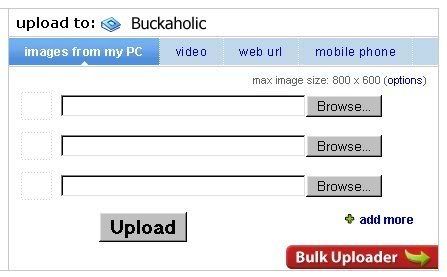
Upload your image by using the Add Pictures box at the top of the page. Click on Browse; navigate to the image on your hard drive; select it by clicking on it, it should appear in the box "picture" line. Add a separate description if you like (I don't bother). Check "keep original picture names" box. Click "Submit" button.

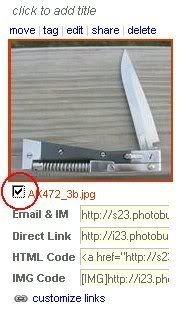
Scroll down to the image you wish to link, check the box next to the image name.

Now, go to the bottom of the page to the "Please Select Action" box, select "Generate HTML and ING Code", and click "GO".

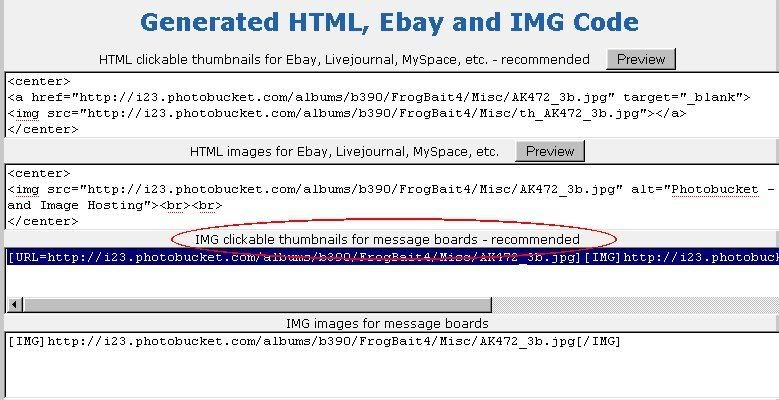
Scroll down to the third selection box "IMG clickable thumbnails for message boards - recommended" and copy that text. Save it to a safe place.

Start your thread. Post your opening text.
Open the "Generated HTML, Ebay and IMG code" text that you saved. Paste the text into your thread. Click "Save" when you've finished typing your post. The clickable thumbnail should be functional.

Set up a PhotoBucket account. I just chose the Free Account.

Make sure you are logged in.
If you haven't set up an "album" yet, do so. If you wish to keep your images separated, set up a "Sub Album" and click on it to open it.
Upload your image by using the Add Pictures box at the top of the page. Click on Browse; navigate to the image on your hard drive; select it by clicking on it, it should appear in the box "picture" line. Add a separate description if you like (I don't bother). Check "keep original picture names" box. Click "Submit" button.
Scroll down to the image you wish to link, check the box next to the image name.
Now, go to the bottom of the page to the "Please Select Action" box, select "Generate HTML and ING Code", and click "GO".

Scroll down to the third selection box "IMG clickable thumbnails for message boards - recommended" and copy that text. Save it to a safe place.
Start your thread. Post your opening text.
Open the "Generated HTML, Ebay and IMG code" text that you saved. Paste the text into your thread. Click "Save" when you've finished typing your post. The clickable thumbnail should be functional.
Last edited by Rich B.; Jan 5, 2006 at 11:52 AM.





