









Kenwood DNX7100
Thread Starter
Instructor


Joined: Feb 2006
Posts: 185
Likes: 2
From: Long Valley NJ
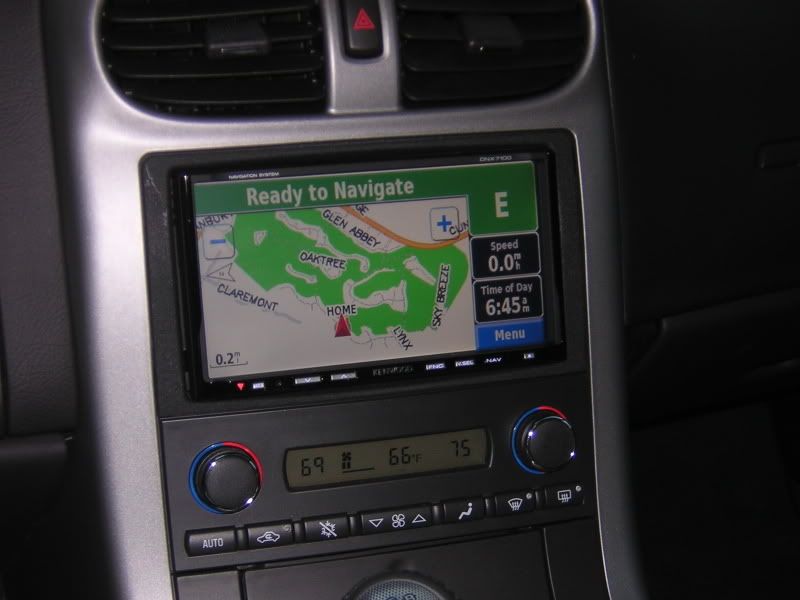
 Kenwood DNX7100
I just had the Kenwood installed on my 07 w/o Bose. I looked at hte AVIC-D3 but I liked the look of the Kenwood in the dash better. The features are great; the GUI is really easy to use. Love the bluetooth and ipod.
I am having one stupid problem...I can't change the background from the default to one of the vette backgrounds I downloaded onto my ipod (jpeg). Anybody know the secret? The manual is terrible. I loaded the pictures on a second generation ipod which it recognizes as USB and I can get it to see the photos folder but when I open the photos folder there is a folder that says "thumbs"...weird. I have tried with a ipod with video and the user interface greys out the buttons.
Any help would be really appreciated. Thx.
I am having one stupid problem...I can't change the background from the default to one of the vette backgrounds I downloaded onto my ipod (jpeg). Anybody know the secret? The manual is terrible. I loaded the pictures on a second generation ipod which it recognizes as USB and I can get it to see the photos folder but when I open the photos folder there is a folder that says "thumbs"...weird. I have tried with a ipod with video and the user interface greys out the buttons.
Any help would be really appreciated. Thx.

2019 Z06 2LZ A8 Coupe


Joined: Jul 2005
Posts: 374
Likes: 56
From: Atlanta GA
Fyi
Not related to the question, but just an FYI on the DNX7100. There is a firmware update for the unit:
https://buy.garmin.com/shop/store/do...t=010-00534-00
Change History
Changes made from version 2.30 to 2.40:
Added Mexican time zones.
Implement new Daylight Savings Time rules for US.
Corrected shutdown caused by some custom POI files.
Added support for Canadian traffic.
Corrected shutdown caused by some address searches.
Improved extended postal code search results for the UK.
Instructions for using this software
Create a 'garmin' folder on an SD data card (must be at least 16mb space available on the card).
Download the appropriate self-extracting archive file onto your hard drive.
Run the downloaded executable file.
Click on Browse and select the SD card reader in the list, then select the 'garmin' folder.
Click Unzip to save the files onto the 'garmin' directory on the SD card.
Wait for the message that the update was unzipped successfully and close the updater.
Safely remove SD card from PC.
Insert SD card into Hideaway Navigation System. If there is already a card there, temporarily remove it.
Your Hideaway Navigation System will ask if you would like to update software. Answer 'Yes'.
The update will begin. Do not power off unit while the update is in progress. When finished you can verify the update by checking the version number in Menu->Settings->About->Software.
Remove SD card.
System requirements:
IBM-compatible PC running Windows 2000 or Windows XP operating system and an available SD card reader.
https://buy.garmin.com/shop/store/do...t=010-00534-00
Change History
Changes made from version 2.30 to 2.40:
Added Mexican time zones.
Implement new Daylight Savings Time rules for US.
Corrected shutdown caused by some custom POI files.
Added support for Canadian traffic.
Corrected shutdown caused by some address searches.
Improved extended postal code search results for the UK.
Instructions for using this software
Create a 'garmin' folder on an SD data card (must be at least 16mb space available on the card).
Download the appropriate self-extracting archive file onto your hard drive.
Run the downloaded executable file.
Click on Browse and select the SD card reader in the list, then select the 'garmin' folder.
Click Unzip to save the files onto the 'garmin' directory on the SD card.
Wait for the message that the update was unzipped successfully and close the updater.
Safely remove SD card from PC.
Insert SD card into Hideaway Navigation System. If there is already a card there, temporarily remove it.
Your Hideaway Navigation System will ask if you would like to update software. Answer 'Yes'.
The update will begin. Do not power off unit while the update is in progress. When finished you can verify the update by checking the version number in Menu->Settings->About->Software.
Remove SD card.
System requirements:
IBM-compatible PC running Windows 2000 or Windows XP operating system and an available SD card reader.
Last edited by Klaus-96; Jun 21, 2007 at 08:17 AM.

Drifting


Joined: Dec 2004
Posts: 1,973
Likes: 55
From: OIB North Carolina
St. Jude Donor '06
I have that same unit (have not done the background yet though), however can you include some dash shots, I would like to see how yours looks.
P.S.
Mine came with 2.40 factory...
P.S.
Mine came with 2.40 factory...
2019 Z06 2LZ A8 Coupe
Joined: Jul 2005
Posts: 374
Likes: 56
From: Atlanta GA
Corvette Stories
The Best of Corvette for Corvette Enthusiasts

Top 10 Most Expensive Corvettes Ever Sold on Bring A Trailer
Brett Foote
10 Things Every Corvette Owner Needs (2026 Edition)
Michael S. Palmer
8 Most "Only Corvette Owners Understand" Quirks and Problems
Pouria Savadkouei
10 Reasons the C6 Z06 is Still A Performance Benchmark After 20 Years
Joe Kucinski
How Much Horsepower Every Corvette Engine "LOST" in 1972
Joe Kucinski
Top 10 DOs and DON'Ts for Protecting Your Convertible Top!
Michael S. Palmer
Top 10 Most Explosive Corvettes Ever Made: Power-to-Weight Ratio Ranked!
Joe Kucinski
150 hp to 1,250 hp: Every Corvette Generation Compared by the Specs That Matter
Joe Kucinski
8 Coolest Corvette Pace Cars (and Replicas) of All Time
Verdad Gallardo
Thread Starter
Instructor
Joined: Feb 2006
Posts: 185
Likes: 2
From: Long Valley NJ
Not related to the question, but just an FYI on the DNX7100. There is a firmware update for the unit:
https://buy.garmin.com/shop/store/do...t=010-00534-00
Change History
Changes made from version 2.30 to 2.40:
Added Mexican time zones.
Implement new Daylight Savings Time rules for US.
Corrected shutdown caused by some custom POI files.
Added support for Canadian traffic.
Corrected shutdown caused by some address searches.
Improved extended postal code search results for the UK.
Instructions for using this software
Create a 'garmin' folder on an SD data card (must be at least 16mb space available on the card).
Download the appropriate self-extracting archive file onto your hard drive.
Run the downloaded executable file.
Click on Browse and select the SD card reader in the list, then select the 'garmin' folder.
Click Unzip to save the files onto the 'garmin' directory on the SD card.
Wait for the message that the update was unzipped successfully and close the updater.
Safely remove SD card from PC.
Insert SD card into Hideaway Navigation System. If there is already a card there, temporarily remove it.
Your Hideaway Navigation System will ask if you would like to update software. Answer 'Yes'.
The update will begin. Do not power off unit while the update is in progress. When finished you can verify the update by checking the version number in Menu->Settings->About->Software.
Remove SD card.
System requirements:
IBM-compatible PC running Windows 2000 or Windows XP operating system and an available SD card reader.
https://buy.garmin.com/shop/store/do...t=010-00534-00
Change History
Changes made from version 2.30 to 2.40:
Added Mexican time zones.
Implement new Daylight Savings Time rules for US.
Corrected shutdown caused by some custom POI files.
Added support for Canadian traffic.
Corrected shutdown caused by some address searches.
Improved extended postal code search results for the UK.
Instructions for using this software
Create a 'garmin' folder on an SD data card (must be at least 16mb space available on the card).
Download the appropriate self-extracting archive file onto your hard drive.
Run the downloaded executable file.
Click on Browse and select the SD card reader in the list, then select the 'garmin' folder.
Click Unzip to save the files onto the 'garmin' directory on the SD card.
Wait for the message that the update was unzipped successfully and close the updater.
Safely remove SD card from PC.
Insert SD card into Hideaway Navigation System. If there is already a card there, temporarily remove it.
Your Hideaway Navigation System will ask if you would like to update software. Answer 'Yes'.
The update will begin. Do not power off unit while the update is in progress. When finished you can verify the update by checking the version number in Menu->Settings->About->Software.
Remove SD card.
System requirements:
IBM-compatible PC running Windows 2000 or Windows XP operating system and an available SD card reader.
I have to say I really like this unit. The Nav is excellent. I have an 07 Lexus IS w/nav and it s so complicated compared with this Garmin. It really was as easy as plugging in the address.
The DVD function was great. The installer bypassed the park only play and it was just fun having the DVD run while I drove. I also like the DVD functionality.
Here are the corvette pics I pulled from the web.

Heel & Toe
Joined: Jun 2007
Posts: 22
Likes: 0
Guys, I have just installed a 7100 with camera and bluetooth. I have everything but the camera working - is there something you have to do on the head unit to enable the camera? I have verified 12v, ground and 12v when in Reverse - it all checked out perfect. But I never get a picture on the head unit, it does not even change inputs...any ideas?
Any help is much appreciated!
Any help is much appreciated!

Drifting
Joined: Dec 2004
Posts: 1,973
Likes: 55
From: OIB North Carolina
St. Jude Donor '06
I pm'ed you, but apparently I had you mistaken...
You have a 5th gen with Video, it is supported, however I was not even aware the IP300 was out...
Ask if you can try a 200 (no video) to see if you have a bad cable... I would think you have one of the first few...
You have a 5th gen with Video, it is supported, however I was not even aware the IP300 was out...
Ask if you can try a 200 (no video) to see if you have a bad cable... I would think you have one of the first few...