



Gearing Up For Nav Install

Thread Starter
Melting Slicks


Joined: Jan 2007
Posts: 3,107
Likes: 7
From: Sandy Ego Ca.
 Gearing Up For Nav Install
Ok....
I think I can do this....
Im installing a Pioneer F900BT in a 2004 C5
Parts I have on hand are :
1. DD Bezel that will be hear Im guessing next week or so...thanks C5BearsFan
2. GMRAP
3. GMCRV2
4. Kenwood back up camera
5. Still need to pick up a GM antenna attachment converter
Ive searched this form (the information is really scattered..non is truly conclusive..most anecdotal the FAQ was a bit helpful but not really it needs a clean up) and Im starting to form up some solid questions
1. Is there a Mfg. that makes brackets that can be used to mount, Making your own is the only otherway but its kinda "klugie" What about the C6 installation kit Metra 95-3304
2. Am I correct that all my power needs can be found either in the BCM or the center counsole
BCM:
a. Constant 12v - Orange
b. Switched 12v - Yellow - ACC
c. Ground - Black
All three in a bundle found in the top left corner of the BCM
I think Ive read that the safety brake wire can be found there too
Center console:
a. Illumination wire , tan wire on the HVAC control
b. VSS wire green with white stripe
3. I WILL have to switch the ground wire on the GMCRV2 apperently its in the wrong place and needs to be relocated to the other end of the jac.
After I have all the wires and harnesses put together it will look like sortta this:
HU==>GMCVR2==>GMRAP==>Primary power source
and
GMCVR2 ==>OEM Harness
4. Ive found some reasonable installation info for a Nav placed into a C6..is there much ther I can use? http://forums.corvetteforum.com/1557194931-post2.html
More later
I think I can do this....
Im installing a Pioneer F900BT in a 2004 C5
Parts I have on hand are :
1. DD Bezel that will be hear Im guessing next week or so...thanks C5BearsFan
2. GMRAP
3. GMCRV2
4. Kenwood back up camera
5. Still need to pick up a GM antenna attachment converter
Ive searched this form (the information is really scattered..non is truly conclusive..most anecdotal the FAQ was a bit helpful but not really it needs a clean up) and Im starting to form up some solid questions
1. Is there a Mfg. that makes brackets that can be used to mount, Making your own is the only otherway but its kinda "klugie" What about the C6 installation kit Metra 95-3304
2. Am I correct that all my power needs can be found either in the BCM or the center counsole
BCM:
a. Constant 12v - Orange
b. Switched 12v - Yellow - ACC
c. Ground - Black
All three in a bundle found in the top left corner of the BCM
I think Ive read that the safety brake wire can be found there too
Center console:
a. Illumination wire , tan wire on the HVAC control
b. VSS wire green with white stripe
3. I WILL have to switch the ground wire on the GMCRV2 apperently its in the wrong place and needs to be relocated to the other end of the jac.
After I have all the wires and harnesses put together it will look like sortta this:
HU==>GMCVR2==>GMRAP==>Primary power source
and
GMCVR2 ==>OEM Harness
4. Ive found some reasonable installation info for a Nav placed into a C6..is there much ther I can use? http://forums.corvetteforum.com/1557194931-post2.html
More later
Last edited by BitViper; Nov 14, 2008 at 03:17 PM.
Le Mans Master

Joined: Nov 2004
Posts: 8,718
Likes: 20
From: Dyer IN
Cruise-In IX Veteran
between gmcrv2 and gmrap none of ur power wires should be coming from anywhere else
the c6 dash kit wont help ya, u need to fab brackets
with that said i am actually working on a new c5 faq but its a mess u are right
the c6 dash kit wont help ya, u need to fab brackets
with that said i am actually working on a new c5 faq but its a mess u are right
Thread Starter
Melting Slicks
Joined: Jan 2007
Posts: 3,107
Likes: 7
From: Sandy Ego Ca.
hey thanks....yeah info is out there sort of...but is spread so far and wide and NOT model specific at all some C4 mixed with C5....mostly C6
That C6 dash kit has some side brackets that looked promising..IM hoping I can find something that's close then adapt it...
Will the wiring stuff in that C6 thread hold true for the C5? Or did GM change the harness allot!
That C6 dash kit has some side brackets that looked promising..IM hoping I can find something that's close then adapt it...
Will the wiring stuff in that C6 thread hold true for the C5? Or did GM change the harness allot!
Drifting


Joined: Jul 2005
Posts: 1,484
Likes: 27
From: Torrance Calif
Hey Bit!
Your in San Diego and I am up in L.A.
If you need some help/info give me a shout.
I added an electric antenna as most of the new systems have a feature that only activates the antenna if the radio is on.
Your in San Diego and I am up in L.A.
If you need some help/info give me a shout.
I added an electric antenna as most of the new systems have a feature that only activates the antenna if the radio is on.
Thread Starter
Melting Slicks
Joined: Jan 2007
Posts: 3,107
Likes: 7
From: Sandy Ego Ca.
I had all the harnesses out last night reading the install notes.....what a bag of spaghetti!
I like spaghetti....so Im thinking of digging in....

Im a software engineer so I hate the unknown/undefined...Ive got the requirement docs..I juts need the functional specs which are spread out all over the site
Last edited by BitViper; Nov 14, 2008 at 08:23 PM.
Drifting
Joined: Jul 2005
Posts: 1,484
Likes: 27
From: Torrance Calif
I am a hardware geek (retired). 
If you like spaghetti your in the right place for it.
I never saw a town with so many Italian restraunts (all with great food!).
I was doing some work down there a few weeks ago.
If you like spaghetti your in the right place for it.
I never saw a town with so many Italian restraunts (all with great food!).
I was doing some work down there a few weeks ago.
Corvette Stories
The Best of Corvette for Corvette Enthusiasts

150 hp to 1,250 hp: Every Corvette Generation Compared by the Specs That Matter
Joe Kucinski
8 Coolest Corvette Pace Cars (and Replicas) of All Time
Verdad Gallardo
Top 10 Corvette Engines RANKED by Peak Torque (70+ Years of Muscle!)
Joe Kucinski
Corvette ZR1X Will Be Pacing the Indy 500, And Could Probably Race, Too!
Verdad Gallardo
Top 10 Corvettes Coming to Mecum Indy 2026!
Brett Foote
Top 10 C9 Corvette MUST-HAVES to Fix These C8 Generation Flaws!
Michael S. Palmer
10 Revolutionary 'Corvette Firsts' Most People Don't Know
Joe Kucinski
5 Reasons to Upgrade to an LS6-Powered Corvette; 5 Reasons to Stay LT2
Michael S. Palmer
2027 Corvette vs The World: Every C8 vs Its Closest Competitor
Joe Kucinski
Thread Starter
Melting Slicks
Joined: Jan 2007
Posts: 3,107
Likes: 7
From: Sandy Ego Ca.
But the "Destructions" for the GMRAP call for
Purple - C lass 2 Databus
Yellow - 12v supply
Black - Ground
Red +12v Accessory output Im guessing on the GMCRV2 or the HU
http://peripheralelectronics.com/per...structions.pdf
Purple - C lass 2 Databus
Yellow - 12v supply
Black - Ground
Red +12v Accessory output Im guessing on the GMCRV2 or the HU
http://peripheralelectronics.com/per...structions.pdf
Le Mans Master
Joined: Nov 2004
Posts: 8,718
Likes: 20
From: Dyer IN
Cruise-In IX Veteran
take red from gmcrv2 and instead of going to ignition switch like instructions say goto red of gmrap
yellow from gmrap goes to yellow from gmcrv2 which also goes to headunit
the databus wire u get at the OBDII connector
yellow from gmrap goes to yellow from gmcrv2 which also goes to headunit
the databus wire u get at the OBDII connector
Thread Starter
Melting Slicks
Joined: Jan 2007
Posts: 3,107
Likes: 7
From: Sandy Ego Ca.
take red from gmcrv2 and instead of going to ignition switch like instructions say goto red of gmrap
There's
Blue - which goes to the "Amplifier On" on the HU or the antenna control on the F900Bt
Black - Ground obviously
Yellow - Which goes to the yellow of the GMRAP
but theres also a yellow from the HU where dose that go?
The instructions (GMCRV2)say to attach the red from the HU to a 12v source that is switched on when ignition is in "run"
Last edited by BitViper; Nov 14, 2008 at 11:49 PM.
Le Mans Master
Joined: Nov 2004
Posts: 8,718
Likes: 20
From: Dyer IN
Cruise-In IX Veteran
tie all the yellows together
the red from headunit goes to red on gmrap, i mixed it up in the earlier post sorry
that blue doesnt go to antenna control it must go to the amp control/remote wire on the pioneer or ur bose subs wont always work
the red from headunit goes to red on gmrap, i mixed it up in the earlier post sorry
that blue doesnt go to antenna control it must go to the amp control/remote wire on the pioneer or ur bose subs wont always work
Thread Starter
Melting Slicks
Joined: Jan 2007
Posts: 3,107
Likes: 7
From: Sandy Ego Ca.
Thats ok..youve most likely forgotten more of this stuff than I could ever soak up..
Thanks again..I know Ill have more
Thread Starter
Melting Slicks
Joined: Jan 2007
Posts: 3,107
Likes: 7
From: Sandy Ego Ca.
Ok..Im gonna start hacking this weekend...the only outstanding items on my check list are the confirmation of the VSS wire here or some other location
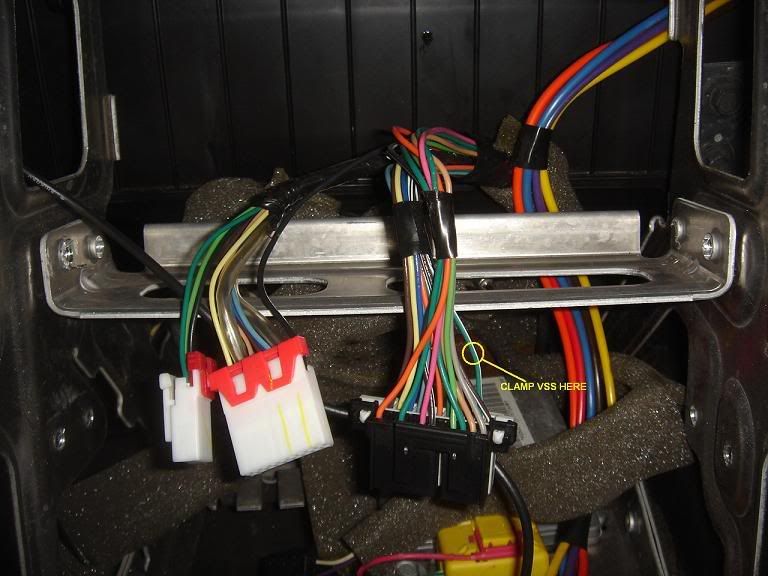
and where and what color is the databus wire
Ive read in a few posts that most of teh wires that are needed can be found in the panel at the feet of the passenger side of the cockpit..is this true... and how do identify them
and where and what color is the databus wire
Ive read in a few posts that most of teh wires that are needed can be found in the panel at the feet of the passenger side of the cockpit..is this true... and how do identify them
Last edited by BitViper; Nov 18, 2008 at 09:25 PM.
Thread Starter
Melting Slicks
Joined: Jan 2007
Posts: 3,107
Likes: 7
From: Sandy Ego Ca.
from this post http://forums.corvetteforum.com/audi...actory-hu.html
I gleaned this
And
is this correct?
I gleaned this
Originally Posted by PentaVolvo
I dont remeber what pin it is but if i recall in the gm harness its a yellow
wire and its one pin in from one of the ends of the connector, most likely
in between a red and pink wire and below a yellow wire
wire and its one pin in from one of the ends of the connector, most likely
in between a red and pink wire and below a yellow wire
Originally Posted by Davey98312
Yes, it's pin 16 on the connector. It should be an orange wire.