




My 1st Corvette

Thread Starter
Instructor

Joined: Dec 2003
Posts: 106
Likes: 0
From: Orange Park FL
 My 1st Corvette
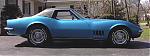
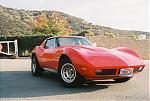
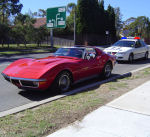
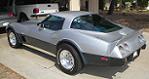
I've been a member for some time. As I've been searching for the perfect Corvette for me. I learned a lot from CF. So last Monday I bought my 1st Corvette. It's a 1975 Coupe, 4spd, silver with black interior.
The previous owner had done several mods to the car, so its a driver, NOT a matching numbers car by any means.
I posted pics in the gallery but I don't know how to get them posted here??
Any help would be appreciated.
The previous owner had done several mods to the car, so its a driver, NOT a matching numbers car by any means.
I posted pics in the gallery but I don't know how to get them posted here??
Any help would be appreciated.
Instructor
Joined: Mar 2005
Posts: 146
Likes: 0
From: Glendale Arizona
Originally Posted by psw5940
I've been a member for some time. As I've been searching for the perfect Corvette for me. I learned a lot from CF. So last Monday I bought my 1st Corvette. It's a 1975 Coupe, 4spd, silver with black interior.
The previous owner had done several mods to the car, so its a driver, NOT a matching numbers car by any means.
I posted pics in the gallery but I don't know how to get them posted here??
Any help would be appreciated.
The previous owner had done several mods to the car, so its a driver, NOT a matching numbers car by any means.
I posted pics in the gallery but I don't know how to get them posted here??
Any help would be appreciated.
Believe me the higher you get up in the C3 years the MORE you want to have a non-numbers matching engine. Those L-48 (165 hp) and L-82(205 hp) just dont cut it now-a-days!

Safety Car


Joined: Jun 2004
Posts: 4,652
Likes: 80
From: Lakeland Florida
Congrats on the car, and welcome to the Forum.
Heres some tips on posting photos to show us your car.
You can use a web site called TINYPIC HOSTING. This is a free website that will help to post pictures in places like this.
here is the address: http://tinypic.com/
Here is what I do.
1. After I download my photos on my computer I then go to this website and use the browser to find my photo.
2. I then use the browse function to host a photo and create an internet address,
3. I copy the address that has this format:
(IMG)http://tinypic.com/filename
4. I then post it in the Forum message
5. To make sure it will show up I use the PREVIEW POST button at the bottom of the reply thread.
6. If it looks ok, I will then SUBMIT REPLY.
kdf
Heres some tips on posting photos to show us your car.
You can use a web site called TINYPIC HOSTING. This is a free website that will help to post pictures in places like this.
here is the address: http://tinypic.com/
Here is what I do.
1. After I download my photos on my computer I then go to this website and use the browser to find my photo.
2. I then use the browse function to host a photo and create an internet address,
3. I copy the address that has this format:
(IMG)http://tinypic.com/filename
4. I then post it in the Forum message
5. To make sure it will show up I use the PREVIEW POST button at the bottom of the reply thread.
6. If it looks ok, I will then SUBMIT REPLY.
kdf
Drifting


Joined: Nov 2003
Posts: 1,634
Likes: 4
From: Northern NJ
St. Jude Donor '04 & '05
Welcome to the insanity! 
What you need to do to post pics is to first upload your pic(s) to a location on the internet. Some people use cardomain.com, photobucket.com, photohost.org or if your ISP provides you with some webspace, that will work too. Then in your post, click on the "Insert Image" button (directly below the right side of the font "size" box) and then place the whole address to the pics within the box that appears. To finish click the OK button and what ends up within your post should look something like this.
Note that the image tags (img) are misspelled (image) so they will show up here and not actually try and display a picture.
[IMAGE]http://www.yourdomain.com/pictures/yourcarpic.jpg[/IMAGE]
Hope this helps. Good Luck w/the new toy!

What you need to do to post pics is to first upload your pic(s) to a location on the internet. Some people use cardomain.com, photobucket.com, photohost.org or if your ISP provides you with some webspace, that will work too. Then in your post, click on the "Insert Image" button (directly below the right side of the font "size" box) and then place the whole address to the pics within the box that appears. To finish click the OK button and what ends up within your post should look something like this.
Note that the image tags (img) are misspelled (image) so they will show up here and not actually try and display a picture.
[IMAGE]http://www.yourdomain.com/pictures/yourcarpic.jpg[/IMAGE]
Hope this helps. Good Luck w/the new toy!
Corvette Stories
The Best of Corvette for Corvette Enthusiasts

Top 10 Most Expensive Corvettes Ever Sold on Bring A Trailer
Brett Foote
10 Things Every Corvette Owner Needs (2026 Edition)
Michael S. Palmer
8 Most "Only Corvette Owners Understand" Quirks and Problems
Pouria Savadkouei
10 Reasons the C6 Z06 is Still A Performance Benchmark After 20 Years
Joe Kucinski
How Much Horsepower Every Corvette Engine "LOST" in 1972
Joe Kucinski
Top 10 DOs and DON'Ts for Protecting Your Convertible Top!
Michael S. Palmer
Top 10 Most Explosive Corvettes Ever Made: Power-to-Weight Ratio Ranked!
Joe Kucinski
150 hp to 1,250 hp: Every Corvette Generation Compared by the Specs That Matter
Joe Kucinski
8 Coolest Corvette Pace Cars (and Replicas) of All Time
Verdad Gallardo
Race Director


Joined: Feb 1999
Posts: 19,659
Likes: 34
From: Lenoir City Tennessee
Ci 6, 8 & 10 Veteran
St. Jude Donor '05-'06-'07-'08-'09-'10-'11-'12-'13-'14-'15
Not a problem at all. To post pics from you uploaded pics, right click on the image and select properties. When it comes up, highlight the properties and then copy them. Come back to the reply screen and click on the image button, square with moutains in it, then paste in the properties you copied from above. Then click ok. Your image properties along with the image tags should pop up into the window. Hope this helps.