


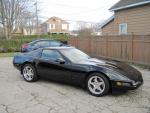



Chip Re-Install help

Thread Starter
Racer


Joined: May 2005
Posts: 372
Likes: 17
From: Cape Coral, FL
 Chip Re-Install help
Hi folks...don't post much, try to read mostly. Query for assistance.
# months ago I purchased a 1991 coupe L-98. Ran spectacular. Had an aftermarket alarm installed-car would barely run, 3 miles to the gallon, smoke etc..
Towed it to a local CVT specialty shop who said it was because the "piggyback chip" had become dislodged, so he removed it, told me how horrid these things are for corvettes, and offered to throw it away for me but refused to re-install it. "I won't put anything in a Corvette that doesn't belong in a Corvette".
Well, I have driven it for 3 months without the chip, and have decided I really like the way it drove with the chip better.
I have tried to open the black box where the chip goes, but there are mongo amounts of wires going to it I can't figure how to disconnect as well as some secret password to open the box I don't know.
The chip is from "Superchips Inc". Any help would be appreciated.
Many thanks.
SOF Vette
# months ago I purchased a 1991 coupe L-98. Ran spectacular. Had an aftermarket alarm installed-car would barely run, 3 miles to the gallon, smoke etc..
Towed it to a local CVT specialty shop who said it was because the "piggyback chip" had become dislodged, so he removed it, told me how horrid these things are for corvettes, and offered to throw it away for me but refused to re-install it. "I won't put anything in a Corvette that doesn't belong in a Corvette".
Well, I have driven it for 3 months without the chip, and have decided I really like the way it drove with the chip better.
I have tried to open the black box where the chip goes, but there are mongo amounts of wires going to it I can't figure how to disconnect as well as some secret password to open the box I don't know.
The chip is from "Superchips Inc". Any help would be appreciated.
Many thanks.
SOF Vette

Drifting

Joined: May 2003
Posts: 1,730
Likes: 1
From: Charlotte NC
St. Jude Donor '05
Thats flat out stuiped.
You can run a piggyback adapter with no ill effects. You'll need to take the 4 quarter inch screws holding on the access panel to the computer (gray)
You'll see a blue chip. Take the chip out, plug it into your piggyback adapter and then plug it all back into the stock computer.
You can run a piggyback adapter with no ill effects. You'll need to take the 4 quarter inch screws holding on the access panel to the computer (gray)
You'll see a blue chip. Take the chip out, plug it into your piggyback adapter and then plug it all back into the stock computer.
Thread Starter
Racer
Joined: May 2005
Posts: 372
Likes: 17
From: Cape Coral, FL
Thanks Alvin
I appreciate the help...if you wouldn't mind, please consider me the ultimate rookie while trying to explain even the simplest of tasks.
The PROM box is black and sits directly above the battery. There is a SMOKIN number of wires going into this box and I THINK it is closed with torx bolts. Once I disconnect the battery, can I leave those wires hooked up and try to open the black box and replace the chip?
If I am totally wrong on this, please feel free.
Thank you again for your help.
SOF Vette
The PROM box is black and sits directly above the battery. There is a SMOKIN number of wires going into this box and I THINK it is closed with torx bolts. Once I disconnect the battery, can I leave those wires hooked up and try to open the black box and replace the chip?
If I am totally wrong on this, please feel free.
Thank you again for your help.
SOF Vette

Safety Car


Joined: Jun 2003
Posts: 4,250
Likes: 656
From: San Diego Ca
Leave the wires alone.
undo the 3 10 mm bolts holding the pcm in place. pull up on the pcm and turn it upside down.
There are 4 1/4 inch bolts that you need to undo. Pull that 2 x 4 gray rubber cover. You will see the memcal. open the two plastic retainers by pressing outward on them. Pull up gently please the memcal. Dont forget to remember the orientation of the memcal. Put the memcal on the piggyback. Carefully slide the memcal in the box while lowering the piggyback into the pins. Be careful. It is hard to do wrong but if you force things you can bend a pin.
press down on the piggy back. The retainers will lift up. Completely bring them together. Replace the rubber cover and its 4 1/4 inch bolts.
Turn over the pcm and put it back in the bracket. Replace the 10 mm bolts that face the motor and the drivers side tire. Take the one that goes under the bracket and faces outward and put it in your tool kit for when you need it to replace one of the others you drop.
Perry
undo the 3 10 mm bolts holding the pcm in place. pull up on the pcm and turn it upside down.
There are 4 1/4 inch bolts that you need to undo. Pull that 2 x 4 gray rubber cover. You will see the memcal. open the two plastic retainers by pressing outward on them. Pull up gently please the memcal. Dont forget to remember the orientation of the memcal. Put the memcal on the piggyback. Carefully slide the memcal in the box while lowering the piggyback into the pins. Be careful. It is hard to do wrong but if you force things you can bend a pin.
press down on the piggy back. The retainers will lift up. Completely bring them together. Replace the rubber cover and its 4 1/4 inch bolts.
Turn over the pcm and put it back in the bracket. Replace the 10 mm bolts that face the motor and the drivers side tire. Take the one that goes under the bracket and faces outward and put it in your tool kit for when you need it to replace one of the others you drop.
Perry
Thread Starter
Racer
Joined: May 2005
Posts: 372
Likes: 17
From: Cape Coral, FL
Originally Posted by pkincy
Leave the wires alone.
undo the 3 10 mm bolts holding the pcm in place. pull up on the pcm and turn it upside down.
There are 4 1/4 inch bolts that you need to undo. Pull that 2 x 4 gray rubber cover. You will see the memcal. open the two plastic retainers by pressing outward on them. Pull up gently please the memcal. Dont forget to remember the orientation of the memcal. Put the memcal on the piggyback. Carefully slide the memcal in the box while lowering the piggyback into the pins. Be careful. It is hard to do wrong but if you force things you can bend a pin.
press down on the piggy back. The retainers will lift up. Completely bring them together. Replace the rubber cover and its 4 1/4 inch bolts.
Turn over the pcm and put it back in the bracket. Replace the 10 mm bolts that face the motor and the drivers side tire. Take the one that goes under the bracket and faces outward and put it in your tool kit for when you need it to replace one of the others you drop.
Perry
undo the 3 10 mm bolts holding the pcm in place. pull up on the pcm and turn it upside down.
There are 4 1/4 inch bolts that you need to undo. Pull that 2 x 4 gray rubber cover. You will see the memcal. open the two plastic retainers by pressing outward on them. Pull up gently please the memcal. Dont forget to remember the orientation of the memcal. Put the memcal on the piggyback. Carefully slide the memcal in the box while lowering the piggyback into the pins. Be careful. It is hard to do wrong but if you force things you can bend a pin.
press down on the piggy back. The retainers will lift up. Completely bring them together. Replace the rubber cover and its 4 1/4 inch bolts.
Turn over the pcm and put it back in the bracket. Replace the 10 mm bolts that face the motor and the drivers side tire. Take the one that goes under the bracket and faces outward and put it in your tool kit for when you need it to replace one of the others you drop.
Perry
Thanks everyone. I need to go buy a torx driver that fits...then I'll be in business

Thanks again!!!
SOF Vette
Thread Starter
Racer
Joined: May 2005
Posts: 372
Likes: 17
From: Cape Coral, FL
One of those star looking thingy's...like the ratchet used to take the top off.
Of course, like I said earlier...maybe I am looking at the wrong bolts???
If it stops raining today I'll pull it and check. If I'm all dorked up about this it will make things much easier
SOF Vette
Of course, like I said earlier...maybe I am looking at the wrong bolts???
If it stops raining today I'll pull it and check. If I'm all dorked up about this it will make things much easier
SOF Vette
Corvette Stories
The Best of Corvette for Corvette Enthusiasts

Top 10 Most Expensive Corvettes Ever Sold on Bring A Trailer
Brett Foote
10 Things Every Corvette Owner Needs (2026 Edition)
Michael S. Palmer
8 Most "Only Corvette Owners Understand" Quirks and Problems
Pouria Savadkouei
10 Reasons the C6 Z06 is Still A Performance Benchmark After 20 Years
Joe Kucinski
How Much Horsepower Every Corvette Engine "LOST" in 1972
Joe Kucinski
Top 10 DOs and DON'Ts for Protecting Your Convertible Top!
Michael S. Palmer
Top 10 Most Explosive Corvettes Ever Made: Power-to-Weight Ratio Ranked!
Joe Kucinski
150 hp to 1,250 hp: Every Corvette Generation Compared by the Specs That Matter
Joe Kucinski
8 Coolest Corvette Pace Cars (and Replicas) of All Time
Verdad Gallardo
Thread Starter
Racer
Joined: May 2005
Posts: 372
Likes: 17
From: Cape Coral, FL
Thanks folks! It never REALLY stops raining here at Lewis...sun breaks are just to keep us from becoming transparent.
I bought a torx driver and followed the above instructions with perfect results. My appreciation to you friend!
SOF Vette
I bought a torx driver and followed the above instructions with perfect results. My appreciation to you friend!
SOF Vette