When you click on links to various merchants on this site and make a purchase, this can result in this site earning a commission. Affiliate programs and affiliations include, but are not limited to, the eBay Partner Network.
Hey all, went out on a road rally and has some issues with surging power. Happened after sustained high revs and then engine braking and then getting back on the throttle would feel like surging. Happened again after sitting in 3rd for a long time behind a moron in a van going down a mountain. Once I tried to pass him getting in the throttle did a bunch or surging and **** till I put it in 6th and just cruised for a bit. I think I noticed it a little just sustaining 25 in my neighborhood too.
Most noticeable though thouwhen driving hard on mountain roads. Like I said high revs between corners, engine braking, and then back on the throttle. Then after a few corner like this then I would get back into the gas and get the surging feeling.
Not really sure where to begin looking other than maybe at my fuel system as I have done opti, plugs, wires, front cover gaskets, fluids etc. Just haven't changed anything in the fuel system other than the in line filter.
Anyone else have this happen?
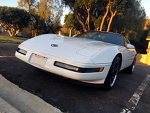
Pic of my car from the rally.
1995 LT1 6 speed
Also found out I have a nice little oil leak. At least it is rust prevention xD
Ahem. Anyway, if we're to assume you have no check engine light, then we go with the basics--fuel and ignition. If by 'surging' you mean 'bucking', then that could be several things. On the fuel side it can mean insufficient fuel flow. That can be caused by a failing fuel pump, a clogged fuel filter, a failing fuel pressure regulator, or injectors that are not firing correctly. On the ignition side, since you note it's after things get hot and happens at higher RPMs, the most likely culprit are the ignition coil and ignition control module, followed by the optispark.
If you don't already have it, get yourself an FSM from RockAuto. They're only $20 and are invaluable for our cars. It's listed under 'literature' at the bottom of the section.
If you really want to get nerdy with your diagnostics, grab a $60 cable from ( http://aldlcable.com/products/aldlobd2u.asp ) and the free program EEHack from ( http://fbodytech.com/eehack-2/download-eehack/ ). This will let you plug into your PCM and do much more thorough diagnostics. You can see all the current sensor values, and will have access to trouble codes not otherwise available (either because they don't light the check engine light, don't display on the dash using the paperclip, or both). The same guy who wrote that program wrote a flash program for our cars too, so if you really feel like getting spicy after fixing your surging issue, you could get into tuning it as well.
Thank you for reminding me I have that technology and the cable. As it is not part of my usual diag routine I tend to forget it is there. Seems like the MAF gets low readings sometimes, there seems to be an issue with coolant temp to the computer. Reading pretty low and possibly keeping the car in open loop a lot? The loop indicator seemed to jump around a lot. I have attached the file, any help and diagnosis would be greatly appreciated.
Thank you for reminding me I have that technology and the cable. As it is not part of my usual diag routine I tend to forget it is there. Seems like the MAF gets low readings sometimes, there seems to be an issue with coolant temp to the computer. Reading pretty low and possibly keeping the car in open loop a lot? The loop indicator seemed to jump around a lot. I have attached the file, any help and diagnosis would be greatly appreciated.
Easy way to test is to just unplug the MAF entirely. This will throw a code, but it's a code that can be safely ignored. Unplugging the MAF puts the PCM into Speed Density mode, where it only uses the MAP sensor. If the problem vanishes, then replace your MAF. I'll take a look at your log in a few hours, just a bit busy at the moment.
EDIT: I lied, I just pulled out my logging laptop to take a look at your data. I think you nailed it! And this is why datalogging is so damn important; without data, we'd be attacking fuel and spark to make sure everything in those systems is working perfectly. Then we'd make our way down the list until we stumbled onto a clue elsewhere. With the data in hand, things like this quite literally jump right out at you and scream "SUS!"
Replace your coolant temperature sensor, and unplug your MAF (for now). Then go for another 'spirited' drive and see how she feels.
Last edited by Nomake Wan; Nov 14, 2020 at 05:47 PM.
Man I really apricate your help a lot. All this data is a lot to look at for someone that doesn't know what it all means.
Since you seem well versed, is there a way to make the logging screen of EEHack not look terrible? While looking at the screen when open all the reading parameters seem to overlap and you can't expand the parameter box to read the whole thing.
Man I really apricate your help a lot. All this data is a lot to look at for someone that doesn't know what it all means.
Since you seem well versed, is there a way to make the logging screen of EEHack not look terrible? While looking at the screen when open all the reading parameters seem to overlap and you can't expand the parameter box to read the whole thing.
It may be a resolution issue. My logging computer is a netbook with a 1366x768 resolution. EEHack for the most part looks okay. On anything smaller than that resolution, it may be somewhat compressed and hard to read. You can try setting your system DPI to a smaller percentage to shrink text across all programs and see if that helps scale the window to make things not overlap, though of course it'll make text smaller.
Also looking at your data again, seems you have a CEL for the primary radiator fan? It's the fan on the left side. Hilariously my 95 has this as well, ended up being the relay harness for that fan having caught fire due to the insulation chafing off. Probably a good idea to check all three fan relays and the fan itself, see what's up. Trust me that you can't keep the engine cool in California weather with just one fan. While moving, no problem. But idling in traffic, it can just barely stay cool, and once you turn the A/C on it'll just keep getting hotter and hotter until you either start driving again or shut the A/C off.
EDIT: Also, mapping the MAF output to the TPS, the spikes actually look better. I forgot for a second that the MAF has less to do with RPM and more to do with the throttle position (because it's measuring air being sucked into the throttle body, not measuring pressure inside the intake manifold). They still seem like they could be lower than expected, but I'd say fix the coolant temperature sensor (and your radiator fan) first.
Last edited by Nomake Wan; Nov 14, 2020 at 10:24 PM.
I am running a 4k laptop and this is what I see EEHack
See now I do not have a CEL for that fan, but every time I plug in EEHack that fault shows up. Weird thing is, is that my fans both work, main come on when running and secondary comes on when I turn on the a/c.
I ordered the goodies to replace the coolant sensor and a few other nick nacks I have been putting off. Once I get those tomorrow I will replace them and run with and without the MAF again and see what happens. Maybe grab some MAF cleaner while I am at it. Not sure what to do about the rad fan, but I will try checking the relays and see if any look bad.
Thank you again for looking this all over. I agree that the MAF seem like it is lower than it should be.
I am running a 4k laptop and this is what I see EEHack
See now I do not have a CEL for that fan, but every time I plug in EEHack that fault shows up. Weird thing is, is that my fans both work, main come on when running and secondary comes on when I turn on the a/c.
I ordered the goodies to replace the coolant sensor and a few other nick nacks I have been putting off. Once I get those tomorrow I will replace them and run with and without the MAF again and see what happens. Maybe grab some MAF cleaner while I am at it. Not sure what to do about the rad fan, but I will try checking the relays and see if any look bad.
Thank you again for looking this all over. I agree that the MAF seem like it is lower than it should be.
Not a problem! As for your screenshot, it's a little hard to make out, but it looks like you're running the latest version (4.93). I've never tried running it at 4K, but at such a high resolution, perhaps it's the opposite problem from what I mentioned earlier. Try cranking the DPI setting up to force all text scaling to increase, or decrease your display resolution. See if that helps. If it does, then it's just that EEHack isn't handling massively pixel-dense displays properly. It was fixed to handle lower-resolution displays a little more gracefully, but perhaps Windows 10 is doing something funky. It may be worth getting in touch with the program's author over on Gearhead-EFI in the EEHack thread to report a bug with your setup and see if there's a way to get an update with support for your screen. The thread is here: http://www.gearhead-efi.com/Fuel-Inj...k-update/page7
As for the fan error, are you sure you don't have it? According to the FSM, Code 77 will not trip the SES light, but will be stored in memory and will display using the paperclip method (or connecting a scantool like EEHack). The condition which causes this code to trip are, again according to the FSM:
"The PCM detects the wrong voltage potential for 26 seconds on CKT 335 (Thin Dark Green Wire on Relay #1)."
This means it should detect ~12V on that line when the fan is off, and ~0V (ground) when the fan is on. If it doesn't detect those things, then something is wrong in that circuit somewhere. Either the relay is bad, the thin dark green wire is bad, or the internal driver circuit in the PCM is bad.
So switch changed out, coolant bled and will do a test drive here soon and see what the computer reads.
On the fan relay: I had noticed that error before in eehack, but since the fan worked I always thought it was just the program being weird, but I found out why. Looks like someone added a ground wire to the green wire essentially keeping the fan on at all time regardless. With the new big 3 core rad I put in this would help explain why reaching operating temp on cold nights took forever. Also replaced the thermostat just cause of the too cold.
Anyway, I unplugged the ground wire that was added and the fan stopped and never turned on even when the car reached temp, though I think that all has to do with that ever the temp the car reads right? Cause I know that is a changeable value.
So I am not sure if the fan relay is good or not, but ill see in the test drive I suppose.
So switch changed out, coolant bled and will do a test drive here soon and see what the computer reads.
On the fan relay: I had noticed that error before in eehack, but since the fan worked I always thought it was just the program being weird, but I found out why. Looks like someone added a ground wire to the green wire essentially keeping the fan on at all time regardless. With the new big 3 core rad I put in this would help explain why reaching operating temp on cold nights took forever. Also replaced the thermostat just cause of the too cold.
Anyway, I unplugged the ground wire that was added and the fan stopped and never turned on even when the car reached temp, though I think that all has to do with that ever the temp the car reads right? Cause I know that is a changeable value.
So I am not sure if the fan relay is good or not, but ill see in the test drive I suppose.
Your log shows that the PCM thinks the car never goes over 90 degrees. Since the fans don't kick in until over 200F, that's why. Sounds like whoever had the car before you "fixed" the coolant temp problem by rigging the fans rather than just...yanno, fixing the actual problem.
Let's get that coolant temperature sensor fixed and see if the car now reads the engine temperature correctly. As a note, and I should've probably mentioned this earlier, there are two coolant temperature sensors on the car. The PCM uses the one on the thermostat housing at the front of the engine. The analog gauge on the dash uses one on the passenger side head. They are physically different sensors. Hopefully you've replaced the correct one. Thanks, GM.
Yeah I changed the correct sensor off the water pump. Drove the car with the fan "fix" undone and as you'll see in the attached bin the fans never went on. Got all the way to 215 so I turned on the a/c and reconnected the fan "fix". Seemed to be driving much better now. I kept the MAF plugged in and it was still having issues. So next up will be running in speed density mode.
I did have to stop in the drive cause I ran something over and it worried us. Thankfully seemed to be nothing, hence why it shut off 3/4 the way through.
Oh also noticed that when in high gear and going 100% throttle I get a fair amount of indicated knock. Was thinking that if the MAF was failing and giving lower air results then the car would be running lean and possibly knocking with these parameters.
Yeah I changed the correct sensor off the water pump. Drove the car with the fan "fix" undone and as you'll see in the attached bin the fans never went on. Got all the way to 215 so I turned on the a/c and reconnected the fan "fix". Seemed to be driving much better now. I kept the MAF plugged in and it was still having issues. So next up will be running in speed density mode.
I did have to stop in the drive cause I ran something over and it worried us. Thankfully seemed to be nothing, hence why it shut off 3/4 the way through.
Oh also noticed that when in high gear and going 100% throttle I get a fair amount of indicated knock. Was thinking that if the MAF was failing and giving lower air results then the car would be running lean and possibly knocking with these parameters.
If you have never altered the code on your PCM, the default Fan 1 enable is 219.2 Degrees F. So if you only got it to 215, then you haven't actually gotten it hot enough to kick in the first fan, let alone the second (which doesn't kick in until 227F). If this is your first LT1 Corvette, then you're like me--you saw the temp gauge and freaked, because every car you've had before this had a 'typical' cooling system with a 'typical' gauge where it goes to about 185F and stays there, and the gauge hovers around the middle. Our Corvettes aren't like that at all. They run hot by design, and the analog gauge is...well, it's crap.
Anyways, went ahead and looked at your log. The coolant temperature sensor output now looks totally correct--no more random jaggies all over the place, and just follows the temperature. Looks like you took this data after reconnecting the """"fix"""" but again, please remove that nonsense and let the PCM do its job. If you're concerned about the temperatures, you can always use Flashhack to grab the BIN from your car, load it into TunerPro, and change the enable temperatures to something lower. But don't hot-wire the fan relays, it's no bueno.
As for the knock, you actually didn't have much. The ones around 500 RPM are likely not knock at all, but rather just noise. For instance, if you haven't disabled the stall saver in the code, I highly suggest you do so. It'll make stop-and-go and low-RPM operation way, way, way more smooth. No more bucking at low speed, low RPM. Here's a howto: http://fbodytech.com/tutorials/fix-l...e-stall-saver/
The spot around 2250 RPM between 30~40 kPa MAP is a little bit more odd to me, but I suppose it could be resonance of some kind.
For now, you can experiment with the MAF by unplugging it. This will flip the car into speed density mode, operating it as if it were a 92-93 Corvette instead. Totally safe to do this (as long as your MAP sensor is working). If this changes the vehicle operation in a good way, then yes, your MAF may need replacing. But to be honest, your O2 numbers don't look bad at all. Your Power Enrichment values are all safely rich, your average O2 reading is just a tad lean, your cross counts are only off by 100 or so, and most BLM cells are around 128. This honestly seems like a stock Corvette to me. It may be time to start trying your hand at tuning if you want to get those numbers up.
As for the data I recorded it without the "fix" up till about half way though the drive where I then plugged it back in cause the temp got high, but I didn't know that the fan temp was set to go on that high. I knew before these cars were designed to run a bit hotter than people expects, but I did not know how much higher.
So I was worried about the Knock count and knock retard being high at 3736 and 3 deg respectfully (at 3418@353.8 on the bin), but you're saying that isn't something to worry about? Cause the count just keeps going up and there are up to 4 deg in retard at times, just one of those things I worry about. The graph of knock retard and knock counts seems to indicate at one point I had a knock retard of 12 degrees, is that normal?
I tried messing with Tunerpro just by looking at what I could do. I guess I'll have to go in there and see what else I can do. Thank you for checking this all out. Much more piece of mind and having a well running car is a nice change. Though I do kind of miss the overrun that the car had from all that extra fuel xD
Last edited by CaptDDale; Nov 17, 2020 at 01:37 PM.
As for the data I recorded it without the "fix" up till about half way though the drive where I then plugged it back in cause the temp got high, but I didn't know that the fan temp was set to go on that high. I knew before these cars were designed to run a bit hotter than people expects, but I did not know how much higher.
So I was worried about the Knock count and knock retard being high at 3736 and 3 deg respectfully (at 3418@353.8 on the bin), but you're saying that isn't something to worry about? Cause the count just keeps going up and there are up to 4 deg in retard at times, just one of those things I worry about. The graph of knock retard and knock counts seems to indicate at one point I had a knock retard of 12 degrees, is that normal?
I tried messing with Tunerpro just by looking at what I could do. I guess I'll have to go in there and see what else I can do. Thank you for checking this all out. Much more piece of mind and having a well running car is a nice change. Though I do kind of miss the overrun that the car had from all that extra fuel xD
If you recorded without the 'fix' it didn't show in the log; but then again if you didn't actually clear the codes, maybe it's just a stale code. The fan code is still there across the whole log. Anyway, the knock counts aren't what's important; you can pretty much ignore them. Knock counts are raw data without filtering, while knock retard is the actual important value. If you use the 'analyze' tool in EEHack you can see exactly where these events actually happened, which helps pin it down.
High knock retard in the same situation can be pointing at something being wrong. If it's insufficient fuel at a particular load, for example. Or it could be noise causing false retard. It's hard to tell without some more diagnostics and understanding your particular car. That's why it may be worth disabling the MAF and running in Speed Density mode to see if that changes how the knock events present. If they all but go away, then your MAF is suspect. If they stay the same, then the issue isn't air/fuel metering, but somewhere else. Again, it could be nothing.
I just didn't see anything that jumped out as being totally uncommon. Remember that we have crappy 91 octane here in California, and our cars have a bunch of ignition retard built in (for example, there is a 'burst knock' feature that pulls timing on sudden throttle changes just to be safe). Best to just make sure everything's nice and sound, run a few tests, and then maybe start getting into tuning and tweaking things.
Alright, was finally able to fix the oil leak. Turns out one of the oil pressure senders was pissing oil out. Now that that is fixed I cleaned the MAF and started recording. Still showed sub par readings. So I unplugged it and went for drive. I was not able to replicate the running issues I was having before which I suppose is a good sign that my MAF seems to be the problem.
Two things I did notice were the IAC turned red here and there, though I suppose that could be due to the speed density mode? Also block learn mode was on for the left side periodically? I have no idea what that means though.
Alright, was finally able to fix the oil leak. Turns out one of the oil pressure senders was pissing oil out. Now that that is fixed I cleaned the MAF and started recording. Still showed sub par readings. So I unplugged it and went for drive. I was not able to replicate the running issues I was having before which I suppose is a good sign that my MAF seems to be the problem.
Two things I did notice were the IAC turned red here and there, though I suppose that could be due to the speed density mode? Also block learn mode was on for the left side periodically? I have no idea what that means though.
The IAC turning red is oddly because it isn't having to adjust very much in order to hit the idle target. That's a little odd, but more in a 'curious' sort of way. BLM is normal, and wasn't on 'for the left side' but in general. It was all operating exactly as expected.
However, it did show that your VE tables are waaaaay off whatever configuration you have for your particular engine. That said, they're within the limits of what the computer can compensate for, which is why your knock events have now decreased dramatically to the point where they're probably just erroneous noise around the 1500 RPM mark. Looks like it's time to start tuning! Oh, and grab a new MAF. Just remember that nowadays all MAFs are a crapshoot, so don't panic if you plug a new one in and it doesn't work. Just return it and get another. Eventually you'll get one that works. I got lucky with a Walker from Amazon, but it really is luck of the draw.
By the way, when you graph the knock retard, look at it compared to the throttle position. You aren't seeing actual knock there--you're seeing the 'burst knock' in action. The car preemptively pulls timing when you suddenly change throttle position to preemptively counteract any possibility of knock. This can be disabled in the code if you're feeling spicy. Just make sure your VE tables are correct before you do that.
Last edited by Nomake Wan; Nov 23, 2020 at 11:42 PM.
Ok so I have been through 3 MAFs now and seeing as they are all reading roughly the same as the one that was on the car do you think it is still MAF issues or something else? I did do a smoke test as any un metered air could be causing this and I had now leaks anywhere, which is a nice find. Kind of feeling a bit stumped on it. Only thing that comes to my mind is the target idle. At 750 rpm the MAF reads low, but at 800 rpm it hits the minimum 8 g/s target for the maf. I have attached the idle warm up from this morning and yesterday with MAF #3.
Thank you for checking out the VE tables, I will have to go about doing some tuning. Weird about the knock retard, but neat info. Engine tuning is such an interesting and dark art to most of us out there, but something I want to learn.
My '95 is currently down in the middle of a rebuild and my dad's '94 is having its HVAC repaired, but as soon as one of the two is back up and running I'll grab a log with the MAF to see how it compares to your data. For now I wouldn't worry too much, especially since you can run in Speed Density mode and tune without the MAF if you so desired.






 95 Running Issue (surging while driving hard)