



My C5 in 3D

Thread Starter
Le Mans Master


Joined: May 2000
Posts: 5,266
Likes: 15
From: Syracuse NY
Cruise-In II Veteran
 My C5 in 3D
I decided to experiment with some simple 3D photography after my coworker showed me some cool 3D pictures... so here is one of my C5. You just need the 'ole red and blue glasses. I have the color version, but the torch red gets washed out , so I posted the B&W version.
The cool thing is you end up with two similar photos in 2D that you can keep along with the 3D version.

The cool thing is you end up with two similar photos in 2D that you can keep along with the 3D version.
Race Director


Joined: Feb 2004
Posts: 11,651
Likes: 9
From: HOW FAST WAS I GOING OFFICER? Los Angeles Hating GM Dealership Service Dept.'s Since Sept. 2004
St. Jude Donor '04-'05-'06-'07
That's cool!
I used a red and a blue drinking glass over each eyes!
I wonder what it'll look like if I drink what's in each glass
I used a red and a blue drinking glass over each eyes!
I wonder what it'll look like if I drink what's in each glass

Burning Brakes

Joined: Oct 2003
Posts: 793
Likes: 0
From: IN
Cruise-In VII Veteran
I just bought my 5 year old son the New "Shark Boy and Lava Girl" DVD. It came with the 3D glasses, but your picture still didn't look quite right to me, but it may be my laptop screen. Its almost like the 2 colors are too far apart, but props for trying.

Cherish your Hopes...


Joined: Feb 2002
Posts: 13,074
Likes: 236
From: West Palm Beach FL
Cruise-In VII Veteran
St. Jude Donor '05-'06-'07
Originally Posted by Scratch
Great...now I'll be looking for those 3D glasses I recall seeing somewhere around here! 
Shouldn't glasses be issued with this type of post...
btw, looks
Shouldn't glasses be issued with this type of post...
btw, looks
...yea this post is useless without 3d glasses
Corvette Stories
The Best of Corvette for Corvette Enthusiasts

Top 10 Most Expensive Corvettes Ever Sold on Bring A Trailer
Brett Foote
10 Things Every Corvette Owner Needs (2026 Edition)
Michael S. Palmer
8 Most "Only Corvette Owners Understand" Quirks and Problems
Pouria Savadkouei
10 Reasons the C6 Z06 is Still A Performance Benchmark After 20 Years
Joe Kucinski
How Much Horsepower Every Corvette Engine "LOST" in 1972
Joe Kucinski
Top 10 DOs and DON'Ts for Protecting Your Convertible Top!
Michael S. Palmer
Top 10 Most Explosive Corvettes Ever Made: Power-to-Weight Ratio Ranked!
Joe Kucinski
150 hp to 1,250 hp: Every Corvette Generation Compared by the Specs That Matter
Joe Kucinski
8 Coolest Corvette Pace Cars (and Replicas) of All Time
Verdad Gallardo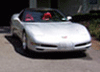

Thread Starter
Le Mans Master
Joined: May 2000
Posts: 5,266
Likes: 15
From: Syracuse NY
Cruise-In II Veteran
Oh Boy... I don't think I can afford to issue 3D glasses to the Forum .
It isn't perfect, but it was a fun experiment. It works well for stills (because you have to take two pictures). You take the two images 2 inches apart by moving the camera to the right in a straight line (no arching). That mimmicks your eyes. Then I found this free software (3D Combine ???) and it allowed me to convert the two images to the nice blurr-o-vision for the red and blue glasses).
Here is the original "right eye" pic

.It isn't perfect, but it was a fun experiment. It works well for stills (because you have to take two pictures). You take the two images 2 inches apart by moving the camera to the right in a straight line (no arching). That mimmicks your eyes. Then I found this free software (3D Combine ???) and it allowed me to convert the two images to the nice blurr-o-vision for the red and blue glasses).
Here is the original "right eye" pic
Le Mans Master
Joined: Jul 2004
Posts: 8,142
Likes: 0
From: Time is a great teacher. Unfortunately, it kills all its pupils.
Cruise-In VIII Veteran
St. Jude Donor '07
Cool idea. Would like to see it but don't have access to any glasses atm.
Just some random thoughts on the subject...
Instead of taking two separate images, wouldn't it be easier to just take one photo, then using some sort of graphic editing software (i.e. PhotoShop), copy the first image and overlay it with the copy? That way you get two exact images where everything that's in the first is in the second (I noticed the guy cutting the grass is only in one image). Not only would you end up with two identical images you can also adjust the overlay to be the exact distance it needs to be from the first image to remove any blurriness before saving the final to your hard drive.
Just some random thoughts on the subject...
Instead of taking two separate images, wouldn't it be easier to just take one photo, then using some sort of graphic editing software (i.e. PhotoShop), copy the first image and overlay it with the copy? That way you get two exact images where everything that's in the first is in the second (I noticed the guy cutting the grass is only in one image). Not only would you end up with two identical images you can also adjust the overlay to be the exact distance it needs to be from the first image to remove any blurriness before saving the final to your hard drive.

Thread Starter
Le Mans Master
Joined: May 2000
Posts: 5,266
Likes: 15
From: Syracuse NY
Cruise-In II Veteran
Originally Posted by jaxgator
Cool idea. Would like to see it but don't have access to any glasses atm.
Just some random thoughts on the subject...
Instead of taking two separate images, wouldn't it be easier to just take one photo, then using some sort of graphic editing software (i.e. PhotoShop), copy the first image and overlay it with the copy? That way you get two exact images where everything that's in the first is in the second (I noticed the guy cutting the grass is only in one image). Not only would you end up with two identical images you can also adjust the overlay to be the exact distance it needs to be from the first image to remove any blurriness before saving the final to your hard drive.
Just some random thoughts on the subject...
Instead of taking two separate images, wouldn't it be easier to just take one photo, then using some sort of graphic editing software (i.e. PhotoShop), copy the first image and overlay it with the copy? That way you get two exact images where everything that's in the first is in the second (I noticed the guy cutting the grass is only in one image). Not only would you end up with two identical images you can also adjust the overlay to be the exact distance it needs to be from the first image to remove any blurriness before saving the final to your hard drive.
This thread is kind of drifting into "off topic", and I appologize; I figured the C5 group would appreciate a 3D C5 as much as I do!


Race Director

Joined: Jun 2000
Posts: 13,733
Likes: 66
From: Hurst, TX USA
Originally Posted by mcronec5
I just bought my 5 year old son the New "Shark Boy and Lava Girl" DVD. It came with the 3D glasses, but your picture still didn't look quite right to me, but it may be my laptop screen. Its almost like the 2 colors are too far apart, but props for trying.
idea, though.
Thread Starter
Le Mans Master
Joined: May 2000
Posts: 5,266
Likes: 15
From: Syracuse NY
Cruise-In II Veteran
It is a software issue. My co-worker manually overlaps the two photos and selects a "focal point" (like the front of the C5). That location has the colors "aligned". As you get closer / further away, the spread between red and blue increases.
It is much more labor intensive than using the free software, but the results are much more impressive too.
It is much more labor intensive than using the free software, but the results are much more impressive too.