





Videos...what is everyone using..

Thread Starter
Team Owner


Joined: Dec 1999
Posts: 174,312
Likes: 1,217
From: Here
Pilot of Beer Force 1
Tampa Regional Coordinator
CI 4-5-6-7-8 Veteran
Organizer St. Jude Fundraiser
I believe in the Beer Fairy
 Videos...what is everyone using..
looking for input on cameras and setup.... 
Thread Starter
Team Owner
Joined: Dec 1999
Posts: 174,312
Likes: 1,217
From: Here
Pilot of Beer Force 1
Tampa Regional Coordinator
CI 4-5-6-7-8 Veteran
Organizer St. Jude Fundraiser
I believe in the Beer Fairy
yeah I decided on the sticky pod..just trying to get input on cameras

Melting Slicks


Joined: Apr 2005
Posts: 3,469
Likes: 4
You can't beat a Mac for ease of use. Visit an Apple store and check it out... they have lots of cameras set up and computers running the software, so you can play and get a feel for both ends of the equation. 

Racer

Joined: Aug 2004
Posts: 315
Likes: 1
From: Bakersfield California
I just bought a new Sony Handycam DCR-DVD305. I records straight onto a mini DVD. I have only used it for my Son's birthday so far but it works great. You can play in on any DVD player as soon as you eject it from the recorder, or download it to your computer for editing. The only downside is the discs only last about 20 minutes each. You can also use it to convert your old miniDV tapes and VHS tapes to DVD using it. I need to take it out in the car soon. Good luck with your search.

Pro

Joined: Nov 2005
Posts: 605
Likes: 0
I haven't used it in the Corvette (yet), but I use a Sony HC40 MiniDV. It's a couple of years old now. I have used it on the motorcycle with a handlebar mount for two week-long roads trips. The second trip was cut short by a crash. The camera survived even though the bike was totalled, and it recorded the whole thing.
Corvette Stories
The Best of Corvette for Corvette Enthusiasts

Top 10 Most Expensive Corvettes Ever Sold on Bring A Trailer
Brett Foote
10 Things Every Corvette Owner Needs (2026 Edition)
Michael S. Palmer
8 Most "Only Corvette Owners Understand" Quirks and Problems
Pouria Savadkouei
10 Reasons the C6 Z06 is Still A Performance Benchmark After 20 Years
Joe Kucinski
How Much Horsepower Every Corvette Engine "LOST" in 1972
Joe Kucinski
Top 10 DOs and DON'Ts for Protecting Your Convertible Top!
Michael S. Palmer
Top 10 Most Explosive Corvettes Ever Made: Power-to-Weight Ratio Ranked!
Joe Kucinski
150 hp to 1,250 hp: Every Corvette Generation Compared by the Specs That Matter
Joe Kucinski
8 Coolest Corvette Pace Cars (and Replicas) of All Time
Verdad Gallardo
Melting Slicks


Joined: Feb 2005
Posts: 2,210
Likes: 0
Apples all the way - AV studio in a 450$ box = priceless.
Camcorder - Sony Cams with
1. carl zeiss lens
2. DV output AND input
3. miniDV tapes (not micro)
recommended
they're HD cams are hot and work Well with the apple build in for free but still quite excellent precursor to the pro app for video editing called www.apple.com/imovie
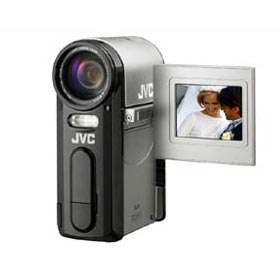
i have a JVC i got in london, its awesome and small - out-tech'd (punked) by now but at 1Megpixel for videorecording its nice enough
nice and compact - i gave up the dv-input (save $$)
but now regret it.... i can bring in the footage to my mac and edit, add transitions, music - lovely. space is a premium when dealing with raw AVI footage - 1Gbyte for 4 minutes roughly
-nice to edit 40 minutes to a 8 minute 'music' video/etc and then its smaller (duh) and smaller again if its encoded/compressed down into an mpeg4 video format (or others that vary windowsize/res or quality even more) - but sometimes i think id like to take the 'full quality - pristine clip and move it back to the tape for ...archiving'
-dvinput on the cam thats the ticket
(they is also some clever software avail for macs that can archive computer data files to a camcorder tape as a deep storage medium (quite cool)
if your seriously looking at a setup, dont overlook the associated costs of using a PeeCee for it - to rival the setup that is 'out of the box on the apple you will spend a fair amount of cash for decent-working software programs to either import the video quickly (no one wants to watch paint dry, or the grass grow, or their 40 Gbytes of video come trickling across a USB wire to their computer) , . Or buy Adobe Premier for PeeCee as the editor - similar to apple's their software 'renders' the extra frames/transitions etc at around 2x realtime -doing it on 'movieshaker' again: watching paint dry. And then organise even more software for authoring an attractive DVD intro movie and click-menu like you see on the dvd's that you hire/buy from the video store - let alone the actual burn to dvd.
www.apple.com/ilife covers it all.
from plug in (no driver install .. for any camera, plug n go, not plug n pray)
to import
to edit
to add titles/transitions/music
export
seemless into 'idvd' (their dvd-menu authoring tool) and clicking the little
radio active 'burn' icon - and SNAP! your done
Camcorder - Sony Cams with
1. carl zeiss lens
2. DV output AND input
3. miniDV tapes (not micro)
recommended
they're HD cams are hot and work Well with the apple build in for free but still quite excellent precursor to the pro app for video editing called www.apple.com/imovie
i have a JVC i got in london, its awesome and small - out-tech'd (punked) by now but at 1Megpixel for videorecording its nice enough
nice and compact - i gave up the dv-input (save $$)
but now regret it.... i can bring in the footage to my mac and edit, add transitions, music - lovely. space is a premium when dealing with raw AVI footage - 1Gbyte for 4 minutes roughly
-nice to edit 40 minutes to a 8 minute 'music' video/etc and then its smaller (duh) and smaller again if its encoded/compressed down into an mpeg4 video format (or others that vary windowsize/res or quality even more) - but sometimes i think id like to take the 'full quality - pristine clip and move it back to the tape for ...archiving'
-dvinput on the cam thats the ticket
(they is also some clever software avail for macs that can archive computer data files to a camcorder tape as a deep storage medium (quite cool)
if your seriously looking at a setup, dont overlook the associated costs of using a PeeCee for it - to rival the setup that is 'out of the box on the apple you will spend a fair amount of cash for decent-working software programs to either import the video quickly (no one wants to watch paint dry, or the grass grow, or their 40 Gbytes of video come trickling across a USB wire to their computer) , . Or buy Adobe Premier for PeeCee as the editor - similar to apple's their software 'renders' the extra frames/transitions etc at around 2x realtime -doing it on 'movieshaker' again: watching paint dry. And then organise even more software for authoring an attractive DVD intro movie and click-menu like you see on the dvd's that you hire/buy from the video store - let alone the actual burn to dvd.
www.apple.com/ilife covers it all.
from plug in (no driver install .. for any camera, plug n go, not plug n pray)
to import
to edit
to add titles/transitions/music
export
seemless into 'idvd' (their dvd-menu authoring tool) and clicking the little
radio active 'burn' icon - and SNAP! your done
Last edited by Freestyler; Mar 16, 2006 at 12:18 PM.

Supporting Tuner
Joined: Sep 2004
Posts: 51,896
Likes: 39
From: ================== Houston, Texas www.englandgreen.com ================== Necessary Evil™ __________
CI 6-7-8-9-10 Veteran
St. Jude Donor '05-'06-'07-'08-'09-'10-'11-'12-'13-'14
Panasonic MiniDV for planned high res, Canon micro for impromptu low res.
iMovie and Final Cut Pro for editing. QuickTime .mov for hosting.
EG
iMovie and Final Cut Pro for editing. QuickTime .mov for hosting.
EG
