






She is a keeper!!!!

Thread Starter
Melting Slicks


Joined: Sep 2002
Posts: 2,787
Likes: 139
From: Las Vegas NV
 She is a keeper!!!!
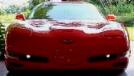
Here is a pic of my latest Mod my new RK Sport Hood looks killer. My wonderful girlfriend drove 2 1/2 hours one way to Westcoast Corvettes to pick it up for me ( God I Love that woman) and she even droped it off at the paint shop for me! She is a keeper for sure!!! 

 IMG]
IMG]
Last edited by Vegas Vette; Oct 25, 2004 at 01:02 AM.

Race Director


Joined: Nov 2003
Posts: 12,346
Likes: 5
From: Mustang OK
Originally Posted by razor2430
I know I dont know what the heck happend 

1. First, you really need to resize your pics. I think the Forum generally recommends that sig pics be no larger than 400 X 300 pixels. However, in this case you can probably get by with 640 X 480 pixels or some where in that vicinity. If you go much larger than this, then it will cause problems with your text not wrapping properly as in your original post and in this one.
2. The second problem is in the way you inserted your images. You have the image tags for the two images side by side which causes your post to run out even further to the side horizontally. In this case, the pics should have been inserted one on top of the other. You can do this by editing your original post, inserting you cursor between the two images, then pressing the ENTER key on your keyboard. This won't do anything for the individual picture size but you can see how this helps some by the way I've redone them below. Press the QUOTE in my reply below and you can see how I redid your images and tags versus the way you did them in your original post.
Hope this helps. Good luck!

Last edited by GrayC5; Oct 25, 2004 at 01:09 AM.
Burning Brakes

Joined: Sep 2003
Posts: 1,230
Likes: 0
From: baton rouge la
LMAO even the submit reply box is slammed over to the right.
lol
I pressed reply.......and I started wondering " gee whats different about this"......it never looked like this before when i replied to a post.
lol
I pressed reply.......and I started wondering " gee whats different about this"......it never looked like this before when i replied to a post.
Corvette Stories
The Best of Corvette for Corvette Enthusiasts

Top 10 Most Expensive Corvettes Ever Sold on Bring A Trailer
Brett Foote
10 Things Every Corvette Owner Needs (2026 Edition)
Michael S. Palmer
8 Most "Only Corvette Owners Understand" Quirks and Problems
Pouria Savadkouei
10 Reasons the C6 Z06 is Still A Performance Benchmark After 20 Years
Joe Kucinski
How Much Horsepower Every Corvette Engine "LOST" in 1972
Joe Kucinski
Top 10 DOs and DON'Ts for Protecting Your Convertible Top!
Michael S. Palmer
Top 10 Most Explosive Corvettes Ever Made: Power-to-Weight Ratio Ranked!
Joe Kucinski
150 hp to 1,250 hp: Every Corvette Generation Compared by the Specs That Matter
Joe Kucinski
8 Coolest Corvette Pace Cars (and Replicas) of All Time
Verdad Gallardo
Race Director
Joined: Nov 2003
Posts: 12,346
Likes: 5
From: Mustang OK
Originally Posted by razor2430
Thanks Gary I am still learning how to properly post pics it kind of tricky. This will help me thanks again.
BTW, your ride looks awesome!
Last edited by GrayC5; Oct 25, 2004 at 01:23 AM.

Administrator


Joined: Mar 2001
Posts: 368,323
Likes: 24,777
From: In a parallel universe. Currently own 2014 Stingray Coupe.
C7 of the Year - Modified Finalist 2021
MO Events Coordinator
St. Jude Co-Organizer
St. Jude Donor '03 thru '26
NCM Sinkhole Donor
CI 5, 8 & 11 Veteran
Nice looking hood and your car looks great. Congrats.


 Nice.....







 Thinking exactly the same thing.
  Hood looks great.