




manual C5 Fan switch wiring

Thread Starter
Pro

Joined: Aug 2001
Posts: 724
Likes: 0
From: West Palm Beach FL
 manual C5 Fan switch wiring
anyone set up a manual turn on for the cooling fans? I want mine to turn on in the stock configuration but I want to be able to flip a switch and have both fans turn on high....
Let me know if you have any links or info. Please make it specific to the C5 Corvette.....I have seen the schematics people made on the other forums and online....they dont help.....I want to know what wires to hokk where on the C5
Tom Ulrich
Let me know if you have any links or info. Please make it specific to the C5 Corvette.....I have seen the schematics people made on the other forums and online....they dont help.....I want to know what wires to hokk where on the C5
Tom Ulrich
Racer


Joined: Apr 2002
Posts: 344
Likes: 0
From: Fremont CA
CI 3-5-8 Veteran
Use the airconditioning switch
I looked into this and drew up a schematic with two relays. The issue is the fans are controlled by one of the modules and you will set codes (and possibly damage the controller) if you just wire around the existing circuit.
Anyway, you achieve nearly the same control by flipping on the air conditioning which bring both fans on.
Neil
Anyway, you achieve nearly the same control by flipping on the air conditioning which bring both fans on.
Neil

Melting Slicks

Joined: Apr 1999
Posts: 2,611
Likes: 0
From: Lake Martin ALABAMA
All you need to do is:
1) Go under the hood, and in the relay / fuse box locate RELAY # 43. Remove the relay. On it's underside, you will see numbers that denote the individual pin numbers.
2) Stab a wire in the socket for PIN # 86, replace the relay, run the wire inside the car, add a TOGGLE SWITCH , and connect the other end of the wire to GROUND.
I've been using this for 2 years now.
1) Go under the hood, and in the relay / fuse box locate RELAY # 43. Remove the relay. On it's underside, you will see numbers that denote the individual pin numbers.
2) Stab a wire in the socket for PIN # 86, replace the relay, run the wire inside the car, add a TOGGLE SWITCH , and connect the other end of the wire to GROUND.
I've been using this for 2 years now.

Racer
Joined: Jul 1999
Posts: 252
Likes: 1
From: Council Bluffs Iowa-2152
Cruise-In II Veteran
Manual Fan Switch
Tom
I added a manual switch to my 2001. To do it you need a switch and 3 relays.
I have a drawing at home and if you are interested I could scan and email it to you.
I think the cost for the relays and switch was about $10 or $12. I mounted the relays
under the fuse box under the hood. Thats where most of the wiring needs to be done.
The switch is mounted next to the lighter so it is out of sight. The reason for three relays is so that you can ether turn the fans on high or low speed. Before I installed the control we were on vacation and got cought in traffic in Gattlenburg TN. The water temp went to about 235 before the fans came on. The next morning I checked the oil and it was down 1 QT. Never have I had to add oil before.Now when I get in traffic I turn the fans on low and the temp will stay 194-198 and the oil level is good.
Jim
I added a manual switch to my 2001. To do it you need a switch and 3 relays.
I have a drawing at home and if you are interested I could scan and email it to you.
I think the cost for the relays and switch was about $10 or $12. I mounted the relays
under the fuse box under the hood. Thats where most of the wiring needs to be done.
The switch is mounted next to the lighter so it is out of sight. The reason for three relays is so that you can ether turn the fans on high or low speed. Before I installed the control we were on vacation and got cought in traffic in Gattlenburg TN. The water temp went to about 235 before the fans came on. The next morning I checked the oil and it was down 1 QT. Never have I had to add oil before.Now when I get in traffic I turn the fans on low and the temp will stay 194-198 and the oil level is good.
Jim
Racer
Joined: Jul 1999
Posts: 252
Likes: 1
From: Council Bluffs Iowa-2152
Cruise-In II Veteran
robert123
No codes! If you just use a switch to apply power to the coil of the relay you will
get a code. On the C4 the fans were controled by a temp switch so we could just add
a switch to trun the power on and off.The C5 is controled by the PCM so when you
put 12 volts on the relay coil you get a code. The way around that is to use a relay. I
used a 3 standard 12 VDC SPDT relays, 1 SPDT switch, and a few feet of wire. It
took the better part of a Saturday afternoon.
Jim
No codes! If you just use a switch to apply power to the coil of the relay you will
get a code. On the C4 the fans were controled by a temp switch so we could just add
a switch to trun the power on and off.The C5 is controled by the PCM so when you
put 12 volts on the relay coil you get a code. The way around that is to use a relay. I
used a 3 standard 12 VDC SPDT relays, 1 SPDT switch, and a few feet of wire. It
took the better part of a Saturday afternoon.
Jim

Drifting

Joined: Sep 2004
Posts: 1,727
Likes: 20
From: Carson City, NV
email me and I'll send you a wiring diagram with details where to tie into your under hood wiring fuse block using a single switch to turn on your fans with the ignition key OFF. I've been using this config for track events, no codes or issues. If you want to turn on both fans, it's a bit more complicated and beware the current draw is 22 amps on high and 11 amps on low. Don't leave the switch on too long or you'll have battery issues.
John
cscokd@gmail.com
John
cscokd@gmail.com

1st Gear
Joined: Jun 2016
Posts: 1
Likes: 0
Hi id like to see the drawing
Id like to see the drawing pls e mail me at selfmade3420@gmail.com thanks
I added a manual switch to my 2001. To do it you need a switch and 3 relays.
I have a drawing at home and if you are interested I could scan and email it to you.
I think the cost for the relays and switch was about $10 or $12. I mounted the relays
under the fuse box under the hood. Thats where most of the wiring needs to be done.
The switch is mounted next to the lighter so it is out of sight. The reason for three relays is so that you can ether turn the fans on high or low speed. Before I installed the control we were on vacation and got cought in traffic in Gattlenburg TN. The water temp went to about 235 before the fans came on. The next morning I checked the oil and it was down 1 QT. Never have I had to add oil before.Now when I get in traffic I turn the fans on low and the temp will stay 194-198 and the oil level is good.
Jim[/QUOTE]
I added a manual switch to my 2001. To do it you need a switch and 3 relays.
I have a drawing at home and if you are interested I could scan and email it to you.
I think the cost for the relays and switch was about $10 or $12. I mounted the relays
under the fuse box under the hood. Thats where most of the wiring needs to be done.
The switch is mounted next to the lighter so it is out of sight. The reason for three relays is so that you can ether turn the fans on high or low speed. Before I installed the control we were on vacation and got cought in traffic in Gattlenburg TN. The water temp went to about 235 before the fans came on. The next morning I checked the oil and it was down 1 QT. Never have I had to add oil before.Now when I get in traffic I turn the fans on low and the temp will stay 194-198 and the oil level is good.
Jim[/QUOTE]
Corvette Stories
The Best of Corvette for Corvette Enthusiasts

Top 10 Most Expensive Corvettes Ever Sold on Bring A Trailer
Brett Foote
10 Things Every Corvette Owner Needs (2026 Edition)
Michael S. Palmer
8 Most "Only Corvette Owners Understand" Quirks and Problems
Pouria Savadkouei
10 Reasons the C6 Z06 is Still A Performance Benchmark After 20 Years
Joe Kucinski
How Much Horsepower Every Corvette Engine "LOST" in 1972
Joe Kucinski
Top 10 DOs and DON'Ts for Protecting Your Convertible Top!
Michael S. Palmer
Top 10 Most Explosive Corvettes Ever Made: Power-to-Weight Ratio Ranked!
Joe Kucinski
150 hp to 1,250 hp: Every Corvette Generation Compared by the Specs That Matter
Joe Kucinski
8 Coolest Corvette Pace Cars (and Replicas) of All Time
Verdad Gallardo

 ... not sure you saw that


Safety Car


Joined: Jan 2014
Posts: 4,496
Likes: 856
From: Walhalla South Carolina
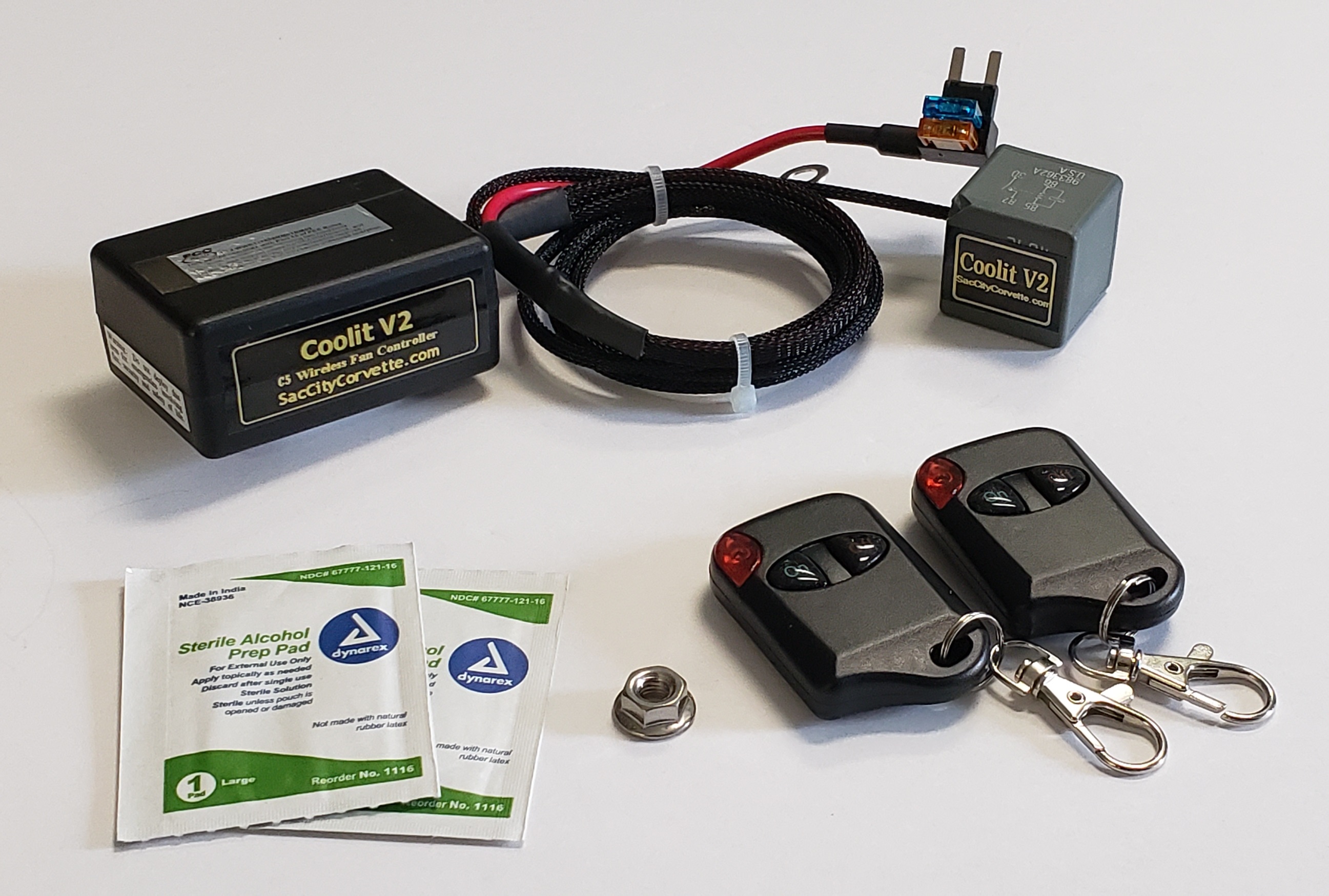
saccitycorvette.com I had this on my previous 01 coupe, worked great and installed in 5 min. Allows you to turn on fan with a fob.
Last edited by bjones7131; May 25, 2020 at 09:20 AM.


Pro
Joined: Jul 2008
Posts: 677
Likes: 1
From: Huntsville AL
