Seat Memory Failure - SCM and BCM Sync Needed?

Thread Starter
Burning Brakes


Joined: Dec 2002
Posts: 1,157
Likes: 5
From: Eastern PA
 Seat / Steering Column Position Memory Failure
Over the last year, memory control has not held or indicated it has stored and/or would accept a memory position for my driver's seat and the telescoping steering wheel. Thankfully, I can still position the seat and wheel via the seat and column switches.
The driver's seat will also sometimes and very annoyingly start to move out of its previous position and all the way forward - sort of a reverse "easy entry" - when unlocking the door. Repositioning the seat with the seat switches is no problem, but pressing Position 1 or Position 2 on the memory pad is no help. Interestingly, I can only remember this seat forward problem happening only when using what has been my primary key fob. When the other fob is used, the seat seems to stay put when unlocking the door. The seat acts like this whether or not I have "easy entry" selected via the DIC. I'm not sure if the fobs are related to my seat position/memory issues, but it is a strange association.
I did have some SCM codes kicking out (B2605 H - Seat Front Vert. Position Sensor Failure and B2607 H - Seat Horizontal Position Sensor Failure). These finally went away when I replaced the OEM unit with a unit from a corvette salvage yard (a CF sponsor). However, the seat and steering wheel position memory issues and seat moving forward headache remain.
Note: before I replaced the SCM, I asked my local "stealership" about the above codes/issues. They said that "the seat motors are probably tired" and I needed to "replace the entire seat sub assembly." (Not cheap.)
Recently, my engine mechanic suggested I might resolve things if I went back to the dealer and had them sync the replacement SCM to the BCM.
Whattayathink? Let the dealer have a whack at it...again? Any other advice?
And no, I'm not wanting to mod the seats with some Corbeaus or similar. I just spent a huge wad of cash replacing the rear end after my diff grenaded itself.
Thanks in advance for the input(s)!
The driver's seat will also sometimes and very annoyingly start to move out of its previous position and all the way forward - sort of a reverse "easy entry" - when unlocking the door. Repositioning the seat with the seat switches is no problem, but pressing Position 1 or Position 2 on the memory pad is no help. Interestingly, I can only remember this seat forward problem happening only when using what has been my primary key fob. When the other fob is used, the seat seems to stay put when unlocking the door. The seat acts like this whether or not I have "easy entry" selected via the DIC. I'm not sure if the fobs are related to my seat position/memory issues, but it is a strange association.
I did have some SCM codes kicking out (B2605 H - Seat Front Vert. Position Sensor Failure and B2607 H - Seat Horizontal Position Sensor Failure). These finally went away when I replaced the OEM unit with a unit from a corvette salvage yard (a CF sponsor). However, the seat and steering wheel position memory issues and seat moving forward headache remain.
Note: before I replaced the SCM, I asked my local "stealership" about the above codes/issues. They said that "the seat motors are probably tired" and I needed to "replace the entire seat sub assembly." (Not cheap.)
Recently, my engine mechanic suggested I might resolve things if I went back to the dealer and had them sync the replacement SCM to the BCM.
Whattayathink? Let the dealer have a whack at it...again? Any other advice?
And no, I'm not wanting to mod the seats with some Corbeaus or similar. I just spent a huge wad of cash replacing the rear end after my diff grenaded itself.
Thanks in advance for the input(s)!
Last edited by kedvesh; Jan 9, 2011 at 04:45 PM. Reason: added additionale notes/info
Thread Starter
Burning Brakes
Joined: Dec 2002
Posts: 1,157
Likes: 5
From: Eastern PA
There aren't any SCM codes at the moment.
The codes were:
B2605 H - Seat Front Vert. Position Sensor Failure
B2607 H - Seat Horizontal Position Sensor Failure
But that was before I replaced the SCM and cleared the codes via the DIC method. There haven't been any SCM codes since then.
(I've added this info to the OP.)
Unfortunately, the seat memory positioning and telescoping steering column problems are still occurring.
I'll have to take it out in the near future for an hour-long or so drive and see if anything new pops up. Will post an update later on.
The codes were:
B2605 H - Seat Front Vert. Position Sensor Failure
B2607 H - Seat Horizontal Position Sensor Failure
But that was before I replaced the SCM and cleared the codes via the DIC method. There haven't been any SCM codes since then.
(I've added this info to the OP.)
Unfortunately, the seat memory positioning and telescoping steering column problems are still occurring.
I'll have to take it out in the near future for an hour-long or so drive and see if anything new pops up. Will post an update later on.
Last edited by kedvesh; Jan 4, 2011 at 12:55 PM.

Tech Contributor


Joined: Dec 1999
Posts: 32,910
Likes: 2,402
From: Anthony TX
CI 6,7,8,9,11 Vet
St. Jude Donor '08
Your engine mechanic is full of BS! There is NOT a BCM / SCM "SYNC"
This is what I recommend.. Run the seat thru ALL of its ranges of motions manually several times. 5-6 cycles UP - DOWN - FORWARD - REVERSE - Tilt UP Tilt DOWN... You can do the mirrors also as this sometines helps them also.
Then run the seat ALL the way back and down.
In the DIC, enter set up and make sure that the EASE ENTRY Mode is on and Memory is on.
Re-LEARN "BOTH FOBS" and then use #1 FOB to unlock the door. Set your car up for your desired driving settings like:
Radio, column position, seat position, mirror settings HVAC Settings and modes etc...
Press and HOLD MEM#1 till the MEM lights blinks and stops.
Then program FOB #2 to the SAME SETTINGS for now.
See if that fixes the issue. IF,,, it works for a short while and fails again, theres a possibility that you could have a 12 VDC battery issue. If your battery allows the BATT B+ volytage to go low out of spec during cranking, you can loose ALL the MEMORY settings and FOB Sync We can discuss that after you attemp the procedure above.
Hope this helps. I provided another Forum this same procedure a couple of days ago and it fix his simular issue.
BC
There is NOT a BCM / SCM "SYNC" This is what I recommend.. Run the seat thru ALL of its ranges of motions manually several times. 5-6 cycles UP - DOWN - FORWARD - REVERSE - Tilt UP Tilt DOWN... You can do the mirrors also as this sometines helps them also.
Then run the seat ALL the way back and down.
In the DIC, enter set up and make sure that the EASE ENTRY Mode is on and Memory is on.
Re-LEARN "BOTH FOBS" and then use #1 FOB to unlock the door. Set your car up for your desired driving settings like:
Radio, column position, seat position, mirror settings HVAC Settings and modes etc...
Press and HOLD MEM#1 till the MEM lights blinks and stops.
Then program FOB #2 to the SAME SETTINGS for now.
See if that fixes the issue. IF,,, it works for a short while and fails again, theres a possibility that you could have a 12 VDC battery issue. If your battery allows the BATT B+ volytage to go low out of spec during cranking, you can loose ALL the MEMORY settings and FOB Sync We can discuss that after you attemp the procedure above.
Hope this helps. I provided another Forum this same procedure a couple of days ago and it fix his simular issue.
BC
Thread Starter
Burning Brakes
Joined: Dec 2002
Posts: 1,157
Likes: 5
From: Eastern PA
Took it on an out and back run down the interstate this evening, 45 min each way. No codes popped up. Slate remains clean.
Bill,
Thanks for the method to the madness!
My mechanic is great with engines, but readily admits the electronic inner workings of a 'Vette's brain are mystifying at times. I know even less, so I'm just going to chalk up his "sync" suggestion to being a shot in the dark rather than pure BS.
I'll update this thread once I get through your procedure, maybe tonight, maybe later this week.
Regards,
Chris
Thanks for the method to the madness!
My mechanic is great with engines, but readily admits the electronic inner workings of a 'Vette's brain are mystifying at times. I know even less, so I'm just going to chalk up his "sync" suggestion to being a shot in the dark rather than pure BS.
I'll update this thread once I get through your procedure, maybe tonight, maybe later this week.
Regards,
Chris
Thread Starter
Burning Brakes
Joined: Dec 2002
Posts: 1,157
Likes: 5
From: Eastern PA
...This is what I recommend...
See if that fixes the issue. IF,,, it works for a short while and fails again, theres a possibility that you could have a 12 VDC battery issue. If your battery allows the BATT B+ volytage to go low out of spec during cranking, you can loose ALL the MEMORY settings and FOB Sync We can discuss that after you attemp the procedure above.
Hope this helps. I provided another Forum this same procedure a couple of days ago and it fix his simular issue.
BC
See if that fixes the issue. IF,,, it works for a short while and fails again, theres a possibility that you could have a 12 VDC battery issue. If your battery allows the BATT B+ volytage to go low out of spec during cranking, you can loose ALL the MEMORY settings and FOB Sync We can discuss that after you attemp the procedure above.
Hope this helps. I provided another Forum this same procedure a couple of days ago and it fix his simular issue.
BC
Did all as you suggested this evening (in my garage), but didn't drive it.
Good thing - the seat doesn't do the reverse Easy Entry positioning action I referred to in my OP. (At least for now it doesn't.)
Bad thing - even with the Easy Entry on, it doesn't do the regular, "normal" version either.
All the seat does is stay in the last position I last had it in while sitting in it with the key turned on in the ignition, just like a normal powered seat that has no memory function associated with it or an Easy Entry mode.
The steering wheel column did recess all the way when I pulled the key out of the ignition the first time after trying to set the memory for #1 and #2 via the door pad, but it just stayed there...never telescoped out again.
Nothing changes when FOB #2 is used.
New/old thing is that SCM error code B2605 (Seat Front Vert. Position Sensor Failure) popped back into the DIC. That's the only one there at the moment.
Just in case I screwed your procedure up, I'll do it all over again tomorrow or Saturday. I'll also drive it to see if that helps.
Regards,
Chris
Tech Contributor
Joined: Dec 1999
Posts: 32,910
Likes: 2,402
From: Anthony TX
CI 6,7,8,9,11 Vet
St. Jude Donor '08
Cycle it and memorize the settings a couple more times. You may have a bad feed back potenieometer in the seat track. Cycling it may help. If not, you may need to remove the seat and start troubleshooting with a meter. I have all the schematics to do that..
Corvette Stories
The Best of Corvette for Corvette Enthusiasts

Top 10 Most Expensive Corvettes Ever Sold on Bring A Trailer
Brett Foote
10 Things Every Corvette Owner Needs (2026 Edition)
Michael S. Palmer
8 Most "Only Corvette Owners Understand" Quirks and Problems
Pouria Savadkouei
10 Reasons the C6 Z06 is Still A Performance Benchmark After 20 Years
Joe Kucinski
How Much Horsepower Every Corvette Engine "LOST" in 1972
Joe Kucinski
Top 10 DOs and DON'Ts for Protecting Your Convertible Top!
Michael S. Palmer
Top 10 Most Explosive Corvettes Ever Made: Power-to-Weight Ratio Ranked!
Joe Kucinski
150 hp to 1,250 hp: Every Corvette Generation Compared by the Specs That Matter
Joe Kucinski
8 Coolest Corvette Pace Cars (and Replicas) of All Time
Verdad Gallardo
Thread Starter
Burning Brakes
Joined: Dec 2002
Posts: 1,157
Likes: 5
From: Eastern PA
Bill,
Much thanks for helping me through these electrical gremlins! Let me know if you want to take this discussion and do it via PM...don't want to bore the rest of the CF community.
Well, not much of a change after testing and driving it today.
Cycled everything in order six times as well as everything six times, 6 x F/B, then 6 x U/D, etc. Notes:
Each time I completed your procedure and took the key out of the ignition, the steering column moved all the way in, but the seat remained in place. (Easy Entry, although engaged seemed to only 1/2 work.)
Locking and unlocking the door via the fobs remains problem free. However, upon placing the key back in the ignition, nothing happens WRT seat or steering position - the seat stays put and the column never comes back out to the position I had set it to.
Oh. I now have the following error codes:
A1 - RDCM - Right Door Control Module
Driving the car continues to present no problems, as I can "manually" position the seat (if I need to) and especially the steering column via the switches.
But, on a car that's equipped with a memory function and an Easy Entry feature, these position/memory issues remain frustrating.
Any next steps to suggest?
Much thanks for helping me through these electrical gremlins!
Let me know if you want to take this discussion and do it via PM...don't want to bore the rest of the CF community. Well, not much of a change after testing and driving it today.
Cycled everything in order six times as well as everything six times, 6 x F/B, then 6 x U/D, etc. Notes:
- Once the seat is all the way forward and I start to move it all the way back, it initially stops after a split second and I have to let go of the switch and reengage it to continue the move all the way back.
- Similar thing happens when moving it down...stops near the end and I have to reengage the switch to get it to bottom out.
- Similar thing happens after moving the left mirror all the way down or all the way left...it stops initially after I get it going up or right and then I have to reengage the switch to get to to continue up or right.
- As for the steering column, once all the way in, it will stop a little ways on the way out, approx. near where the last memory position was located. I then have to move the switch 6x backwards to get the column to continue to move backwards.
Each time I completed your procedure and took the key out of the ignition, the steering column moved all the way in, but the seat remained in place. (Easy Entry, although engaged seemed to only 1/2 work.)
Locking and unlocking the door via the fobs remains problem free. However, upon placing the key back in the ignition, nothing happens WRT seat or steering position - the seat stays put and the column never comes back out to the position I had set it to.
Oh. I now have the following error codes:
A1 - RDCM - Right Door Control Module
- B2265 H - Horizontal Position Sensor Fault
- B2605 H - Seat Front Vertical Position Sensor Failure
- B2607 H - Seat Horizontal Position Sensor Failure
- B2860 H - Telescoping Column Position Sensor Failure
Driving the car continues to present no problems, as I can "manually" position the seat (if I need to) and especially the steering column via the switches.
But, on a car that's equipped with a memory function and an Easy Entry feature, these position/memory issues remain frustrating.
Any next steps to suggest?

Tech Contributor

Joined: Dec 2006
Posts: 10,962
Likes: 29
From: Van Buren Arkansas
Wounded Warrior Escort '11
Probably a good idea to disconnect the battery, then pull the seat out of the car and clean the two connector"s pins and sockets. Carefully pay attention to the sockets as you'll probably see they are spread apart. You need to use a pick tool or other method to somehow tightend them back up but insure they are clean first. Specifically pay attention to the blue 7-pin connector but really both of them.
Thread Starter
Burning Brakes
Joined: Dec 2002
Posts: 1,157
Likes: 5
From: Eastern PA
Probably a good idea to disconnect the battery, then pull the seat out of the car and clean the two connector"s pins and sockets. Carefully pay attention to the sockets as you'll probably see they are spread apart. You need to use a pick tool or other method to somehow tightend them back up but insure they are clean first. Specifically pay attention to the blue 7-pin connector but really both of them.
Thanks for chiming in with a suggested way-ahead! I'll try to act on it later this week or next weekend w/ a thread update thereafter.
Also and ref your profile, thanks for your USAF service.
 (I just retired from the USAF this past fall after 20 yrs as a logistics readiness officer retread/mustang...still looking for that 2d career. )
Last edited by kedvesh; Jan 9, 2011 at 04:44 PM.
Tech Contributor
Joined: Dec 2006
Posts: 10,962
Likes: 29
From: Van Buren Arkansas
Wounded Warrior Escort '11
Thanks for that. I only did 10.5 years in the Air Force, then did 25 years with Hughes Aircraft which later was bought by GM, then sold to Boeing. Back in the AF days, I was in 32874 then cross-trained into 34174. I know the second one was closed down by the AF as they felt it was too complex for the average airman and passed off everything to contractors but before that, it was the elite of the electronics fields.
Back on the seat issue, I've had problems with the memory settings and the telescoping steering wheel memory, until I properly fixed the blue 7-pin connector's pins and sockets. Problem went away after that.
Back on the seat issue, I've had problems with the memory settings and the telescoping steering wheel memory, until I properly fixed the blue 7-pin connector's pins and sockets. Problem went away after that.
Tech Contributor
Joined: Dec 1999
Posts: 32,910
Likes: 2,402
From: Anthony TX
CI 6,7,8,9,11 Vet
St. Jude Donor '08

The seat connector / plug is very close to the carpet and takes a lot of abuse. It gets damaged a LOT. Give it a good inspection and make sure that all the female pins are close and tight on the male pins.
Easy fix if thats the issue.
BC

Burning Brakes

Joined: Aug 2004
Posts: 783
Likes: 0
From: Phoenix Arizona
Bill,
Much thanks for helping me through these electrical gremlins! Let me know if you want to take this discussion and do it via PM...don't want to bore the rest of the CF community.
Well, not much of a change after testing and driving it today.
Cycled everything in order six times as well as everything six times, 6 x F/B, then 6 x U/D, etc. Notes:
Each time I completed your procedure and took the key out of the ignition, the steering column moved all the way in, but the seat remained in place. (Easy Entry, although engaged seemed to only 1/2 work.)
Locking and unlocking the door via the fobs remains problem free. However, upon placing the key back in the ignition, nothing happens WRT seat or steering position - the seat stays put and the column never comes back out to the position I had set it to.
Oh. I now have the following error codes:
A1 - RDCM - Right Door Control Module
Driving the car continues to present no problems, as I can "manually" position the seat (if I need to) and especially the steering column via the switches.
But, on a car that's equipped with a memory function and an Easy Entry feature, these position/memory issues remain frustrating.
Any next steps to suggest?
Much thanks for helping me through these electrical gremlins!
Let me know if you want to take this discussion and do it via PM...don't want to bore the rest of the CF community. Well, not much of a change after testing and driving it today.
Cycled everything in order six times as well as everything six times, 6 x F/B, then 6 x U/D, etc. Notes:
- Once the seat is all the way forward and I start to move it all the way back, it initially stops after a split second and I have to let go of the switch and reengage it to continue the move all the way back.
- Similar thing happens when moving it down...stops near the end and I have to reengage the switch to get it to bottom out.
- Similar thing happens after moving the left mirror all the way down or all the way left...it stops initially after I get it going up or right and then I have to reengage the switch to get to to continue up or right.
- As for the steering column, once all the way in, it will stop a little ways on the way out, approx. near where the last memory position was located. I then have to move the switch 6x backwards to get the column to continue to move backwards.
Each time I completed your procedure and took the key out of the ignition, the steering column moved all the way in, but the seat remained in place. (Easy Entry, although engaged seemed to only 1/2 work.)
Locking and unlocking the door via the fobs remains problem free. However, upon placing the key back in the ignition, nothing happens WRT seat or steering position - the seat stays put and the column never comes back out to the position I had set it to.
Oh. I now have the following error codes:
A1 - RDCM - Right Door Control Module
- B2265 H - Horizontal Position Sensor Fault
- B2605 H - Seat Front Vertical Position Sensor Failure
- B2607 H - Seat Horizontal Position Sensor Failure
- B2860 H - Telescoping Column Position Sensor Failure
Driving the car continues to present no problems, as I can "manually" position the seat (if I need to) and especially the steering column via the switches.
But, on a car that's equipped with a memory function and an Easy Entry feature, these position/memory issues remain frustrating.
Any next steps to suggest?
Thread Starter
Burning Brakes
Joined: Dec 2002
Posts: 1,157
Likes: 5
From: Eastern PA
Ended up purchasing replacement parts.
Obtained a used actuator for the steering column from a junk yard (GM no longer manufactures the thing!)
Purchased a new seat track assembly via GM Parts Direct (or similar)...not the dealer (too expensive).
Good luck with your solution!
Obtained a used actuator for the steering column from a junk yard (GM no longer manufactures the thing!)
Purchased a new seat track assembly via GM Parts Direct (or similar)...not the dealer (too expensive).
Good luck with your solution!
Burning Brakes
Joined: Aug 2004
Posts: 783
Likes: 0
From: Phoenix Arizona
ended up purchasing replacement parts.
Obtained a used actuator for the steering column from a junk yard (gm no longer manufactures the thing!)
purchased a new seat track assembly via gm parts direct (or similar)...not the dealer (too expensive).
Good luck with your solution!
Obtained a used actuator for the steering column from a junk yard (gm no longer manufactures the thing!)
purchased a new seat track assembly via gm parts direct (or similar)...not the dealer (too expensive).
Good luck with your solution!
Tech Contributor
Joined: Dec 1999
Posts: 32,910
Likes: 2,402
From: Anthony TX
CI 6,7,8,9,11 Vet
St. Jude Donor '08
Bill,
Did all as you suggested this evening (in my garage), but didn't drive it.
Good thing - the seat doesn't do the reverse Easy Entry positioning action I referred to in my OP. (At least for now it doesn't.)
Bad thing - even with the Easy Entry on, it doesn't do the regular, "normal" version either.
All the seat does is stay in the last position I last had it in while sitting in it with the key turned on in the ignition, just like a normal powered seat that has no memory function associated with it or an Easy Entry mode.
The steering wheel column did recess all the way when I pulled the key out of the ignition the first time after trying to set the memory for #1 and #2 via the door pad, but it just stayed there...never telescoped out again.
Nothing changes when FOB #2 is used.
New/old thing is that SCM error code B2605 (Seat Front Vert. Position Sensor Failure) popped back into the DIC. That's the only one there at the moment.
Just in case I screwed your procedure up, I'll do it all over again tomorrow or Saturday. I'll also drive it to see if that helps.
Regards,
Chris
Did all as you suggested this evening (in my garage), but didn't drive it.
Good thing - the seat doesn't do the reverse Easy Entry positioning action I referred to in my OP. (At least for now it doesn't.)
Bad thing - even with the Easy Entry on, it doesn't do the regular, "normal" version either.
All the seat does is stay in the last position I last had it in while sitting in it with the key turned on in the ignition, just like a normal powered seat that has no memory function associated with it or an Easy Entry mode.
The steering wheel column did recess all the way when I pulled the key out of the ignition the first time after trying to set the memory for #1 and #2 via the door pad, but it just stayed there...never telescoped out again.
Nothing changes when FOB #2 is used.
New/old thing is that SCM error code B2605 (Seat Front Vert. Position Sensor Failure) popped back into the DIC. That's the only one there at the moment.
Just in case I screwed your procedure up, I'll do it all over again tomorrow or Saturday. I'll also drive it to see if that helps.
Regards,
Chris
Lets try this. The MAIN seat motor power is supplied thru a RESETTABLE CIRCUIT BREAKER. If the circuit draws too much current, the breaker trips. After it cools down, it automatically resets its self. If that breaker is weak, it may trip off line upon initial motor movement or not be able to provide the seat and column motor the correct current. OR The motors are in need of some lubrication and are dragging upon initial movement.
Either way, both problems are self fixable
Swap out the seat circuit breaker in the passengers compartment fuse center (they are at the top of the fuse panel) with another breaker of like part number or purchase a new one.
You can see if you can get some light lubricating oil into the motor bearings. I have never had to try it but is not difficult to remove the seat and see if theres a way to add a little oil to the motor armature shaft ends.
Bill
Tech Contributor
Joined: Dec 1999
Posts: 32,910
Likes: 2,402
From: Anthony TX
CI 6,7,8,9,11 Vet
St. Jude Donor '08
Circuit breaker (PWR ST/DVR) Breaker #35 (20 amp)
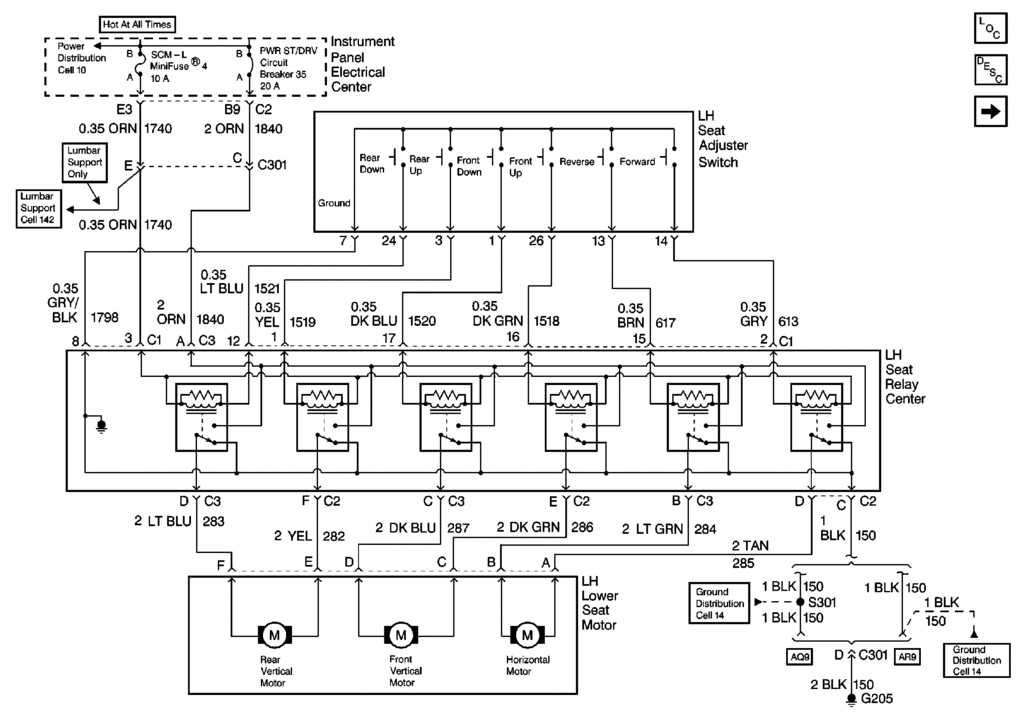
This is a 98 Seat motor schematic.
You can also make sur ethat the GROUND is in good shape and making proper contact.
Bill
This is a 98 Seat motor schematic.
You can also make sur ethat the GROUND is in good shape and making proper contact.
Bill

2nd Gear

Joined: Jul 2014
Posts: 2
Likes: 0
the lumbar motor does not work on drivers side. i plugged the motor from the drivers side into the passenger side and it works finale i even switched the switches to make sure it wasn't a bad switch. everything else works fine on the seat any ideas it is driving me crazy
Last edited by sweetpeaj; Jul 25, 2014 at 10:34 PM.