



Newbie With a Few Questions

Thread Starter
Instructor

Joined: Jun 2011
Posts: 123
Likes: 0
From: Carson VA
 Newbie With a Few Questions
Hey folks. New to the site and new as a vette owner. Little history. '02 C5 A4 stock with 38k miles. I know low rpm detonation is a dead horse topic, but wanted opinions for which method of attack...if any, to try not to throw too many $$ at this. Horrible detonation at the often stated 10-18k range, but nothing decernable at cruising speed or WOT. Car runs perfect with 93 ethonal free gas with Techron added for the last 10 tanks...no improvement. No DTCs stored. Coolant temp and oil pressure perfect. No air leaks detected. Have been told not to worry about it, just put on Stingers and forget it, but I was trying to make this my first vehicle with stock exhaust. This is my fifth LS1 and have never had this problem before. Should I take it to a professional tuner? 180 stat and lower fan cut-ons with decreased A/F ratio? De-carb? Don't worry about it? Thanks a bunch!

Tech Contributor


Joined: Dec 1999
Posts: 32,910
Likes: 2,402
From: Anthony TX
CI 6,7,8,9,11 Vet
St. Jude Donor '08
Hmmmmmmm,,, I’ve owned several C5 and NONE of them have EVER had any KNOCK issues in STOCK FORM. NONE!
Something is wrong. Are you SURE that its KNOCK and your getting KNOCK RETARD (KR)
One way that you can see if it is Knock and your PCM is reacting to it in the proper way is to DATA LOG your engine. Anyone that owns EFI Live or HP Tuners can hook up to your OBDII ALDL Port under the dash and data log the PCM while you drive. When you experience PING/KNOCK etc.. the PCM should drop the timing back in the timing cells that have Knock.. If it experiences too many KR events, it will drop into the LOW OCTANE TIMING TABLES.
Are you the FIRST OWNER of the car???
If not, are you positive that the PCM was not previously tuned for MODS that may have been removed from the engine?????? You need to make sure that the PCM is reacting to Knock properly..
The KR circuits could have been desensitized or there could be something wrong with one or both of the knock sensors that doesn’t throw a DTC.
How are you reading the DTCs????? Are you using the internal DTC routine or a code reader??
READING YOUR Engine Diagnostic Trouble Codes (DTC)
This procedure should be carried out any time you experience a problem with your C5. Most inexpensive store bought aftermarket code readers will ONLY read power train DTC’s. Reading the DTC’s with the C5 built in code reader will allow you to read ALL the modules in the vehicle.
The Diagnostic Display Mode is entered with the following procedure:
1) Turn on the ignition but don't start the engine.
2) Press the RESET button to turn off any warning messages. (i.e. door open, trunk open ect)
3) Press and hold the OPTIONS button
4) While holding OPTIONS, press FUEL button four times within a 10 -second period.
Initially, the on-board diagnostics go into an Automatic Mode which will cycle through each module and shows diagnostic codes in a pre-set sequence: PCM - TCS - RTD - BCM - IPC - RADIO - HVAC - LDCM - RDCM - SCM - RFA. All codes will be displayed for each module. ( i.e. PCM = 4 codes) If none are present in a given module, you will see No More Codes on the display.
There are two types of diagnostic codes, Current and History designated with a letter suffix, “C” or “H”. A current code indicates a malfunction is present in the module displaying data. A history code indicates a problem existed sometime in the last 40 or 50 ignition cycles. When not accompanied by a current code of the same number, it's potential evidence of a previous problem, now resolved, that was not removed by clearing the codes. More likely it's an indication of an intermittent malfunction.
Intermittent codes are the most challenging of the diagnostics. An intermittent code may have happened once, may have happened more than once but is inconsistent or may be happening on a regular basis but not at the time the codes are displayed. History codes can also be caused by a current malfunction in a system that is not operating at the time codes are displayed. An example is the rear window defogger which doesn't operate until the Body Control Module detects engine rpm. For history codes set by a module that does not operate with the key on and engine off, a special diagnostic tool called a Scan Tester is necessary to properly diagnose the malfunction.
Once the system has displayed all modules, it goes into the manual mode which allows selection of each module using combinations of Driver Information Center buttons. Manual mode can also be entered during the automatic sequence by pressing any button except E/M. Once the display shows Manual Diagnostics, select a module by pressing the OPTIONS button to go forward or the TRIP button to go back. Once a module is selected, a code is displayed, and if more than one are present; press GAGES to go forward or FUEL to go back.
To exit the diagnostic mode at any time, press E/M. If you want to erase codes in a given module, press RESET To reset the codes once in manual mode, press and hold RESET until it displays NO CODES Press OPTIONS to go to the next module. Repeat the steps until you have reset the codes in all the computer modules.
NOTE!! Only reset the codes IF you want to - it is NOT necessary to do this. Clearing a code does not repair a problem. You are simply erasing the evidence of it in the module's memory. If you clear the code/s, and extinguish the Check Engine Light, your emissions status ready will NOT allow you to pass an emissions test until you have completed the required driving cycles. There are a few body module DTC’s that if set will prevent the module from operating properly. Once the DTC is cleared, the module will return to full function. This is not true for power train DTCs.
If you have never read and cleared your codes, there will probably be a lot of old history DTCs. It is recommended that you clear your codes and see if any come back during a driving cycle. Those are the ones that you need to concentrate on diagnosing.
Once you have the codes, the next question is: What to do with the information?
First, consult the factory service manual. Any serious C5 Do-It-Yourself owner should invest in the Corvette Service Manual of the appropriate model year. The Service Manual is really a requirement if you want to understand and work on your C5.
You can read the DTCs while the engine is running. If you turn the engine OFF and then back ON, that can clear some DTCs that may be important with identifying a problem. One example is a Misfire DTC (p-0300) If the engine is shut down, the DTC will clear.
These are some very good C5 Diagnostic Trouble Code (DTC) explanation web sites!!! They also explain how to read the DTCs
Here are some very good sites that explain what DTC mean:
http://www.gearchatter.com/viewtopic11755.php
http://www.obd-codes.com/trouble_cod...d-ii-codes.php
Make sure to include the H or C suffix when you post your DTCs!!
BC
Something is wrong. Are you SURE that its KNOCK and your getting KNOCK RETARD (KR)
One way that you can see if it is Knock and your PCM is reacting to it in the proper way is to DATA LOG your engine. Anyone that owns EFI Live or HP Tuners can hook up to your OBDII ALDL Port under the dash and data log the PCM while you drive. When you experience PING/KNOCK etc.. the PCM should drop the timing back in the timing cells that have Knock.. If it experiences too many KR events, it will drop into the LOW OCTANE TIMING TABLES.
Are you the FIRST OWNER of the car???
If not, are you positive that the PCM was not previously tuned for MODS that may have been removed from the engine?????? You need to make sure that the PCM is reacting to Knock properly..
The KR circuits could have been desensitized or there could be something wrong with one or both of the knock sensors that doesn’t throw a DTC.
How are you reading the DTCs????? Are you using the internal DTC routine or a code reader??
READING YOUR Engine Diagnostic Trouble Codes (DTC)
This procedure should be carried out any time you experience a problem with your C5. Most inexpensive store bought aftermarket code readers will ONLY read power train DTC’s. Reading the DTC’s with the C5 built in code reader will allow you to read ALL the modules in the vehicle.
The Diagnostic Display Mode is entered with the following procedure:
1) Turn on the ignition but don't start the engine.
2) Press the RESET button to turn off any warning messages. (i.e. door open, trunk open ect)
3) Press and hold the OPTIONS button
4) While holding OPTIONS, press FUEL button four times within a 10 -second period.
Initially, the on-board diagnostics go into an Automatic Mode which will cycle through each module and shows diagnostic codes in a pre-set sequence: PCM - TCS - RTD - BCM - IPC - RADIO - HVAC - LDCM - RDCM - SCM - RFA. All codes will be displayed for each module. ( i.e. PCM = 4 codes) If none are present in a given module, you will see No More Codes on the display.
There are two types of diagnostic codes, Current and History designated with a letter suffix, “C” or “H”. A current code indicates a malfunction is present in the module displaying data. A history code indicates a problem existed sometime in the last 40 or 50 ignition cycles. When not accompanied by a current code of the same number, it's potential evidence of a previous problem, now resolved, that was not removed by clearing the codes. More likely it's an indication of an intermittent malfunction.
Intermittent codes are the most challenging of the diagnostics. An intermittent code may have happened once, may have happened more than once but is inconsistent or may be happening on a regular basis but not at the time the codes are displayed. History codes can also be caused by a current malfunction in a system that is not operating at the time codes are displayed. An example is the rear window defogger which doesn't operate until the Body Control Module detects engine rpm. For history codes set by a module that does not operate with the key on and engine off, a special diagnostic tool called a Scan Tester is necessary to properly diagnose the malfunction.
Once the system has displayed all modules, it goes into the manual mode which allows selection of each module using combinations of Driver Information Center buttons. Manual mode can also be entered during the automatic sequence by pressing any button except E/M. Once the display shows Manual Diagnostics, select a module by pressing the OPTIONS button to go forward or the TRIP button to go back. Once a module is selected, a code is displayed, and if more than one are present; press GAGES to go forward or FUEL to go back.
To exit the diagnostic mode at any time, press E/M. If you want to erase codes in a given module, press RESET To reset the codes once in manual mode, press and hold RESET until it displays NO CODES Press OPTIONS to go to the next module. Repeat the steps until you have reset the codes in all the computer modules.
NOTE!! Only reset the codes IF you want to - it is NOT necessary to do this. Clearing a code does not repair a problem. You are simply erasing the evidence of it in the module's memory. If you clear the code/s, and extinguish the Check Engine Light, your emissions status ready will NOT allow you to pass an emissions test until you have completed the required driving cycles. There are a few body module DTC’s that if set will prevent the module from operating properly. Once the DTC is cleared, the module will return to full function. This is not true for power train DTCs.
If you have never read and cleared your codes, there will probably be a lot of old history DTCs. It is recommended that you clear your codes and see if any come back during a driving cycle. Those are the ones that you need to concentrate on diagnosing.
Once you have the codes, the next question is: What to do with the information?
First, consult the factory service manual. Any serious C5 Do-It-Yourself owner should invest in the Corvette Service Manual of the appropriate model year. The Service Manual is really a requirement if you want to understand and work on your C5.
You can read the DTCs while the engine is running. If you turn the engine OFF and then back ON, that can clear some DTCs that may be important with identifying a problem. One example is a Misfire DTC (p-0300) If the engine is shut down, the DTC will clear.
These are some very good C5 Diagnostic Trouble Code (DTC) explanation web sites!!! They also explain how to read the DTCs
Here are some very good sites that explain what DTC mean:
http://www.gearchatter.com/viewtopic11755.php
http://www.obd-codes.com/trouble_cod...d-ii-codes.php
Make sure to include the H or C suffix when you post your DTCs!!
BC
Thread Starter
Instructor
Joined: Jun 2011
Posts: 123
Likes: 0
From: Carson VA
Thank you very much...I will test this weekend. No, I am not the first owner. I am 95% sure it is detonation. Sounds like BBs in a coffee can, or a 1978 Chrysler K-car on bad gas. Yes, I looked for the DTCs with a standard scanner, but I will use your method and report back. Thanks again!
Melting Slicks


Joined: Nov 2008
Posts: 2,938
Likes: 65
From: Rochester Hills MI
 this would be my first guess on a newly owned used car with no codes. if it did have an aftermarket tune, you can tell by when the fans come on. 99.99999% of the time, an aftermarket tune will adjust the fan on temps. let us know the temps at which the low and high speed fans come on.
this is definitely not something i would just forget about.
Last edited by SaberD; Jun 10, 2011 at 05:08 PM.
Melting Slicks
Joined: Nov 2008
Posts: 2,938
Likes: 65
From: Rochester Hills MI
try putting a long screw driver up to your ear and push it up against the block or the closest you can get it to the combustion chamber for each cylinder while the car is running to see which cylinders it is coming from. this will at least allow us to isolate the issue.
Thread Starter
Instructor
Joined: Jun 2011
Posts: 123
Likes: 0
From: Carson VA
I have no current codes, only historical. They are as follows:
U1016, U1064, U1096, U1255, P1431, B2252, B2282, B2283, B2284 and B2285. I reset all codes and went for a long cruise. No new codes stored. Please understand that the level of detonation is very light, but constant at low rpms above 200 degrees. It is rarely audible (from inside) unless you are accellerating under an overpass or the like. It just bugs the crap out of me.
Thanks for your time.
U1016, U1064, U1096, U1255, P1431, B2252, B2282, B2283, B2284 and B2285. I reset all codes and went for a long cruise. No new codes stored. Please understand that the level of detonation is very light, but constant at low rpms above 200 degrees. It is rarely audible (from inside) unless you are accellerating under an overpass or the like. It just bugs the crap out of me.
Thanks for your time.
Corvette Stories
The Best of Corvette for Corvette Enthusiasts

Every 2027 Corvette Engine Explained
Joe Kucinski
Designer Imagines A Corvette That Looks More Like a Corvette Than the Corvette
Verdad Gallardo
10 Ugly Corvettes That We Still Kinda Love
Joe Kucinski
Top 10 Most Expensive Corvettes Ever Sold on Bring A Trailer
Brett Foote
10 Things Every Corvette Owner Needs (2026 Edition)
Michael S. Palmer
8 Most "Only Corvette Owners Understand" Quirks and Problems
Pouria Savadkouei
10 Reasons the C6 Z06 is Still A Performance Benchmark After 20 Years
Joe Kucinski
How Much Horsepower Every Corvette Engine "LOST" in 1972
Joe Kucinski
Top 10 DOs and DON'Ts for Protecting Your Convertible Top!
Michael S. Palmer
Thread Starter
Instructor
Joined: Jun 2011
Posts: 123
Likes: 0
From: Carson VA
I will check, but do not think it is a pulley. No noise at idle or when not under load (or under load above 2k rpm). It is the classic "pinging" sound. After reading many posts on here, I am leaning towards the rear knock sensor and/or carbon buildup. Thanks
Tech Contributor
Joined: Dec 1999
Posts: 32,910
Likes: 2,402
From: Anthony TX
CI 6,7,8,9,11 Vet
St. Jude Donor '08
Until you DATA LOG the PCM/ENGINE,,,,, your going to get 50 different recommendations and you will spend all sorts of money trying different things that may or may NOT solve the issue.
If it is KNOCK/PING,, a Data LOG will show you Knock Retard data when it happens. If you use soft ware like EFI Live or HP Tuners, it will show you the Knock in the specific timing cells and how much retard is being inserted.
If your PCM is working correctly, it should eliminate KR by reducing timing and if that doesnt work, it should drop down to the LOW OCTANE timing tables.
If your cylinders are excessively carboned up, the PCM may not be able to counter act Knock.
Have you ever done a CYLINDER DE-CARBONIZATION process by running SEAFOAM in the engine??
CLEAR ALL THOSE OLD DTCS!!!!!! See what re-appears when you drive!
If your PCV system is allowing excessive oil into the intake, it also can cause Knock/Ping. Consider a quality Oil Catch can..
FUEL PRESSURE! If you have a clogged fuel filter or low fuel pressure, that to can contribute to Knock/ping!
If it is KNOCK/PING,, a Data LOG will show you Knock Retard data when it happens. If you use soft ware like EFI Live or HP Tuners, it will show you the Knock in the specific timing cells and how much retard is being inserted.
If your PCM is working correctly, it should eliminate KR by reducing timing and if that doesnt work, it should drop down to the LOW OCTANE timing tables.
If your cylinders are excessively carboned up, the PCM may not be able to counter act Knock.
Have you ever done a CYLINDER DE-CARBONIZATION process by running SEAFOAM in the engine??
CLEAR ALL THOSE OLD DTCS!!!!!! See what re-appears when you drive!
If your PCV system is allowing excessive oil into the intake, it also can cause Knock/Ping. Consider a quality Oil Catch can..
FUEL PRESSURE! If you have a clogged fuel filter or low fuel pressure, that to can contribute to Knock/ping!
Last edited by Bill Curlee; Jun 15, 2011 at 01:07 PM.
Thread Starter
Instructor
Joined: Jun 2011
Posts: 123
Likes: 0
From: Carson VA
All old DTCs have been cleared and none have returned in 100 miles. I have performed the Sea-Foam process on many an outboard motor and Dodge pickup. I found the instructions for C5s last night on here and will do this weekend. If that helps, I will put a catch can in. I will investigate the data logging next and report back. Do the upper end hand helds do this, or do I need to take it to a pro? Thanks again.
Tech Contributor
Joined: Dec 1999
Posts: 32,910
Likes: 2,402
From: Anthony TX
CI 6,7,8,9,11 Vet
St. Jude Donor '08
I have the ACTRON 9180 but it looks as though there now being closed out. I paid $130 from Amazon
The next one is the 9185 and that one will read and do everything that you need.
Here is the ACTRON Website:
http://www.actron.com/product_category.php?id=249
Read the write up for your self. Then find the one you want and suurf the web for the best price!
BC
The next one is the 9185 and that one will read and do everything that you need.
Here is the ACTRON Website:
http://www.actron.com/product_category.php?id=249
Read the write up for your self. Then find the one you want and suurf the web for the best price!
BC
Thread Starter
Instructor
Joined: Jun 2011
Posts: 123
Likes: 0
From: Carson VA
Thanks a bunch! Did not realize the logger was so cheap. I have read three similar decarb procedures on this site with minor differences. Do you have a preference? GM Top cleaner, or is Sea-Foam ok?
Tech Contributor
Joined: Dec 1999
Posts: 32,910
Likes: 2,402
From: Anthony TX
CI 6,7,8,9,11 Vet
St. Jude Donor '08
SEAFOAM works fantastic! You just have to get it in the engine properly. You cant just suck it in with the engine running and think its going to clean the pistons.
You have to get the cleaner in each cylinder WET and let it soak.
The best way I found to do that is to remove the PCV connection on the passengers side of the manifold near the Throttle Body. BOTTOM U SHAPPED HOSE on the late model C5s Its different on the early cars. Its a straight hose that goes down the side of the manifold to the back of the engine.
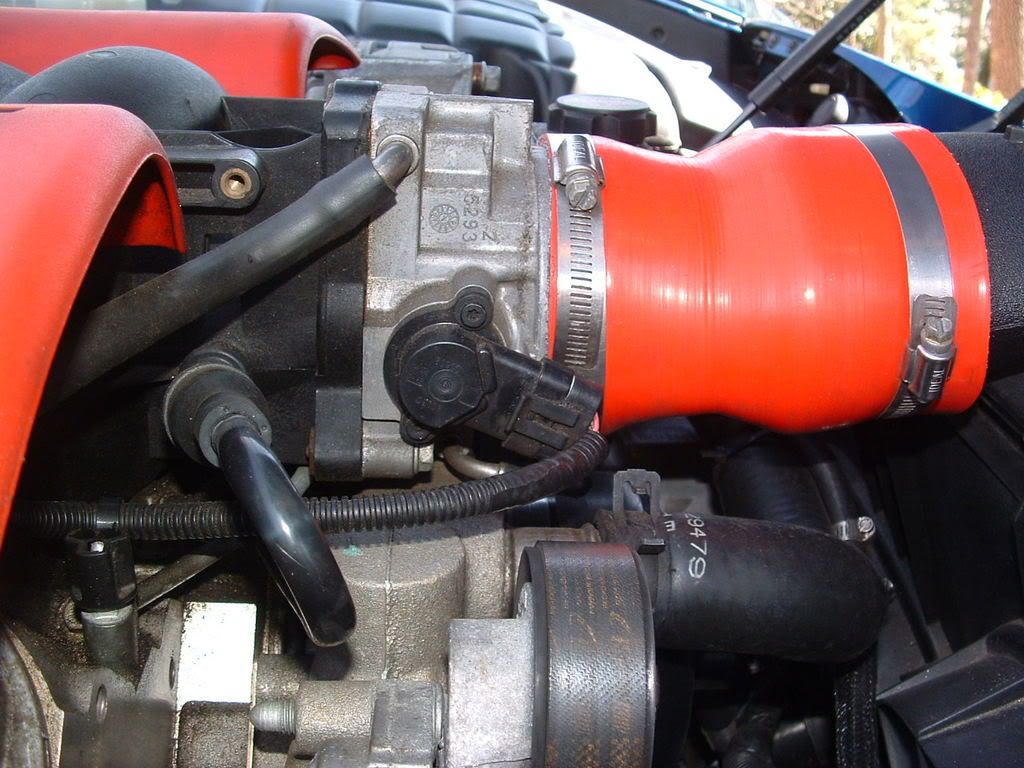
Replace that hose with a short length of hose that you can insert into the can!
While the engine is running have a friend rev it to approx 2000 rpm. Insert the tube into the can and suck out approx 1/3 of the can. That 1/3 will help clean the oil out of the intake. Then tell the person to TURN OFF the engine while you still allow the seafoam to be sucked from the can as the engine while it coasts to a stop. Allowing it to coast down and suck in raw seafoam will let the raw seafoam sit in the cylinder and on the piston with out being comsumed in the combustion process.
Hook the PCV line back up and I let it sit 4-5 hours and crank it back up. It will run a little rough and smoke up your neighborhood!!!!
 but will clear up as the engine runs. DONE!
You have to get the cleaner in each cylinder WET and let it soak.
The best way I found to do that is to remove the PCV connection on the passengers side of the manifold near the Throttle Body. BOTTOM U SHAPPED HOSE on the late model C5s Its different on the early cars. Its a straight hose that goes down the side of the manifold to the back of the engine.
Replace that hose with a short length of hose that you can insert into the can!
While the engine is running have a friend rev it to approx 2000 rpm. Insert the tube into the can and suck out approx 1/3 of the can. That 1/3 will help clean the oil out of the intake. Then tell the person to TURN OFF the engine while you still allow the seafoam to be sucked from the can as the engine while it coasts to a stop. Allowing it to coast down and suck in raw seafoam will let the raw seafoam sit in the cylinder and on the piston with out being comsumed in the combustion process.
Hook the PCV line back up and I let it sit 4-5 hours and crank it back up. It will run a little rough and smoke up your neighborhood!!!!
but will clear up as the engine runs. DONE!
Last edited by Bill Curlee; Jun 15, 2011 at 07:28 PM.
Thread Starter
Instructor
Joined: Jun 2011
Posts: 123
Likes: 0
From: Carson VA
Well, took a while but she runs great. I lazied out and took it to Steve Williams (tunedbyfrost) here in Richmond. Did the Seafoam, adjusted a/f ratio, shift points/firmness, fan cut on/off temps and timing. Not only lost my detonation, but picked up 12hp to boot after five pulls on the dyno. Also maintians flat hp/tq curve to 6200 where it was dropping off pretty hard at 5200 before. This was exactly what I was looking for as I really only wanted the pinging gone and the frickin' car not to run 240 at idle. Thanks for the help!
Last edited by fishmen222; Jul 7, 2011 at 10:14 PM.

Safety Car

Joined: May 2008
Posts: 4,237
Likes: 11
From: Lacombe Louisiana
SEAFOAM works fantastic! You just have to get it in the engine properly. You cant just suck it in with the engine running and think its going to clean the pistons.
You have to get the cleaner in each cylinder WET and let it soak.
The best way I found to do that is to remove the PCV connection on the passengers side of the manifold near the Throttle Body. BOTTOM U SHAPPED HOSE on the late model C5s Its different on the early cars. Its a straight hose that goes down the side of the manifold to the back of the engine.
Replace that hose with a short length of hose that you can insert into the can!
While the engine is running have a friend rev it to approx 2000 rpm. Insert the tube into the can and suck out approx 1/3 of the can. That 1/3 will help clean the oil out of the intake. Then tell the person to TURN OFF the engine while you still allow the seafoam to be sucked from the can as the engine while it coasts to a stop. Allowing it to coast down and suck in raw seafoam will let the raw seafoam sit in the cylinder and on the piston with out being comsumed in the combustion process.
Hook the PCV line back up and I let it sit 4-5 hours and crank it back up. It will run a little rough and smoke up your neighborhood!!!! but will clear up as the engine runs. DONE!
You have to get the cleaner in each cylinder WET and let it soak.
The best way I found to do that is to remove the PCV connection on the passengers side of the manifold near the Throttle Body. BOTTOM U SHAPPED HOSE on the late model C5s Its different on the early cars. Its a straight hose that goes down the side of the manifold to the back of the engine.
Replace that hose with a short length of hose that you can insert into the can!
While the engine is running have a friend rev it to approx 2000 rpm. Insert the tube into the can and suck out approx 1/3 of the can. That 1/3 will help clean the oil out of the intake. Then tell the person to TURN OFF the engine while you still allow the seafoam to be sucked from the can as the engine while it coasts to a stop. Allowing it to coast down and suck in raw seafoam will let the raw seafoam sit in the cylinder and on the piston with out being comsumed in the combustion process.
Hook the PCV line back up and I let it sit 4-5 hours and crank it back up. It will run a little rough and smoke up your neighborhood!!!!
but will clear up as the engine runs. DONE!