




Bad ground?

Thread Starter
7th Gear

Joined: Feb 2012
Posts: 7
Likes: 0
 Bad ground?
So lately my 02 c5 convert has been acting up. At first the active handling would flash as a failure. Than the colum lock(the recall was done back in 05) and than when I went to roll the windows down with the driver door controls all the lights on the door went off and once I opened the door all the way they came back on but than went off once the door was closed and none of the buttons worked. Open again and they came back on and started working. Also every now and than the horn won't work. All the "failures" have gone away and those functions now work.
Any ideas as to where I should start?
Any ideas as to where I should start?
Drifting


Joined: Feb 2008
Posts: 1,596
Likes: 67
From: Bahama North Carolina
So lately my 02 c5 convert has been acting up. At first the active handling would flash as a failure. Than the colum lock(the recall was done back in 05) and than when I went to roll the windows down with the driver door controls all the lights on the door went off and once I opened the door all the way they came back on but than went off once the door was closed and none of the buttons worked. Open again and they came back on and started working. Also every now and than the horn won't work. All the "failures" have gone away and those functions now work.
Any ideas as to where I should start?
Any ideas as to where I should start?

Melting Slicks

Joined: Apr 2009
Posts: 2,479
Likes: 36
Check the harness wiring in your driver side door. I believe that it can become damaged. Remove the rubber accordian and verify that the connector/ wiring harness is not damaged. You can do a search on this forum for a more detailed procedure on what to verify. Of course there may be other causes, but I would check the easy stuff first. The fact that opening and closing your door causes lights to flicker is a good indication of where to look.

Le Mans Master


Joined: Aug 2000
Posts: 6,273
Likes: 14
From: Austin TX
I was having a few electrical issues when I bought my 99 a year or so ago. There is a thread somewhere on grounds. I think it was posted by Bill Curlee. It locates all the grounds and which systems each controls. After cleaning up corrosion, etc on the grounds, my problems disappeared.
Check it out.
Check it out.

Burning Brakes

Joined: Apr 2009
Posts: 778
Likes: 1
From: Chantilly VA
First pull codes, check battery voltages, and tighten battery cables. I have had the same thing going on with my 02 vert. I would get all kinds of whack codes. It drove me nuts.
The next time this happens, open the drivers door and play with the accordion tube containing the wires going to the door. I'm sure you will get a reaction. Getting control of your lights on the door panel may come back first. You will/can get all kinds of error codes. TCS, reduce engine power, radio, all kinds of stuff. If you pull codes, you will see most will be loss of communications. I'm sure this is due to the serial interface (wiring) that connects all the computers to each other, is shoring to ground. If you don't know how to pull codes do a search on DIC codes.
I chased this for about a year and Bill has may threads on this problem. I tried all the things that Bill addresses in his write ups. Finally I found the door wiring just inside the body, from the door, there is a panel that holds the wiring bundle. You have to look up under the dash towards the door, to see the wiring coming in from the door (I hope that makes sense). My panel was loose. I snapped it back into place and have not had so many problems sense. I almost feel as if I am tempting the vette gremlins by writing this. I think they will hear me and take revenge.
I think you will find that the drivers side door wiring is the cause of your problems if the battery voltage is good.
The next time this happens, open the drivers door and play with the accordion tube containing the wires going to the door. I'm sure you will get a reaction. Getting control of your lights on the door panel may come back first. You will/can get all kinds of error codes. TCS, reduce engine power, radio, all kinds of stuff. If you pull codes, you will see most will be loss of communications. I'm sure this is due to the serial interface (wiring) that connects all the computers to each other, is shoring to ground. If you don't know how to pull codes do a search on DIC codes.
I chased this for about a year and Bill has may threads on this problem. I tried all the things that Bill addresses in his write ups. Finally I found the door wiring just inside the body, from the door, there is a panel that holds the wiring bundle. You have to look up under the dash towards the door, to see the wiring coming in from the door (I hope that makes sense). My panel was loose. I snapped it back into place and have not had so many problems sense. I almost feel as if I am tempting the vette gremlins by writing this. I think they will hear me and take revenge.
I think you will find that the drivers side door wiring is the cause of your problems if the battery voltage is good.
Corvette Stories
The Best of Corvette for Corvette Enthusiasts

Top 10 Most Expensive Corvettes Ever Sold on Bring A Trailer
Brett Foote
10 Things Every Corvette Owner Needs (2026 Edition)
Michael S. Palmer
8 Most "Only Corvette Owners Understand" Quirks and Problems
Pouria Savadkouei
10 Reasons the C6 Z06 is Still A Performance Benchmark After 20 Years
Joe Kucinski
How Much Horsepower Every Corvette Engine "LOST" in 1972
Joe Kucinski
Top 10 DOs and DON'Ts for Protecting Your Convertible Top!
Michael S. Palmer
Top 10 Most Explosive Corvettes Ever Made: Power-to-Weight Ratio Ranked!
Joe Kucinski
150 hp to 1,250 hp: Every Corvette Generation Compared by the Specs That Matter
Joe Kucinski
8 Coolest Corvette Pace Cars (and Replicas) of All Time
Verdad Gallardo
Le Mans Master


Joined: Mar 2004
Posts: 8,700
Likes: 298
From: Ft. Lauderdale Fl
Check the harness wiring in your driver side door. I believe that it can become damaged. Remove the rubber accordian and verify that the connector/ wiring harness is not damaged. You can do a search on this forum for a more detailed procedure on what to verify. Of course there may be other causes, but I would check the easy stuff first. The fact that opening and closing your door causes lights to flicker is a good indication of where to look.
 He has all the symptoms of a couple of wires that rubbed together in the accordian connector. Good call.


Le Mans Master
Joined: Nov 2005
Posts: 6,993
Likes: 25
Drifting
Joined: Feb 2008
Posts: 1,596
Likes: 67
From: Bahama North Carolina
You need to use this link and use the dic to pull the codes. http://www.c5forum.com/ayc/dtcdic.php
It is about the only thing that will read all the codes and I guarantee you have a few. If you have never been in it and cleared the codes you probably have many from past problems. Clear them and take a short drive and then post what comes back.
As described this does not sound like a serial bus issue caused by problems in the door wiring. Problems with the serial bus include the fuel gauge goes to zero, oil pressure to zero, and coolant temp to max, then it sounds like a class 2 issue and you would investigate the wiring in the door.
It is about the only thing that will read all the codes and I guarantee you have a few. If you have never been in it and cleared the codes you probably have many from past problems. Clear them and take a short drive and then post what comes back.
As described this does not sound like a serial bus issue caused by problems in the door wiring. Problems with the serial bus include the fuel gauge goes to zero, oil pressure to zero, and coolant temp to max, then it sounds like a class 2 issue and you would investigate the wiring in the door.

Tech Contributor


Joined: Dec 1999
Posts: 32,910
Likes: 2,402
From: Anthony TX
CI 6,7,8,9,11 Vet
St. Jude Donor '08
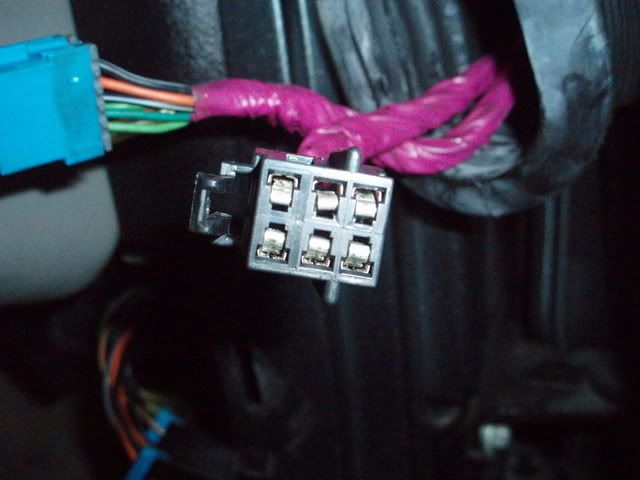
You have the classic symptoms of POOR CONNECTIONS IN THE DOOR WIRING HARNESS CONNECTORS!
The female pins in the power connector fail and cause the door module/s to corrupt the serial data buss. When that happens, you can see NUMEROUS symptoms. There NOT the same all the time. Thats the very first place that I would look.
Pop the accordion tube out and fish the connectors out of the A pillar hole.
If you find deformed pins,, bend them back in shape.
Read your own codes You dont need no stinking code reader!!!
READING YOUR Engine Diagnostic Codes
The Diagnostic Display Mode is entered with the following procedure:
1) Turn on the ignition but don't start the engine. NOTE! You can read the DTCs with the engine running and or driving down the road but it can distract you. BE careful! Some DTCs clear themselves when you turn the ignition OFF!
2) Press the RESET button to turn off any warning messages. (i.e. door open, trunk open ect)
3) Press and hold OPTIONS
4) While holding OPTIONS, press FUEL four times within a 10-second period.
Initially, on-board diagnostics go into an Automatic Mode which shows diagnostic codes in a pre-set sequence: PCM - TCS - RTD - BCM - IPC - RADIO - HVAC - LDCM - RDCM - SCM - RFA. All codes will be displayed for each. ( i.e. PCM = 4 codes) If none are present in a given module, you will see No More Codes on the display.
There are two kinds of diagnostic codes, Current and History designated with a letter suffix, “C” or “H”. A current C code indicates a malfunction is present and active in the module displaying data. A history code indicates a problem existed sometime in the last 40 or 50 ignition cycles. When not accompanied by a current code of the same number, it's potential evidence of a previous problem, now resolved, that was not removed by clearing the codes.
More likely it's an indication of an intermittent malfunction.
Intermittent codes are the most challenging of the diagnostics. An intermittent code may have happened once, may have happened more than once but is inconsistent or may be happening on a regular basis but not at the time the codes are displayed. History codes can also be caused by a current malfunction in a system that is not operating at the time codes are displayed. An example is the rear window defogger which doesn't operate until the Body Control Module detects engine rpm. For history codes set by a module that does not operate with the key on and engine off, a special diagnostic tool called a Scan Tester is necessary to properly diagnose the malfunction.
Once the system has displayed all modules, it goes into the manual mode which allows selection of each module using combinations of Driver Information Center buttons. Manual mode can also be entered during the automatic sequence by pressing any button except English/Metric (E/M). Once the display shows Manual Diagnostics, select a module by pressing the OPTIONS button to go forward or the TRIP button to go back. Once a module is selected, a code is displayed, and if more than one are present; press GAGES to go forward or FUEL to go back.
To exit the diagnostic mode at any time, press E/M. If you want to erase codes in a given module, press and hold the RESET button To reset the codes once in manual mode, press and hold RESET until it displays NO CODES Press OPTIONS to go to the next module. Repeat the steps until you have reset the codes in all the computer modules.
NOTE!! Only reset the codes IF you want to - it is NOT necessary to do this. Clearing a code does not repair a problem. You are simply erasing the evidence of it in the module's memory. If you clear the code/s, and extinguish the Check Engine Light, your emissions status ready will NOT allow you to pass an emissions test until you have completed the required driving cycles.
Once you have the codes, the next question is: What to do with the information?
First, consult the factory service manual. Any serious C5 Do-It-Yourself owner should invest in the Corvette Service Manual of the appropriate model year. The Service Manual is really a requirement if you want to understand and work on your C5. You can GOOGLE the DTC and also find information on it.
Here is very good site that explains the DTCs:
http://www.corvette-web-central.com/C5DTCcode.html
http://www.obd-codes.com/trouble_cod...d-ii-codes.php
Make sure to include the H or C suffix!!
BC
The female pins in the power connector fail and cause the door module/s to corrupt the serial data buss. When that happens, you can see NUMEROUS symptoms. There NOT the same all the time. Thats the very first place that I would look.
Pop the accordion tube out and fish the connectors out of the A pillar hole.
If you find deformed pins,, bend them back in shape.
Read your own codes You dont need no stinking code reader!!!
READING YOUR Engine Diagnostic Codes
The Diagnostic Display Mode is entered with the following procedure:
1) Turn on the ignition but don't start the engine. NOTE! You can read the DTCs with the engine running and or driving down the road but it can distract you. BE careful! Some DTCs clear themselves when you turn the ignition OFF!
2) Press the RESET button to turn off any warning messages. (i.e. door open, trunk open ect)
3) Press and hold OPTIONS
4) While holding OPTIONS, press FUEL four times within a 10-second period.
Initially, on-board diagnostics go into an Automatic Mode which shows diagnostic codes in a pre-set sequence: PCM - TCS - RTD - BCM - IPC - RADIO - HVAC - LDCM - RDCM - SCM - RFA. All codes will be displayed for each. ( i.e. PCM = 4 codes) If none are present in a given module, you will see No More Codes on the display.
There are two kinds of diagnostic codes, Current and History designated with a letter suffix, “C” or “H”. A current C code indicates a malfunction is present and active in the module displaying data. A history code indicates a problem existed sometime in the last 40 or 50 ignition cycles. When not accompanied by a current code of the same number, it's potential evidence of a previous problem, now resolved, that was not removed by clearing the codes.
More likely it's an indication of an intermittent malfunction.
Intermittent codes are the most challenging of the diagnostics. An intermittent code may have happened once, may have happened more than once but is inconsistent or may be happening on a regular basis but not at the time the codes are displayed. History codes can also be caused by a current malfunction in a system that is not operating at the time codes are displayed. An example is the rear window defogger which doesn't operate until the Body Control Module detects engine rpm. For history codes set by a module that does not operate with the key on and engine off, a special diagnostic tool called a Scan Tester is necessary to properly diagnose the malfunction.
Once the system has displayed all modules, it goes into the manual mode which allows selection of each module using combinations of Driver Information Center buttons. Manual mode can also be entered during the automatic sequence by pressing any button except English/Metric (E/M). Once the display shows Manual Diagnostics, select a module by pressing the OPTIONS button to go forward or the TRIP button to go back. Once a module is selected, a code is displayed, and if more than one are present; press GAGES to go forward or FUEL to go back.
To exit the diagnostic mode at any time, press E/M. If you want to erase codes in a given module, press and hold the RESET button To reset the codes once in manual mode, press and hold RESET until it displays NO CODES Press OPTIONS to go to the next module. Repeat the steps until you have reset the codes in all the computer modules.
NOTE!! Only reset the codes IF you want to - it is NOT necessary to do this. Clearing a code does not repair a problem. You are simply erasing the evidence of it in the module's memory. If you clear the code/s, and extinguish the Check Engine Light, your emissions status ready will NOT allow you to pass an emissions test until you have completed the required driving cycles.
Once you have the codes, the next question is: What to do with the information?
First, consult the factory service manual. Any serious C5 Do-It-Yourself owner should invest in the Corvette Service Manual of the appropriate model year. The Service Manual is really a requirement if you want to understand and work on your C5. You can GOOGLE the DTC and also find information on it.
Here is very good site that explains the DTCs:
http://www.corvette-web-central.com/C5DTCcode.html
http://www.obd-codes.com/trouble_cod...d-ii-codes.php
Make sure to include the H or C suffix!!
BC
Thread Starter
7th Gear
Joined: Feb 2012
Posts: 7
Likes: 0
Ok here are all the codes it pulled(about half way I was really tired of writing all these down)
10-PCM P1626 H
28-tcs u1301 H
* * * * *C1226 h
40-bcm b2586 h
* * * * * * * * * 92h
* * * * * * U1255 h
* * * * * * *1096 h
* * * * * * * 1016 h
58-sdm u1301 h
* * * * * * * 1016 h
* * * * * * * 1096 h
60-ipc u1255 h
* * * * * *1016 h
* * * * * **1064 h
* * * * * **1040 h
* * * * * *1088 h
* * * * * **1176 h
* * * * * **1160 h
80-radio u1096 h
U1064h
U1016 h
99-hvac u1064 h
U1096 h
U1160 h
U1255 h
A0-ldcm b2282 h
B2284 h
U1064 h
U1016 h
A1 rdcm b2283 h
87*H
85 h
U1255 h
U1064 h
16 h
96 h
A6-scm B0851 h
U1300 h
U1255 h
U1160 h
U1064 h
B0-rfa u1255 h
1064 h
1096 h
1016 h
There is a lot and I really appreciate all the help with this and it might have something to do with low volts it died right at the end of writing all these codes down.
10-PCM P1626 H
28-tcs u1301 H
* * * * *C1226 h
40-bcm b2586 h
* * * * * * * * * 92h
* * * * * * U1255 h
* * * * * * *1096 h
* * * * * * * 1016 h
58-sdm u1301 h
* * * * * * * 1016 h
* * * * * * * 1096 h
60-ipc u1255 h
* * * * * *1016 h
* * * * * **1064 h
* * * * * **1040 h
* * * * * *1088 h
* * * * * **1176 h
* * * * * **1160 h
80-radio u1096 h
U1064h
U1016 h
99-hvac u1064 h
U1096 h
U1160 h
U1255 h
A0-ldcm b2282 h
B2284 h
U1064 h
U1016 h
A1 rdcm b2283 h
87*H
85 h
U1255 h
U1064 h
16 h
96 h
A6-scm B0851 h
U1300 h
U1255 h
U1160 h
U1064 h
B0-rfa u1255 h
1064 h
1096 h
1016 h
There is a lot and I really appreciate all the help with this and it might have something to do with low volts it died right at the end of writing all these codes down.
Thread Starter
7th Gear
Joined: Feb 2012
Posts: 7
Likes: 0
Also I would have cleared and gone for a short drive but there is snow and salt on the ground and I've gone ten years with out it seeing either so I choose to just write then down. If we need to wait until its better out I can.
Tech Contributor
Joined: Dec 1999
Posts: 32,910
Likes: 2,402
From: Anthony TX
CI 6,7,8,9,11 Vet
St. Jude Donor '08

 Trust me.. If you have an issue, the code will show back up. Clear them ALL and see what comes back. Im positive you will have a SHORT list.
BC
